
Rapid ERP Implementation: What It Is and How to Do It Right

Rapid ERP implementation is a disciplined, scope-limited, template-driven approach that gets a working ERP system into production in weeks rather than months by restricting the initial go-live to a Day-in-the-Life MVP covering only the processes your team needs to operate on Day 1. It is not a shortcut. It is a deliberate method that trades comprehensive feature delivery upfront for speed to value, with advanced capabilities sequenced into post-go-live sprints. The approach fits your organization when five conditions are true: you are deploying a cloud-native platform with industry-ready templates, your core processes can run on out-of-the-box (OOTB) workflows without heavy customization, a single executive holds decision authority, your data is reasonably clean or can be cleansed quickly, and your MVP scope is genuinely narrow enough to configure and test in 10–12 weeks.
When those conditions are not met, a phased hybrid or traditional program is the more honest choice. Forcing a rapid schedule onto a complex, highly customized, multi-entity rollout does not produce a rapid implementation. It produces a failed one.
Table of Contents
- How does rapid ERP differ from a traditional big-bang rollout?
- What are the four core phases of a rapid ERP implementation?
- What are the real business benefits of a rapid ERP approach?
- What goes wrong when teams rush a rapid ERP rollout?
- How do you make a rapid ERP implementation actually work?
- How should you handle data migration and testing on a fast schedule?
- How do you manage change and drive adoption when go-live comes early?
- What does a rapid ERP implementation cost, and when do you break even?
- Is rapid ERP implementation right for your organization?
- How Designflow-build delivered a rapid ERP rollout for a construction contractor
- Your three-step starter plan for a rapid ERP rollout
- Key Takeaways
- What most rapid ERP guides get wrong
- Designflow-build: rapid ERP built for contractors, live in 2–4 weeks
- Useful sources and further reading
How does rapid ERP differ from a traditional big-bang rollout?
The defining difference is not just speed. It is how scope, governance, and risk are managed throughout the project.
Traditional ERP programs attempt to configure every module, integrate every system, and migrate every data set before a single user logs in. That approach can take over a year for mid-market companies, according to published ERP implementation research, and it concentrates all project risk into a single go-live event. If something breaks, everything breaks.
Rapid implementations reject that model. SMB practitioners consistently emphasize phased, modular rollouts and quick wins over a risky big-bang event. The MVP goes live first. Enhancements follow in short post-go-live sprints, so the team is always working against a smaller, more manageable scope.

The governance model is equally different. Traditional programs route decisions through steering committees, change control boards, and multi-week approval cycles. That structure creates what practitioners call a poor work-to-wait ratio: teams spend far more time waiting for approvals than doing actual configuration work. Rapid programs compress that ratio by transferring decision authority to a single accountable owner, which eliminates the idle calendar time that inflates traditional timelines.
Here is how the two approaches compare across the dimensions that matter most to decision-makers:
- Scope at go-live: Rapid targets a narrow MVP (procure-to-pay, order-to-cash, core financials). Traditional targets full system coverage.
- Customization policy: Rapid enforces OOTB configuration for the initial release; custom code is a Phase 2 item. Traditional often builds customizations before go-live.
- Testing cadence: Rapid runs iterative, short-cycle testing throughout. Traditional front-loads testing in a single long UAT phase near the end.
- Governance: Rapid uses single-decision authority. Traditional uses committee-based approvals.
- Risk profile: Rapid distributes risk across multiple smaller releases. Traditional concentrates it at one go-live event.
- Timeline: Rapid targets a 10–12 week schedule for a full Day-in-the-Life MVP; lightning deployments for very narrow scopes can take as little as 2–4 weeks. Traditional programs typically run from several months up to more than a year.
What are the four core phases of a rapid ERP implementation?
A well-run rapid program follows four phases. The table below shows typical week ranges, primary activities, and the key deliverables for each. These ranges reflect a common 10–12 week rapid plan as outlined by QAD’s rapid implementation methodology.
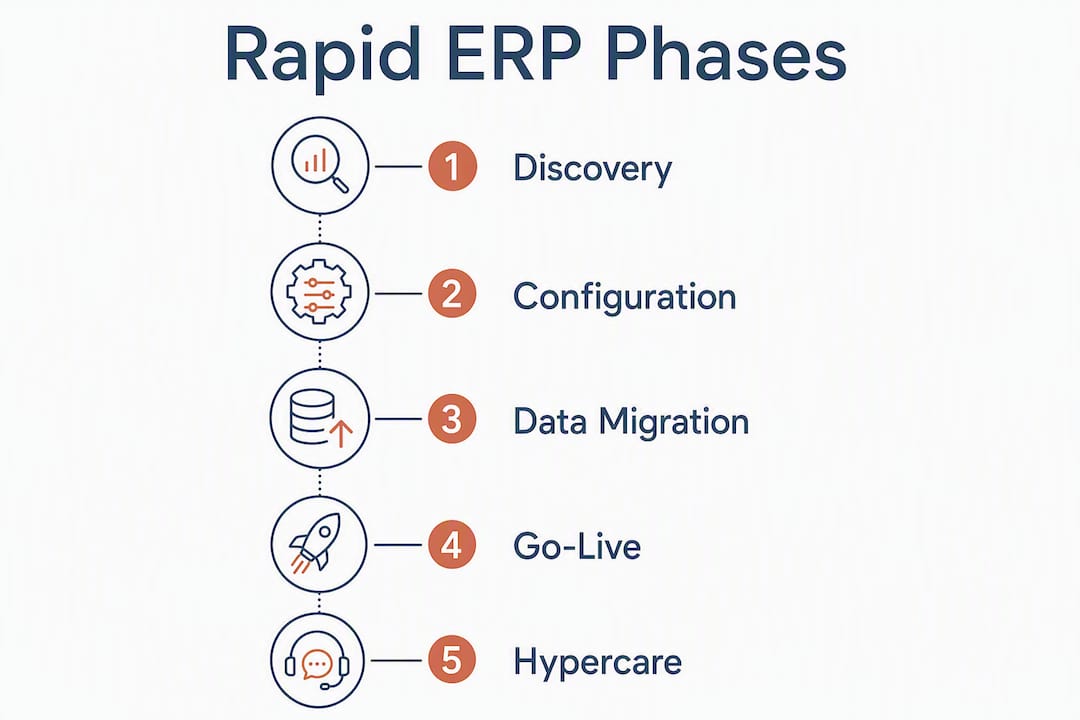
| Phase | Typical Weeks | Primary Activities | Key Deliverable |
|---|---|---|---|
| Discovery & Planning | Wk 1–2 | MVP scope definition, process mapping, data audit, governance setup | Signed scope document, data readiness report |
| Configuration & Setup | Wk 3–4 | OOTB template configuration, chart of accounts, user roles, integrations deferred | Configured sandbox environment |
| Data Migration & Testing | Wk 5–9 | Iterative data cleansing, migration runs, unit/integration/UAT testing cycles | Clean cutover data set, signed UAT sign-off |
| Go-Live & Hypercare | Wk 10–12 | Cutover rehearsal, production go-live, intensive support, adoption tracking | Live system, hypercare log, Phase 2 backlog |
Discovery & Planning is where the project is won or lost. Senior subject matter experts (SMEs) map the processes that must work on Day 1, identify data gaps, and lock the MVP scope. The deliverable is a signed scope document that the single decision authority cannot revise without a formal change. Front-loading your best talent into this phase is the single most important determinant of whether the compressed schedule holds.
Configuration & Setup uses prebuilt industry templates to configure the system against the agreed MVP. No custom code. Integrations that are not critical for Day 1 operations are deferred. The goal is a working sandbox environment by the end of Week 4.
Data Migration & Testing runs in short iterative cycles rather than one long migration event. Each cycle cleanses a batch of records, migrates them into the test environment, and validates them against defined acceptance criteria. This is also where unit, integration, and conference room pilot testing happen in parallel.
Go-Live & Hypercare covers the final cutover rehearsal, the production go-live, and an intensive 2–4 week hypercare period where senior team members stay close to the system and users. Enhancements identified during go-live are logged into a Phase 2 backlog rather than delaying the launch.
What are the real business benefits of a rapid ERP approach?
Speed to value is the headline benefit, but the downstream effects on cost, agility, and team morale are just as significant.
- Faster ROI: A system that goes live in 10–12 weeks starts generating operational savings in the same quarter. A traditional 12-month program defers that return by a full year.
- Lower near-term project cost: Shorter programs consume fewer consulting hours, fewer internal staff hours, and less infrastructure spend before the system is productive.
- Reduced disruption: A narrow MVP scope means fewer processes change simultaneously. Teams adapt to a smaller set of new workflows, which keeps productivity stable during the transition.
- Agility post-go-live: Because advanced features are sequenced into short sprints, the team can reprioritize based on what users actually need after going live, rather than being locked into a requirements document written 12 months earlier.
- Fewer calendar risks: Long programs accumulate organizational risk: key staff leave, business priorities shift, budgets get cut. A 10–12 week program is short enough to maintain momentum and executive attention.
- Measurable early wins: A working MVP creates visible proof of progress. That proof builds stakeholder confidence and makes it easier to fund Phase 2 enhancements.
ERP implementation timelines for small and mid-sized businesses can range from 6 weeks to 24 months depending on scope and complexity. Choosing a rapid approach at the lower end of that range means your team is operating on the new system while competitors are still in configuration workshops.
What goes wrong when teams rush a rapid ERP rollout?
“Rapid” and “rushed” are not the same thing. The failure modes below are almost always the result of organizational shortcuts, not the rapid methodology itself.
Poor data quality is the most common cause of go-live problems. Practitioners consistently identify data migration as the element most likely to be under-resourced, and the consequences are severe: failed month-end closes, duplicate vendor records, missing job cost history. The mitigation is simple but non-negotiable: audit your data in Week 1 and allocate dedicated cleansing resources before configuration begins.
Insufficient testing happens when teams treat the compressed timeline as a reason to skip test cycles. A conference room pilot that surfaces a broken payables workflow in Week 7 is recoverable. The same discovery in Week 11 is a go-live delay. Run iterative test cycles from Week 5 onward, not a single UAT sprint at the end.
Inadequate training produces low adoption even when the system works perfectly. Users who receive a two-hour overview the week before go-live will revert to spreadsheets. Role-based microtraining tied to the MVP scope, delivered two to three weeks before go-live, is the minimum viable training program.
Scope creep is the silent schedule killer. A single “small addition” to the MVP scope in Week 6 typically adds two to three weeks of configuration and testing. The mitigation is a locked scope document and a single decision authority who can say no.
Misaligned expectations between the project team and business stakeholders create friction at go-live when users discover that features they assumed were included are actually in Phase 2. Solve this in Discovery by walking stakeholders through a Day-in-the-Life demo of exactly what the MVP will and will not do.
The real root cause behind most of these failures is organizational friction: unclear ownership, committee-based decisions, and a culture that treats every process exception as a must-have requirement. Rapid implementations succeed when leadership is willing to make fast, final decisions and hold the line on scope.
How do you make a rapid ERP implementation actually work?
The practices below are not theoretical. They are the decisions and actions that separate rapid programs that go live on schedule from those that quietly extend into traditional timelines.
-
Define your Day-in-the-Life MVP first. List the five to eight processes that must work on Day 1 for the business to operate. QAD and other practitioners recommend anchoring the MVP to core procure-to-pay and order-to-cash workflows, then sequencing everything else into Phase 2 sprints. If a process is not on that list, it does not belong in the initial go-live scope.
-
Adopt a strict OOTB configuration policy. Industry guidance is clear: treat the initial go-live as a lift-and-shift of standard best practices. Every customization request adds testing cycles and long-term maintenance cost. Log custom requests in a Phase 2 backlog and evaluate them after go-live, not before.
-
Front-load senior talent into Discovery. Your best process experts should be in the room during Weeks 1 and 2, not brought in at the end to validate decisions made by junior staff. BCG’s analysis of ERP delivery confirms that dedicating senior SMEs early to define an achievable MVP is the single most important resource decision on a rapid project.
-
Lock scope with single-decision authority. Identify one executive who can approve or reject scope changes without a committee. That person’s availability and decisiveness will determine whether your schedule holds.
-
Schedule cutover rehearsals. Run at least one full cutover rehearsal before the production go-live. Rehearsals surface timing issues, missing data, and access problems that are easy to fix in a test environment and catastrophic to discover on go-live day.
-
Define your governance model in Week 1. Set a change freeze date (typically two weeks before go-live), an escalation path for blockers, and a weekly decision cadence. Without these, small issues become week-long delays.
Pro Tip: Use temporary manual workarounds or CSV imports to defer non-critical integrations past go-live. If your CRM integration is not ready by Week 9, export the relevant data to a spreadsheet and import it manually for the first 30 days. This keeps the go-live date intact and gives the integration team a clean post-go-live window to finish the work without blocking core operations.
How should you handle data migration and testing on a fast schedule?
Data and testing are where rapid implementations either hold their schedule or quietly collapse. Neither can be treated as a late-stage activity.

Data migration checklist
Start with a full data inventory in Week 1: open purchase orders, vendor master, customer master, chart of accounts, job cost history, and any open AR/AP balances. Assign a cleansing priority to each data set based on whether it is required for Day 1 operations. Job cost history from five years ago is not. Open invoices are.
Define your mapping rules before configuration begins. Every field in the legacy system needs a destination in the new system, and ambiguous mappings discovered in Week 7 cause the same delays as scope creep. Build a rollback plan: if the cutover data fails validation, you need a documented procedure to revert to the legacy system within a defined window.
Keep the cutover data set as small as possible. Migrate open transactions and current master data. Archive historical records separately and import them post-go-live when the team has bandwidth.
Testing cadence
Run testing in short iterative cycles starting in Week 5, not as a single UAT sprint in Week 10. Each cycle should cover unit testing of individual configurations, integration testing of connected workflows, and a conference room pilot where real users walk through Day-in-the-Life scenarios using simulated data.
BCG estimates that GenAI tools can reduce implementation effort by roughly 20%–40% by automating requirements capture, data mapping, and parts of testing. Tools that automate field mapping between legacy and target schemas can cut the manual mapping effort in a typical mid-market migration from weeks to days. Use them for mapping and cleansing; keep human judgment for validation and sign-off.
Finish with a smoke test on go-live day: a short, scripted walkthrough of the five most critical transactions to confirm the production environment is behaving as expected before you open it to all users.
How do you manage change and drive adoption when go-live comes early?
A rapid go-live gives users less time to prepare, which makes change management more important, not less. The goal is confident users on Day 1, not perfect users.
Training design
Tie training directly to the MVP scope. Users do not need to learn the full system before go-live; they need to learn the workflows they will use in their first week. Role-based microtraining sessions of 30–60 minutes, delivered two to three weeks before go-live, cover exactly those workflows. Supplement with recorded walkthroughs and in-app guides that users can reference when they hit a question mid-task.
Identify super-users in each department during the Configuration phase. These are the people who learn the system deeply, support their colleagues during hypercare, and become your internal champions for Phase 2 adoption.
Hypercare
Plan for an intensive hypercare period covering the first two to four weeks after go-live. Senior team members and implementation consultants should be available same-day for escalations, with a clear escalation path from user to super-user to implementation team. After the first two weeks, taper support based on ticket volume and adoption metrics.
Adoption metrics
Track these four metrics from Day 1 of go-live:
- Task completion rate: Are users completing core workflows in the system, or reverting to manual processes?
- Helpdesk ticket volume: A spike in the first week is normal. A sustained high volume in Week 3 signals a training gap.
- Time-to-first-transaction: How long does it take a new user to complete their first transaction without assistance? Shorter is better.
- User satisfaction score: A brief weekly pulse survey in the first month surfaces friction points before they become adoption failures.
If task completion rates are low in Week 2, the answer is almost always targeted retraining on the specific workflow, not a system change.
What does a rapid ERP implementation cost, and when do you break even?
Timeline and cost vary significantly based on scope, platform, and the amount of data cleansing required. The ranges below reflect common patterns for small and mid-sized businesses.
| Scenario | Typical Timeline | Primary Cost Drivers | Notes |
|---|---|---|---|
| Lightning MVP (narrow scope, 1–2 modules) | 2–4 weeks | Licensing, minimal services, data prep | Suitable for single-process automation; limited ROI breadth |
| Standard Day-in-the-Life MVP | 10–12 weeks | Licensing, implementation services, data cleansing, change management | Most common rapid scenario for SMBs |
| Phased rapid (core + 1–2 follow-on sprints) | 12–20 weeks total | Above plus integration work, additional training | Best for organizations with moderate complexity |
The primary cost drivers in any rapid program are licensing fees, implementation services (consulting or vendor-led), data cleansing labor, integration development, and internal staff time. Of these, internal staff time is the most frequently underestimated. A 10-week rapid program typically requires 20–30% of key SMEs’ time during the project, not a few hours per week.
A simple ROI framing: divide your total implementation cost by the monthly net benefit the system delivers (reduced labor hours, eliminated software subscriptions, faster invoicing cycles). That ratio gives you your months-to-break-even. For example, if your implementation costs $80,000 and the system saves $20,000 per month in labor and software costs, you break even in four months. A traditional 12-month program with the same monthly benefit would not break even until well into its second year of operation.
ERP implementation timelines for SMBs can range from 6 weeks to 24 months. Choosing the shorter end of that range compresses the break-even window and reduces the organizational risk that accumulates in long programs.
Is rapid ERP implementation right for your organization?
Use this checklist to make a fast, honest assessment. More “yes” answers mean a stronger fit for a rapid approach.
- Cloud-native platform: Are you deploying a cloud ERP with prebuilt industry templates rather than a heavily customized on-premise system?
- Process standardization: Can your core Day 1 processes run on OOTB workflows without significant modification?
- Executive governance: Is there a single executive who can make scope and priority decisions without committee approval?
- Data readiness: Is your master data (vendors, customers, chart of accounts, open transactions) reasonably clean or cleanable within two weeks?
- Senior SME availability: Can your best process experts commit 20–30% of their time for 10–12 weeks?
- Acceptable MVP scope: Can you identify five to eight processes that, if working on Day 1, would make the go-live a success?
- Tolerance for Phase 2: Is your organization comfortable going live without every feature and completing enhancements post-go-live?
If you answered “yes” to five or more of these, a rapid approach is a realistic option. If you answered “no” to executive governance, data readiness, or MVP scope, address those gaps before committing to a compressed timeline. Forcing a rapid schedule onto an organization that is not ready produces the failure modes described earlier, not a faster go-live.
For organizations with mixed answers, a phased hybrid approach works well: run a rapid MVP for your highest-priority core processes, then follow with iterative 4–6 week sprints for each additional capability. Industry-specific templates and a cloud-first platform are the two factors that most reliably make a hybrid approach manageable for construction and contracting firms.
How Designflow-build delivered a rapid ERP rollout for a construction contractor
The construction industry presents a specific version of the rapid ERP challenge. Contractors need job costing by cost code, certified payroll, compliance tracking (COI, lien waivers), and field data capture running from Day 1. A generic ERP configured from scratch rarely gets there in under 12 weeks. An AI-native platform built specifically for construction can.
Designflow-build’s rapid deployment model targets a 2–4 week go-live for contractors using its construction-specific templates. The MVP scope covers the modules contractors need immediately: project management and accounting (general ledger, AR/AP, job costing, WIP), field operations via mobile app, and compliance automation for COI and lien waivers. Advanced capabilities such as AI blueprint takeoff and custom analytics are sequenced into post-go-live phases.
The reported outcomes from Designflow-build deployments include:
- A 70% reduction in manual data entry, driven by AI-driven project management and automation builder workflows that eliminate the spreadsheet-to-system re-entry that consumes hours of admin time daily.
- A 98% user adoption rate, which reflects both the platform’s construction-specific design and the role-based training approach tied to the MVP scope.
- Monthly savings of up to $847K for qualifying contractors, attributed to reduced labor overhead, eliminated redundant software subscriptions, and faster invoicing cycles.
Three lessons other construction decision-makers should replicate from this model:
- Use industry templates as your configuration baseline. Construction-specific templates for job costing, certified payroll, and compliance mean you are configuring against a known best practice, not building from a blank chart of accounts.
- Appoint an internal champion in the field operations team. The fastest adoption gains come from a field supervisor who learns the mobile app deeply and trains their crew directly, not from a top-down mandate.
- Defer custom reporting until after go-live. Standard reports cover 80% of what contractors need on Day 1. Custom dashboards belong in the Phase 2 backlog, not the go-live scope.
For construction firms evaluating their options, the role of ERP in engineering and construction operations covers the specific module requirements and adoption metrics in more detail.
Your three-step starter plan for a rapid ERP rollout
If the checklist above returned five or more “yes” answers, you are ready to move. Here is where to start.
-
Define your MVP scope in writing. Convene your senior SMEs for a two-day discovery sprint. List every process the business needs to operate on Day 1, then cut the list to the five to eight that are truly non-negotiable. Document them in a one-page scope statement that the single decision authority signs off on before any configuration begins.
-
Secure your governance model and your best people. Name the single executive decision authority. Confirm that your top two or three process experts can commit 20–30% of their time for the duration of the project. Set a weekly decision cadence and a change freeze date. Without these in place before Week 1, the schedule will slip.
-
Run a two-week discovery sprint using your platform’s templates. Map your Day-in-the-Life processes against the OOTB template workflows. Every gap you identify in Week 1 is a configuration decision, a Phase 2 deferral, or a data cleansing task. Surfacing those gaps early is what makes the rest of the schedule realistic.
One risk to keep in mind: a rapid timeline compresses the window for error correction. Track adoption metrics from Day 1 of go-live, and treat a sustained drop in task completion rates as an immediate signal to intervene with targeted retraining, not a problem to revisit at the 30-day review.
Key Takeaways
Rapid ERP implementation succeeds when scope is deliberately narrow, governance is fast, and data is ready before configuration begins.
| Point | Details |
|---|---|
| Core definition | Rapid ERP is a disciplined, template-driven approach targeting a Day-in-the-Life MVP go-live in 10–12 weeks, with enhancements in post-go-live sprints. |
| When to use it | Use rapid when you have a cloud platform with OOTB templates, clean data, single-decision governance, and an achievable MVP scope. |
| Three must-do practices | Define the MVP first, enforce OOTB configuration, and front-load senior SMEs into the Discovery phase. |
| Main risk to avoid | Under-resourcing data migration and testing is the most common cause of go-live failure on compressed timelines. |
| Designflow-build | Designflow-build delivers a 2–4 week rapid deployment for contractors using construction-specific templates, reporting a 98% adoption rate and 70% reduction in manual data entry. |
What most rapid ERP guides get wrong
Most articles on fast ERP implementation treat speed as the primary goal. It is not. Speed is the outcome of doing the right things in the right order. The organizations that struggle with rapid implementations are almost never the ones that chose the wrong platform. They are the ones that skipped the governance conversation, assumed their data was cleaner than it was, or let scope creep in through the side door because no one had the authority to say no.
The cultural reality is that rapid implementations are harder on people than traditional ones, not easier. A 10-week program demands faster decisions, more focused attention, and a willingness to defer things that feel urgent. That is genuinely difficult for organizations used to consensus-based decision-making. The teams that succeed are the ones where leadership treats the single-decision-authority model as a feature, not a compromise.
There is also a common misread of what “out-of-the-box” means in practice. It does not mean accepting a system that does not fit your business. It means accepting that the system’s standard workflows are good enough for Day 1, and that the customizations you think you need are often preferences rather than requirements. The discipline of separating genuine requirements from preferences is where experienced implementation leads earn their fee. For construction contractors specifically, an AI-native platform with construction-specific templates narrows that gap considerably, because the OOTB configuration already reflects how contractors actually work.
Designflow-build: rapid ERP built for contractors, live in 2–4 weeks
If you are a contractor, general contractor, or specialty trade firm evaluating ERP options, the implementation timeline is not a secondary concern. It is a primary one. Every week your team spends in a configuration workshop is a week they are not managing projects, billing clients, or tracking job costs.
Designflow-build is an AI-native construction ERP that combines project management, accounting, field operations, and compliance automation in one platform, with construction-specific templates that get contractors live in 2–4 weeks without an army of consultants. The platform reports a 98% user adoption rate and a 70% reduction in manual data entry, with monthly savings of up to $847K for qualifying firms.

The evaluation path is straightforward: start with a free tier to test core features against your actual workflows, then move to a paid pilot scoped to your Day-in-the-Life MVP. You can explore Designflow-build’s AI-native ERP platform to see the full feature set and request a pilot scoped to your specific project type and team size.
Useful sources and further reading
- Rapid Implementation of Enterprise Resource Planning Systems — Academic research on ERP implementation timelines and the challenges facing small to mid-sized companies converting from legacy systems; useful background on why traditional programs take 12–18 months.
- ERP Implementation Timeline: Phases, Steps, and Timing | Rand Group — Practical breakdown of ERP implementation phases and realistic timeline ranges (6 weeks to 24 months) for SMBs; good reference for setting stakeholder expectations.
- QAD Rapid ERP Implementation for Manufacturers — QAD’s methodology page covering the four-phase rapid implementation model, Day-in-the-Life MVP framing, and typical week-by-week timeline; directly relevant to the phase table in this article.
- GenAI Can Revolutionize ERP Transformations | BCG — BCG analysis estimating 20%–40% effort savings from GenAI applied to requirements capture, data mapping, and testing automation; useful for teams evaluating AI-assisted implementation tools.
- Rapid ERP Implementation: A Smarter Path for Small and Medium-Sized Businesses — Practitioner guidance on phased rollouts, cloud-first platforms, and industry templates for SMBs and construction firms.
- Rapid Implementation of Cloud ERP System: Benefits and Challenges — Covers the case for strict OOTB configuration at go-live and the cost implications of premature customization.
- How to Deliver a Lightning-Fast ERP Implementation Without Sacrificing Quality | Opal Creek — Practitioner writeup on data migration as the most under-resourced element of rapid programs and how to avoid go-live failures.
- Rapid ERP Deployment Glossary and Analysis — Explains the work-to-wait ratio concept and how single-decision governance compresses calendar time in rapid programs.
- What Is Commercial Construction ERP? A 2026 Guide | Designflow-build — Designflow-build’s overview of construction-specific ERP functionality, module coverage, and how OOTB templates map to contractor workflows.
- The Role of ERP in Engineering Operations: 2026 Guide | Designflow-build — Covers ERP adoption metrics and ROI evidence in engineering and construction contexts.