
Top ERP Tools for Large-Scale Commercial Projects: 2026 Guide

For most U.S. large-scale commercial projects, Designflow-build is the recommended first choice. It combines AI-native project accounting, BoQ/WBS-to-ledger integration, and field operations in a single platform that goes live in 2–4 weeks with a 98% adoption rate. When you need a system your crews actually use from day one, that combination is hard to beat.
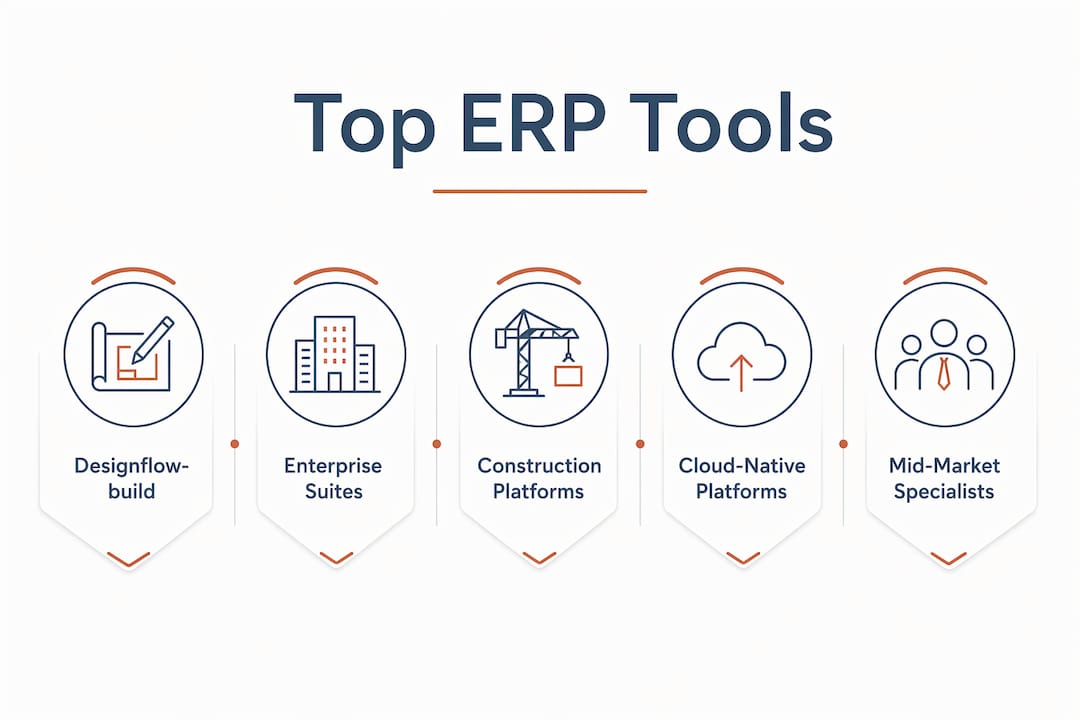
The broader shortlist breaks into four categories:
- Enterprise global suites (SAP S/4HANA, Oracle Fusion Cloud ERP, Microsoft Dynamics 365 Finance & Operations): best for multinationals with complex compliance and transactional volume at scale.
- Cloud-native all-in-one platforms (Oracle NetSuite, Acumatica Cloud ERP, Workday, Sage Intacct): best for growing enterprises that want mature cloud finance without a multi-year rollout.
- Construction-specific ERP platforms (Designflow-build, Viewpoint, CMiC, Deltek, Foundation Software, Jonas Construction ERP, Penta): built around job costing, certified payroll, and field ops — the right fit for contractors and AEC firms.
- Mid-market and industry-specialist platforms (IFS Cloud, Infor CloudSuite, Epicor Kinetic, SYSPRO, Unit4 ERP, and others): deep vertical templates for manufacturing, distribution, and asset-intensive industries.
Key stat: More than 70% of ERP initiatives fail to fully meet their original business goals without strong adoption and workflow alignment — which is why implementation speed and role-based UX belong at the top of your selection criteria, not the bottom.
Table of Contents
- How do the top ERP tools for large-scale commercial projects compare?
- How to choose the right ERP for large-scale commercial projects
- What each shortlisted ERP offers for large-scale commercial projects
- What an ERP for large-scale commercial projects must do
- Implementation realities and ROI expectations for large-scale ERP projects
- When should you choose Designflow-build vs. an enterprise suite?
- Key Takeaways
- A note on how this guide was built
- Designflow-build cuts the implementation timeline from months to weeks
- Useful sources and further reading
How do the top ERP tools for large-scale commercial projects compare?
The table below covers all 55 platforms in this guide. Designflow-build leads as the featured option; remaining entries follow in category order. Use the “Best For” column to filter by your industry and the “Pricing Band” column to filter by budget tier.
Filtering tip: If your priority is rapid deployment and integrated construction accounting, filter to construction-specific platforms first. If you need multinational compliance or SAP-level transactional scale, go straight to the enterprise suite category.
| Platform | Best For | Project Accounting & BoQ/WBS | Scalability | Deployment | Impl. Timeline | Pricing Band | Integration Ecosystem | AI / Automation | Support & Partners |
|---|---|---|---|---|---|---|---|---|---|
| Designflow-build | General contractors, MEP, civil, engineering firms | Full BoQ/WBS-to-ledger linkage, job costing by cost code, WIP | 10–500 employees | Cloud (SaaS) | 2–4 weeks | Free tier; Pro at $100/user/month | Open API, automation builder | AI risk prediction, scheduling, blueprint takeoff | Guided onboarding, in-app support |
| SAP S/4HANA | Large multinationals, global supply chains | Strong project accounting, WBS-native | Enterprise | Cloud, hybrid, on-prem | 12–24+ months | Enterprise licensing | Massive SAP ecosystem | Embedded AI analytics | Global SI partner network |
| SAP S/4HANA Cloud | Enterprises wanting managed cloud SAP | WBS and project system modules | Enterprise | Cloud | 6–18 months | Enterprise SaaS | SAP App Center | AI-driven forecasting | SAP RISE partner network |
| Oracle Fusion Cloud ERP | Enterprises needing integrated finance and procurement | Project costing and billing modules | Enterprise | Cloud | 6–18 months | Enterprise licensing | Oracle Cloud Marketplace | Embedded AI anomaly detection | Oracle partner network |
| Microsoft Dynamics 365 Finance & Operations | Microsoft-centric large enterprises | Project management module, WBS support | Enterprise | Cloud, hybrid | 6–12 months | Enterprise licensing | Power Platform, Azure | Copilot AI features | Large Microsoft partner network |
| Microsoft Dynamics 365 (Finance & Supply Chain) | Microsoft-ecosystem organizations | WBS and project accounting via modules | Enterprise to mid-market | Cloud, hybrid | 6–12 months | Enterprise licensing | Office 365, Teams, Power BI | Power Automate, Copilot | Extensive Microsoft SI network |
| Microsoft Dynamics 365 Business Central | SMBs in the Microsoft ecosystem | Basic project management and job costing | SMB to mid-market | Cloud | 2–6 months | Mid-market SaaS | Microsoft AppSource | Copilot AI features | Microsoft partner network |
| IFS Cloud | Asset-intensive, field service, defense | Project lifecycle management, WBS | Mid-market to enterprise | Cloud, on-prem | 6–12 months | Enterprise licensing | IFS marketplace | AI scheduling, predictive maintenance | IFS partner network |
| Infor CloudSuite | Vertical industry deployments | Industry-template project accounting | Mid-market to enterprise | Cloud (AWS) | 6–12 months | Enterprise licensing | Infor OS, third-party APIs | Infor Coleman AI | Infor partner network |
| Infor CloudSuite Industrial Enterprise (Infor LN) | Manufacturing and distribution enterprises | Manufacturing project costing | Enterprise | Cloud, on-prem | 9–18 months | Enterprise licensing | Infor OS | AI-assisted planning | Infor SI partners |
| Infor CloudSuite Distribution (Infor SX.e) | Distribution enterprises | Distribution-focused financials | Mid-market to enterprise | Cloud | 6–12 months | Enterprise licensing | Infor OS | Automation features | Infor partners |
| Infor CloudSuite Industrial | Mid-market industrial manufacturers | Shop-floor to finance | Mid-market | Cloud | 6–9 months | Mid-market licensing | Infor OS | AI planning tools | Infor partners |
| Acumatica Cloud ERP | Mid-market growth companies | Project accounting, construction edition | Mid-market | Cloud | 2–6 months | Consumption-based pricing | Open API, many connectors | Workflow automation | VAR partner network |
| Sage Intacct | Finance-led organizations | Core project accounting, consolidation | Mid-market | Cloud | 2–4 months | Mid-market SaaS | many integrations | AI-driven reporting | Sage partner network |
| Sage X3 | Mid-market manufacturing and distribution | Financial and inventory controls | Mid-market | Cloud, on-prem | 4–9 months | Mid-market licensing | Sage marketplace | Automation workflows | Sage partner network |
| Sage X3 ERP | Mid-market manufacturing and distribution | Financial depth, project costing | Mid-market | Cloud, on-prem | 4–9 months | Mid-market licensing | Sage marketplace | Automation workflows | Sage partners |
| Viewpoint | General and specialty contractors | Construction accounting, job costing, payroll | Mid-market to enterprise | Cloud, on-prem | 3–6 months | Mid-market to enterprise | Trimble ecosystem | Workflow automation | Trimble partner network |
| CMiC | Mid-to-large construction firms | Integrated finance and project controls | Mid-market to enterprise | Cloud, on-prem | 4–9 months | Mid-market to enterprise | Open API | Automation features | CMiC implementation partners |
| Deltek | AEC and professional services | Project accounting, resource planning | Mid-market to enterprise | Cloud, on-prem | 3–9 months | Mid-market to enterprise | Deltek ecosystem | AI-assisted resource planning | Deltek partner network |
| Oracle NetSuite | Fast-growing cloud-first enterprises | Project accounting module | SMB to enterprise | Cloud | 3–6 months | Mid-market to enterprise SaaS | SuiteApp marketplace | AI forecasting | Oracle NetSuite partner network |
| Oracle E-Business Suite | Enterprises with legacy on-prem needs | Mature project costing and billing | Enterprise | On-prem, hybrid | 12–24 months | Enterprise licensing | Oracle integration hub | Limited AI (legacy) | Oracle SI partners |
| Odoo | Organizations needing modular, lower-cost ERP | Project module, basic job costing | SMB to mid-market | Cloud, on-prem | 1–4 months | Open-source / per-user SaaS | many app modules | Basic automation | Community + partner network |
| ERPNext | SMBs comfortable with open-source | Project management module | SMB | Cloud, on-prem | 1–3 months | Open-source / hosted | Community modules | Basic automation | Community support |
| Cetec ERP | Mid-market manufacturers and distributors | Shop-floor to financials | SMB to mid-market | Cloud | 1–3 months | Mid-market SaaS | Open API | Workflow automation | Direct support |
| Foundation Software | Mid-sized contractors replacing QuickBooks | Construction accounting, job costing | SMB to mid-market | Cloud, on-prem | 1–3 months | Mid-market licensing | Accounting integrations | Reporting automation | Direct + partner support |
| Jonas Construction ERP | Specialty and service contractors | Field service, trade-specific accounting | SMB to mid-market | Cloud | 2–4 months | Mid-market SaaS | Open API | Workflow automation | Jonas partner network |
| Penta | Heavy civil and subcontractor-heavy projects | Equipment and subcontractor management | Mid-market | Cloud, on-prem | 3–6 months | Mid-market licensing | ERP integrations | Reporting tools | Direct support |
| BatchMaster ERP B1 | Process manufacturers | Formulation and regulatory controls | SMB to mid-market | Cloud, on-prem | 2–4 months | Mid-market licensing | SAP B1 ecosystem | Batch automation | SAP B1 partner network |
| Crowe Materials Accelerator for Microsoft Dynamics 365 | Dynamics 365 users in construction materials | Prebuilt materials and costing workflows | Mid-market to enterprise | Cloud | 3–6 months | Add-on to Dynamics 365 | Dynamics 365 ecosystem | Power Automate | Crowe + Microsoft partners |
| Datacor ERP | Chemical distributors and processors | Industry compliance and inventory | SMB to mid-market | Cloud, on-prem | 2–4 months | Mid-market licensing | Industry connectors | Compliance automation | Direct support |
| Deacom ERP | Batch and process manufacturers | Single-codebase manufacturing and finance | Mid-market | Cloud | 3–6 months | Mid-market licensing | ERP integrations | Workflow automation | Direct + partner support |
| DELMIAWorks | Manufacturers needing MES integration | MES-to-ERP integration | Mid-market | Cloud, on-prem | 3–6 months | Mid-market licensing | Dassault Systèmes ecosystem | MES automation | Dassault SI partners |
| Epicor Kinetic | Manufacturers, distributors, building supply | Manufacturing and distribution features | Mid-market to enterprise | Cloud, on-prem | 4–9 months | Mid-market to enterprise | Epicor ecosystem | AI-assisted planning | Epicor partner network |
| Epicor for Building Supply | Building supply distributors | Distribution and inventory for building supply | Mid-market | Cloud, on-prem | 3–6 months | Mid-market licensing | Epicor ecosystem | Automation tools | Epicor partners |
| Epicor for Distribution (Prophet 21) | Distribution-focused businesses | Distribution and warehouse management | Mid-market to enterprise | Cloud | 3–6 months | Mid-market to enterprise | Epicor ecosystem | Workflow automation | Epicor partner network |
| Genius ERP | Discrete manufacturers | Production scheduling and costing | SMB to mid-market | Cloud, on-prem | 2–4 months | Mid-market licensing | Open API | Scheduling automation | Direct support |
| Global Shop Solutions | SMB manufacturers | Shop-floor to finance integration | SMB | Cloud, on-prem | 2–4 months | SMB licensing | ERP integrations | Workflow automation | Direct support |
| JustFood ERP | Food processors and manufacturers | Food traceability and compliance | SMB to mid-market | Cloud | 2–4 months | Mid-market licensing | Industry connectors | Compliance automation | Direct support |
| QAD Adaptive | Global manufacturers | Supply-chain and manufacturing optimization | Mid-market to enterprise | Cloud | 4–9 months | Mid-market to enterprise | QAD ecosystem | AI supply-chain tools | QAD partner network |
| RealSTEEL | Steel fabricators and structural manufacturers | Fabrication and steel-industry workflows | SMB to mid-market | On-prem, cloud | 2–4 months | Mid-market licensing | Industry connectors | Fabrication automation | Direct support |
| Rootstock Cloud ERP | Salesforce-native manufacturers | Salesforce-integrated manufacturing ERP | Mid-market | Cloud (Salesforce) | 3–6 months | Mid-market SaaS | Salesforce AppExchange | Salesforce Flow automation | Salesforce partner network |
| SAP Business All-In-One | Enterprises wanting packaged SAP processes | Preconfigured industry project accounting | Mid-market to enterprise | Cloud, on-prem | 6–12 months | Enterprise licensing | SAP ecosystem | SAP AI features | SAP partner network |
| SAP Business All-In-One Software | Enterprises wanting packaged SAP processes | Preconfigured industry project accounting | Mid-market to enterprise | Cloud, on-prem | 6–12 months | Enterprise licensing | SAP ecosystem | SAP AI features | SAP partners |
| VAI S2K Enterprise | Distribution-centric mid-market businesses | Distribution and warehouse management | Mid-market | Cloud, on-prem | 3–6 months | Mid-market licensing | ERP integrations | Workflow automation | VAI partner network |
| Workday | HR and finance-led organizations | Financial planning and project costing | Mid-market to enterprise | Cloud | 4–9 months | Enterprise SaaS | Workday marketplace | AI workforce planning | Workday partner network |
| XoroERP | SMBs in retail and e-commerce | Basic financials and order management | SMB | Cloud | 1–2 months | SMB SaaS | Limited connectors | Basic automation | Direct support |
| QuickBooks Enterprise | SMBs needing advanced accounting | Advanced accounting, basic job costing | SMB | Cloud, on-prem | Weeks | SMB licensing | QuickBooks ecosystem | Basic reporting | Intuit support |
| Tally ERP | Accounting-focused organizations | Accounting-centric workflows | SMB | On-prem | Weeks | SMB licensing | Limited | Basic | Direct support |
| Katana | Small manufacturers | Inventory and production scheduling | SMB | Cloud | Weeks | SMB SaaS | Shopify, QuickBooks | Basic automation | Direct support |
| Zoho ERP | SMBs in the Zoho ecosystem | Suite-integrated finance and operations | SMB | Cloud | 1–2 months | SMB SaaS | Zoho suite | Zoho AI (Zia) | Zoho partner network |
| SYSPRO | Manufacturers and distributors | Modular manufacturing and distribution | SMB to mid-market | Cloud, on-prem | 3–6 months | Mid-market licensing | Open API | AI-assisted planning | SYSPRO partner network |
| Unit4 ERP | Services, education, nonprofits | People-centric project and finance | Mid-market to enterprise | Cloud | 4–9 months | Mid-market to enterprise | Unit4 marketplace | AI-driven HR and finance | Unit4 partner network |
| Wherefour ERP | Food and beverage manufacturers | Traceability and compliance | SMB | Cloud | Weeks–months | SMB SaaS | QuickBooks, Shopify | Basic automation | Direct support |
How to choose the right ERP for large-scale commercial projects
The single most important selection criterion is BoQ/WBS-to-ledger integration. If your ERP cannot link a Bill of Quantities and Work Breakdown Structure directly to the financial ledger, you will always be reconciling spreadsheets to get budget-versus-actual data. That gap is where cost overruns hide. Industry practitioners consistently identify this linkage as the primary differentiator between a construction-grade ERP and a generic financial system dressed up with project modules.
Priority selection checklist
- BoQ/WBS-to-ledger linkage — can the system map line items from your estimate directly to cost codes and the general ledger in near real time?
- Role-based UX — does the field crew see only what they need, and does the PM see a different, richer view? Platforms that expose only job-relevant data to field crews achieve higher sustained adoption.
- Native field mobility — is there a genuine mobile app with offline capability, or just a browser wrapper?
- Certified payroll and prevailing wage — required for public work in the U.S.; confirm it is native, not a bolt-on.
- Change-order workflow — can the system route, approve, and post a change order to the budget and schedule without manual re-entry?
- Schedule integration — does the ERP connect to your CPM scheduling tool, or does it have native scheduling?
- APIs and integrations — what does the integration ecosystem look like for your existing tools (estimating, BIM, payroll, banking)?
- Security and compliance — SOC 2 Type II and ISO 27001 are the baseline for cloud platforms handling financial data.
- Partner network depth — local certified implementation partners matter as much as out-of-the-box functionality for multi-location commercial projects.
Questions to ask vendors during demos
- “Show me a live migration of one real job’s BoQ into your system, then pull a budget-to-actual report and process a change order for that job.” A vendor that hesitates here has a gap.
- “What is your median go-live time for a contractor of our size, and what are the top three reasons projects run over that timeline?”
- “Who are your certified implementation partners in our region, and can you provide two references from similar-scope projects?”
- “How does your system handle certified payroll for Davis-Bacon projects, and is that module native or third-party?”
Red flags to watch for
- Vague answers about BoQ support (“we can configure that”) with no live demonstration.
- No clear data migration plan or a plan that pushes migration to post-go-live.
- Adoption projections measured in quarters with no phased milestones or user-acceptance checkpoints.
- A partner network that is thin in your geography — a great platform with no local implementation support is a risk on a large project.
Pro Tip: Require vendors to include adoption SLAs in the contract. Specify the percentage of active users expected at 30, 60, and 90 days post-go-live. A vendor confident in their platform will agree; one that pushes back is telling you something.
What each shortlisted ERP offers for large-scale commercial projects
Designflow-build
Designflow-build is purpose-built for U.S. contractors and engineering firms that need a system live in weeks, not quarters. Its core strength is the direct link between BoQ and the financial ledger, so budget-versus-actual reporting is always current without manual reconciliation. The platform covers AI-driven scheduling and risk prediction, certified payroll for Davis-Bacon compliance, mobile field ops with voice data entry, and an automation builder for custom workflow rules. Designflow-build reports a significant reduction in manual data entry and monthly savings up to $847K in cited contractor case examples. Pricing starts free, with Pro seats at $100/user/month — no multi-year enterprise contract required.
Enterprise global suites
SAP S/4HANA and SAP S/4HANA Cloud are the right choice when you are running a multinational operation with complex intercompany transactions, global compliance requirements, and a dedicated IT team to manage the rollout. The in-memory HANA database delivers real-time analytics at a scale few platforms match. Expect 12–24+ months for a full implementation and enterprise-level licensing costs. SAP Business All-In-One and SAP Business All-In-One Software offer packaged industry processes for organizations that want SAP depth with faster configuration.
Oracle Fusion Cloud ERP and Oracle E-Business Suite serve enterprises that need integrated finance, procurement, and supply-chain management at scale. Oracle Fusion’s embedded AI handles anomaly detection and forecasting well. Oracle E-Business Suite remains relevant for organizations with heavy on-prem customization requirements, though its cloud migration path is a long-term consideration.
Microsoft Dynamics 365 Finance & Operations and the broader Microsoft Dynamics 365 (Finance & Supply Chain) suite are the natural fit for Microsoft-centric organizations. Native integration with Excel, Teams, and Power BI reduces the friction of adoption for teams already living in the Microsoft ecosystem. Microsoft Dynamics 365 Business Central serves the SMB and lower mid-market end of that same ecosystem.
Construction-specific platforms
Viewpoint (now part of Trimble) and CMiC are the two most established names in mid-to-large construction ERP. Viewpoint covers accounting, job costing, payroll, and field productivity in a single platform; CMiC integrates finance and project controls with a strong emphasis on centralized data for multi-project firms. Both require 3–9 months for a full deployment.

Deltek (including Deltek Vantagepoint and Deltek Costpoint) is the go-to for AEC and professional services firms with project-based revenue. Its project accounting and resource planning modules are optimized for the way architecture and engineering firms actually bill and staff projects.
Foundation Software is a practical upgrade path for mid-sized contractors outgrowing QuickBooks. Its job-cost reporting and construction payroll are its strongest features. Jonas Construction ERP covers specialty and service contractors with trade-specific modules. Penta brings a long heritage in heavy civil and subcontractor management, with strong equipment-cost tracking.
Cloud-native all-in-one platforms
Oracle NetSuite is the most mature cloud-native ERP on this list, with a large partner ecosystem and strong financials. It suits fast-growing companies that want a single system for financials, inventory, and order management. Acumatica Cloud ERP offers flexible consumption-based pricing and an open architecture that mid-market firms find easier to customize than SAP or Oracle. Sage Intacct is the right call for finance-led organizations that prioritize audit trails and multi-entity consolidation over field operations.
Workday is strongest in HR, workforce planning, and financial performance dashboards. It is not a construction-first platform, but it is a strong choice for professional services and large organizations where people costs dominate the P&L.
Mid-market and industry specialists
IFS Cloud stands out for asset-intensive industries: energy, defense, and facilities management. Its EAM and field-service scheduling capabilities are among the best in the market. Infor CloudSuite (including Infor LN, Infor SX.e, and Infor CloudSuite Industrial) offers deep vertical templates on an AWS-based architecture — a good fit for manufacturers and distributors that want preconfigured industry processes.
Epicor Kinetic, Epicor for Building Supply, and Epicor for Distribution (Prophet 21) cover manufacturing, building-supply distribution, and wholesale distribution respectively. SYSPRO offers modular deployment for manufacturers and distributors that want to phase their rollout. Unit4 ERP is built for people-centric organizations: professional services, education, and nonprofits.
The remaining platforms — BatchMaster ERP B1, Crowe Materials Accelerator for Microsoft Dynamics 365, Datacor ERP, Deacom ERP, DELMIAWorks, Genius ERP, Global Shop Solutions, JustFood ERP, QAD Adaptive, RealSTEEL, Rootstock Cloud ERP, VAI S2K Enterprise, and Wherefour ERP — are industry specialists for process manufacturing, chemical distribution, food processing, steel fabrication, and Salesforce-native environments. Each earns its place on a shortlist for the right vertical; none is a general-purpose construction ERP.
For SMBs evaluating simpler options: Odoo, ERPNext, Cetec ERP, XoroERP, Zoho ERP, Katana, QuickBooks Enterprise, and Tally ERP cover accounting and basic operations well, but they lack the project accounting depth and field-ops integration that large commercial projects require.
What an ERP for large-scale commercial projects must do
The system must link BoQ/WBS to the financial ledger in near real time. Without that connection, every budget-versus-actual report is a manual exercise, and by the time the numbers are reconciled, the project has already drifted. That single architectural requirement eliminates most generic ERPs from consideration for capital-heavy commercial work.
Core feature checklist
- Project accounting with cost codes, WIP tracking, and job-cost reporting at the line-item level.
- BoQ/WBS integration linked directly to the general ledger — not a separate module that syncs nightly.
- Certified payroll for Davis-Bacon and state prevailing-wage compliance, native to the platform.
- Change-order management with approval routing, budget impact posting, and schedule linkage.
- Commitments and subcontractor management — purchase orders, subcontracts, and retention tracked against the budget.
- Integrated scheduling or a certified connector to CPM tools like Primavera P6 or Microsoft Project.
- Mobile field operations with offline capability for time entry, daily logs, and inspections.
- Document control with version management and audit trails for submittals, RFIs, and drawings.
- Compliance automation for certificates of insurance, lien waivers, and AIA G702/G703 billing.
- APIs and integration hubs for estimating, BIM, banking, and HR systems.
Architecture considerations
Cloud-native platforms generally deliver faster updates, lower infrastructure costs, and better mobile performance than on-prem deployments. For large commercial projects, the key architectural question is whether the ledger updates in real time or on a batch cycle. Batch-cycle ledgers mean your cost reports are always slightly behind, which matters when a project is burning $500K a week.
Role-based UI is the other architectural decision that directly affects adoption. A field foreman does not need to see the general ledger; a project accountant does not need to see the daily log. Platforms that expose only job-relevant data to each role reduce training time and increase the likelihood that data gets entered accurately.

Pro Tip: When evaluating cloud ERPs, ask specifically whether the ledger posts in real time or on a scheduled batch. “Real-time reporting” in marketing materials often means a real-time dashboard pulling from a batch-updated ledger — those are not the same thing.
Implementation realities and ROI expectations for large-scale ERP projects
Most ERP projects underdeliver not because the software is wrong but because alignment and adoption are treated as afterthoughts. More than 70% of ERP initiatives fail to fully meet their original business goals without strong adoption and workflow alignment — a figure that should be in every procurement team’s risk register.
Timeline bands
- Rapid (2–8 weeks): Lightweight cloud platforms and AI-native tools like Designflow-build. Covers core project accounting, field ops, and payroll. Best for contractors that need to replace spreadsheets and QuickBooks quickly.
- Moderate (3–6 months): Mid-market cloud ERP (Acumatica, Sage Intacct, NetSuite, Viewpoint). Covers full financials, project controls, and integrations. Requires data migration planning and change management.
- Long (6–18+ months): Full enterprise rollouts (SAP S/4HANA, Oracle Fusion, Microsoft Dynamics 365 Finance & Operations). Covers global compliance, multi-entity consolidation, and deep customization. Requires a dedicated implementation team and phased go-live strategy.
No-code and composable ERP alternatives can be deployed quickly but require governance for customized workflows to avoid technical debt over time.
ROI KPIs to track
| KPI | What it measures | How vendors typically quantify it |
|---|---|---|
| Reduction in manual data entry | Hours saved on re-keying data between systems | Significant reduction in data-entry hours per week |
| Days to close books | Speed of monthly financial close | Days from period end to signed financials |
| Budget variance improvement | Accuracy of cost forecasting vs. actuals | % reduction in cost overruns per project |
| Labor savings | Payroll processing and field reporting efficiency | Hours saved per pay period |
| Change-order cycle time | Speed from change event to approved and posted CO | Days from initiation to ledger posting |
| User adoption rate | Percentage of licensed users actively using the system | % of seats with weekly active logins at 90 days |
Designflow-build’s internal data shows a significant reduction in manual data entry and monthly savings up to $847K for contractors in cited case examples. Those figures are specific to their customer base; request comparable metrics from any vendor you shortlist.
Implementation pro tips
Pro Tip: Put project accounting and field mobility into production first. Phased deployments that prioritize these two modules show measurable ROI fastest; advanced forecasting and enterprise finance integrations can follow in phase two.
- Prioritize data migration for active jobs first — historical data can follow after go-live.
- Include adoption SLAs (30/60/90-day active-user targets) in the contract.
- Schedule a change-management checkpoint at week two: if field crews are not logging time in the system, find out why before the habit is set.
- Require partner references from projects of similar scope and geography before signing.
- For real-time budget tracking, confirm the ledger update frequency during the demo — not in the sales deck.
When should you choose Designflow-build vs. an enterprise suite?
Designflow-build is the right first call for most large U.S. commercial projects where rapid deployment, high field adoption, and integrated project accounting are the priorities. If your team needs to be live in weeks rather than months, and you want AI-driven scheduling and cost control without a multi-year implementation, Designflow-build fits that profile directly.
Decision guide
Choose Designflow-build if you:
- Need to go live in 2–4 weeks and cannot afford a 6–12 month rollout.
- Are a general contractor, MEP firm, civil contractor, or engineering firm with 10–500 employees.
- Want AI-driven risk prediction, blueprint takeoff, and BoQ-to-ledger integration in one platform.
- Need certified payroll for U.S. prevailing-wage compliance without a third-party add-on.
- Want a free tier to validate the platform before committing to paid seats.
Choose an enterprise suite (SAP, Oracle, Microsoft Dynamics 365 F&O) if you:
- Operate across multiple countries with complex intercompany and multi-currency requirements.
- Need SAP-level transactional volume and global compliance infrastructure.
- Have a dedicated IT team and a 12–24 month implementation budget.
- Require deep customization of global supply-chain workflows that go beyond construction project accounting.
Choose a construction specialist (Viewpoint, CMiC, Deltek) if you:
- Are a mid-to-large contractor with established IT infrastructure and a longer implementation runway.
- Need deep integration with Trimble or other construction-tech ecosystems.
- Require AEC-specific resource planning and project-based billing at scale.
The procurement team’s next-step checklist:
- Contact Designflow-build for an ROI workbook specific to your project volume and crew size.
- Request a 30-day sandbox to validate BoQ-to-ledger workflows on a real job.
- Schedule an internal stakeholder demo with your project accountant, field superintendent, and IT lead in the same room.
- Draft your RFP must-have checklist using the selection criteria in this guide — BoQ/WBS linkage, certified payroll, mobile field ops, and change-order workflow are non-negotiables.
- Require two partner references from projects of similar scope before signing any contract.
Key Takeaways
For large-scale commercial projects, BoQ/WBS-to-ledger integration is the single most important ERP selection criterion — it is the difference between real-time cost control and end-of-month surprises.
| Point | Details |
|---|---|
| Lead with BoQ/WBS linkage | The ERP must connect Bill of Quantities and WBS directly to the financial ledger for accurate budget-vs-actual reporting. |
| Adoption drives ROI | More than 70% of ERP initiatives fail to meet original goals without strong adoption and workflow alignment. |
| Timeline varies by platform class | Rapid deployments run 2–8 weeks; mid-market cloud ERPs take 3–6 months; enterprise suites require 6–18+ months. |
| Partner network matters | Local certified implementation partners are as important as out-of-the-box functionality for multi-location commercial projects. |
| Designflow-build leads for most U.S. contractors | With a 98% adoption rate, a rapid implementation process lasting a few weeks, and a significant reduction in manual data entry, it is the fastest path to measurable ROI for general contractors and engineering firms. |
A note on how this guide was built
The recommendations in this guide are grounded in published analyst roundups, industry ERP coverage, and Designflow-build’s own internal performance data. The shortlist reflects platforms that consistently appear across 2026 enterprise ERP roundups and construction-specific coverage, filtered for U.S. market availability.
Designflow-build’s proof points — 98% adoption rate, a rapid implementation process lasting a few weeks, a significant reduction in manual data entry, and monthly savings up to $847K — come from the platform’s own published case data. You should request equivalent metrics from every vendor you evaluate. Ask for the methodology behind the numbers: sample size, project type, and whether the figures represent median or best-case outcomes.
The vendor profiles in this guide are based on publicly available information and published analyst positioning. No vendor paid for placement. Designflow-build is the publisher of this guide and is recommended on the merits of its fit for the primary audience: U.S. contractors and engineering firms that need rapid, integrated project accounting.
Use the shortlists and selection criteria here as a starting point for your RFP. Validate every claim in a live demo with your own data.
Designflow-build cuts the implementation timeline from months to weeks
Most of the enterprise ERPs in this guide will cost you 6–18 months and a team of consultants before your first project goes live in the system. Designflow-build takes a different approach: AI-native construction ERP that combines project accounting, BoQ/WBS linkage, certified payroll, field operations, and an automation builder in one platform — live in 2–4 weeks, with guided onboarding and no multi-year contract.

The platform’s AI handles risk prediction, resource allocation, and blueprint takeoff automatically, reducing manual data entry significantly from day one. Contractors using Designflow-build report monthly savings up to $847K. The free tier lets you validate the platform on a real job before you commit to paid seats.
Ready to see it on your own project data? Request a 30-minute ROI workshop or explore the construction software glossary to build your RFP terminology before your next vendor demo.
Useful sources and further reading
| Source | Type | Why it’s useful |
|---|---|---|
| Gartner ERP Research | Analyst | Primary analyst coverage of ERP market leaders; use for Magic Quadrant positioning and vendor validation in RFPs. |
| 10 Best ERP Platforms in 2026 — Domo | Industry roundup | Covers adoption failure rates and cloud-native platform trends; useful for implementation risk framing. |
| The 10 Best Construction ERP Systems — ERP Focus | Industry blog | Construction-specific vendor coverage with BoQ/WBS and field-ops criteria; use for RFP technical language. |
| The 9 Best ERPs in 2026 — Doss | Industry roundup | Covers implementation timeline bands and partner network importance; useful for procurement planning. |
| Top ERP Systems for Large Businesses — Top10ERP | Analyst/comparison | Vendor comparison for mid-market businesses; use for enterprise shortlist validation. |
| ERP for Project Management — ERP Research | Industry research | Deep comparison of project-management ERP capabilities across SAP, Oracle, Microsoft, IFS, and NetSuite. |
| Best ERP Systems — Forbes Advisor | Industry roundup | Broad vendor coverage including SMB options; useful for validating mid-market and SMB shortlist entries. |
| ERP Software Comparison 2026 — ERP Focus | Comparison tool | Side-by-side feature and pricing comparison across many vendors; use for technical validation. |
| What Is Commercial Construction ERP? — Designflow-build | Vendor whitepaper | Designflow-build’s internal data on adoption rates, implementation timelines, and ROI metrics. |
| No-Code ERP for Construction — Knack | Industry blog | Covers trade-offs of no-code and composable ERP approaches; useful for governance and technical-debt planning. |
| Foundation Software | Vendor site | Primary reference for Foundation Software’s construction accounting and job-costing capabilities. |