
Schedule MEP Crews Across Multiple Jobs: Contractor’s Guide

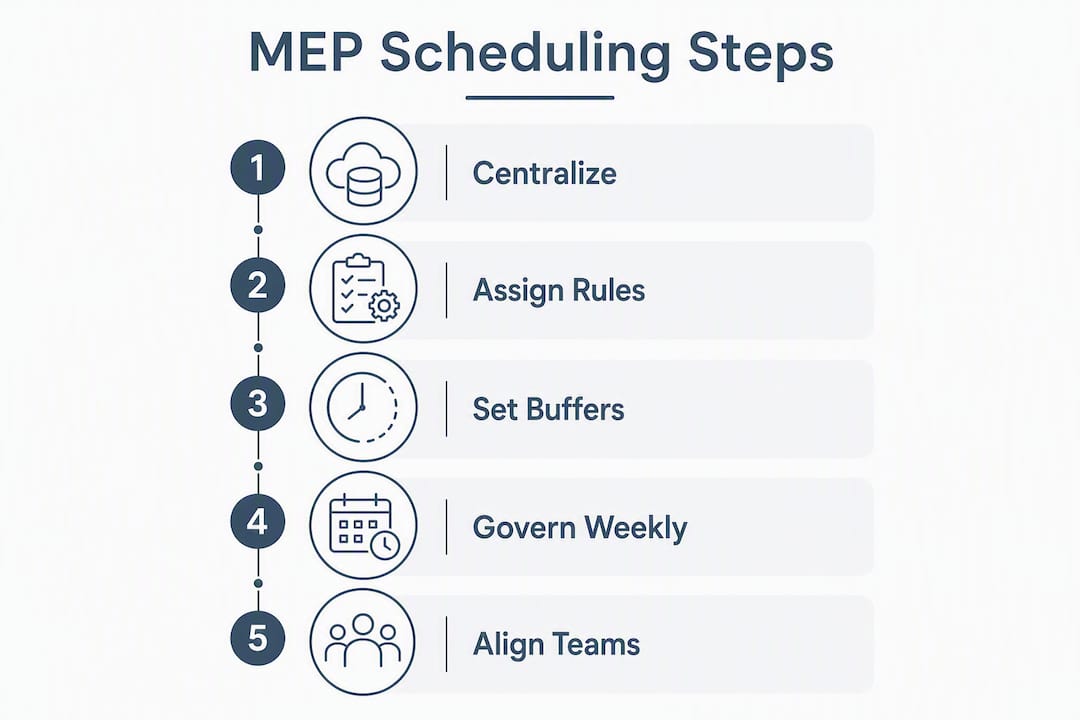
A repeatable, conflict-free process for scheduling MEP crews across multiple jobs starts with one centralized master schedule, rule-driven crew assignment, built-in travel buffers, and a single system that pushes updates to every foreman and field worker in real time. Those four elements, working together, eliminate the double-booking and idle-crew problems that plague multi-site MEP operations. The NBIMS-US Version 3 Section 5.5 standard formalizes this through the Project Coordination Manager (PCM) role, which owns the coordination schedule and arbitrates conflicts across trades. The AGC’s MEP spatial coordination guidance adds that a mutually agreed coordination schedule is not optional — failing to comply can trigger cost liability for the responsible party. BIM-based clash detection closes the loop by surfacing field conflicts before crews mobilize, so your schedule reflects a constructible plan, not an optimistic one.
Table of Contents
- What does a 15-minute setup checklist look like for MEP scheduling?
- How should you structure a master schedule for multi-job MEP crews?
- What rules should govern crew assignment across multiple jobs?
- How do you set travel buffers and shift patterns for multi-site crews?
- What safety and compliance items must travel with every crew?
- How do you keep field crews and schedulers aligned when plans change?
- Which software features actually matter for multi-job MEP scheduling?
- What does a 90-day rollout look like, and which KPIs should you track?
- How can an AI-native ERP automate multi-job MEP scheduling day to day?
- Key Takeaways
- What actually changes after the first month of structured MEP scheduling
- Designflow-build handles the scheduling complexity you are trying to solve
- Useful sources for deeper reading
What does a 15-minute setup checklist look like for MEP scheduling?
You can stop double-booking and cut unnecessary travel tomorrow with five focused actions. Run through this list in a single planning session before your next week starts.
Immediate setup steps (do these first):
- Create one shared master calendar and assign a single owner, your PCM or scheduling lead, who has final authority to approve changes.
- Tag every crew member with trade specialty, active licenses, certifications, and availability windows before adding them to any job.
- Set default travel buffers: 30 minutes for urban service areas under 15 miles, 60 minutes for suburban or rural zones beyond that threshold.
- Publish a three-week rolling lookahead and require foreman sign-off for any change that affects crew start times or site assignments.
- Enable real-time update channels (mobile push as primary, SMS as fallback) and define who handles change tickets when a conflict surfaces.
Quick wins to confirm before you close the session:
- Verify that no crew member appears on two jobs with overlapping time windows.
- Confirm that equipment reservations are visible in the same calendar view as crew assignments.
- Check that the lookahead is accessible on mobile for every foreman on active projects.
Moving from spreadsheets to a shared system is the single fastest way to reduce manual coordination work. The Replace Excel guide from Designflow-build walks through the migration steps if your team is still running rosters in Excel.
How should you structure a master schedule for multi-job MEP crews?
The master schedule is both an operational tool and a contract-level artifact. Treat it that way from day one.
Calendar architecture that actually works
Structure the master schedule in three visible layers: project lanes (one row per active job, showing milestone dates and coordination sign-off gates), crew roster lanes (one row per crew or foreman, showing assigned jobs, travel windows, and off days), and equipment reservation lanes (one row per major piece of shared equipment). Every layer must be visible in a single view so conflicts surface before dispatch, not after.

Naming conventions matter more than most schedulers expect. Use a consistent format: [ProjectID]-[TradeCode]-[CrewID]-[Date]. A file named 2024-HVAC-C03-0615 is unambiguous when three foremen are looking at the same calendar on their phones. Inconsistent naming is one of the fastest ways to introduce version-control errors when updates filter into mobile apps and field rosters.
| Schedule Layer | What It Contains | Who Updates It | Update Frequency |
|---|---|---|---|
| Project lanes | Milestones, coordination sign-off gates, BIM clash closure dates | PCM | Weekly, after coordination meeting |
| Crew roster lanes | Job assignments, travel windows, availability, off days | Scheduling lead | Daily or on change |
| Equipment reservations | Shared tools, lifts, specialty equipment by job and date | Equipment manager | On request + daily review |
| Site-level lookahead | Three-week rolling plan, foreman-confirmed tasks | Foreman | Weekly sign-off required |
Reconciling the master schedule with BIM coordination milestones is where many MEP contractors lose time. Federated BIM reviews and clash detection cycles produce a constructible spatial roadmap — link your crew start dates to coordination sign-off closures so no crew mobilizes before the clash matrix for that area is cleared. The PCM role defined in NBIMS-US V3 carries explicit responsibility for this reconciliation.
Pro Tip: Schedule a 20-minute weekly governance call with the PCM, scheduling lead, and one foreman representative. That cadence catches 80% of conflicts before they hit the field.
What rules should govern crew assignment across multiple jobs?
Matching the right crew to the right job is not guesswork. It is a rule set you define once and enforce consistently.
Mandatory crew metadata
Every crew member in your system needs five data fields before they can be auto-assigned:
- Trade specialty: HVAC, electrical, plumbing, fire protection, BAS/LV — one primary, one secondary if applicable.
- Active certifications: journeyman license, OSHA 10/30, confined space, hot work, trade-specific endorsements.
- Travel radius and max daily travel time: most MEP contractors set a hard cap of 90 minutes one-way for day shifts.
- Availability windows: standard hours, overtime eligibility, and any site-specific access restrictions.
- Workload ceiling: maximum contiguous travel hours per week and current utilization percentage.
How tags drive assignment rules
A practical tagging scheme looks like this: assign only to crews tagged HVAC-Journeyman + OSHA-30 + within 60 minutes drive + who have not exceeded 45 field hours this week. That single rule, applied consistently, prevents both compliance gaps and burnout. Rotation fairness follows naturally: when two crews meet all tags, the system assigns the one with lower current utilization.
Escalation rules need to be explicit. If no crew meets all tags, the scheduling lead gets an alert and has authority to override one non-safety tag (travel radius, for example) with PCM approval. Safety certifications are never overridable. The AGC coordination framework places final conflict arbitration with the PCM, and your internal rules should mirror that.
Pro Tip: Build a “crew card” for each worker — trade, certs, travel radius, current utilization — and review it monthly. Stale data in your tagging system produces bad auto-assignments faster than any other single failure point. See MEP workforce productivity best practices for a deeper look at utilization tracking.
How do you set travel buffers and shift patterns for multi-site crews?
Deadhead time, the hours a crew spends traveling between jobs without billing, is one of the most controllable costs in multi-job MEP scheduling. The fix is systematic, not heroic.
Setting travel buffers by zone
- Urban zones (under 15 miles): add 30 minutes before the first job and 20 minutes between consecutive jobs. Account for parking and equipment load/unload, which routinely adds 10–15 minutes at each site.
- Suburban zones (15–40 miles): add 45–60 minutes between jobs. If a crew is moving equipment, add another 15 minutes for securing loads.
- Rural zones (over 40 miles): build in 75–90 minutes and consider whether a same-day multi-job assignment is realistic. Two rural jobs in one day often costs more in overtime than the revenue justifies.
- Fabrication and delivery lead times: fold these into the crew schedule directly. If ductwork ships on Tuesday, the HVAC crew’s rough-in cannot start before Wednesday at the earliest — build that gap into the project lane, not as a verbal reminder.
Shift pattern options for MEP work
Rotating 8-hour shift patterns are the most common structure for continuous-coverage MEP projects. A four-crew 8-hour rotation covers 24/7 over a 28-day cycle, which works well for commissioning phases or critical infrastructure jobs. For standard commercial MEP work, three patterns cover most situations:
- Standard 8-hour day crew: lowest overtime exposure, easiest to staff, best for urban multi-job routing where crews hit two or three sites per day.
- 12-hour swing team: two crews cover a full day with a handoff at noon or 6 PM. Reduces site mobilization overhead on large single-site jobs but limits multi-job flexibility.
- Rolling 4-crew 8-hour rotation: provides full coverage on critical projects without mandatory overtime. The 28-day cycle means every crew rotates through day, swing, and night windows, which requires careful certification tracking since some site-access rules change by shift.
Cluster jobs geographically when building daily routes. A crew assigned to three jobs in the same ZIP code travels less and bills more than one crossing the metro area twice. Prioritize skill-per-trip: if a journeyman electrician is already on-site at Job A, check whether Job B (nearby) needs the same trade before dispatching a second crew.

What safety and compliance items must travel with every crew?
Centralizing safety verification is not bureaucracy. It is the mechanism that lets crews move between sites quickly without creating liability gaps.
Crew-level safety checklist (travels with every dispatch):
- PPE confirmation: hard hat, safety glasses, gloves, steel-toed boots, and any site-specific requirements (arc flash PPE, respirators).
- Job-specific hazard briefing: reviewed and signed by the foreman before first entry.
- Pre-task plan (PTP): completed for each new task at each site, not just once per day.
- Active licenses and certifications verified in the system before dispatch, not on arrival.
- COI (Certificate of Insurance) on file for the specific job site, confirmed by the scheduling lead.
Site-level standardization items:
- Lockout/tagout (LOTO) procedures: use the site-specific LOTO log, not a generic form. Crews moving between sites need a site-specific briefing each time.
- Hot work permits: confirm the permit is active and site-specific before any welding, cutting, or torch work begins.
- Access procedures: badge requirements, escort rules, and restricted-area protocols vary by site. Document these in the crew assignment record, not in a separate binder.
- Lien waiver and compliance document status: verify before mobilization, not after the first invoice dispute.
The most practical approach is to fold these checks directly into the crew assignment rules in your scheduling system. When a crew is assigned to a new site, the system triggers a compliance checklist that must be confirmed before the assignment is marked active. No confirmation, no dispatch.
How do you keep field crews and schedulers aligned when plans change?
Change is constant on multi-job MEP projects. The question is whether your communication system handles it in minutes or hours.
Channel hierarchy and notification rules:
- Mobile app push notification: primary channel for all assignment changes, delays, and equipment conflicts. Triggers immediately when a change is confirmed in the master schedule.
- SMS fallback: activates automatically when a push notification is unacknowledged after 15 minutes. Useful for crews in areas with spotty data coverage.
- Crew roster email with change ticket: sent at end of day summarizing all changes, with a unique ticket number for each modification. Foremen reference ticket numbers when calling in questions.
What triggers an immediate alert vs. an end-of-day summary:
Immediate alerts go out for reassignments, site delays over 30 minutes, equipment conflicts that block work, and safety-related changes. End-of-day summaries cover minor schedule adjustments, updated travel times, and next-day lookahead confirmations.
Sample notification templates:
- Reassignment: “CREW-C03: Job #2024-HVAC-0615 reassigned to Job #2024-HVAC-0618. New start: 10:00 AM. Confirm receipt by replying YES.”
- Delay: “Job #2024-PLMB-0412 delayed 2 hours due to inspection hold. New crew arrival: 11:00 AM. Travel buffer adjusted.”
- Equipment conflict: “Scissor lift #SL-07 unavailable at Job #0615 until 2:00 PM. Alternate lift #SL-09 reserved. Confirm.”
Field confirmations must feed back into the master schedule automatically. A foreman reply of “YES” should close the change ticket and update the crew lane in real time. Mobile tools for construction management covers the specific app features that make two-way sync work without manual re-entry.
Which software features actually matter for multi-job MEP scheduling?
Not every scheduling tool is built for the complexity of coordinating MEP crews across multiple active jobs. Evaluate tools against two tiers of features.
Must-have features:
- Centralized crew roster with skills, certifications, and availability in one view.
- Skills and certification tag filtering that drives auto-assignment rules.
- Travel buffer configuration by zone or mile threshold.
- Two-way mobile sync: changes in the system push to the field; field confirmations update the system.
- Single source-of-truth calendar visible to schedulers, foremen, and project managers simultaneously.
Nice-to-have features:
- AI-assisted crew matching by skill, proximity, and current utilization.
- Predictive travel time and time-to-complete estimates based on historical job data.
- Automated conflict resolution with escalation routing to the PCM.
- Payroll and job costing integration so labor hours flow directly to cost codes without re-entry.
Integration checklist before you commit to a tool:
| Integration Point | Why It Matters | What to Verify in Demo |
|---|---|---|
| BIM/coordination file links | Ties crew start dates to clash-closure sign-offs | Can you attach a coordination milestone to a crew assignment? |
| Procurement and fabrication lead times | Prevents crews from arriving before materials | Does the system flag a crew assignment when a material delivery is delayed? |
| Timesheet automation | Eliminates manual re-entry into payroll | Do field clock-ins sync to job cost codes automatically? |
| Subcontractor availability | Prevents scheduling conflicts with subs on shared sites | Can you view sub availability alongside your own crew roster? |
Workforce scheduling tools built for MEP contractors centralize the roster and reduce manual coordination work considerably. When evaluating any platform, test one specific scenario in the demo: reassign a crew mid-week across two active jobs and watch how long it takes the system to update the master schedule, notify the foreman, and flag any certification gaps. That single test reveals more than any feature list.
For deeper reading on automated MEP scheduling, Designflow-build’s guide covers rule-based assignment and pilot testing in detail.
What does a 90-day rollout look like, and which KPIs should you track?
A phased rollout prevents the most common failure mode: trying to change everything at once and getting adoption from no one.
- Weeks 1–2 (quick wins): stand up the shared master calendar, assign the PCM as owner, tag all active crews with skills and certifications, and set travel buffers by zone. Publish the first three-week rolling lookahead and require foreman sign-off.
- Weeks 3–6 (pilot phase): run the new process on 1–3 active projects. Collect foreman feedback weekly. Close process gaps — missing crew tags, buffer times that are too short, notification rules that are triggering too often or not enough.
- Weeks 7–12 (scale and automate): roll out to all active projects and regions. Automate assignment rules for the most common crew-to-job matches. Train all schedulers and foremen on the system, with a focus on mobile confirmations and change-ticket handling.
| Phase | Weeks | Owner | Key Deliverable |
|---|---|---|---|
| Quick wins | 1–2 | PCM + Scheduling lead | Shared calendar live, crews tagged, buffers set |
| Pilot | 3–6 | Scheduling lead + Foremen | 1–3 projects on new process, feedback collected |
| Scale | 7–12 | PCM + All schedulers | Full rollout, automation rules active, training complete |
KPIs to track from week one:
- On-time starts: percentage of crew arrivals within 15 minutes of scheduled start time. Target: high on-time start rates by the end of the rollout phase.
- Average travel hours per crew per week: baseline this in week one and track the trend. A well-structured routing plan typically reduces this figure within the first month.
- Crew utilization rate: billable field hours divided by total available hours. Track by trade and by project.
- Schedule change frequency: number of changes to the master schedule per week. High frequency early is normal; a declining trend by week 8 confirms the process is working.
- Overtime hours: track by crew and by project. Unexpected overtime is usually a routing or buffer problem, not a productivity problem.
Automating timesheet collection makes utilization and overtime tracking far more accurate than manual entry, and it connects labor hours directly to job cost codes.
How can an AI-native ERP automate multi-job MEP scheduling day to day?
The practical difference between a scheduling tool and an AI-native ERP shows up in day-to-day operations, not in feature comparison slides.
What automation looks like in practice:
- The system reads your crew tags, current utilization, and job proximity, then proposes the best crew match for a new assignment without a scheduler manually sorting through a roster.
- When a job runs long, the system automatically recalculates travel buffers for the next assignment and alerts the foreman before the conflict becomes a problem.
- Certification expiration flags surface in the scheduling view, not in a separate HR system, so a scheduler sees the gap before dispatching a non-compliant crew.
- Labor hours captured on mobile sync directly to job cost codes, eliminating the manual re-entry step that Designflow-build reports accounts for a 70% reduction in manual data entry for contractors using its integrated ERP.
Questions to ask any vendor in a demo:
- Show me how long it takes to reassign a crew across two active jobs, including the foreman notification and master schedule update.
- Can the system flag a crew assignment when a required certification is expired or missing?
- How does the scheduling module connect to payroll and job costing — does it require manual export?
- What does a cross-project utilization report look like, and how current is the data?
- What is your typical implementation timeline for a contractor with 50–200 field employees?
Automation works best when the rule sets are explicit. A rule like “assign only to crews with tag HVAC-Journeyman, within 60 minutes drive, and who have not exceeded 45 hours this week” is something a system can enforce consistently. Vague rules produce inconsistent results regardless of how sophisticated the underlying AI is.
Key Takeaways
Scheduling MEP crews across multiple jobs requires a centralized master schedule, explicit crew assignment rules, geographic routing logic, and a system that propagates changes to the field in real time.
| Point | Details |
|---|---|
| Assign a single schedule owner | A named PCM or scheduling lead with authority to arbitrate conflicts is the foundation of any multi-job MEP scheduling process. |
| Tag crews before assigning them | Skills, certifications, travel radius, and utilization ceiling must be in the system before auto-assignment rules can work reliably. |
| Set travel buffers by zone | Use 30 minutes for urban zones under 15 miles, 45–60 minutes for suburban, and 75–90 minutes for rural assignments. |
| Track five KPIs from week one | On-time starts, average travel hours, utilization rate, schedule change frequency, and overtime hours reveal whether the process is improving. |
| Designflow-build for integrated scheduling | Designflow-build’s AI-native ERP connects crew scheduling, certification tracking, payroll, and job costing in one system, with a vendor-claimed short implementation timeline. |
What actually changes after the first month of structured MEP scheduling
The first week of a new scheduling process feels slower, not faster. Foremen who have been running their own informal rosters push back on sign-off requirements. Schedulers spend more time entering crew tags than they did before. That friction is real, and it is temporary.
By week four, the pattern shifts. The double-booking calls stop. Travel time starts dropping because routing rules are clustering jobs by geography instead of by whoever called the office last. Foremen who resisted the sign-off process start using it as a tool to protect their crews from last-minute reassignments they did not agree to.
The harder truth is that early resistance usually comes from the scheduling team, not the field. Schedulers who built their value around knowing the roster in their heads feel exposed when the system makes that knowledge visible to everyone. The answer is not to soften the process. It is to reframe the scheduler’s role: they are now the person who configures and governs the rules, not the person who manually resolves every conflict. That is a more skilled job, not a lesser one.
Realistic expectations: expect two to three weeks of disruption, one or two process gaps you did not anticipate (a certification category you forgot to tag, a buffer time that is consistently too short for one service area), and a noticeable improvement in on-time starts by the end of week six. The quick wins that keep momentum are the ones foremen can see: fewer last-minute reassignments, fewer surprise overtime hours, and a schedule they can actually trust the night before a job starts.
Designflow-build handles the scheduling complexity you are trying to solve
Contractors managing MEP crews across multiple active jobs need more than a calendar. They need a system where crew tags, job assignments, travel buffers, certifications, payroll, and job costing all live in one place and update together.

Designflow-build’s AI-native construction ERP connects all of those elements without requiring a separate scheduling tool, a separate payroll system, and a separate compliance tracker. The platform’s AI-assisted crew matching reads skill tags, current utilization, and job proximity to propose assignments automatically. Certification gaps surface in the scheduling view before dispatch. Labor hours captured on mobile sync directly to job cost codes, which the vendor reports significant reductions in manual data entry. Implementation is claimed to be rapid, without a large consulting engagement required to get started.
For your demo, bring one real week of schedules and ask the team to show you a mid-week crew reassignment across two active jobs, including the foreman notification, the master schedule update, and the utilization report that follows. That scenario will tell you everything you need to know about whether the system fits your operation. You can also explore Designflow-build’s AI construction software capabilities to see how the automation layer connects to the rest of your project management workflow.
Useful sources for deeper reading
- NBIMS-US Version 3, Section 5.5 — MEP Spatial Coordination Requirements: the primary standard defining PCM and MSC roles, coordination schedules, and mandatory meeting requirements. Reference this in any internal scheduling policy or vendor RFP.
- AGC MEP Spatial Coordination Requirements for BIM: the contractor-side governance framework that mirrors NIBS, including the mutually agreed coordination schedule and cost-liability provisions for non-compliance.
- MEP BIM Coordination Team: Clash Detection and Project Success: practical guidance on federated reviews, clash detection matrices, and linking coordination milestones to crew mobilization dates.
- BIM for MEP Coordination: Practical Guide for Engineers: covers BEP table items (software, exchange format, LOD, naming conventions, issue resolution) that prevent coordination failure modes.
- Rotating 8-Hour Shift Pattern — Snap Schedule: explains the four-crew 8-hour rotation structure and 28-day cycle used for continuous-coverage MEP projects.
- Automated MEP Scheduling: A 2026 Guide for Project Managers — Designflow-build: Designflow-build’s in-depth treatment of rule-based assignment, pilot testing, and automation thresholds for MEP contractors.
- MEP Workforce Productivity Best Practices — Designflow-build: practical approaches to utilization tracking, crew assignment, and productivity improvement across multiple job sites.