
Engineering Workflow Automation Software Comparison for Contractors

For most US construction contractors and engineering firms, the right answer in any engineering workflow automation software comparison is an AI-native ERP that combines project accounting, field operations, and automated workflows in one system. Designflow-build is that practical pick. It covers the full stack — job costing by cost code, certified payroll, AI risk prediction, mobile field capture, and a built-in automation builder — without requiring a separate BPM engine or a months-long consultant rollout. Your POC target for the next 7 days: run a timesheet automation and job-cost posting scenario inside Designflow-build’s free tier to validate fit before committing to a paid seat.
Table of Contents
- How do the main automation approaches compare for engineering firms?
- What questions should you ask every vendor before signing?
- What technical checks should engineering leaders run before committing?
- What does a realistic implementation timeline and ROI look like?
- How does Designflow-build map to the evaluation checklist?
- What are your next steps this week?
- Key Takeaways
- What most procurement teams get wrong about automation selection
- Designflow-build delivers construction automation without the long rollout
- Useful sources
How do the main automation approaches compare for engineering firms?
Not every workflow automation tool is built for construction. The four main approaches each serve a different buyer, and picking the wrong category is the most expensive mistake you can make.
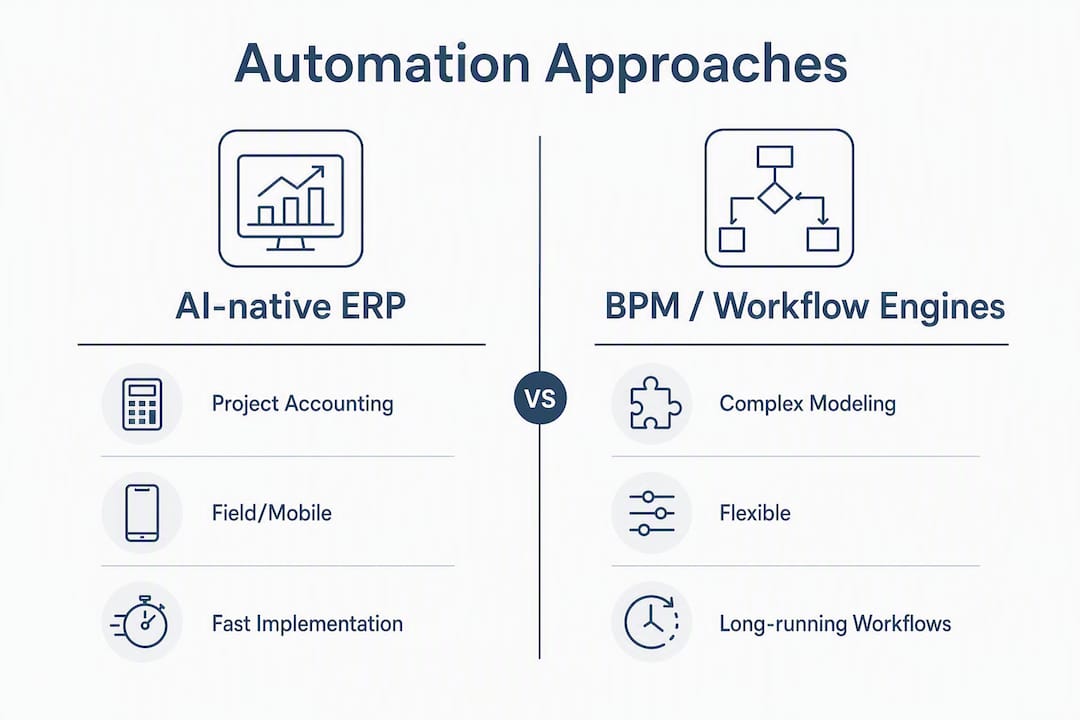
AI-native ERP (like Designflow-build) bundles project management, accounting, and field operations into one data model. Workflows are embedded and construction-aware — they already know what a cost code, WIP schedule, or lien waiver is. This is the right fit for contractors who want fast time-to-value without stitching together separate systems.
BPM / workflow engines (standalone BPMN platforms) give engineering teams maximum flexibility for modeling complex, long-running processes. BPMN persistence reduces manual handoffs in multi-step construction processes, but these platforms require dedicated process engineers to configure and maintain them.

PLM platforms are designed for product lifecycle management in manufacturing and discrete engineering. They excel at design-to-production traceability but carry little native construction accounting or field-ops capability.
Generic low-code platforms are fast to prototype but trade off code portability and deep customization for usability. They work well for non-technical users building simple automations, but hit a ceiling quickly on construction-specific logic.
| Approach | Best for | Workflow engine type | AI automation | Project accounting | Field/mobile | Implementation time |
|---|---|---|---|---|---|---|
| AI-native ERP | Contractors, engineering firms wanting one system | Embedded state machine + rule engine | Built-in risk prediction, AI takeoff | Full GL, AR/AP, job costing, WIP | Native mobile app | Typically requires a few weeks |
| BPM / workflow engine | Engineering teams needing custom process modeling | BPMN, long-running persisted | Varies by platform | Requires integration | Requires integration | May require several months |
| PLM platform | Manufacturing / product engineering | State machine, lifecycle rules | Design-focused AI | Minimal or none | Limited | May require multiple months |
| Generic low-code | Non-technical teams, simple cross-app automations | Rule engine / visual flow | Basic AI steps | None native | None native | Typically days to weeks |
What questions should you ask every vendor before signing?
The vendor demo is where deals get made and mistakes get locked in. Go in with a scored checklist, not a list of features to admire.
Technical questions:
- Can workflows be exported as JSON or BPMN and stored in a Git repository?
- Does the platform support long-running, persisted workflows that survive server restarts?
- Is there a code escape hatch — inline JS, Python, or an extensible SDK — for logic the visual builder cannot handle?
- How does the API handle bi-directional sync with your existing accounting or ERP system?
Construction accounting questions:
- Does job costing post at the cost-code level in real time, or is it a nightly batch?
- Does the platform produce certified payroll reports compliant with Davis-Bacon requirements?
- How is WIP calculated, and can you export a WIP schedule directly to your bonding agent?
Commercial and governance questions:
- What is the pricing model: per seat, per workflow execution, or flat subscription? Per-task billing models can escalate rapidly for construction workflows that process hundreds of line items per job.
- Where does your data reside, and what is the SLA for uptime and support response?
| Question | Pass signal | Fail signal |
|---|---|---|
| Workflow export (JSON/BPMN) | Yes, exportable and version-controllable | “Proprietary format, not exportable” |
| Code escape hatch | Inline JS/Python or SDK available | Visual builder only, no custom code |
| Job-costing granularity | Real-time cost-code posting | Nightly batch or GL-only posting |
| Certified payroll | Built-in Davis-Bacon report | Manual export to spreadsheet |
| Data residency | US-based, stated in contract | “Cloud, details TBD” |
| Pricing model | Per-seat or flat subscription | Per-execution with no cap |
Red flags to watch: No code escape hatch means you will hit a logic ceiling within 12 months. Proprietary workflow formats make future migrations painful and expensive. Vague job-costing answers (“we integrate with QuickBooks”) are not the same as native cost-code accounting.
Pro Tip: Score each vendor answer 0, 1, or 2 across these dimensions before the demo ends. A vendor who scores below 10 out of 16 on technical and accounting questions rarely improves post-sale.
What technical checks should engineering leaders run before committing?
The workflow engine underneath a platform determines what you can build, how safely you can change it, and whether you can ever leave.
Workflow engine types matter for construction. BPMN-based engines support long-running persisted workflows — critical when a construction process spans weeks (RFI resolution, lien waiver collection, certified payroll cycles). Embedded state machines are faster to configure but may not survive a server restart mid-process. Rule engines handle simple conditional logic well but struggle with multi-step, stateful processes.
Version control is a governance requirement, not a nice-to-have. Treating workflow artifacts as version-controlled code enables short feedback loops and safer automated changes — the same discipline that makes software teams reliable applies directly to construction automation. Ask vendors to show you a workflow diff in a pull request.
The code escape hatch is your insurance policy. Without custom JS/Python injection, teams eventually hit a limits wall and must migrate the entire workflow library. Validate the escape hatch during the demo: ask the vendor to add a custom calculation step live, not in a pre-built demo environment.
Pro Tip: During your POC, simulate an external system outage: disconnect the accounting integration and confirm the workflow queues and replays correctly rather than silently dropping data. This single test reveals more about platform reliability than any sales deck.
Closed-loop, agentic automation — where the system generates an action, reviews the output, and revises before committing — materially improves decision accuracy over single-step automation. For construction, this means AI that flags a budget overrun, proposes a reforecast, and waits for approval before posting — not a bot that silently updates the ledger.
What does a realistic implementation timeline and ROI look like?
Most contractors underestimate time-to-value for workflow automation tools and overestimate how long a good implementation takes.
The honest benchmark: A focused AI-native ERP implementation for a mid-size contractor runs 2–4 weeks from kickoff to live production workflows — not the 6–12 months a traditional ERP rollout requires.
A realistic phased approach:
- Discovery (Days 1–3): Map your current manual workflows, identify the top 3 pain points (manual timesheet entry, late invoicing, job-cost variance), and define your POC KPIs.
- Configuration (Days 4–10): Set up chart of accounts, cost codes, and user roles. Import active projects and open commitments.
- Pilot (Days 11–18): Run one project end-to-end: timesheet capture, job-cost posting, and a draft invoice. Measure against your baseline.
- Roll-out (Days 19–28): Expand to all active projects, train field crews on the mobile app, and activate compliance automation (COI tracking, lien waivers).
| KPI | Baseline (manual) | Target after automation | Monthly impact |
|---|---|---|---|
| Manual data entry hours | Typically many hours per week | Significantly reduced | Significant labor cost recovery |
| Time-to-invoice | Typically multiple days after job completion | Much faster | Faster cash flow |
| Job-cost variance | Typically moderate percentage variance at month-end | Reduced variance with real-time posting | Better bonding capacity |
| Certified payroll prep time | Typically several hours per project per week | Greatly reduced | Compliance risk reduction |
Construction-specific automation that integrates project accounting with field workflows is what actually moves these numbers. A platform that handles GL, AR/AP, and job costing natively — without a middleware layer — is the difference between real ROI and a dashboard that looks good in demos.
How does Designflow-build map to the evaluation checklist?
Designflow-build was built specifically for contractors and engineering firms, which means the evaluation checklist above maps directly to its feature set rather than requiring custom configuration to get there.
| Evaluation dimension | Designflow-build capability |
|---|---|
| Workflow engine | Embedded automation builder with rule-based and AI-triggered workflows |
| Project accounting | Full GL, AR/AP, certified payroll, job costing by cost code, WIP schedules |
| AI automation | Risk prediction, resource allocation, AI blueprint takeoff |
| Field/mobile | Native mobile app with voice data entry |
| Compliance | COI tracking, lien waiver automation, Davis-Bacon certified payroll |
| Integrations | Open API with BIM and CAD integration support |
| Estimating | AI takeoff and bid management with vendor bid leveling |
On implementation: Designflow-build’s 2–4 week implementation is not a marketing claim — it reflects a platform designed so that a contractor’s project manager, not an army of consultants, owns the rollout. The project manager handles configuration; the accounting lead imports cost codes and chart of accounts; field supervisors get a 30-minute mobile onboarding.
Designflow-build reports a 70% reduction in manual data entry and up to $847,000 in monthly savings for contractors using the full platform. User adoption is very high, reflecting how the interface was designed: field crews use it because it is faster than paper, not because IT mandated it.
What are your next steps this week?
Run this POC script in Designflow-build’s free tier before your next vendor decision:
- Create one active project with a real cost-code structure from a current job.
- Submit three timesheets via the mobile app and confirm they post to job costs automatically.
- Trigger a schedule change and watch the system reforecast the cost-to-complete.
- Generate a certified payroll report and a draft lien waiver for the same project.
- Export the workflow log and confirm you can read the audit trail without vendor assistance.
Demo checklist for any vendor you evaluate:
- Request a live workflow export in JSON or BPMN format.
- Ask to see the accounting ledger export for a sample project, including WIP.
- Request log access during the demo, not after.
- Ask the vendor to add a custom calculation step live, using the code escape hatch.
- Confirm data residency in writing before the trial ends.
Decision gates: Move a pilot to production when job-cost variance drops below 5%, certified payroll prep time falls under 30 minutes per project, and your team submits timesheets via mobile without prompting for two consecutive weeks.
Key Takeaways
AI-native ERP is the fastest path to measurable ROI for US contractors and engineering firms — provided the platform covers project accounting, field operations, and workflow automation natively.
| Point | Details |
|---|---|
| AI-native ERP wins for contractors | One system covering accounting, field ops, and automation beats stitching together separate tools. |
| Code escape hatch is non-negotiable | Platforms without custom code injection force costly migrations within 12 months. |
| Version-controlled workflows reduce risk | Treating workflow artifacts like code enables safer changes and audit-ready governance. |
| Implementation takes 2–4 weeks | A focused AI-native ERP rollout does not require months of consultant time. |
| Designflow-build is the recommended POC | Start with timesheet automation and job-cost posting in the free tier to validate fit this week. |
What most procurement teams get wrong about automation selection
The biggest mistake I see in construction software evaluations is treating workflow automation as a feature to check off rather than an architectural decision that affects every system downstream. Teams spend weeks comparing UI screenshots and miss the two questions that actually determine long-term cost: Can I export my workflows? And can I add custom logic when the visual builder runs out of road?
The second pitfall is underweighting accounting depth. A platform that handles project management beautifully but posts job costs in nightly batches will still leave your project managers working in spreadsheets at month-end. Real-time cost-code posting is not a premium feature — it is the baseline for any tool that claims to replace your current accounting workflow.
On governance: set a patch cadence before go-live, subscribe to the vendor’s security advisory feed on day one, and write SLA response times into the contract rather than accepting the default support tier. The vendors who push back on SLA specifics in writing are the ones who will be hard to reach when something breaks at 5 PM on a Friday before a certified payroll deadline.
Designflow-build delivers construction automation without the long rollout
Contractors who complete the evaluation checklist above consistently find that Designflow-build covers more of the must-have dimensions out of the box than any other category of tool. The AI construction software platform combines project accounting, AI risk prediction, certified payroll, field mobile, and an automation builder in one subscription — starting free, with Pro seats at $100/user/month.

The reported 70% reduction in manual data entry and up to $847,000 in monthly savings are the numbers to test against your own baseline during a 2–4 week POC. No consultant engagement required. Your project manager runs the pilot; your accounting lead validates the job-cost output; your field crew downloads the app. Start your free trial today and run the POC script from this article on a live project.
Useful sources
- Best process engineering software — Gitnux: covers BPMN persistence and long-running workflow requirements for process engineering platforms.
- Google SWE Book, Chapter 9 — Abseil: Google engineering guidance on version-controlled workflow artifacts and short feedback loops.
- SWE-Review: Closing the Loop on Issue Resolution — Paperium: research on closed-loop agentic automation and its impact on decision accuracy.
- VibeDex — Platform engineer workflow automation analysis: benchmark criteria for escape hatches, portable exports, and RBAC for engineering teams.
- Pricing model comparison — BNXT.ai: analysis of per-task vs. per-seat pricing and cost escalation risks.
- n8n — self-hosted automation platform: documentation on self-hosted vs. managed SaaS trade-offs, data sovereignty, and patch discipline.
- Designflow-build — AI construction ERP: platform documentation covering engineering firm integration requirements and contractor workflow automation use cases.