
2–4 Week Pilot: Vendor Compliance Tracking for Contractors

Vendor compliance tracking is the ongoing process of verifying that suppliers meet tax, insurance, certification, and contractual requirements throughout the life of a relationship, not just at onboarding. The single control that makes it scale is automated status monitoring tied directly to payment enforcement: when a document expires or a screening flag trips, the system blocks payment until it’s resolved. Everything below shows you how to build that program.
TL;DR:
- Regular verification of tax documents, insurance certificates, and certifications is essential, with distinct renewal cycles for each requirement.
- Automating status monitoring linked to payment systems ensures compliance issues prevent disbursements, avoiding manual follow-up delays.
- Segmenting vendors by risk and assigning clear ownership streamlines oversight and reduces the chance of missed expirations or violations.
- Centralized systems with self-service portals and integrated AP gating improve efficiency and reduce manual chasing of expired or missing documents.
- Tracking compliance metrics weekly allows early detection of gaps, preventing costly breaches and maintaining ongoing vendor adherence.
Table of Contents
- What Vendor Compliance Tracking Actually Covers
- Building An Operational Compliance Program Step By Step
- What To Require From A Compliance Tracking Tool
- Operational Controls That Force Compliance To Stick
- Measuring Whether The Program Is Actually Working
- The Failures That Undo Otherwise Good Programs
- How An Integrated ERP Puts Continuous Compliance Into Practice
- Why Compliance Tracking Is A Procurement Growth Lever, Not Overhead
- Try A Compliance Pilot Inside Your Existing Construction Workflow
- Sources
What Vendor Compliance Tracking Actually Covers
Vendor compliance tracking is distinct from onboarding or a one-time risk assessment. Onboarding happens once, when you bring a supplier in. Compliance tracking runs continuously after the contract is signed, which is exactly why payment holds on noncompliant vendors work as the enforcement mechanism that scales instead of relying on someone remembering to chase paperwork every quarter.
The components you need to monitor, and how often, break down like this:
- Tax documentation (W-9, W-8BEN): verify at onboarding, refresh when entity status or address changes.
- Certificates of insurance (COIs): track expiration dates individually. Most run 12-month terms.
- Certifications (SOC 2, ISO 9001, HIPAA where applicable): recheck on renewal cycles, typically annual or biennial.
- Sanctions and watchlist screening: rescreen continuously, not just at intake, since lists update in real time.
- Banking details: verify on file and re-verify anytime a change request comes in.
- Contracts and SLAs: review against actual performance, not just signed terms.
Each item carries its own expiration clock. Miss one and you’re either paying a vendor with a lapsed license or exposing your business to a sanctions violation you didn’t know existed.
Building An Operational Compliance Program Step By Step
You don’t need a compliance department to run this well. You need a defined structure, and it works whether you have 40 vendors or 4,000.
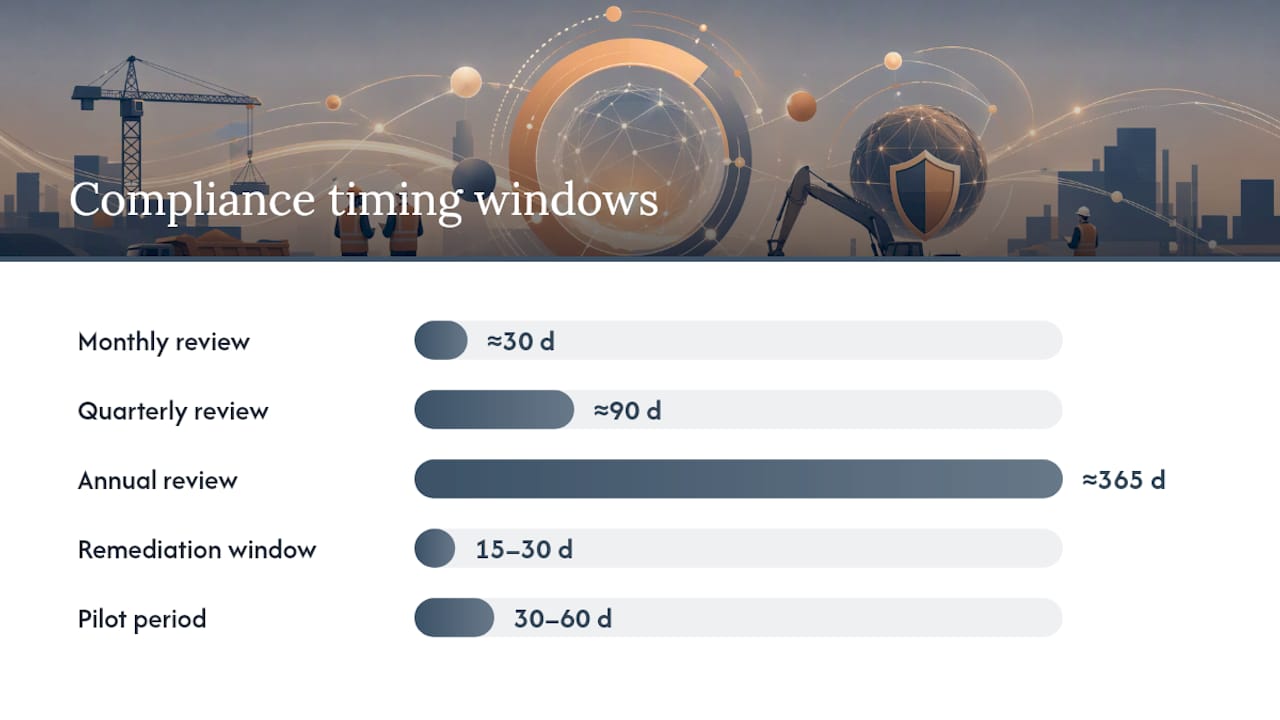
- Segment vendors by criticality. A subcontractor pouring foundations carries more risk than a stationery supplier. High-risk vendors get monthly review cycles; low-risk vendors can run quarterly or annually.
- Assign clear owners. Procurement owns intake and evidence collection. AP owns payment gating. Legal owns contract terms. Security owns sanctions and data-access reviews. Split ownership without clear handoffs is how documents fall through the cracks.
- Standardize evidence collection. Every document type needs a defined expiry rule and a reminder trigger, not an ad hoc email when someone notices a gap.
- Define enforcement thresholds. Set a remediation window (commonly 15 to 30 days) before a payment hold kicks in, and make the rule non-negotiable once it’s set.
- Run a pilot before a full rollout. Pick one vendor segment, run it for 30 to 60 days, and measure time-to-resolution and the number of holds triggered before scaling.
A structured third-party risk management approach pairs due diligence with continuous monitoring and remediation, and that pairing is what separates a real program from a spreadsheet that gets updated whenever someone has time.
Pro Tip: Start your pilot with your highest-spend vendor segment, not your riskiest one. You’ll get faster buy-in from finance when the dollar exposure is visible immediately.
What To Require From A Compliance Tracking Tool
Skip anything that just stores documents. You want a system built around continuous status, not static files.
The non-negotiable capabilities:
- Centralized vendor inventory with a single compliance status per vendor, visible to procurement and AP simultaneously.
- Automated evidence requests that fire before expiration, not after.
- Self-service vendor portals, so suppliers upload their own COIs and certifications instead of emailing PDFs to a shared inbox.
- Continuous sanctions and watchlist screening, not a one-time check at intake.
- AP and payment-gating integration, so noncompliant status blocks disbursement automatically.
On integrations: connect the tool to your accounting or AP system, your screening data provider, your contract repository, and your SSO setup. Supply-chain compliance platforms that centralize assessments and route evidence electronically cut the manual chasing dramatically compared to email-based follow-up.
Lightweight field apps work fine if you’re managing under 50 vendors with simple document needs. Once you’re juggling multiple entity types, certified payroll, or subcontractor tiers, an enterprise-grade platform with built-in AP gating earns its cost quickly.
Operational Controls That Force Compliance To Stick
Policy without enforcement is a suggestion. These four controls turn the policy into something vendors actually respond to:
- Payment gating: block disbursement automatically when a critical document is expired or missing. No manual override without a documented exception.
- Bank-change verification: require a callback to a known contact and multi-factor confirmation before updating banking details. This single step stops the majority of vendor-impersonation fraud attempts.
- COI renewal triggers: set automatic reminders 60 days before expiration, with escalation at 30 and 15 days.
- Sanctions rescreening cadence: run continuous or at minimum monthly rescreens, with a documented exception process for false positives.
Enterprise accounting systems increasingly embed compliance status directly inside AP and subcontract ledgers, which confirms the AP tie-in isn’t a nice extra. It’s becoming the default.
Pro Tip: Treat bank-change requests as a security event, not an admin task. Route every one through a second approver who never sees the original request.

Measuring Whether The Program Is Actually Working
Track a small set of numbers weekly and you’ll know within a month whether the program holds up. Track them monthly only, and you’ll find out too late.
- Percent of vendors audit-ready at any given moment
- Payments blocked for noncompliance (a rising trend early on is healthy, not alarming)
- Time-to-evidence-collection, from request to received document
- Expired-document aging, how long a lapse sits unresolved
- Vendor risk distribution across your segmentation tiers
HITRUST’s guidance on harmonizing standards across multiple frameworks supports using a consistent scoring method rather than judging each vendor by whatever criteria happens to be handy. Run operational checks daily or weekly at the team level. Save the roll-up summary for executives monthly, tied to spend and risk exposure rather than raw document counts.
The Failures That Undo Otherwise Good Programs
Most breakdowns trace back to the same handful of habits.
- Annual-only checks. A COI verified in January can lapse in July with nobody noticing until a claim gets filed.
- Spreadsheet fragmentation. Different teams tracking different vendors in different files means no one has the full picture.
- Unclear ownership. When procurement assumes AP is watching expirations and AP assumes procurement is, nobody is.
- Ignoring fourth-party risk. Your vendor’s subcontractors carry exposure too, and most programs never look past tier one.
When a gap surfaces, suspend new transactions, require a written remediation plan with a deadline, and escalate to offboarding only if the vendor misses it twice. Keep the tone collaborative in vendor-facing communications. Most lapses are administrative oversight, not bad faith, and treating every gap like a violation burns relationships you’ll need again next quarter.
How An Integrated ERP Puts Continuous Compliance Into Practice
Compliance tracking works best when it’s not a bolt-on tool sitting outside your project and accounting systems. Designflow-build was built around that principle: project management, accounting, and field operations run in one system, so compliance status connects directly to the same ledgers that process payment.
Contractors using the platform report significant reductions in manual data entry, with implementation taking a few weeks and high user adoption rates. Those numbers map directly to the requirements covered above:
- AP payment gating runs against the same job-costing ledger, not a separate spreadsheet.
- COI and certification tracking flow through the customer portal for self-service uploads.
- Automated follow-ups replace manual email chasing for expiring documents.
A sensible pilot: pick one subcontractor tier, run compliance tracking through the platform for 30 days, and measure the drop in manual chasing before expanding further.
Why Compliance Tracking Is A Procurement Growth Lever, Not Overhead
Most teams still treat compliance as defensive paperwork. That’s backwards. Framing compliance as a strategic enabler gives procurement a concrete way to show reduced disruptions and cleaner audit outcomes to leadership, which is a far stronger case than “we avoided a fine.”
Two priorities beat everything else: gate payments on compliance status, and segment vendors by actual risk rather than treating every supplier the same. Everything else in a program builds on those two decisions.
— Keith
Try A Compliance Pilot Inside Your Existing Construction Workflow
If you’re running vendor compliance tracking through spreadsheets and shared inboxes today, the fastest fix isn’t a new point solution bolted onto everything else. It’s folding compliance status into the accounting and project system you already use for payments, so a lapsed COI blocks a check run automatically instead of surfacing three weeks after the fact.

A Designflow-build pilot typically runs 2 to 4 weeks: you pick one vendor segment, connect it to AP through the AI construction software platform, and measure two things at the end: time saved on manual document chasing and the number of payment holds caught before they became a problem. For teams managing certified payroll or multiple subcontractor tiers, this is where construction scheduling and compliance workflows start paying for themselves fast. Book a pilot walkthrough and bring your worst vendor segment. It’s the fastest way to see the gap.
For broader supplier risk monitoring beyond compliance documents, particularly on the financial and performance side, engineering-focused risk monitoring services are worth pairing with your internal tracking.
Sources
Vanta on continuous monitoring, HITRUST on TPRM frameworks, Thomson Reuters ONESOURCE on automated evidence routing, Ken from Finance on payment-hold enforcement, and Amazon Business on strategic framing.
- Third-Party Risk Management and Vendor Compliance | HITRUST
- Thomson Reuters ONESOURCE Supply Chain Compliance
- What is Vendor Compliance Management? Definition, Requirements & Best Practices | Ken from Finance
- Vendor compliance: 2026 guide and best practices | Amazon Business (blog)