
Resource Leveling With Live Crew Data for Construction Schedulers

Construction resource leveling adjusts start and finish dates within (or beyond) available float to eliminate crew and equipment overloads, even if it pushes the project end date. Use it when a limited resource, not the calendar, is your real constraint: one crane, one certified welding crew, a rental window that won’t move. If the deadline is the constraint instead, reach for resource smoothing first.
TL;DR:
- Resource leveling is necessary when a single crew or resource is booked across multiple activities, particularly when float is insufficient to absorb conflicts.
- Smoothing only reallocates noncritical activities within their existing float and does not extend the project finish date, unlike leveling which may push deadlines when necessary.
- Proper resource data accuracy, including calendars and crew availability, is essential for effective leveling and avoiding schedule distortions or claims issues.
- Using activity splitting with hybrid genetic algorithms can significantly improve scheduling feasibility in large networks by allowing interruption and restart, despite added complexity.
- Most scheduling errors stem from outdated or incorrect resource information, emphasizing the importance of maintaining current data before applying leveling algorithms.
Table of Contents
- What Is Construction Resource Leveling vs Resource Smoothing?
- When to Choose Leveling Over Smoothing on a Construction Job
- Resource Leveling Techniques: CPM, Critical Chain, and Splitting
- How to Level a Construction Schedule Step by Step
- Float Accuracy and Contract Reporting After You Level
- What Real Resource Leveling Software Needs to Do
- A Multi-Crew Leveling Example: Data-Backed Decisions in Practice
- Avoiding the Most Common Resource Leveling Mistakes
- The Real Lesson Buried in the Leveling Research
- Get Leveling Right With Data That Isn’t Two Weeks Old
- Sources
What Is Construction Resource Leveling vs Resource Smoothing?
Resource leveling shifts activity dates to match the crews, crane hours, or specialty equipment you actually have, and it will move your project finish date if that’s what it takes to stop double-booking a resource. Say your schedule has two structural steel activities both requiring the same certified welding crew during the same week. Leveling delays one of them until the crew frees up, even if that pushes the milestone.
Resource smoothing works the opposite direction. It only reassigns noncritical activities inside their existing float, and it never touches the project end date. If your welding crew conflict can be resolved by nudging one activity three days inside its slack, smoothing solves it without consequence. If the conflict can’t be absorbed by float alone, smoothing fails and leveling becomes the only option left.
ASCE research on optimizing resource leveling in construction projects frames both models around the same goal: minimize resource fluctuations by shifting noncritical activities within available float wherever possible, and only extend the timeline when float runs out.
The practical differences show up fast once you compare outcomes side by side:
- Critical path: Smoothing never changes it. Leveling frequently extends it, since delaying resource-constrained activities can create a new longest path.
- Float: Smoothing consumes float without eliminating it entirely. Leveling can eat all available float on affected activities and even push some into negative float.
- End date: Smoothing guarantees no change. Leveling accepts a later finish as the cost of a workable resource plan.
- Best use case: Smoothing fits fixed-deadline contracts. Leveling fits scarce-resource environments where the calendar has some give.
One useful way to think about the sequence: leveling and smoothing aren’t competitors, they’re sequential tools. Most schedulers try smoothing first, then level whatever spikes survive.
When to Choose Leveling Over Smoothing on a Construction Job
Use this checklist to decide fast instead of guessing:
- Check whether a single specialist or crew is the bottleneck. If your MEP crew, tower crane, or licensed inspector is booked across multiple activities in the same window, smoothing usually can’t absorb the conflict. Leveling is likely required.
- Confirm whether float exists to smooth into. Run the numbers before assuming leveling is necessary. If total float on the conflicting activities exceeds the overload duration, smoothing solves it with zero schedule impact.
- Look at fixed rental or hiring windows. A rented tower crane booked for six weeks, or a hiring freeze on additional welders, means you cannot simply add resources to fix an overload. Leveling around the fixed window is often the only real option.
- Review the contract’s completion date sensitivity. If liquidated damages or a hard substantial-completion date make any delay costly, try every smoothing option before accepting a leveled, later finish.
- Assess portfolio-level resource competition. A crew shared across three active jobs changes the leveling decision. What looks resource-constrained on one schedule might just need reallocation across the portfolio instead.
Construction schedulers rarely get a clean binary choice. In practice, you’ll extend a deadline on one trade, add a second crew on another, and accept a leveled sequence somewhere else, all inside the same schedule update. That mix of strategies, drawn from real project trade-offs, is more common than the textbook single-method approach.
Resource Leveling Techniques: CPM, Critical Chain, and Splitting
Critical Path Method (CPM) scheduling is the foundation every leveling technique operates on top of. CPM identifies your longest sequence of dependent activities and calculates float on everything else. Leveling then uses that float as its working budget: activities with slack absorb resource conflicts first, and only when slack runs out does leveling push into the critical path itself and extend the finish date.
Critical chain scheduling takes a different angle. Instead of leveling around individual activity float, it builds resource buffers directly into the chain of resource-dependent tasks, protecting the project from the kind of student-syndrome delays and multitasking losses that erode traditional CPM schedules. It’s more common on complex, resource-intensive builds where the same superintendent or crew touches multiple critical activities in sequence.
Preferential logic deserves special attention because it solves a problem automatic leveling algorithms create. When software auto-levels a schedule, it often does so by inserting hidden constraints or artificial relationships that shift dates but don’t show up as real logic ties. That distorts float on paper even when the underlying network hasn’t actually changed. Manual leveling, guided by explicit preferential logic (real predecessor-successor relationships you define, not software-generated placeholders), keeps float mathematically accurate and defensible if a delay claim ever goes to review.
Automatic leveling heuristics are still valuable for a first pass on large schedules; they’re fast and catch conflicts a scheduler might miss by eye. But they work best as a starting draft, not a final answer, especially on schedules feeding contract deliverables.
Activity splitting, allowing an activity to pause and restart around a resource conflict rather than pushing it wholesale, is where the research gets genuinely interesting:
- A hybrid genetic algorithm that permits activity splitting improved the resource-leveling criterion by at least 76% over early-start schedule solutions on large network instances, according to research published in the ASCE Journal of Construction Engineering and Management.
- The same hybrid genetic algorithm approach does carry a real cost: every split introduces interruption overhead and crew restoration work that has to be tracked, not ignored.
Splitting isn’t free, but on networks with thousands of activities, where traditional no-split assumptions simply fail to produce a workable plan, it’s often the only heuristic that gets you to a feasible schedule at all.
How to Level a Construction Schedule Step by Step
Here’s the sequence that produces a leveled baseline you can actually defend to an owner or a claims consultant, not just one that looks clean in the software.
- Build and validate a resource-loaded CPM schedule. Every activity needs an assigned crew, quantity, and calendar before leveling means anything. Confirm resource units (how many welders, how many pumps) and calendar exceptions (holidays, weather days, permit windows) are accurate first. Garbage resource assignments produce garbage leveling.
- Generate resource histograms for every constrained resource. Don’t just look at labor totals. Break histograms out by trade, by equipment type, and by crew, since a combined histogram can hide a spike that’s obvious once you isolate the resource actually overloaded.
- Apply smoothing within existing float first. Move noncritical activities inside their slack to flatten spikes before touching the end date. This step alone resolves a surprising share of apparent conflicts.
- Level the remaining spikes selectively, not globally. Run leveling only on the specific resources still showing conflicts after smoothing. Global auto-level on the whole schedule tends to shift dates you never intended to touch.
- Apply manual preferential logic where float accuracy matters. For any activity feeding a contract milestone or likely delay claim, replace algorithm-generated constraints with real logic ties you can explain and defend.
- Document every assumption and get sign-off. Record which activities moved, why, and what resource conflict drove the decision. Circulate to the owner’s rep and superintendent before the leveled schedule becomes the working baseline.
- Set a re-leveling cadence tied to your update cycle. Monthly schedule updates should trigger a fresh histogram check, not just a date shuffle, because out-of-sequence progress can quietly reintroduce a resource spike you already solved.
Pro Tip: Run your resource histogram by individual crew name or equipment ID, not by trade category. “Electrical” as one bucket hides the fact that your only licensed low-voltage tech is double-booked, while three other electricians sit idle that same week.
Float Accuracy and Contract Reporting After You Level
Leveling changes more than dates on a Gantt chart. It changes what your float numbers mean to anyone reading the schedule for contract or claims purposes, and that’s where a lot of schedulers get burned.
Automatic leveling algorithms frequently insert artificial constraints to force a conflict-free schedule, and those constraints can distort the float values you’d normally rely on for delay analysis. PMI’s scheduling guidance draws a clear line between manual and automatic leveling for exactly this reason: manual leveling with explicit preferential logic keeps float numbers real, while auto-leveling can leave float looking available when it’s actually consumed by a hidden constraint.
That distortion matters most in two places:
- Earned-value tracking. If leveled dates shifted without documentation, your planned-value curve no longer reflects the schedule logic your team is actually working, and that gap tends to only surface at the worst time.
- Delay analysis and claims. A concurrent-delay or critical-path argument built on artificially constrained float won’t hold up if the other side’s scheduler reruns the network without those hidden ties.
Build a short governance checklist into every leveling pass: log the change through formal change control, issue a notice of schedule change to affected parties, and keep a written record of which resource conflict justified each date shift. That paper trail is what turns a leveled schedule from a scheduling exercise into a defensible contract document.
What Real Resource Leveling Software Needs to Do
Leveling by hand on a spreadsheet works for a fifty-activity schedule. It falls apart fast past a few hundred activities across multiple trades, which is where software support stops being a convenience and starts being a requirement. Look for these capabilities before trusting a tool with a live construction schedule:
- Resource histograms broken out by individual resource, not aggregated trade totals, so spikes are visible at the crew or equipment level.
- Scenario comparison, letting you run smoothing and leveling side by side against the unleveled baseline before committing to one.
- Preferential-logic import and export, so manual logic ties survive a re-level pass instead of getting overwritten by the algorithm.
- Activity-splitting support for large networks where interruption and restart costs need to be tracked, not just assumed away.
- Resource calendars tied to real availability, including rental windows, licensing constraints, and crew-specific holidays.
Behind the scenes, the strongest leveling engines now borrow from hybrid genetic algorithm research, the same family of heuristics that improved leveling criteria by at least 76% over early-start solutions in academic testing. These algorithms combine multiple heuristic passes rather than relying on a single rule, which is part of why ASCE-published research treats hybrid and multiheuristic methods as the more reliable option for large-scale construction networks.
None of that matters without clean input data. Leveling output is only as good as your activity durations, crew productivity rates, and crew definitions. If your scheduling software still pulls resource data from a separate spreadsheet that’s two weeks out of date, the histogram you’re leveling against is already wrong before you start.
A Multi-Crew Leveling Example: Data-Backed Decisions in Practice
Picture a mid-rise project running MEP rough-in across three floors simultaneously, with one HVAC crew certified for the rooftop unit tie-ins that all three floors need in the same two-week window. Smoothing can’t fix it, since none of the three tie-in activities carry enough float to absorb the overlap. Leveling one floor’s tie-in back by eight days, verified against the actual crew calendar rather than an assumed one, resolves the conflict without touching the critical path on the other two floors.

That kind of decision moves faster when scheduling, field crew data, and job costing live in one system instead of three. DesignFlow Build reports that contractors running integrated project and accounting data cut manual data entry by 70%, which matters directly here: a scheduler isn’t waiting on a separate field-reporting spreadsheet to confirm which crew is actually available before running the histogram. Fewer stale inputs means fewer leveling decisions made on bad data.
Avoiding the Most Common Resource Leveling Mistakes
Most leveling failures trace back to a handful of repeat mistakes, not a bad algorithm.
- Trusting auto-level output as final. Automatic leveling is a first pass, not a deliverable. Review every date shift it makes before it becomes the baseline.
- Loading inaccurate resource definitions. Wrong crew sizes or missing calendar exceptions guarantee a wrong histogram, no matter how good the leveling engine is.
- Skipping the re-run after updates. Out-of-sequence progress on one activity can quietly reopen a resource conflict you already solved last month.
- Leveling without documenting why. An undocumented date shift looks arbitrary in a claims review, even when the underlying resource logic was sound.
Pro Tip: Before every monthly update, rerun histograms on your top three constrained resources first, not the whole schedule. It catches the conflicts most likely to matter in minutes instead of hours.
The Real Lesson Buried in the Leveling Research
The academic evidence and the practitioner guidance point to the same uncomfortable conclusion: most schedules aren’t leveled badly because the math is hard. They’re leveled badly because the resource data feeding the histogram was wrong before anyone touched the algorithm.
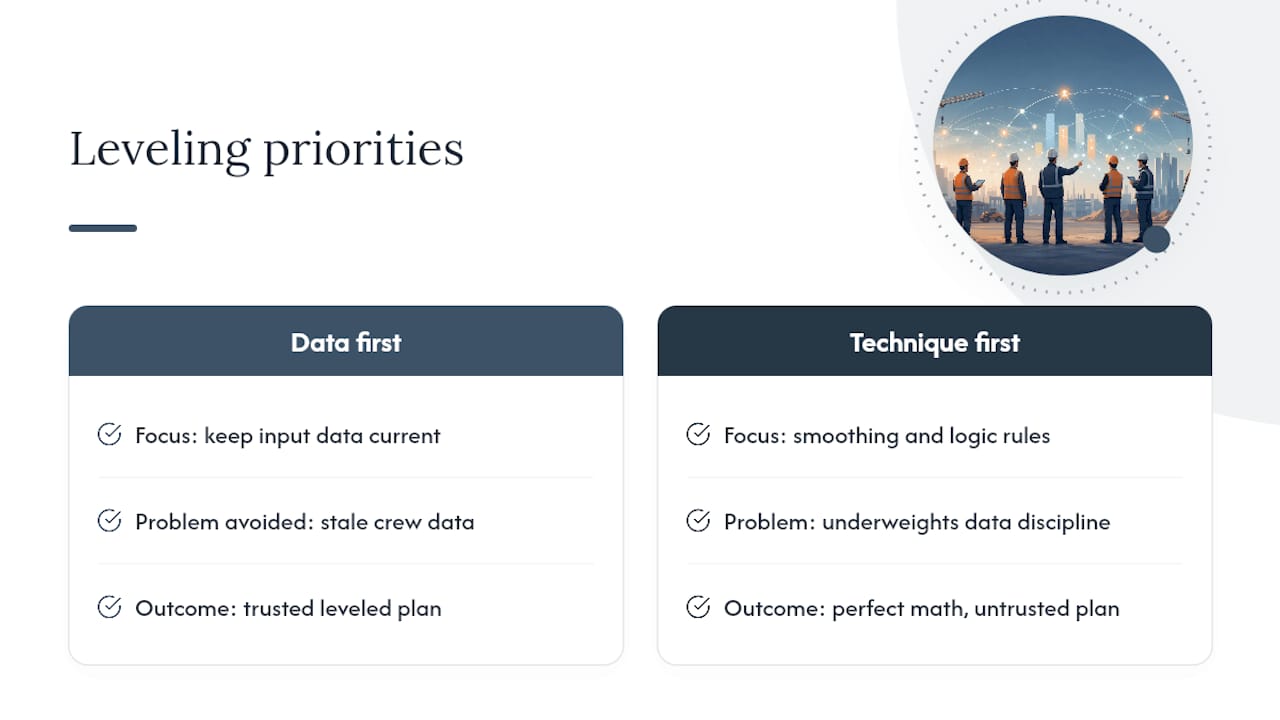
Conventional scheduling advice spends most of its energy on technique: smooth first, level second, use preferential logic, split activities when the network is large enough to need it. That’s all correct. What it underweights is the discipline of keeping input data current between updates, which is where most real schedules actually break down. A perfectly executed leveling algorithm running on stale crew data will still produce a plan nobody can trust.
If you take one thing from this guide, prioritize the data pipeline before the technique. Fix how resource information gets from the field into your schedule, and the leveling method you choose becomes a much smaller decision than it feels like right now.
— Keith
Get Leveling Right With Data That Isn’t Two Weeks Old
Every leveling technique in this guide, from preferential logic to activity splitting, depends on one thing: knowing your real crew and equipment availability the moment you build the histogram, not two weeks after the fact. Designflow-build closes that gap by combining scheduling, field operations, and job costing in a single AI-native ERP, so the resource data you’re leveling against reflects what’s actually happening on site today.

That matters most on multi-crew, multi-trade schedules where a stale spreadsheet turns a solvable conflict into a missed milestone. If you’re managing resource conflicts across several active jobs, explore DesignFlow Build’s scheduling capabilities and see what a resource-loaded schedule looks like when the underlying data updates itself.
Sources
For deeper technical grounding, review the ASCE research on optimizing resource leveling, PMI’s fundamentals of scheduling and resource leveling, and the construction software glossary for quick term lookups on leveling, smoothing, and CPM.
- An efficient hybrid genetic algorithm for resource leveling via activity splitting
- Optimizing Resource Leveling in Construction Projects
- Fundamentals of scheduling & resource leveling