
Audit Ready Certified Payroll Reporting for U.S. Contractors

Any contractor or subcontractor on a federal or federally assisted construction contract over $2,000 must submit certified payroll reports every week, backed by a signed Statement of Compliance. This obligation flows from the Davis-Bacon and Related Acts and the Copeland Act, enforced through 29 CFR 3.3, and some states layer on their own portals and rules. If this applies to you, the first move is simple: pull your contract number and wage determination, then get someone authorized to sign that weekly statement.
TL;DR:
- Contractors must submit weekly certified payroll reports once a federally funded construction contract exceeds $2,000, with payroll routing depending on the funding source.
- The standard form WH-347 requires detailed reporting of hours, wages, fringe benefits, and a signed Statement of Compliance, with errors risking criminal penalties.
- Preparing and submitting payrolls involves matching wage determinations, assigning sequential payroll numbers, and verifying fringe benefit documentation for accuracy.
- State-specific rules may impose different filing frequencies, forms, and public record requirements, so contractors must check local regulations beyond federal guidance.
- Automating payroll data entry using specialized platforms can reduce errors by up to 70%, streamline compliance, and speed up submission processes.
Table of Contents
- What Triggers Certified Payroll Requirements?
- What Goes on a Certified Payroll Report?
- How Do You Prepare and Submit Certified Payrolls?
- What Are the Most Common Certified Payroll Mistakes?
- How Long Should You Keep Certified Payroll Records?
- Do 1099 Workers Need to Appear on Certified Payrolls?
- Can Automation Reduce Certified Payroll Errors?
- Do State Certified Payroll Rules Differ From Federal Ones?
- A Compliance Officer’s View on Certified Payroll
- Automate Certified Payroll Compliance With DesignFlow Build
- Sources
What Triggers Certified Payroll Requirements?
Coverage under the Davis-Bacon and Related Acts (DBRA) kicks in once a federally funded or federally assisted construction contract crosses $2,000. Below that threshold, 29 CFR 3.3 doesn’t require weekly certified payroll at all. Above it, every contractor and every subcontractor performing covered work on the job owes the government a weekly payroll report, whether they’re pouring foundations or running electrical.
The prime contractor carries ultimate responsibility for the project’s compliance, but that doesn’t let subs off the hook. Each tier files its own certified payroll for its own workers. Where the payroll actually goes depends on who’s holding the contract:
- If a federal agency is a direct party to the contract, payrolls typically route to that agency’s contracting officer.
- If the funding flows through a grant or federally assisted program (highway funds through a state DOT, HUD-funded housing), payrolls usually go to the applicant, owner, or sponsor administering the funds, who then keeps them on file for federal review.
- Prime contractors are generally responsible for collecting and forwarding subcontractor payrolls, not just their own.
A few carve-outs exist. Some agencies apply narrower thresholds or additional documentation rules for specific program types, and timing windows for submission can vary slightly by agency even though the underlying weekly cadence stays constant under DOL Fact Sheet 66. If you’re unsure whether your contract is covered, check the contract clauses first. They almost always spell out Davis-Bacon applicability in plain language.
What Goes on a Certified Payroll Report?
Form WH-347 is the DOL’s standard template, and while its use isn’t mandatory, the fields it lays out represent exactly what covered contractors have to report weekly. Skipping a field isn’t a formatting problem. It’s a compliance gap.
A complete WH-347 report needs:
- Payroll number (sequential, per project)
- Project name and contract number
- Employee name and identifying number (typically the last four digits of the Social Security number)
- Work classification (electrician, laborer, operator, etc.)
- Daily and total hours worked, split between straight time and overtime
- Straight-time and overtime rates
- Gross wages earned on the project
- Fringe benefit credits, whether paid into a plan or given as cash in lieu
- Deductions
- Net wages paid
Fringe benefits trip up more contractors than any other line on the form. If you’re crediting an hourly amount toward a bona fide fringe plan, that credit has to be documented and consistent with the wage determination. Apprenticeship rates need matching registration with a recognized program, and if a worker is covered by more than one fringe plan across different classifications on the same job, each plan’s contribution should be broken out rather than lumped together.
Pro Tip: Keep a standing reference sheet mapping each classification on your active wage determinations to its exact fringe rate. Payroll clerks who eyeball this weekly make far fewer errors than those recalculating it from memory.
The Statement of Compliance, attached as page two of WH-347, is where things get legally serious. It’s a signed attestation that wages paid match the certified payroll and that fringe benefits were paid as claimed, and DOL guidance confirms electronic signatures are acceptable as long as your system reliably ties the signature to the signer. A false statement here isn’t a paperwork slip. Willful falsification can trigger criminal exposure under 18 U.S.C. § 1001, on top of contract and administrative penalties.
How Do You Prepare and Submit Certified Payrolls?
Certified payroll steps follow a predictable weekly rhythm once you’ve built the habit, but each new project resets the setup work. Here’s the sequence that keeps most contractors out of trouble:
- Pull the wage determination for the project from your contract documents or Sam, and confirm it matches the classifications you’re actually using on site.
- Assign a payroll number for the week, sequential and specific to that contract, starting at one and never skipping.
- Map hours and classifications from timecards to the correct wage determination line for each worker.
- Compile fringe benefit documentation, including plan contributions or cash-in-lieu amounts, matched against what the determination requires.
- Complete the Statement of Compliance and get it signed by someone authorized to attest on behalf of the company.
- Submit to the correct destination: the federal agency directly if it’s a party to the contract, or the funding recipient/owner/sponsor when the work flows through a grant program.
Where you submit matters as much as what you submit. Federal agencies generally accept payrolls through their own designated channels, while DOL’s own instructions point contractors to the appropriate contracting officer or program administrator when the agency isn’t a direct signatory.
State-run public works add another layer. California’s Department of Industrial Relations requires certified payroll records to move through its CPR portal electronically, and the records submitted there become publicly searchable, which raises the stakes on accuracy. Other states run comparable electronic systems, and each tends to have its own file format quirks, whether that’s a specific XML schema or a portal-native upload template that doesn’t accept a straight WH-347 PDF.
Pro Tip: Before your first submission on a new state project, run a test payroll through the portal during a non-billable week. Finding a formatting mismatch before it delays a real payment application saves everyone a bad Friday.
What Are the Most Common Certified Payroll Mistakes?
Certified payroll compliance fails in a handful of predictable ways, and almost all of them are avoidable with a checklist and a second set of eyes.
- Late or missing weekly payrolls, even when the underlying wages were paid correctly and on time.
- Worker misclassification, often unintentional, where a laborer is coded at a lower rate than the work they actually performed.
- Using the wrong or an outdated wage determination, especially on multi-year contracts where rates get revised.
- Claiming fringe benefit credits that don’t match a documented, bona fide plan.
- Submitting an incomplete or unsigned Statement of Compliance.
The consequences scale with the severity and intent behind the error. Agencies can withhold contract funds pending correction, assess fines, and in cases of pattern noncompliance, move toward administrative debarment that blocks a contractor from future federal work. Willful falsification of the Statement of Compliance carries potential criminal liability, separate from the civil and contractual exposure.
If you catch an error after submission, don’t sit on it. Correct the payroll, notify the contracting agency or fund administrator in writing, document exactly what changed and why, and keep every email and correction memo in the project file. Agencies respond far better to a contractor who self-reports and fixes a mistake than one who gets caught by an auditor first.
How Long Should You Keep Certified Payroll Records?
Retention isn’t optional or vague. Under 29 CFR 3.4, certified payroll records generally need to be kept for at least three years after project completion, and agencies retain the right to request supporting documentation during that window.
A complete audit-ready file includes:
- Weekly timecards and daily logs
- Certified payroll registers (WH-347s or your system’s equivalent)
- Wage determinations applicable to each project phase
- Fringe benefit plan documents and contribution records
- Apprenticeship program registrations
- Signed Statements of Compliance
- Correction logs and any related agency correspondence
Organizing this by project, rather than by date or employee, makes an audit request far less painful. A financial records checklist built around per-project subfolders, with a running change log for any corrected payroll, turns a scramble into a five-minute file pull.
Do 1099 Workers Need to Appear on Certified Payrolls?
Paying someone on a 1099 doesn’t exempt their hours from certified payroll reporting if they’re performing covered construction work on a DBRA project. The IRS classification and the Davis-Bacon coverage question are separate issues, and treating them as the same thing is a common and costly mistake.
If a worker is functioning as an employee in practice, direction, tools, schedule, control, they likely need to be reported regardless of how they’re paid. Document the difference clearly on your certified payroll submission and keep the tax treatment distinction visible in your internal records, even if it doesn’t change what the government sees on the WH-347.
To manage this risk before it becomes a dispute:
- Require subcontractors to provide scope-of-work documentation and evidence of independent contractor status before work starts.
- Review workforce classification practices as part of your subcontractor onboarding, not after a payroll audit flags a gap.
- Keep contracts, control-of-work evidence, and correspondence on file to support classification decisions if questioned later.
Can Automation Reduce Certified Payroll Errors?
Manual certified payroll processing is where most errors creep in, mapping timecard hours to the right classification, remembering fringe credit rules, and re-keying the same data into a state portal’s format. Automated field mapping to WH-347 categories, automatic wage-determination lookups tied to project location, auto-incrementing payroll numbers, and templated fringe-credit calculations remove the repetitive judgment calls that cause mistakes.
A practical rollout checklist looks like this:
- Map your payroll system’s export fields directly to WH-347 categories before your first automated run.
- Run test payrolls against your target state portal’s format during a non-billable period.
- Confirm portal acceptance with a real submission test, not just a format check.
- Set up retention and archival rules that satisfy the three-year minimum automatically.
- Train payroll staff on the new workflow with a dedicated session, not a shared memo.
Pro Tip: Test your automated wage-determination lookup against a project that recently had a rate change. If the system pulls the old rate, you’ve found a gap before it costs you a compliance letter.
Contractors using DesignFlow Build’s platform for this kind of workflow automation have reported a 70% reduction in manual data entry, with implementation typically running two to four weeks and adoption rates around 98% among field and office staff. Those are publisher-reported figures from DesignFlow Build’s own deployments, not an independent audit, but they reflect what’s achievable when payroll mapping stops depending on someone’s memory of last quarter’s fringe rate.
Do State Certified Payroll Rules Differ From Federal Ones?
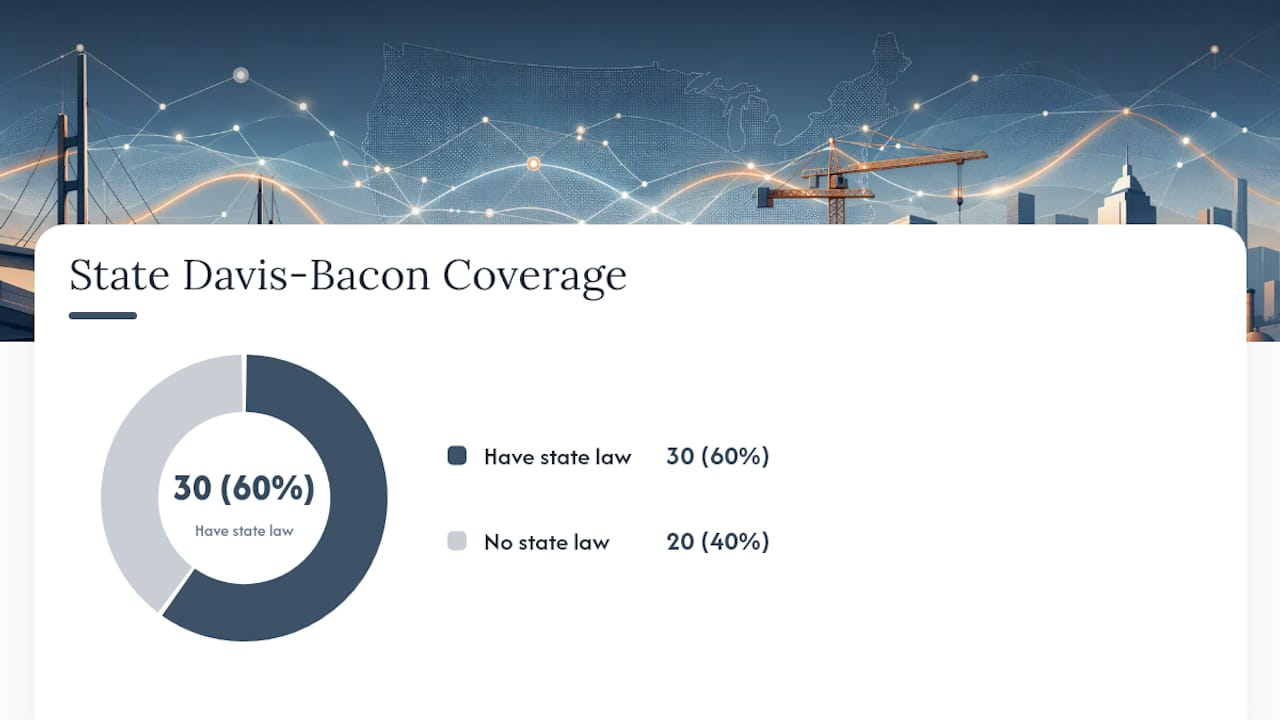
Roughly 30 states run their own “little Davis-Bacon” laws, which means state-funded public works can carry separate wage thresholds, separate forms, and separate filing cadences from the federal DBRA framework. Assuming federal rules cover a state-funded job is one of the most common blind spots for contractors who mostly work federal contracts and occasionally pick up state work.
Differences show up in filing frequency, required data fields beyond WH-347’s basics, and whether records become part of a public search database the way California’s DIR portal operates. Some states require additional apprenticeship or veteran-hire reporting fields that have no federal equivalent.
To find the right rules for a given project:
- Start with the contract clauses themselves. They usually name the governing statute and any state-specific portal.
- Check the state labor department’s public works or prevailing wage division for forms and submission instructions.
- Use SAM.gov’s wage determination search to confirm the federal rate baseline, especially on projects with mixed federal and state funding.
When in doubt, follow the contract clause first, the state portal instructions second, and fall back to DOL guidance for anything the state framework doesn’t address.
A Compliance Officer’s View on Certified Payroll
Certified payroll gets treated like a paperwork chore, and that’s the wrong frame entirely. It’s a legal attestation with criminal exposure attached to a false statement, and it’s also your fastest path to getting paid on a public project. Agencies withhold funds over payroll gaps far more readily than they escalate to debarment, so the practical risk most contractors face is cash flow, not courtrooms.
The contractors who stay clean map their wage determinations and payroll fields before the first shovel hits dirt, not after the first missed submission. If your team is still doing this by hand, the checklist earlier in this piece is a reasonable starting point, but automation closes gaps that memory and spreadsheets consistently miss.
— Keith
Automate Certified Payroll Compliance With DesignFlow Build
DesignFlow Build treats certified payroll as a native part of your accounting system rather than a separate weekly scramble. The platform maps timecard and job-cost data directly to WH-347 fields, pulls wage determinations automatically by project location, and preserves a complete audit trail with electronic signature support for every Statement of Compliance.

Customers using DesignFlow Build’s construction ERP report significant reductions in manual payroll data entry, with typical implementation lasting a few weeks and high adoption rates among field and office teams. That’s the difference between chasing down last week’s fringe calculations and having them ready before the deadline. If certified payroll reporting is eating hours your team doesn’t have, take a look at DesignFlow Build’s scheduling and compliance platform and see how the field mapping works for your current wage determinations.
Sources
- DOL Fact Sheet 66: Davis-Bacon and Related Acts
- 29 C.F.R. § 3.3 — Certified payrolls (eCFR)
- Certified Payroll Reporting — California Department of Industrial Relations (DIR)