
Estimators: Cut Manual Data Entry 70% With AI Blueprint Takeoff

Yes. AI blueprint takeoff produces a reviewable first-pass takeoff that cuts estimator time while preserving your judgment as the final check. It’s not a replacement for a skilled estimator. It’s a faster starting point, with counts and measurements tied to visible drawing evidence, that exports directly into your pricing workflow.
TL;DR:
- Confidence scores help identify which measurements need manual review, especially in poor-quality scans or drawings with overlapping layers.
- The software links quantities directly to their source drawing locations, enabling easier verification and reducing errors.
- Export formats like CSV, Excel, and direct integration with estimating or ERP systems maximize workflow efficiency and ROI.
- Focus on a vendor’s ability to handle your actual file types, calibration, revision differences, and traceability rather than just accuracy percentages.
- Seamless flow of quantities into estimating, job costing, and accounting systems significantly enhances time savings and operational consistency.
Table of Contents
- What AI Blueprint Takeoff Actually Does for an Estimator
- How AI Takeoff Works, in Plain Terms
- Accuracy, Limits, and How to Manage the Risk
- Fitting AI Takeoff Into Your Estimating Workflow
- Vendor Checklist: What to Ask on a Demo
- How an AI-Native ERP Puts Takeoff Data to Work
- Why the Real Value Isn’t the Accuracy Score
- Ready to See AI Takeoff Working Inside a Full ERP?
- Sources
What AI Blueprint Takeoff Actually Does for an Estimator
Strip away the marketing and AI blueprint takeoff does three concrete things: it counts, it measures, and it shows you proof. Point the software at a set of PDFs, and it returns bounding boxes around doors, fixtures, and equipment, linear footage on piping and conduit, and square footage on rooms and finishes. Each detection carries a confidence score, so you know which numbers to trust and which need a second look.
That output becomes the skeleton of your bill of quantities. You’re not starting from a blank spreadsheet. You’re starting from a populated one that needs pricing, adjustment, and sign-off.
Here’s what changes for you day to day:
- Counts and measurements arrive pre-populated instead of hand-tallied sheet by sheet
- Confidence scores flag which detections need a manual glance versus which are safe to trust
- Every quantity links back to the exact spot on the drawing where the software found it
- Bulk exports feed straight into your estimating spreadsheet or software
What doesn’t change: you’re still the one reading specs, catching concealed scope, and interpreting anything that lives in a schedule or a general note rather than a drawn symbol.
How AI Takeoff Works, in Plain Terms
The process starts with your files. Clean vector PDFs and CAD exports feed the computer vision engine cleanly. Scanned raster drawings and low-resolution photocopies give it a rougher job, which matters when you’re judging why one project comes back sharper than another.
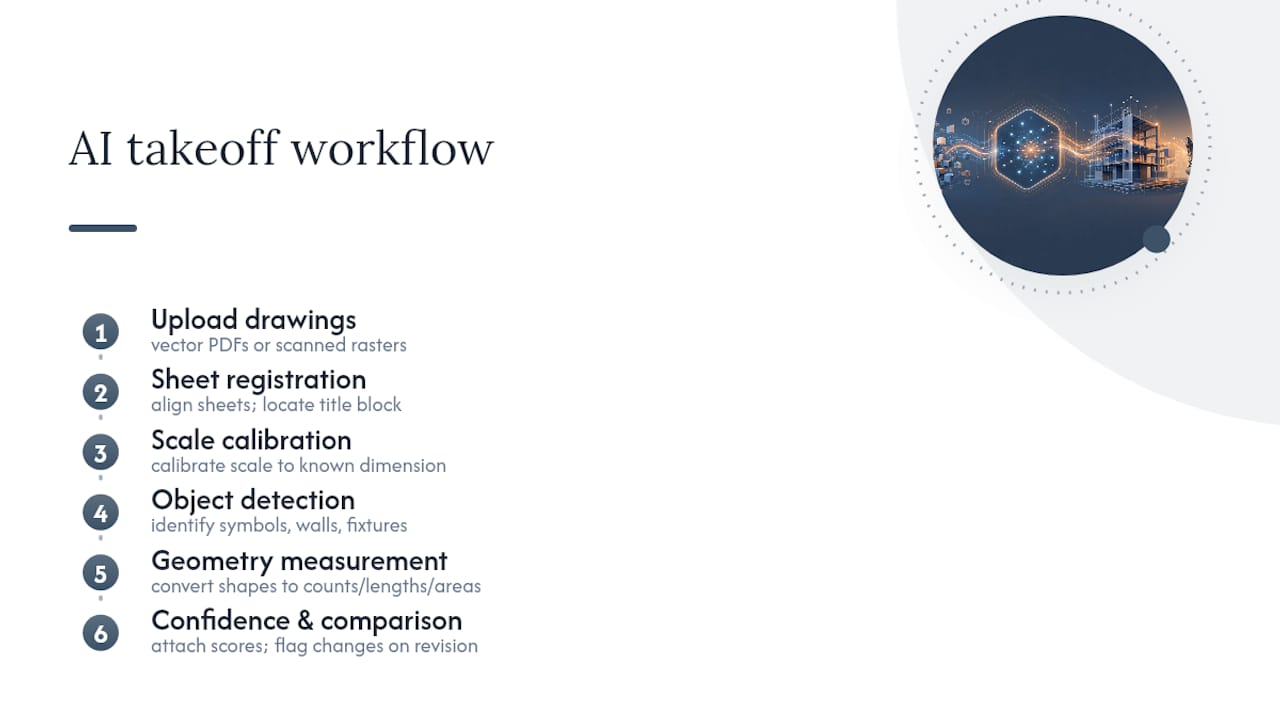
From there, the software registers each sheet, calibrates scale against a known dimension or title block, and runs object detection to identify symbols, walls, and fixtures. Geometry measurement follows, converting detected shapes into counts, lengths, and areas. A confidence score attaches to each result, and if you upload a revised set later, the system compares versions and flags what changed.
Legends, schedules, and general notes are where automated detection still needs backup. A door schedule that specifies hardware sets or a note calling out an alternate is not always something computer vision reads correctly on its own, so plan on a human pass there regardless of vendor.
When you’re sitting through a demo, ask specifically what “accuracy” means in the vendor’s reporting. Is it detection rate, measurement precision, or both? Analyses of AI capability curves consistently caution against treating any single tool as an instant leap rather than a gradual, improvable process, and that framing applies directly to takeoff software.
Accuracy, Limits, and How to Manage the Risk
First-pass accuracy claims describe the detection run before your review, not the number you should carry into a bid. Treat every AI-generated quantity as a draft until an estimator has checked it against the drawing.
The failure modes are predictable once you know to look for them: poor-quality scans, symbols that don’t match a standard legend, CAD files with dozens of overlapping layers, and drawings missing a clear scale reference. Any one of these can quietly throw off a count.
A workable verification routine looks like this:
- Set a confidence threshold, and manually review anything the software flags as uncertain
- Spot-check a sample of high-confidence detections against the original sheet
- Run revision comparison whenever a new drawing set arrives, and confirm the deltas make sense
- Log corrections so patterns in vendor error become visible over time
Pro Tip: Keep a running tally of where your team overrides AI counts. If the same symbol or drawing type keeps needing correction, that’s a signal to flag it with your vendor, not just fix it silently every time.
Fitting AI Takeoff Into Your Estimating Workflow
The workflow itself is simple: upload drawings, let the AI run its pass, have an estimator review and adjust, then move into pricing. The value shows up in how much time that middle step saves versus a fully manual count.
Integration is where the real ROI lives. Look for export formats that match what your team already uses, not what forces a switch:
- CSV and Excel exports for teams still pricing in spreadsheets
- API or direct connectors into estimating and ERP platforms
- Audit logs that trace every quantity back to its source detection
Calculating your own ROI is straightforward. Track estimator hours saved per bid, count how many additional bids your team can submit in the same window, and note how much rework revision changes used to cause versus now. Integrated platforms tend to amplify these savings beyond what the AI accuracy alone would suggest, because eliminating duplicate entry between takeoff, estimating, and accounting compounds the time saved at each stage. Understanding how that takeoff data flows into scheduling and resource planning also clarifies where the bigger operational payoff sits.
Vendor Checklist: What to Ask on a Demo
Bring your own drawings to every demo. A vendor’s polished sample set tells you nothing about how the software handles your typical scan quality or your trade’s symbol conventions.
Work through these checks in order:
- File compatibility. Confirm support for your actual mix of PDF, CAD, and BIM formats, not a generic list.
- Scale and calibration. Ask how the system handles drawings with a missing or ambiguous scale reference.
- Revision handling. Upload a revised sheet and check whether the diff between versions is clear and accurate.
- Audit trail. Every quantity should trace back to a highlighted location on the source drawing.
- Export and integration. Verify CSV output plus any direct connector to your estimating or ERP system.
- Commercial terms. Get specifics on pricing per seat, setup time, and what training is included.
Partner guidance on comparing automated takeoff tools flags the same red flag repeatedly: vendors who cite accuracy numbers without showing you the underlying audit trail. If a vendor can’t show you exactly where a count came from, treat the number as unverified.
How an AI-Native ERP Puts Takeoff Data to Work
Takeoff accuracy only gets you halfway. The bigger time sink is usually re-entering the same quantities into an estimate, then again into job costing, then again into accounting. Designflow-build built its platform specifically to close that gap, combining AI blueprint takeoff with estimating, accounting, and field operations in one system.
The reported results are specific: a 70% reduction in manual data entry, monthly savings reaching up to $847,000 for larger operations, implementation in 2 to 4 weeks, and a 98% user adoption rate. Those numbers reflect what happens when takeoff quantities flow straight into pricing and job costing without a re-entry step at every handoff. Bid-to-contract friction drops because the same data set that priced the job also seeds the accounting and scheduling records once you win it. For estimating teams evaluating whether integrated AI takeoff justifies a platform switch, that adoption rate is the number worth scrutinizing most closely.
Why the Real Value Isn’t the Accuracy Score
Most vendor pitches lead with accuracy percentages, and most buyers fixate on them during evaluation. That’s the wrong first question. The bigger, less-discussed variable is what happens to a correct quantity after detection: does it sit in a standalone takeoff file, or does it flow into your estimate, your job costing, and your accounting without you retyping it three times?
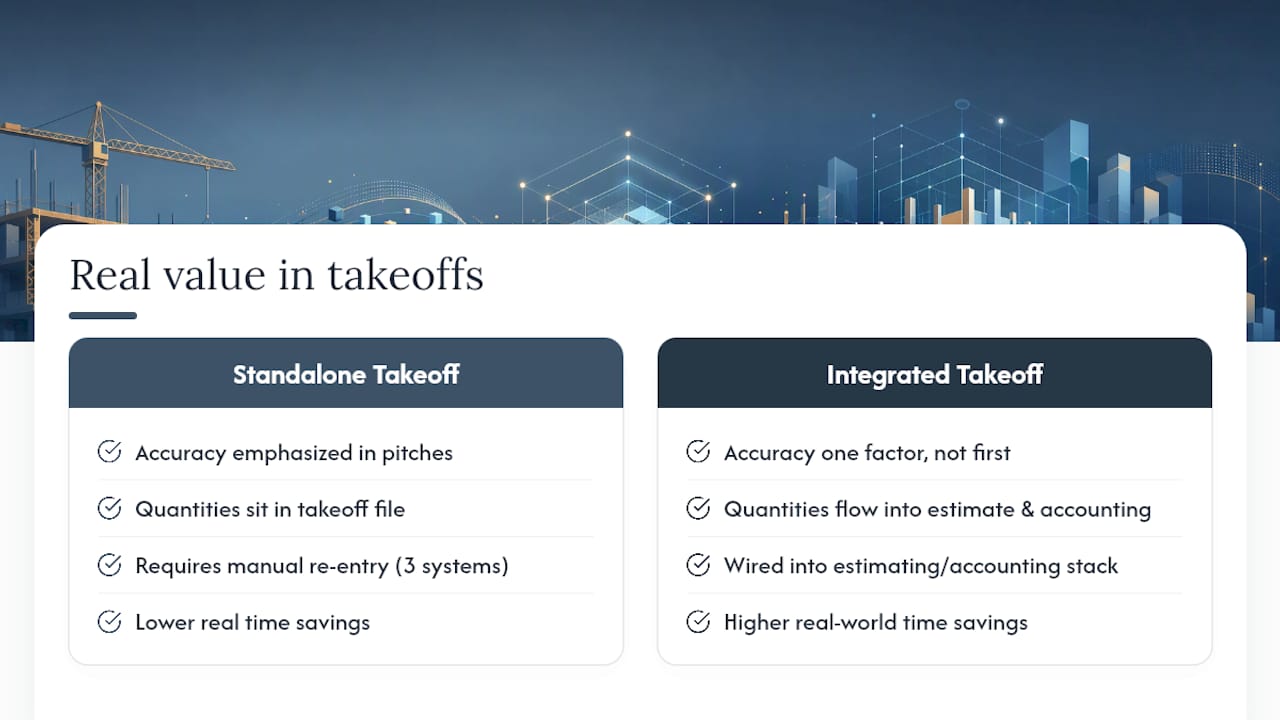
Conventional buying advice treats takeoff software as a standalone purchase decision. That framing misses where the hours actually go. A perfectly accurate takeoff that still requires manual re-entry into three other systems saves you less time than a slightly less polished takeoff wired directly into your estimating and accounting stack.
If you’re evaluating options this year, prioritize the audit trail and the integration path before the accuracy claim. Ask to see a flagged detection traced back to its source drawing. Ask where the exported quantities land next. Those two answers tell you more about real-world time savings than any percentage on a sales sheet.
— Keith
Ready to See AI Takeoff Working Inside a Full ERP?
Designflow-build gives you AI blueprint takeoff built into the same system that runs your estimating, accounting, and field operations, so a quantity you extract from a drawing never needs re-entry to become a priced line item or a job cost code.

That integration is exactly what drives the reported 70% cut in manual data entry and the 2 to 4 week rollout timeline. If you want to see how a real drawing set runs through the system, request a demo, upload a sample project, and export a takeoff to check the audit trail yourself before you commit to anything.
Sources
For readers who want to go deeper on the technology and the buying process:
- On intelligence explosion dynamics (arXiv)
- Hyperbolic takeoff (LessWrong)
- Top Automated Takeoff Software Comparison for Estimators