
Automation Service Contracting: What Contractors Need to Know

An automation service contracting business designs, integrates, and operates automated systems and workflows so construction contractors deliver projects faster, with fewer errors, and at more predictable cost. The role goes well beyond selling software: these firms take ownership of the full technical scope, from requirements through commissioning, and coordinate every automated system across a project. For contractors, that means measurable cycle-time reductions, tighter compliance, and real cost avoidance on every job.
What you can expect from the right automation partner:
- Faster bid-to-award cycles through automated leveling and compliance checks
- Fewer missed obligations with contract lifecycle management (CLM) and automated obligation tracking
- Reduced manual data entry, which Designflow-build reports at 70% for its users
- Improved certified payroll and lien waiver compliance without adding headcount
- A realistic 2–4 week implementation path for AI-native platforms, not a months-long rollout
Table of Contents
- What does an automation service contracting business actually do?
- Core roles and responsibilities on a construction project
- What types of automation services apply to construction projects?
- What are the real business benefits of automation services?
- When should you involve an automation contractor on a project?
- What deliverables should you require from an automation contractor?
- How do you evaluate and choose an automation service contractor?
- What implementation and integration challenges should you prepare for?
- What trends are shaping automation contracting right now?
- How does AI-native ERP integration work in practice?
- Key Takeaways
- The part most contractors underestimate
- Cut manual work on your next project with Designflow-build
- Useful sources and further reading
What does an automation service contracting business actually do?
The term “automation service contracting business” is a descriptive phrase the industry uses broadly. The recognized industry term for the highest-level provider is the Main Automation Contractor (MAC). Understanding the distinctions between provider types will save you from misaligned expectations and costly scope gaps.
Main Automation Contractor (MAC): A MAC holds single-point accountability for the full automation scope on a project. It designs the overall system architecture, manages subcontractors and vendors, and delivers an integrated, commissioned solution. On large industrial or commercial construction projects, the MAC is the automation equivalent of the general contractor.
Systems integrator: A systems integrator connects disparate hardware and software components into a working system. It typically operates within a defined scope rather than managing the full automation program. Many MACs subcontract systems integration work.
Software vendor: A software vendor sells a licensed product. It does not take responsibility for integration, commissioning, or ongoing operations. Vendors are a component of the solution, not the solution itself.
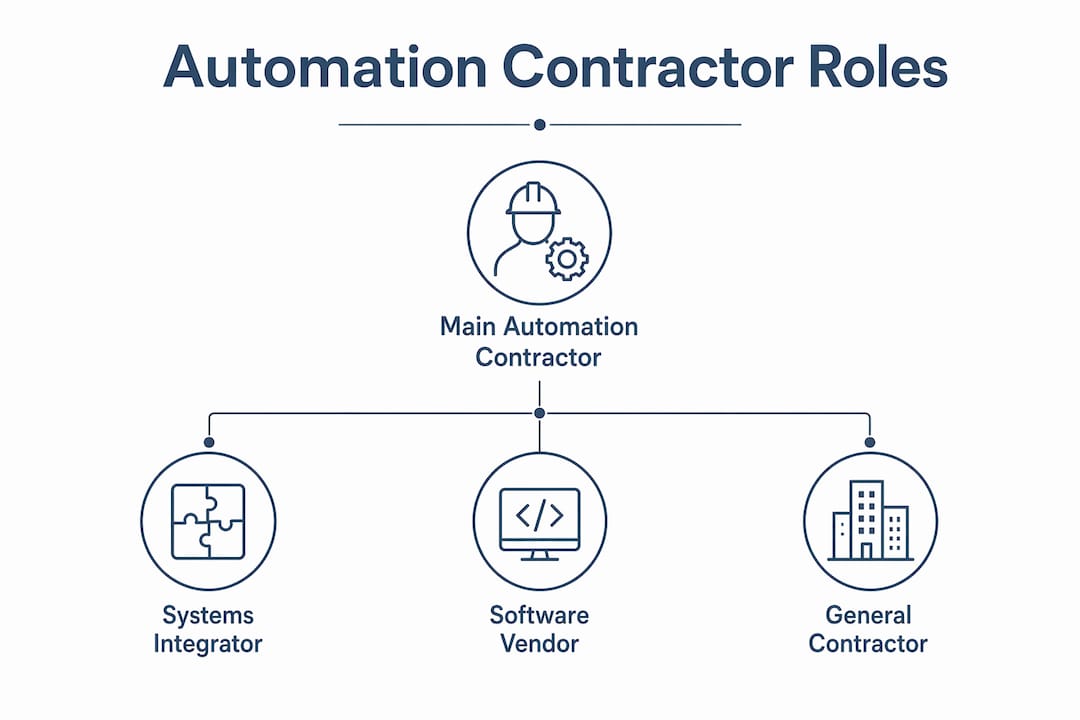
General contractor (GC): A GC manages overall project delivery but rarely has deep automation engineering capability in-house. The GC typically subcontracts automation scope to a MAC or systems integrator.
The practical boundary for an automation service contracting business is this: it integrates and operates systems rather than simply selling a boxed product, and it carries accountability for outcomes, not just deliverables. KPMG’s research confirms that buyers now expect providers to combine technology, process expertise, and delivery capability in a single engagement, not hand off responsibility at go-live.
Early trust signals to look for: ISA (International Society of Automation) certification, CSIA (Control System Integrators Association) membership, documented FAT/SAT processes, and verifiable references from projects of comparable scope and complexity.
Core roles and responsibilities on a construction project
When you bring an automation service contracting business onto a project, here is the sequence of work you should expect them to own:
- Scoping and requirements definition. The contractor interviews owner teams, reviews existing systems, and produces a functional requirements specification (FRS) that defines what the automated systems must do, not just what equipment will be installed.
- System design and engineering. This covers control system architecture, network topology, hardware selection, and software platform decisions. Good design at this stage prevents expensive rework during commissioning.
- Controls programming (PLC/HMI). The contractor writes, tests, and documents all programmable logic controller (PLC) and human-machine interface (HMI) code. This is proprietary intellectual property, so ownership and escrow terms belong in the contract.
- BIM and asset model integration. Automation scope gets embedded into the project’s Building Information Model (BIM) or digital twin so that as-built data is accurate from day one.
- Procurement support. The contractor specifies equipment, supports bid leveling for automation subcontractors, and manages vendor qualification.
- Factory Acceptance Testing (FAT) and Site Acceptance Testing (SAT). FAT validates the system before it ships; SAT confirms it performs correctly in the field. Both generate formal documentation tied to payment milestones.
- Commissioning and startup. The contractor sequences startup, resolves integration issues, and hands over a fully operational system with documented performance baselines.
- Training. Structured training for operators, maintenance staff, and project managers, with materials that stay with the owner.
- Operations support and warranty. Post-handover support, SLA commitments, and a defined warranty period for both hardware and software.
The automation contractor also coordinates subcontractors, equipment vendors, and owner IT/OT teams throughout. Governance deliverables include the FRS, design documents, test plans, as-built BIM models, and acceptance criteria tied to each milestone.

What types of automation services apply to construction projects?
Construction automation covers more ground than most owners realize. Here is a practical map of service categories and where they show up on real projects:
- Site robotics and autonomous equipment. Robotic total stations, autonomous grading equipment, and AI-driven construction scheduling reduce layout errors and cut machine idle time on large civil and commercial sites.
- Prefabrication automation. Automated cutting, welding, and assembly lines in offsite fabrication facilities improve throughput and dimensional accuracy for MEP and structural components.
- Drone and survey automation. Automated drone flights with photogrammetry software generate progress models, earthwork quantity calculations, and safety inspection records without manual survey crews.
- Controls, SCADA, PLC, and HMI systems. Building automation systems (BAS), process controls for industrial construction, and low-voltage (LV) systems integration. Specialty trade contractors in MEP and BAS rely on these heavily.
- Digital workflow automation. AI-driven CLM, automated bid leveling, automated certified payroll, lien waiver tracking, and compliance obligation management. These are the highest-return targets for most contracting businesses because the processes are high-volume and rule-based.
- BIM and digital twin integration. Connecting field data capture to a live BIM model so project managers see real-time progress against design intent.
- Field data capture and mobile automation. Mobile apps with voice data entry, automated daily reports, and photo-to-record workflows that eliminate manual transcription from the field.
For general contractors and specialty trade contractors with 10–500 employees, digital workflow automation typically delivers the fastest return. Certified payroll, lien waiver compliance, and bid management are rule-based processes that commercial contractor workflow automation handles well without requiring heavy capital investment or site infrastructure changes.
What are the real business benefits of automation services?
The business case for automation in contracting is concrete. Deloitte and Docusign research found efficiency gains, cost avoidance, and significant improvement in agreement accuracy when AI-powered agreement management is deployed across functions. Those numbers hold when contract data is connected across systems rather than managed in isolated tools.
| Benefit area | What automation delivers | Why it matters to your P&L |
|---|---|---|
| Cycle time | Faster bid-to-award, faster certified payroll processing | Improves cash flow and reduces overhead per project |
| Error reduction | Automated compliance checks catch missed clauses and lien deadlines | Avoids claims, penalties, and retainage disputes |
| Labor productivity | Fewer hours on data entry, reporting, and manual tracking | Redeploys field and office staff to higher-value work |
| Obligation tracking | Automated alerts for SLA, renewal, and compliance deadlines | Reduces contract value leakage |
| Decision quality | Real-time job cost and WIP data replaces lagging spreadsheet reports | Supports faster, better-informed owner decisions |
The highest-return automation targets are high-volume, rule-based processes. Academic research on service automation frames this as “Cost-Effective Service Excellence” (CESE): automating repetitive tasks yields consistent, reliable outcomes regardless of project complexity. For contractors, that means certified payroll, bid leveling, COI tracking, and lien waiver management should be your first automation investments, not your last.
Pro Tip: Before you evaluate any automation platform or contractor, audit your three highest-volume, most error-prone processes. Those are your pilot candidates. Automation that starts with a real pain point generates adoption momentum that broader rollouts rarely achieve.
Manual processes cut into construction profits in ways that don’t always show up until a job closes. Rework, missed deadlines, and compliance gaps are the silent margin killers that automation directly addresses.
When should you involve an automation contractor on a project?
Timing is one of the most underestimated variables in automation contracting. Bringing an automation contractor in late costs more and delivers less.
- Planning and owner requirements stage. Engage a MAC or automation advisor when you are defining project scope. Automation requirements embedded in the owner’s program prevent costly redesign later and give the design team accurate system parameters from the start.
- Pre-construction and design. The automation contractor participates in design coordination, confirms system interfaces with structural, MEP, and IT/OT teams, and produces the FRS. Early involvement here is where integration costs are controlled.
- Early procurement. Automation scope should be bid and awarded before major equipment procurement closes. Waiting until construction is underway forces substitutions and workarounds that inflate commissioning time.
- Execution phase. The contractor manages installation oversight, integration testing, and resolves field conflicts. At this stage, scope changes are expensive, which is why earlier involvement pays off.
- Closeout and handover. SAT, as-built documentation, training delivery, and warranty activation. Owners who skip structured closeout often inherit undocumented systems that are expensive to maintain.
For digital workflow automation (CLM, payroll, scheduling), the timeline is different: you can engage an AI-native platform and be operational in 2–4 weeks. Platforms that deploy quickly capture more 18-month ROI than feature-rich systems that take months to implement, because realized value starts accumulating from day one.
What deliverables should you require from an automation contractor?
A well-structured automation contract specifies deliverables tied to payment milestones. Here is what to require:
- Functional Requirements Specification (FRS): The agreed definition of what the system must do, signed off before design begins.
- Design documents: Control system architecture, network diagrams, hardware schedules, and software platform specifications.
- PLC/HMI code with source files: Fully documented, commented code with source file ownership assigned to the owner.
- BIM/asset model updates: As-built automation scope embedded in the project BIM or digital twin.
- FAT report: Documented test results from factory acceptance testing, with pass/fail criteria agreed in advance.
- SAT report: Site acceptance test results confirming field performance against the FRS.
- Integration adapters and API documentation: All connectors between the automation system and ERP, financial, or field management platforms.
- Training materials: Role-specific training for operators, maintenance staff, and project managers, with recorded sessions where possible.
- Warranty and support SLA: Defined response times, escalation paths, and duration for both hardware and software components.
- Maintenance plan: Recommended preventive maintenance schedule and spare parts list.
Tie each deliverable to a payment milestone and define acceptance criteria in writing. CLM automation that tracks obligation deadlines and renewal dates should be part of your own contract management process, not just a deliverable you require from the contractor.
How do you evaluate and choose an automation service contractor?
Selection is where most owners leave value on the table. A structured evaluation prevents you from choosing on price alone and missing the integration or change-management capability that actually determines project success.
Evaluation criteria and scoring approach:
| Criterion | What to assess | Weight (schedule-focused) | Weight (risk-focused) |
|---|---|---|---|
| Domain experience | Projects of similar type, size, and system complexity | High | High |
| Integration track record | ERP, BIM, and field system integrations completed | Medium | High |
| FAT/SAT process maturity | Documented test plans and acceptance criteria | Medium | High |
| Change management support | Training, adoption, and governance capability | Medium | High |
| Commercial model fit | Outcome-based vs. time-and-materials options | High | Medium |
| Implementation speed | Time to operational system, not just go-live | High | Medium |
Interview questions that reveal competence:
- “Walk me through your FAT process for a project of this complexity.” A strong answer describes specific test scripts, pass/fail criteria, and how defects are tracked to resolution.
- “How do you handle integration with our existing ERP and financial systems?” Look for named integration experience, not generic assurances.
- “What happens if the system doesn’t meet the FRS at SAT?” The answer should describe a defined remediation process, not a negotiation.
- “Who owns the PLC source code at project closeout?” The answer must be the owner, not the contractor.
Red flags to avoid:
- No documented FAT/SAT process or unwillingness to define acceptance criteria in writing
- Integration references that are vague or unverifiable
- Overreliance on manual handoffs between automation scope and other trades
- Proposals that bundle software licensing and services without separating costs
- No change management or training plan included in scope
Faster implementation often beats feature-complete platforms for realized ROI. Weight implementation speed higher than you think you should, especially for digital workflow automation where time-to-value is measured in weeks.
What implementation and integration challenges should you prepare for?
Technical deployment is the visible part of automation. The organizational changes underneath it are where most implementations stall.
Technical challenges:
- Legacy equipment interfaces. Older PLCs, proprietary protocols, and aging field devices often require custom adapters or middleware. Budget for discovery time before finalizing integration scope.
- Data quality. Automation amplifies whatever data quality exists in your ERP and project management systems. Poor job cost structures or inconsistent cost codes will produce unreliable automated outputs.
- Cybersecurity. OT/IT convergence creates new attack surfaces. Require network segmentation, role-based access controls, and a documented incident response plan from any automation contractor.
- Commissioning complexity. Integrated systems have more failure modes than standalone ones. Staged commissioning with defined hold points reduces risk.
Organizational challenges:
Construction Executive notes that data integration barriers and cultural resistance are the two most common reasons AI and automation adoption stalls in construction. Role redefinition is real: when automated systems handle certified payroll, bid leveling, and compliance tracking, the people who did those tasks manually need new responsibilities, not pink slips. Frame automation as a productivity multiplier, not a headcount reduction, and adoption rates climb.

Bain’s research on autonomous procurement makes a critical distinction between “copilot” automation (AI assists humans) and “autopilot” automation (AI executes and owns outcomes). Autopilot implementations drive the largest productivity gains, but they require operating-model redesign and data governance, not just a software deployment.
Pro Tip: Start your automation pilot with the highest-volume, lowest-complexity process you have. NDAs, standard vendor agreements, certified payroll, and purchase orders are ideal first targets. Fast wins build the internal credibility that makes broader automation adoption possible.
What trends are shaping automation contracting right now?
The automation contracting market is moving fast, and the commercial models are changing with it.
- Software-based service delivery is replacing labor arbitrage. KPMG reports that software-based service delivery is expected to grow from 14% to 30% of the market by 2027. Buyers now expect providers to combine AI, process expertise, and delivery capability in a single engagement.
- Agentic and autonomous procurement. AI agents that can draft, route, and execute procurement workflows without human intervention are moving from pilot to production. Bain finds AI-enabled procurement can increase ROI up to five times and boost productivity by approximately 60% when processes are redesigned rather than just layered with AI tools.
- AI-native platforms replacing point solutions. Contractors who built their tech stack on separate tools for estimating, scheduling, payroll, and compliance are consolidating onto AI-native ERP platforms that connect data across the full project lifecycle. The role of AI in construction is shifting from reporting to prediction and autonomous execution.
- Outcome-based and subscription commercial models. Fixed-fee and time-and-materials contracts are giving way to subscription and outcome-based pricing, where the automation provider shares accountability for the results the system delivers.
- Integration-first architecture. Early adopters are building automation strategies around open APIs and standardized data models so new tools plug in without custom development. This architectural discipline is what separates durable automation programs from expensive one-off deployments.
How does AI-native ERP integration work in practice?
A mid-size general contractor running 15–20 active projects was managing certified payroll, lien waivers, and bid leveling across three separate tools, with a fourth spreadsheet to reconcile them. Manual data entry consumed roughly two hours per project per week across the project management team, and compliance errors were generating retainage disputes on two to three jobs per quarter.
After deploying an AI-native construction ERP with an integrated automation builder, the contractor consolidated project management, accounting, and field operations into a single system. Designflow-build reports that contractors using its platform see a 70% reduction in manual data entry, an implementation in 2–4 weeks, and a 98% user adoption rate. Monthly savings for active users have reached up to $847K, driven by reduced rework, faster certified payroll processing, and automated compliance tracking.
The practical lessons from this type of integration are consistent: start with the processes that generate the most manual work and the most compliance risk, connect your contract data across systems from day one rather than migrating it later, and choose a platform with a fast implementation path so you see results before the next project cycle begins. Construction project automation that connects field, office, and financial data in one place eliminates the reconciliation overhead that erodes margins on every job.
Key Takeaways
Automation service contracting delivers the most value when you engage the right provider type early, start with high-volume rule-based processes, and connect contract data across systems rather than deploying isolated point solutions.
| Point | Details |
|---|---|
| Engage early in the project lifecycle | Involving an automation contractor at the design stage reduces integration costs and prevents expensive rework during commissioning. |
| Start with rule-based, high-volume processes | Certified payroll, bid leveling, and CLM obligation tracking deliver the fastest ROI and build adoption momentum for broader automation. |
| Require FAT/SAT and source code ownership | Documented acceptance testing and owner-held PLC source code are non-negotiable contract terms that protect your investment. |
| Prioritize implementation speed | Platforms that deploy in 2–4 weeks generate more 18-month ROI than feature-rich systems with months-long rollouts. |
| Designflow-build as your AI-native ERP | Designflow-build combines project management, accounting, and field operations in one platform, with a 70% reduction in manual data entry and up to $847K in monthly savings reported by its users. |
The part most contractors underestimate
The technical side of automation contracting gets most of the attention, and that’s understandable. PLC code, BIM integration, and FAT/SAT processes are concrete and measurable. But the harder problem, and the one that determines whether an automation investment actually pays off, is organizational.
Most contractors I’ve seen struggle with automation aren’t failing because they chose the wrong software or the wrong systems integrator. They’re failing because they treated automation as a technology project instead of a business change. The field superintendent who has run certified payroll manually for 12 years isn’t going to trust an automated output on day one. The project manager who built her own Excel tracker isn’t going to abandon it because a new platform says it’s better. These aren’t technology problems. They’re trust and habit problems, and no amount of feature richness solves them.
The contractors who get durable results from automation do two things differently. First, they pick a pilot process where the pain is obvious and the win is fast, so skeptics can see the outcome before they’re asked to change their workflow. Second, they treat the automation contractor as a long-term partner, not a one-time vendor, which means the relationship includes change management, training, and governance, not just a go-live date. That shift in how you structure the engagement is worth more than any individual feature on a product comparison sheet.
Cut manual work on your next project with Designflow-build
If this guide confirmed that your biggest automation opportunity is in project management, accounting, and compliance workflows, rather than site robotics or heavy controls, Designflow-build is built for exactly that.

Designflow-build is an AI-native construction ERP that combines project management, accounting, and field operations in one platform, with no army of consultants required to get started. Contractors report a 70% reduction in manual data entry, monthly savings up to $847K, and a 98% user adoption rate after a 2–4 week implementation. The platform’s automation builder lets you set workflow rules for certified payroll, lien waivers, COI tracking, and bid management without writing code. You get the benefits of a full automation program without the months-long rollout.
See what the platform does for contractors like you at Designflow-build’s AI construction software page, or explore the AI takeoff and ERP features to start a free trial today.
Useful sources and further reading
| Source | Why it’s useful |
|---|---|
| Deloitte/Docusign: AI-powered agreement management study (Nasdaq) | Quantifies efficiency gains, cost avoidance, and accuracy improvements from integrated CLM automation across functions. |
| KPMG: How AI and automation are changing service delivery | Tracks the shift from labor-led to software-based service delivery and what buyers now expect from automation providers. |
| Bain & Company: The rise of autonomous, intelligent procurement | Explains the copilot vs. autopilot distinction and the operating-model redesign required to capture large productivity gains. |
| Stealth Agents: AI CLM automation statistics | Benchmarks for CLM ROI, payback periods, and where to start pilots for fastest time-to-value. |
| Construction Executive: AI in construction contracts | Covers adoption barriers and practical benefits of AI-assisted contract drafting and management in construction. |
| Designflow-build: Commercial contractor workflow automation | Practical guide to automating contractor workflows, from certified payroll to bid management, with construction-specific examples. |
| Designflow-build: AI construction software platform | Product overview of AI-native ERP features for contractors, including automation builder, scheduling, and compliance tools. |