
Scale Your Construction Business Without Hiring

The fastest way to scale a construction business without hiring is to raise throughput per existing employee — not add payroll. Document your repeatable processes, automate your admin workflows, orchestrate trusted subcontractors, and make smarter equipment decisions. That combination lets the same crew handle significantly more volume. Industry surveys show that 80% of construction firms already struggle to fill hourly craft roles and many contractors plan to increase automation — meaning the contractors who build systems now will outpace those still waiting to hire their way to growth.
You need three things before you expand capacity: your schedule is fully booked several weeks out, you carry sufficient operating expenses in reserve, and your gross margin clears a healthy level on general contracting work or specialty trades. If those readiness signals are green, you are ready to scale without adding a single W-2.
Your 7-day quick-start checklist:
- Pick one process you repeat every week (estimating, job kickoff, or closeout) and write down every step you take to complete it.
- Turn on automated estimate follow-up reminders in your current software or CRM — if you do not have one, set a calendar rule.
- Identify one trusted subcontractor you could call tomorrow for overflow work and confirm their insurance is current.
- Pull your last five job cost reports and flag any job where labor ran over budget by more than 10%.
- Compare your next equipment need against a rental quote before committing to a purchase.
Pro Tip: Start with the task that costs you the most time each week. Document it first, hand it off second, and automate it third. That sequence, not the reverse, is what prevents rework.
Table of Contents
- How do SOPs let your existing crew handle more work?
- Which software categories give you the fastest ROI on automation?
- How do subcontractors let you scale capacity without payroll?
- How do you get more billable hours from the crew you already have?
- What does a 30–90 day scaling rollout actually look like?
- What mistakes kill a no-hire scaling plan before it works?
- Key Takeaways
- The real reason scaling without hiring is harder than it looks
- Ready to put this playbook into practice?
- Useful sources and further reading
How do SOPs let your existing crew handle more work?
The answer is simple: when every step of a job lives in a written process, your crew stops waiting for you to make decisions. That frees you to take on more jobs without adding a manager. The document-test-hand-off-monitor sequence is the proven path — and most owners skip the “test” step, which is exactly where rework creeps in.
Start with the tasks you personally do every day. Estimating, job kickoff calls, quality-control walkthroughs, and project closeout are the four highest-leverage processes to document first. Each one touches revenue directly.
Which software categories give you the fastest ROI on automation?
The manual processes that quietly drain construction profits are almost always the same five: re-entering field data into the office system, chasing estimate approvals by phone, generating invoices manually, scheduling crews by text thread, and reconciling job costs in spreadsheets. Each one has a software category that eliminates it.
| Software category | Primary outcome | Time to value |
|---|---|---|
| AI takeoff and estimating | Faster, more accurate bids with less manual measurement | 1–2 weeks |
| Integrated project accounting | Job-level P&L without double entry | 2–4 weeks |
| Field mobile app | Real-time data capture, no back-office transcription | 1 week |
| Scheduling and dispatch | Crew utilization visibility and conflict prevention | 1–2 weeks |
| Workflow automation builder | Automated reminders, triggers, and approvals | 2–3 weeks |
Key stat: Designflow-build reports a 70% reduction in manual data entry for contractors who consolidate project management, accounting, and field operations into a single platform — the kind of reduction that frees your existing staff to handle more jobs without working more hours.
Your minimum viable configuration to cut admin time in the first 30 days:
- Load your three most common estimate types as templates with pre-filled line items and markup rules.
- Set automated follow-up reminders at 24 hours, 72 hours, and 7 days after sending an estimate.
- Configure invoice triggers that fire automatically when a job milestone is marked complete in the field.
- Enable mobile data capture for daily logs, time entry, and material receipts so field crews stop calling the office.
The integration priority is non-negotiable: get project accounting, takeoff, and field data in a single source of truth before layering any other automations. Connecting a scheduling tool to a separate accounting system and a separate estimating tool creates three data silos instead of one. The efficiency gains disappear in the reconciliation work.
How do subcontractors let you scale capacity without payroll?
Subcontracting is the fastest capacity multiplier available to a construction owner, and it carries none of the fixed overhead of a W-2 hire. For contractors under roughly $1.5M in annual revenue, subcontracting is almost always the lower-risk path to growth. Above that threshold, the math on bringing some roles in-house starts to shift — but the sub model still makes sense for specialty scopes and overflow volume.

The markup math is straightforward: apply a 15–30% markup on subcontractor costs depending on scope complexity and your coordination burden. A simple paint sub on a residential job sits at the low end. A mechanical sub on a complex commercial fit-out, where you are managing RFIs, inspections, and schedule coordination, earns the high end.
Vetting checklist before you put a sub on a job:
- Verify current general liability and workers’ comp certificates — call the insurer directly, do not accept a PDF alone.
- Check two references from jobs of similar size and scope, completed in the last 12 months.
- Review a sample scope of work they have written to confirm they understand what “complete” means.
- Award a small, low-risk first job before trusting them with a critical-path scope.
Contract clauses that protect you:
- Payment timing tied to your receipt of owner payment (pay-when-paid clause, enforceable in most U.S. states).
- Quality standards with specific inspection triggers and a defined punch-list process.
- Substitution rules that require your written approval before the sub changes materials or methods.
- Performance triggers that allow you to replace a non-performing sub after written notice.
Outsourcing estimating and back-office functions follows the same logic. Managed estimating services handle takeoff and bid prep during peak periods, increasing your bid capacity without a full-time estimator on payroll. Back-office providers can cover bookkeeping, billing, and even inbound call handling. The governance rule is simple: define the deliverable, set a turnaround SLA, and review outputs weekly. Treat managed services like subs — vet them, contract them, and measure their output.
Pro Tip: Build a bench of three to five vetted subs per trade before you need them. The worst time to vet a new sub is when you have a job starting Monday. A pre-qualified bench lets you increase bid volume confidently because you know you can staff the work.
Maximizing uptime on equipment you own
- Build a preventive maintenance schedule tied to hours, not calendar dates. Most equipment failures happen because owners track oil changes by months, not by hours of use.
- Keep a parts inventory for your three most common failure points on each machine. A $200 parts kit that prevents a two-day rental gap pays for itself the first time you use it.
- Stage equipment across jobs by sequence, not by job. Move a compactor from Job A to Job B the day before Job B needs it, not the day of.
- Track cost per productive hour weekly. If a machine’s cost per hour climbs above your rental alternative, it is time to sell or replace.
Utilization KPIs to track:
- Hours used per week per machine (target: above 60%)
- Cost per productive hour by equipment type
- Rental spend as a percentage of total equipment cost (rising rental spend signals a fleet gap worth filling)
How do you get more billable hours from the crew you already have?
Scheduling and dispatch are where most construction businesses leave money on the table. A crew that spends 90 minutes a day driving between jobs and waiting for materials is a crew that could complete one more job per week without working a single extra hour.
Daily and weekly scheduling checklist:
- Block-schedule similar task types on the same day. Drywall days, inspection days, and rough-in days — not a mix of all three on the same crew.
- Batch jobs by geography. Route crews to minimize drive time between sites; a 20-minute reduction in daily travel time compounds to nearly two hours per week per crew.
- Confirm material delivery 24 hours before crew arrival. A crew waiting for a delivery is the most expensive idle time in construction.
- Send a digital work pack to each crew the night before: scope, drawings, material list, and any site access notes.
Micro-metrics that reveal hidden capacity:
- Travel time per job: Track GPS-reported drive time as a percentage of total crew hours. Above 15% signals a routing problem.
- Crew idle time: Time on-site but not productive (waiting for materials, inspections, or decisions). Target under 5% of daily hours.
- Schedule adherence: Percentage of jobs that start and finish within the planned window. Below 70% means your planning assumptions are wrong.
Small improvements in these numbers compound fast. Cutting crew idle time from 10% to 5% on a four-person crew recovers roughly 80 minutes of productive time per day — enough to finish one additional task per crew per shift.
Pro Tip: Run a 10-minute morning huddle with each crew lead before they leave the yard. Cover the day’s sequence, confirm materials are staged, and surface any blockers. That 10 minutes prevents the 60-minute problem that shows up at 10 AM. For MEP-specific productivity tactics, the discipline-level scheduling guidance goes deeper.
What does a 30–90 day scaling rollout actually look like?
The biggest mistake owners make is trying to change everything at once. A phased rollout reduces risk and lets you measure what is working before you invest more. Here is a realistic timeline with milestones.
30/60/90 day implementation plan
Days 1–30: Document and configure
- Document three core SOPs (estimating, job kickoff, and closeout).
- Configure estimate templates and automated follow-up reminders in your software.
- Identify and vet two subcontractors per trade you regularly use.
- Enable mobile time entry and daily logs for field crews.
- Pull job-level cost reports for the last 90 days and identify your two lowest-margin job types.
Days 31–60: Pilot and measure
- Run one job entirely on the new SOPs without your direct involvement in daily decisions.
- Onboard one managed service (estimating or bookkeeping) and define their SLA.
- Pilot one prefab component on a qualifying job and measure installed hours vs. baseline.
- Review your equipment utilization report and flag any asset below 60% utilization.
- Track the five core KPIs weekly (see the KPI section below).
Days 61–90: Expand and optimize
- Roll out the SOP playbook to all active jobs and PMs.
- Add invoice automation triggers tied to job milestones.
- Expand the sub bench to cover your top three trade categories.
- Make a rent-vs-buy decision on your next equipment need using the utilization data you have collected.
- Review 60-day KPI trends and adjust pricing or job selection criteria based on margin data.
Investment tiers
| Tier | Example line items | Estimated monthly cost | Expected time to ROI |
|---|---|---|---|
| Low | SOP documentation, basic software config, sub vetting | $500+ | 30–60 days |
| Medium | AI-native ERP subscription, managed estimating service, prefab pilot | — | 60–90 days |
| High | Full ERP implementation, back-office outsourcing, fleet optimization | — | 90 days |
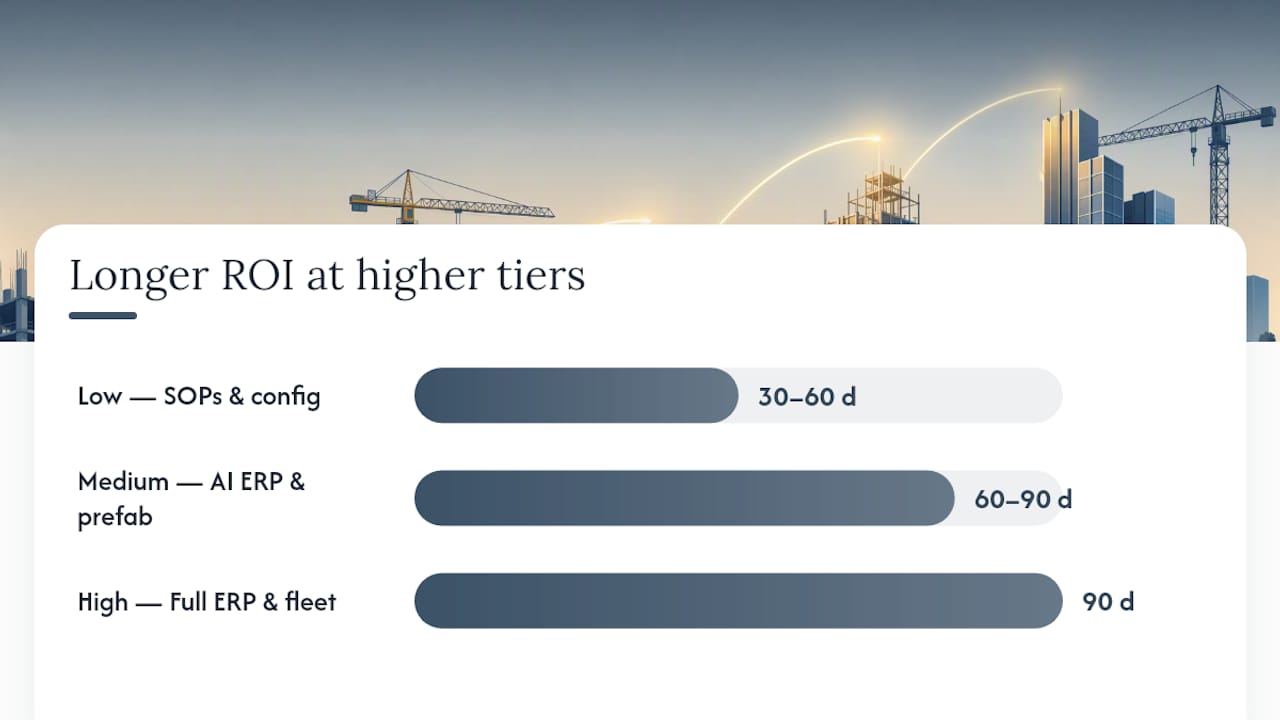
Start at the low tier and prove ROI before moving up. The medium tier is where most owners find the best balance of investment and return, particularly when software replaces manual admin hours that were previously costing them in overtime or missed billing.
What mistakes kill a no-hire scaling plan before it works?
Most scaling attempts fail for one of four reasons, and all four are predictable.
Mistake 1: Hiring before systems are in place. Adding a PM or estimator before you have documented SOPs means you are paying someone to figure out your process for you. The result is inconsistent output and a new employee who is frustrated within 90 days. Document first, delegate second, hire only when the documented process is too much volume for your current team.
Mistake 2: Failing to price for subcontractor float. When you pay subs before the owner pays you, you are financing the job out of your own cash. Apply the 15–30% markup on sub costs, use pay-when-paid clauses where enforceable, and use staged invoicing to keep cash flowing in before it flows out.
Mistake 3: Ignoring cash runway. Scaling volume without three months of operating expenses in reserve is how contractors end up unable to make payroll during a slow billing cycle. Build the reserve before you expand capacity, not after.
Mistake 4: Skipping integration testing before full rollout. Configuring a new ERP and going live on all jobs simultaneously is the fastest way to create billing errors and missed invoices. Pilot on one job, confirm the data flows correctly, then expand.
Warning signs that say pause before you scale further:
- Gross margin is declining as revenue grows (pricing or cost control problem).
- AR days are climbing above 45 (cash-flow risk).
- More than 20% of jobs are finishing late (scheduling or capacity problem).
- You are personally making more decisions than you were six months ago (SOP failure).
Pro Tip: When any two of these warning signs appear simultaneously, stop adding volume and fix the underlying system. Scaling a broken process just produces more broken outcomes faster.
Pilot checklist: your first 2–4 weeks with Designflow-build
- Configure your three most common estimate templates with pre-filled line items and markup rules.
- Set up job-level cost codes for direct labor, materials, and subcontractor costs on one active job.
- Enable mobile time entry and daily log capture for your field crew on that same job.
- Build two automation rules: one for estimate follow-up at 72 hours, one for invoice reminders at day 7 past due.
- Review the job-level P&L at the end of week two and compare actual vs. estimated costs.
The quick wins you should expect in the first 30 days: faster estimate turnaround, fewer missed invoices, and a measurable reduction in the hours your PM spends on data entry and phone follow-up. The AI construction software platform overview explains the full feature set for owners who want to see the complete picture before starting a pilot.
Key Takeaways
Scaling a construction business without hiring is a systems and cash-flow challenge: document processes first, automate admin second, and orchestrate subcontractors and smarter equipment decisions to raise throughput per existing employee.
| Point | Details |
|---|---|
| Systems before headcount | Document and test SOPs for estimating, kickoff, QC, and closeout before adding any staff. |
| Protect margin at the job level | Track direct labor, materials, sub costs, and overhead by cost code; target 20%+ gross margin on GC work. |
| Automate the admin layer | Designflow-build reports a 70% reduction in manual data entry when project management, accounting, and field ops run on one platform. |
| Build a sub bench proactively | Vet three to five subs per trade before you need them; apply a 15–30% markup and use pay-when-paid clauses to protect cash flow. |
| Designflow-build as your ERP pilot | A 2–4 week implementation with 98% user adoption makes Designflow-build the practical first step for contractors ready to automate and measure. |
The real reason scaling without hiring is harder than it looks
Most contractors approach this as a staffing problem. They think: “If I just had one more good PM, I could take on more work.” That framing is almost always wrong, and it leads to the most common and expensive mistake in construction growth: hiring into chaos.
The contractors who scale without adding headcount share one trait. They treat their business as a system first and a collection of skilled people second. They know their margin by job type before they bid the next job. They have a written process for every repeatable task. They measure output, not activity. And they use technology to enforce consistency rather than relying on individual memory.
The uncomfortable truth is that most construction businesses are not ready to scale when their owners think they are. The schedule is full, the phone is ringing, and the instinct is to hire. But full schedules and ringing phones are symptoms of demand, not evidence of operational readiness. Operational readiness looks like documented SOPs, clean job-level financials, a vetted sub bench, and a software platform that gives you real-time visibility into every job. Without those four things, adding volume just amplifies the existing problems.
Sustainable scaling requires measurement, iteration, and the right technology. Not more people doing the same things the same way.
Ready to put this playbook into practice?
If you have read this far, you have the framework. The next step is putting it into motion, and that is exactly where Designflow-build makes the difference between a plan on paper and a business that actually runs without you in every conversation.

Designflow-build’s AI-native ERP gives you job-level cost visibility, automated estimate and invoice workflows, mobile field data capture, and a compliance automation layer — all configured in 2–4 weeks, with no army of consultants required. The free tier gets you started immediately. The Pro plan at $100 per user per month unlocks the full automation builder, AI takeoff, and advanced reporting. Contractors who consolidate on the platform report up to $847K in monthly savings and a 70% drop in manual data entry from day one of full adoption.
Start your pilot on one active job. Configure your estimate templates, enable mobile time entry, and set up two automation rules. By the end of week two, you will have real data on what the platform saves you — and a clear picture of what full rollout looks like for your business. Start your free trial and see how fast the admin work disappears.
Useful sources and further reading
These sources informed this guide and are worth reading directly for deeper context:
- Construction Automation
- How to Scale a Construction Business From One Truck to a Team in the USA · CoreQuote
- How to Scale Without Burning Out in 2026: The Contractor’s Guide | Adeltium
- Grow Your Contracting Business With Subcontractors
- How Smart Construction Entrepreneurs Are Scaling Without Hiring More In-House Staff
- BuildOps HQ | Back Office Support for Roofers
- Affordable Construction Software for SMBs: 2026 Guide | DesignFlow Build
- Mobile Tools in Construction Management: A 2026 Guide | DesignFlow Build