
Progress Billing: G702/G703 Checklist for Construction Contractors

Progress billing invoices a construction project incrementally as work gets done, tied to a Schedule of Values so payments track actual completion. Each pay application calculates percent complete per line item, adds stored materials, subtracts retainage, and nets against prior draws. The payoff is straightforward: contractors collect cash close to when they spend it instead of financing an entire job out of pocket while waiting for one lump payment at the end.
TL;DR:
- Accurate progress billing requires granular Schedule of Values with 60 to 80 line items to reduce disputes and speed review times.
- Automated workflows, including direct change order integration and waiver tracking, can eliminate reconciliation errors and cut billing cycle times to 2–4 weeks.
- Retainage typically ranges from 5% to 10%, with hybrid structures like upfront mobilization payments and reduced retainage benefiting cash flow management.
- Proper documentation such as invoices, insurance, and photos is crucial for stored materials, and unapproved change orders can delay payments if not tracked properly.
- Choosing the right billing method depends on project length, scope measurability, maintainable retainage exposure, and owner oversight, with progress billing suited for ongoing work.
Table of Contents
- What Is Progress Billing in Construction and How Does It Work?
- How to Calculate a Progress Bill
- Retainage, Mobilization, and Hybrid Billing Patterns
- Documents That Gate Payment: Waivers, Materials, and Change Orders
- Progress Billing vs. Milestone Billing vs. Time and Materials
- A Reproducible Monthly Pay-Application Checklist
- How Automation Cuts Billing Friction
- Why Billing Discipline Is a Survival Skill, Not Paperwork
- Get Your Pay Applications Right the First Time
- Sources
- FAQ
What Is Progress Billing in Construction and How Does It Work?
A Schedule of Values (SOV) is the backbone of every progress billing cycle. It breaks the contract into line items, each with a dollar value, so the pay application can measure how much of each scope has actually been completed. A coarse SOV with ten line items invites disputes over what counts as “70% done.” A granular SOV with 60 to 80 line items lets you bill site work, concrete, framing, and MEP rough in separately, which speeds up reviewer approval because there is less to argue about.
Every pay application rolls forward from the one before it. That rollforward has six fields that have to reconcile cleanly:
- Previous — the amount billed to date as of the last approved application.
- This period — new value earned since the last billing cycle.
- Stored materials — materials purchased and on site or in a bonded warehouse, not yet installed.
- To date — previous plus this period plus stored materials.
- Retainage — the percentage withheld from the to-date total.
- Balance to finish — the remaining contract value not yet billed.
The AIA G702 form functions as the summary sheet, showing the total contract sum, total earned, retainage, and net amount due. The G703 is the continuation sheet, listing every SOV line item with its own scheduled value, percent complete, and retainage calculation. Reviewers on the owner or lender side typically check three things first: does the previous column match the prior approved application exactly, is retainage applied consistently across every line, and does the SOV reflect approved change orders. Miss any one of those and the application gets kicked back, which is often the single biggest source of payment delay on a job that otherwise has no real dispute.
How to Calculate a Progress Bill
The core formula for each SOV line item is simple:
- Take the scheduled value for that line item.
- Multiply it by the percent complete for the current period.
- Add any stored materials tied to that line item, if your contract allows billing for materials on site.
- Subtract the retainage percentage from that subtotal.
- Repeat for every line and sum the results to get the period’s gross bill.
- Subtract the total already billed in prior periods to get net amount due this period.
Simple example: a $200,000 electrical rough-in line item that’s 40% complete this period, with no stored materials and 10% retainage, bills as $200,000 × 0.40 = $80,000, less $8,000 retainage, for a net $72,000 owed on that line.
Multi-line rollforward example: say a job has three SOV lines totaling $600,000 in contract value. Previous billing to date across all lines was $180,000. This period, combined work completed brings the gross to-date total to $255,000, with $10,000 in stored materials for a millwork package not yet installed. At 10% retainage, the calculation runs: $255,000 to-date gross, plus $10,000 stored materials, equals $265,000 to-date before retainage. Retainage of $26,500 comes off that figure, leaving $238,500 net to-date.
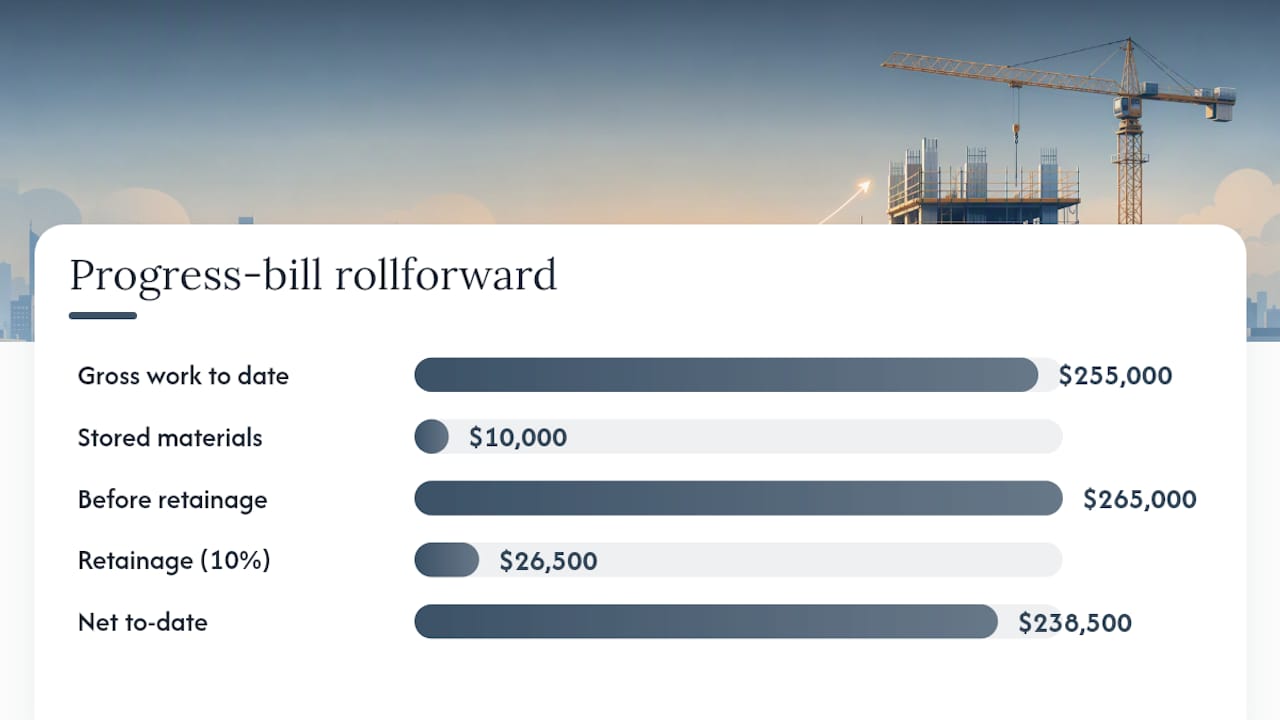
Prior draws matter because reviewers subtract cumulative net paid from cumulative net earned, not gross earned. Stored materials inflate the to-date total but usually carry the same retainage treatment as installed work unless your contract specifies otherwise.
Retainage, Mobilization, and Hybrid Billing Patterns
Retainage is the percentage of each progress payment withheld until substantial completion or contract closeout, and it exists to give owners leverage against incomplete or defective work. Most commercial contracts hold back somewhere in the 5% to 10% range, though public projects and some states cap it lower as the job nears completion. A good example of applied billing and contract strategies in renovation projects is illustrated in the Indulge Renovations paid social case study, showing how clear billing procedures ease cash flow management. On a $2 million contract billed monthly, 10% retainage held across a 12 month build ties up roughly $200,000 in cash the contractor has already earned but can’t collect until the final walkthrough.
That gap is real enough that many contractors negotiate a hybrid structure instead of accepting straight retainage on every draw:
- A mobilization payment, often 10% to 15% of contract value, paid upfront before major work begins.
- Standard monthly progress billing for the remainder of the schedule, still subject to retainage.
- Reduced retainage after 50% completion on some contracts, once the owner has confidence the job will finish.
A mobilization payment doesn’t eliminate that exposure, but it front loads enough cash to cover early payroll, permits, and material deposits before retainage accumulation starts working against you.
Documents That Gate Payment: Waivers, Materials, and Change Orders
Lien waivers stop more pay applications than any other single document. A conditional waiver releases lien rights once payment is received. An unconditional waiver releases them immediately, regardless of whether payment has cleared. Owners and lenders typically require conditional waivers with the application and unconditional waivers once the prior check clears, and one missing subcontractor waiver can hold an entire draw, even when every other line item is clean.
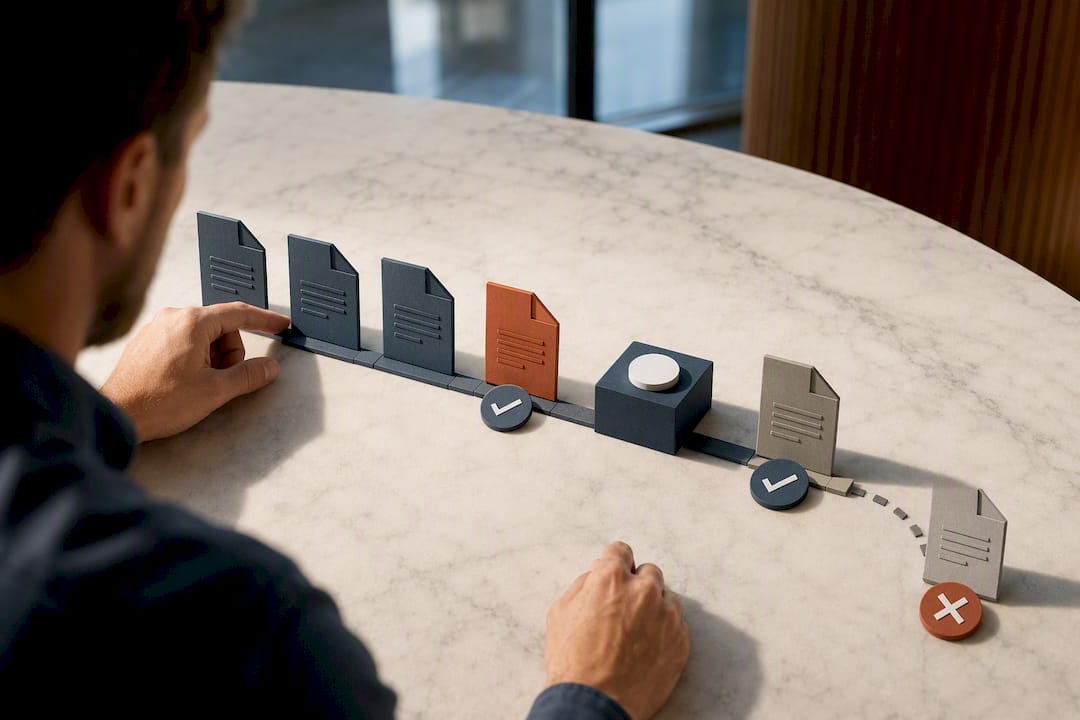
Stored materials need their own paper trail: paid invoices, proof of insurance covering the materials on site, and often photos confirming the goods are actually present. Skip the backup and expect the reviewer to strip that line from the application entirely.
Change orders create a third bottleneck when they sit unapproved for weeks while work proceeds anyway. The fix is procedural, not creative:
- Add approved change orders to the SOV as new line items the same billing cycle they’re signed, never batched for “next month.”
- Track pending change orders separately so field-completed work isn’t accidentally billed before approval.
- Reconcile the SOV total against the current contract sum, including all approved change orders, before submitting.
Pro Tip: Build your waiver collection into the billing calendar itself, not as an afterthought after the application is drafted. Request waivers from subs the same day you receive their backup, so you’re never scrambling three days before the submission deadline.
Progress Billing vs. Milestone Billing vs. Time and Materials
Progress billing, milestone billing, and time-and-materials solve different cash-flow problems, and picking the wrong one creates friction that has nothing to do with the quality of your work.
| Factor | Progress billing | Milestone billing | Time and materials |
|---|---|---|---|
| Payment cadence | Monthly, tied to percent complete | At defined deliverables | As costs are incurred |
| Admin burden | High (SOV, G702/G703, reconciliation) | Low to moderate | Moderate (rate documentation) |
| Cash-flow risk | Low, steady inflows | Higher, lumpy inflows | Low, but rate disputes common |
| Best-fit projects | Long, continuous scopes | Clearly verifiable deliverables | Undefined or evolving scope |
Milestone billing works better when deliverables are easy to verify, like a foundation pour or a roof dry-in, and the owner wants payment tied to visible progress rather than a percentage estimate. Time and materials fits scope that can’t be fixed in advance, and it requires billing rates built from labor cost plus a profit factor, usually with a not-to-exceed clause protecting the owner from runaway hours.
Choose based on four questions: how long is the project, how measurable is the work in discrete units, how much retainage exposure can you carry, and how much oversight does the owner relationship demand. Continuous, hard-to-isolate work favors progress billing; clearly bounded deliverables favor milestones.
A Reproducible Monthly Pay-Application Checklist
Run this checklist before every submission, in order:
- Confirm the SOV total matches the current contract sum, including all approved change orders.
- Reconcile the previous to-date column against the last approved application, line by line.
- Verify stored materials have backup: invoices, insurance, and site confirmation.
- Confirm waiver collection status for every sub billed in the prior cycle.
- Enter approved change orders as new SOV lines before calculating percent complete.
- Submit on the earliest date your contract allows, not the deadline.
Four failure modes account for most rejected applications. A missing waiver stalls the whole draw, so track waiver status the same way you track line-item completion, not as a separate afterthought. A SOV mismatch between this month’s previous column and last month’s approved to-date usually traces back to a manual entry error, so reconcile those two numbers first, before touching anything else. Inconsistent retainage across line items, often from a rate change mid-project that wasn’t applied uniformly, needs a single retainage policy documented in the contract and referenced every cycle. An unbilled change order sitting in email threads instead of the SOV means you’re financing approved work for free, so build the five-day rule: any change order approved gets added to the SOV within five business days.
Track billing health with three simple numbers across your active jobs: average days from submission to approval, dollar value of applications rejected on first submission, and total retainage outstanding as a percentage of backlog. A rising rejection rate almost always points back to the SOV mismatch or waiver problem above.
How Automation Cuts Billing Friction
The failure modes above (rollforward mismatches, missing waivers, unbilled change orders) share a root cause: they’re manual reconciliation tasks living across spreadsheets, email, and separate accounting software.
The specific mechanics that address the problems in this article include:
- Automated SOV updates that add approved change orders directly to the schedule of values, eliminating the lag that causes unbilled work.
- Pay application generation that builds G702/G703 forms from field-reported percent complete, cutting the manual rollforward math that causes reconciliation errors.
- Waiver collection tracking that flags missing conditional or unconditional waivers before submission instead of after rejection.
- AR mirroring that keeps the billing system and general ledger in sync automatically, so retainage balances match across both.
When evaluating any construction software for this purpose, test it against four criteria: pay application accuracy against manual calculations, waiver workflow visibility, AR-to-GL reconciliation speed, and how long real implementation takes on an active job.
Why Billing Discipline Is a Survival Skill, Not Paperwork
Contractors don’t go under because they can’t build. They go under because they can’t collect fast enough to keep building. Progress billing mastery, done right with a clean SOV and disciplined rollforward math, is one of the few operational levers that directly protects margin without touching a single field decision.
If you run more than a handful of active jobs, pilot the monthly checklist above on one project this cycle. Measure your rejection rate before and after. The gap will tell you exactly where your current process is bleeding cash.
— Keith
Get Your Pay Applications Right the First Time
Every rollforward mismatch, missing waiver, and unbilled change order in this article traces back to the same root cause: billing data living in separate tools that don’t talk to each other. Designflow-build replaces that patchwork with one system where field-reported percent complete, your Schedule of Values, and your general ledger update together automatically.

That means pay applications that reconcile against last month’s numbers without manual double-checking, waiver tracking built into the billing calendar instead of a separate spreadsheet, and AR that mirrors your GL in real time. The platform’s Construction ERP handles the accounting side, general ledger, job costing, and WIP, while automated workflows generate your G702/G703 forms directly from field data captured through the mobile field app. Implementation runs 2 to 4 weeks, not months of consultant-led rollout.
If your current billing process is costing you a week of reconciliation every month, check pricing plans and see which tier fits your team size.
Sources
For readers who want to go straight to source material: Adobe’s progress billing explainer covers SOV and AIA form basics in plain language. ConstructionCoverage’s retainage glossary breaks down common withholding rates and hybrid mobilization structures. AccountingTools on time-and-materials pricing walks through building an hourly billing rate from cost and profit targets. PayAppPro’s guide details the rollforward mechanics and the most common reasons applications stall.
FAQ
How Do I Calculate WIP in Construction?
Work in progress (WIP) compares the value earned to date, calculated as contract value times percent complete, against the amount actually billed to date. If earned exceeds billed, you have underbilling; if billed exceeds earned, you have overbilling, and either signals a mismatch between your SOV and your actual progress that needs correcting before the next pay application.
How Do You Do Progress Billing?
You build a Schedule of Values breaking the contract into line items, then submit a pay application each period showing percent complete, stored materials, and retainage per line, typically using AIA G702 and G703 forms. Net amount due equals the current to-date total minus what was previously paid.
How Is Progress Billing Calculated?
Each line item’s bill equals its scheduled value multiplied by percent complete, plus allowed stored materials, minus retainage. Sum every line, then subtract the amount already billed in prior periods to arrive at the net amount due for the current cycle.
How Much Should a Progress Payment Be?
The payment amount depends entirely on verified percent complete for each SOV line item that period, not a flat percentage of the contract. Retainage, commonly 5% to 10%, gets subtracted from the gross earned amount before arriving at net due.
Does DesignFlow Build Handle Progress Billing and Pay Applications?
Yes. DesignFlow Build’s Construction ERP generates pay applications from field-reported percent complete and tracks waiver collection alongside SOV updates. Pricing details for Essentials, Pro, and Field seat plans are available on the pricing page.