
Construction Purchase Orders: Capture Photo Receipts and Lien Waivers

A construction purchase order is a formal, written order that authorizes and documents the purchase of materials, equipment, or services for a specific project, and it becomes a binding contract once the supplier accepts it. Every solid PO does three jobs at once: it authorizes spend before money moves, it creates a legal record you can point to in a dispute, and it gives your accounting team the paper trail needed to match invoices before payment. This guide breaks down the fields, workflow, legal exposure, and software features that turn a construction purchase order from a formality into a real control.
TL;DR:
- A construction purchase order becomes legally binding once the supplier accepts it, highlighting the importance of precise, detailed line items to prevent disputes.
- Essential fields include specific descriptions, quantities, spec references, commercial terms, risk clauses, lien protections, and an acknowledgment signature or digital confirmation.
- Different PO types, such as standard, blanket, planned, and contract POs, are suited for various purchase sizes, frequencies, and contractual relationships, optimizing procurement processes.
- Following a seven-step workflow, including requisition, approval, dispatch, receiving, three-way matching, and closeout, is crucial to minimize cost overruns and legal exposure.
- Digital, AI-enabled ERP systems streamline approval, recognition, and reconciliation processes, reducing manual entry by up to 70% and saving thousands of dollars monthly.
Table of Contents
- What Makes a Construction Purchase Order Legally Binding
- The Fields Every Enforceable PO Needs
- Choosing the Right Purchase Order Type for the Job
- The Seven-Step Purchase Order Workflow
- Liens, Insurance, and Tax Rules Tied to Every PO
- Best Practices for Writing a PO That Holds Up
- What to Look for in a Digital PO System
- How an AI-Native ERP Closes the Gaps Manual POs Leave Open
- Why Disciplined POs Separate the Contractors Who Stay Profitable
- A Faster Way to Manage Construction Purchase Orders
- Where to Go for Standard Forms and Templates
- Sources
- FAQ
What Makes a Construction Purchase Order Legally Binding
A purchase order is a document you, the buyer, issue to a supplier or subcontractor spelling out what you’re ordering, at what price, and under what terms. On its own, a PO is just an offer. It turns into an enforceable contract the moment the supplier accepts it, whether that’s a signed return copy, a written acknowledgment email, or simply shipping the goods you ordered. Courts generally treat an accepted PO as a contractual offer with defined terms, which is why sloppy or vague line items come back to bite you during a dispute.
Contractors often blur three documents that are legally distinct:
- A purchase requisition is an internal request. It never leaves your company and creates no obligation to a vendor.
- A purchase order is the external offer to buy, issued once the requisition is approved.
- A subcontract agreement covers labor and scope for a trade partner performing work, not just supplying goods, and typically carries more detailed indemnity and insurance language than a standard PO.
Under the Uniform Commercial Code, contracts for goods valued at $500 or more generally need to be in writing to be enforceable. Verbal material orders under that threshold might hold up, but treating every purchase as a written PO is standard practice for a reason: it gives you evidence when a supplier claims a different price or quantity than what you actually agreed to.
The Fields Every Enforceable PO Needs
A PO template earns its keep when it’s specific enough to survive a dispute. Vague quantities and missing spec references are the two most common reasons a purchase order fails to protect a contractor when a delivery goes wrong.
Build every construction purchase order around these components:
- Header data: unique PO number, issue date, buyer and seller names, addresses, and your company’s EIN rather than a personal Social Security number.
- Line items: description, quantity, unit of measure, unit price, and a direct reference to the drawing sheet or spec section the material ties to.
- Commercial terms: total price, payment terms (net 30, net 45), and delivery instructions, including jobsite address and receiving window.
- Risk clauses: insurance and certificate of insurance (COI) requirements, indemnity language, and liquidated damages for late delivery on schedule-critical items.
- Lien protection: a note on when lien waivers are due relative to payment milestones.
- Acknowledgment: a signature line or digital confirmation field so the supplier’s acceptance is documented, not assumed.
A standardized starting point like ConsensusDocs 702 already builds in most of these fields for commodity goods purchases, and it assigns liability based on who controls the goods at time of loss, which is worth knowing before you draft a custom template. Field-tested templates also show why detail matters: a real, precise unit of measure and a spec section citation often separate an enforceable PO from a dispute-prone one.
Pro Tip: Attach the actual quote or spec sheet as a PDF to the PO rather than summarizing it in a text field. When a supplier disputes a price later, the attached document does the arguing for you.
Choosing the Right Purchase Order Type for the Job
Not every purchase needs the same paperwork. Matching the PO type to the purchase saves your team from either over-processing small buys or under-documenting big ones.
- Standard PO. One-time purchase with a fixed quantity and price. Use it for a single equipment rental or a specific material delivery tied to one phase of work.
- Blanket PO. Covers repeat purchases from one supplier over a set period, with a spending cap instead of a fixed quantity. This fits ongoing relationships with a concrete supplier or rental yard where you’ll place multiple releases against the same agreement.
- Planned PO. Sets an approved quantity and delivery schedule up front but releases actual shipments against forecasted dates. Useful for phased deliveries like structural steel or precast panels tied to a schedule.
- Contract PO. Ties the purchase order to a broader master agreement or subcontract, referencing its terms instead of restating them. This keeps line-item detail separate from the legal terms governing the whole relationship.
- Digital/electronic PO. Functionally the same as any of the above but generated and acknowledged inside a system rather than on paper. Electronic acknowledgment timestamps acceptance automatically, which removes the “we never got that PO” argument before it starts.
The Seven-Step Purchase Order Workflow
A construction purchase order works best as a chain of checkpoints, not a single document. The standard flow runs through seven distinct steps, and skipping any one of them is usually where cost overruns start.
- Requisition. A field lead or PM submits an internal request specifying material, quantity, need-by date, and job cost code.
- Approval. The requisition routes to whoever holds signing authority for that dollar amount. Most contractors set tiered thresholds, so a $2,000 tool order clears faster than a $75,000 equipment lease.
- PO creation. Once approved, the PO gets a unique number and the supporting quote or subcontract reference gets attached.
- Dispatch and acknowledgment. The PO goes to the supplier, who confirms receipt by signed return, email acknowledgment, or shipping confirmation.
- Receiving and inspection. Materials arrive on-site and get checked against the PO. Photo-backed proof and a signed delivery ticket matter here more than most crews realize.
- Three-way match. Accounts payable compares the PO, the delivery receipt, and the supplier’s invoice before releasing payment.
- Closeout. Retainage gets released and lien waivers get collected once the line item is fully paid.
On numbers: contractors running disciplined receiving and matching processes catch pricing and quantity discrepancies before they become invoice disputes, rather than after a check has already gone out. That single step, the three-way match, is what most manual systems handle worst, because it depends on someone physically reconciling three separate paper trails.
Liens, Insurance, and Tax Rules Tied to Every PO
A purchase order isn’t just a procurement document. It’s your first line of defense against liens, tax reporting mistakes, and coverage gaps.
- Mechanic’s liens. Unpaid suppliers can file a lien against the property, even if you paid your subcontractor in full. Collecting lien waivers at every payment milestone, conditional waivers before payment and unconditional waivers after, keeps that risk documented and current.
- Insurance and COIs. Require a certificate of insurance naming your company as additional insured before the first delivery, not after. A PO with no insurance clause gives a supplier no reason to send one.
- Retainage. Typical retainage runs 5% to 10% of contract value, and state public works rules often cap it. Spell out the release trigger, substantial completion, final inspection, or a specific date, directly in the PO rather than leaving it to a side conversation.
- Tax reporting. Collect a W-9 before the first payment to avoid backup withholding, and use your EIN on outgoing paperwork instead of a personal Social Security number. When a supplier’s invoice bundles labor with materials, split the lines. Combined labor and materials invoicing can trigger unexpected 1099 reporting obligations if you’re not tracking service payments separately from goods.
State rules on retainage caps and lien waiver sequencing vary enough that a one-size template won’t cover every job. Run your PO language past counsel familiar with your state’s mechanic’s lien statute before you scale it across projects.
Pro Tip: Never accept a “conditional waiver on final payment” from a supplier until that final payment has actually cleared. It’s a common mistake that leaves you exposed for the exact window you thought you’d closed.
Best Practices for Writing a PO That Holds Up
The gap between a PO that protects you and one that doesn’t usually comes down to five habits, not a longer template.
- Tie every line item to a drawing or spec section. A generic “2x4 lumber, 500 units” invites disputes. “2x4x8 SPF #2, per Sheet A-101 framing schedule” doesn’t.
- State acceptance criteria and inspection points up front. If a delivery needs to pass a moisture test or dimensional check before it’s accepted, say so on the PO, not after the truck has already left.
- Link the PO to a job cost code and budget line. This keeps procurement tied to the budget you actually approved, not a number someone remembered from a meeting.
- Collect W-9 and COI paperwork before the first payment, and require lien waivers at every milestone, not just at project closeout.
- Route every change through a written PO amendment or formal change order. A verbal “just add ten more sheets” instruction is exactly the kind of thing that turns into a $4,000 argument three months later.
Pro Tip: Keep a running log of every PO amendment tied to the original PO number. When a dispute lands on your desk six months after the fact, that log is often the difference between a five-minute resolution and a week of digging through email threads.
Following industry-standard quick tips like these, spec references, signed delivery tickets, and milestone-based lien waivers, consistently improves how defensible your paperwork is if a dispute ever goes to arbitration or court.
What to Look for in a Digital PO System
Digitizing your construction order management only pays off if the software actually replaces manual steps instead of adding a new one on top. Look for these core capabilities before you commit to a platform:
- Approval workflows that route requisitions automatically based on dollar thresholds, so nothing sits waiting on a single signature.
- Automatic PO number generation to eliminate duplicate or reused numbers across projects.
- Electronic dispatch and acknowledgment, so supplier acceptance is timestamped instead of assumed.
- Mobile receiving capture, letting field crews log deliveries with photos instead of paper tickets that get lost.
- Built-in three-way matching between PO, receipt, and invoice before AP can release payment.
- Integration with general ledger and job costing, so a PO’s spend shows up against the right cost code without a second data entry step.
The real payoff of automating PO capture and approval comes from cutting duplicate data entry between field receipts and office accounting, not just from moving paper to a screen. Start by mapping your current workflow on a whiteboard before you pilot any tool. Most rollouts fail because teams digitize a broken process instead of fixing it first.
How an AI-Native ERP Closes the Gaps Manual POs Leave Open
Manual PO tracking usually breaks in the same place: the field logs a delivery on paper, the office re-enters it into accounting, and by the time someone runs a three-way match, the invoice has already been paid or the dispute window has closed. An AI-native construction ERP that combines project management, accounting, and field operations in one system removes that re-entry step entirely, since a delivery logged from a phone on-site becomes the same record accounting matches against later.
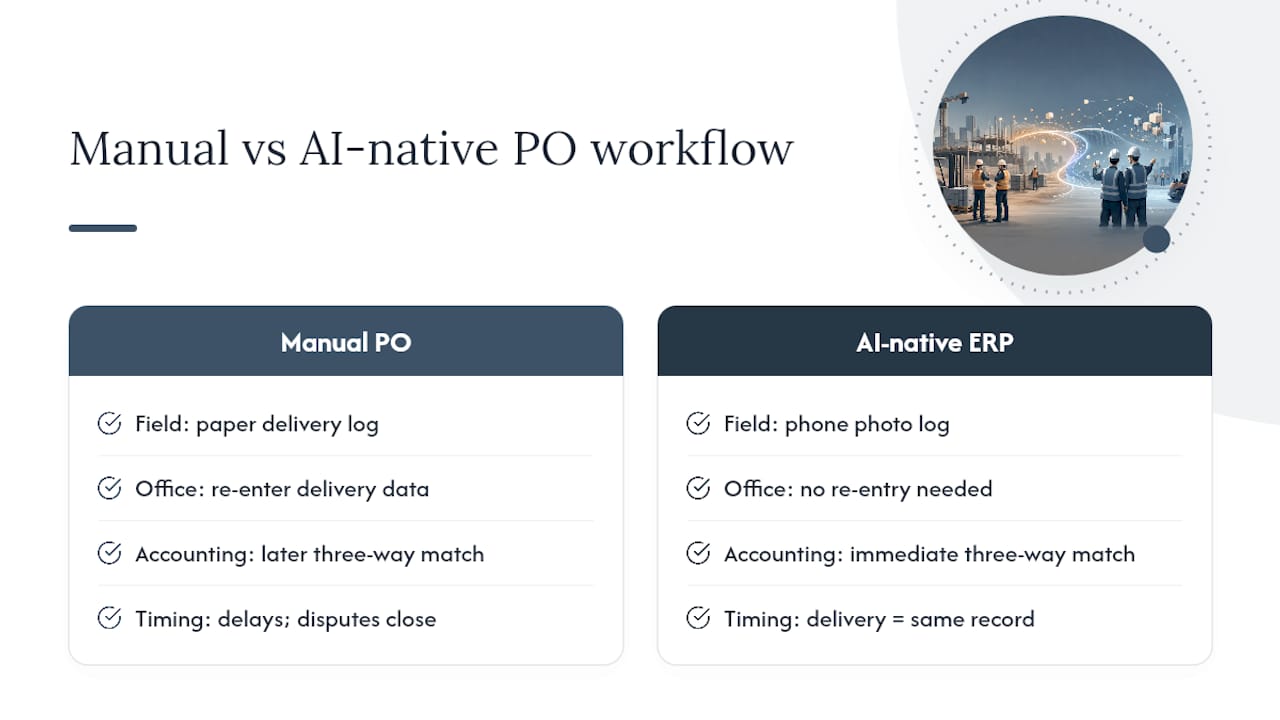
Designflow-build reports a 70% reduction in manual data entry and monthly savings of up to $847,000 for contractors who consolidate PO tracking, job costing, and receiving into a single platform, with typical implementation running two to four weeks and a 98% user adoption rate.
If you’re piloting automation, start with one job, map your approval thresholds first, and train your receiving crew to log photo-backed proof before you expand to a second project.
Why Disciplined POs Separate the Contractors Who Stay Profitable
Most PO disputes I’ve seen traced back to the same root cause: a verbal change nobody wrote down. One general contractor’s crew added extra material to a delivery without a written amendment, and the supplier billed for it at a different unit price than the original PO specified, an argument that could have been closed in one email exchange if the change had gone through proper channels. A second case involved a subcontractor who claimed a verbal scope addition; without a signed PO amendment, the contractor had no leverage in the negotiation that followed.
Cash flow, schedule, and dispute avoidance all trace back to the same discipline: write it down, get it acknowledged, match it before you pay. Pick three habits from this guide, spec-tied line items, milestone lien waivers, and mandatory change order documentation, and apply them to your next job this month.
— Keith
A Faster Way to Manage Construction Purchase Orders
Manually chasing PO approvals and reconciling paper receipts against invoices eats hours every week that most project managers don’t have to spare. Designflow-build replaces that scattered process, spreadsheets for tracking, email chains for approvals, separate accounting software for matching, with a single AI-native ERP built specifically for how contractors actually order materials and pay for them.

Purchase orders get generated with automatic numbering, routed for approval based on the thresholds you set, and matched against delivery receipts and invoices without anyone re-typing a line item. Field crews log deliveries with photos through the mobile field app, and that receipt flows straight into the same system your accounting team uses for job costing, so nothing gets entered twice. The Construction ERP ties PO tracking directly to your general ledger and work-in-progress reporting, which is where most spreadsheet-based systems fall apart.
Pricing runs on a simple per-seat structure, with Pro seats at $100 per office user per month and Field seats at $25 per user per month, detailed on the pricing page. If your team is ready to stop reconciling POs by hand, request a demo and see how quickly your first project can go live.
Where to Go for Standard Forms and Templates
For a standardized starting point, review the ConsensusDocs 702 form for commodity goods purchases. For field-by-field template guidance and tax clauses, see LegalClarity’s construction PO breakdown. For process mapping, review Procurify’s PO workflow guide and industry best-practice resources from Kept’s procurement library.
Sources
- Purchase Order for Commodity Goods - 702 | ConsensusDocs
- Purchase order process flow — Procurify
- Construction purchase order template: fields, clauses & tax | LegalClarity
FAQ
What are the four types of purchase orders?
The four core types are standard, blanket, planned, and contract POs. Standard POs cover one-time purchases, blanket POs set a spending cap for repeat buys, planned POs schedule phased releases, and contract POs tie back to a master agreement or subcontract.
Can I create my own purchase order?
Yes. Many contractors build custom PO templates, though starting from a standardized form like ConsensusDocs 702 helps ensure you don’t miss fields like insurance requirements or lien waiver terms.
What is the difference between a purchase order and a subcontract agreement?
A purchase order covers the purchase of materials, equipment, or standalone services at a set price. A subcontract agreement covers labor and scope of work performed by a trade partner, typically with more detailed indemnity, insurance, and schedule obligations than a standard PO.
What is a PO on a project?
A PO, or purchase order, is the formal document a contractor issues to authorize a specific purchase for a project. It sets the price, quantity, delivery terms, and payment terms, and becomes a binding contract once the supplier accepts it.
How does software change construction order tracking?
Digital PO systems route approvals automatically, capture receiving data from the field through photos, and run three-way matches without manual re-entry. Platforms like Designflow-build’s Construction Project Management tools tie that tracking directly to job costing and accounting.