
Construction Software Integrations: 6 Steps to Fix Job Costing for PMs

Integrating your project management, accounting, and field systems gives you accurate, near real-time job costing and removes most duplicate data entry. The fastest path there runs through native connectors, APIs, or middleware, chosen based on how many systems you’re connecting and how much custom development you can support. Start now with two moves: inventory every system your team touches daily, then map the three fields that break integrations most often. Project ID, cost code, and time entry.
TL;DR:
- Integrating project management, accounting, and field systems reduces manual data entry errors and provides real-time job costing, with many companies still manually transferring data despite frequent application use.
- Critical data flows include accounting for job costing, project schedules and change management, field reports, and BIM updates, all requiring precise matching of project IDs and cost codes across systems.
- Native connectors are the fastest setup approach but offer limited customization, while APIs, middleware, or batch file transfers suit different sizes and complexities of construction operations, requiring strong access control and testing.
- Prioritizing accounting and field data synchronization early ensures immediate ROI, reduces errors, and simplifies subsequent integration of schedules or BIM information over time.
- An AI-native ERP like Designflow-build can short-circuit complex integrations by combining core functions into one system, reportedly enabling quicker implementation and higher team adoption.
Table of Contents
- Why Construction Software Integrations Matter
- Where Data Actually Has to Flow
- Choosing Your Integration Architecture
- Your Integration Implementation Checklist
- How an AI-Native ERP Shortens the Integration Timeline
- What I’d Prioritize If I Were Running This Project
- Get Your Systems Talking to Each Other With Designflow-build
- Sources
- FAQ
Why Construction Software Integrations Matter
The math on manual data entry is brutal once you actually measure it. A project coordinator who retypes daily field logs into an accounting system isn’t just slow. She’s introducing errors that show up three weeks later as a job costing report nobody trusts.
Industry data backs this up. Autodesk’s research on construction software integrations found that 37% of construction companies run four or more applications on a single project, and 51% still manually transfer data between those apps. That’s not a minor inefficiency. It’s half the industry copying numbers by hand between systems that could talk to each other directly.
When integrations work correctly, you get:
- Real-time job costing that reflects field activity the same day, not the same month
- Fewer transposition errors in AP/AR and payroll
- Faster financial closeout because accounting isn’t waiting on someone’s spreadsheet
- One accurate source for schedules, budgets, and field progress instead of three competing versions
A well-executed integration doesn’t eliminate manual work. It shrinks it to the exceptions that genuinely need a human decision.
Where Data Actually Has to Flow
Every construction software integration boils down to a handful of data flows that repeat across projects. Get these right and the rest of your tech stack falls into place.
- Accounting. General ledger entries, cost codes, and AP/AR records need to sync with project systems so job costing reflects real spend, not estimated spend. Certified payroll and WIP schedules depend on this flow being clean.
- Project management. Schedules, RFIs, and submittals move in both directions. A schedule slip in your PM tool should trigger a budget flag in accounting, and a change order approved in accounting should update the project timeline.
- Field operations. Daily reports, time and labor entries, and equipment logs originate on-site and need to land in accounting and PM systems without a second round of data entry. Mobile apps like Procore’s field tool exist precisely because this flow breaks down constantly.
- Estimating and takeoff. Quantities and unit costs from your takeoff process feed directly into budgets and cost codes at project kickoff.
- BIM and design. Models and markups need to sync with field and PM systems so field crews are working from current drawings, not last month’s revision.
Most integrations sync in one dominant direction, with the other direction limited to status updates. Field data flows up into accounting; approved budgets flow down into the field. When both systems try to edit the same record, you need a conflict resolution rule, usually “most recent timestamp wins” or “accounting has final say on cost data.” Before any of this works, normalize your canonical IDs: project numbers, cost code structures, and vendor IDs need to match exactly across every connected system, or the sync fails silently.
Choosing Your Integration Architecture
Four approaches dominate construction software integrations, and each fits a different situation.
- Native connectors. Built by the vendor, these are the fastest to turn on and require no development work. The tradeoff is limited flexibility. You get the fields the vendor decided to expose, nothing more.
- APIs and webhooks. These give you real control over what syncs and when, often near real-time. FlowForma’s automation platform shows how far no-code process automation can extend an API-based approach, but you’ll still need someone with development know-how to build and maintain the connection.
- Middleware and iPaaS. Integration platforms sit between your systems and handle the mapping logic, which suits companies running five or more disconnected apps. Kahua’s platform approach reflects this pattern: connect everything to a hub rather than building point-to-point connections.
- CSV/batch transfers. Still legitimate for low-frequency data, like monthly vendor master updates, where real-time sync adds cost without adding value.
Whichever method you choose, lock down access control, audit trails, and encryption for data in transit and at rest before you go live, not after.
Pro Tip: Test your integration with a deliberately messy dataset first, duplicate project IDs, missing cost codes, and all. Clean test data hides the exact failures that will hit you in week two of production.
Your Integration Implementation Checklist
Treat this like a construction schedule: sequence matters, and skipping a step costs you later.
- Map stakeholders and systems. List every tool touching project data and who owns it. This usually surfaces two or three “shadow” spreadsheets nobody mentioned in the kickoff meeting.
- Prioritize your first data flows. Start with accounting job costing and time entry. These deliver the fastest, most visible ROI and expose mapping problems early.
- Build your data map. Define canonical fields for project ID, cost code, vendor ID, and date formats before writing a single line of connector logic.
- Test and reconcile. Run parallel systems for at least one billing cycle and compare totals line by line.
- Roll out in phases. Start with one project team, then expand. Train users on the “why,” not just the clicks.
- Track your success metrics. Data accuracy rate, reduction in double entry, and time-to-close should all move in the right direction within 60 days.
| Timeline phase | Typical duration | Primary cost driver |
|---|---|---|
| Planning and mapping | 1–2 weeks | Internal staff time |
| Connector build/config | 2–6 weeks | Vendor connector fees or developer hours |
| Testing and reconciliation | 1–2 weeks | Internal staff time |
| Phased rollout and training | 2–4 weeks | Training hours, support tickets |
Costs generally scale with the architecture you picked. Native connectors carry low direct cost but limited flexibility; middleware platforms often carry a subscription fee on top of setup time.
How an AI-Native ERP Shortens the Integration Timeline
Most of the friction in construction software integrations comes from stitching together separate accounting, PM, and field tools that were never designed to share data. An AI-native ERP sidesteps a chunk of that work by keeping project management, accounting, and field operations inside one system instead of connecting three.
Designflow-build is built around that model, and the company reports several proof points worth noting as client-supplied figures rather than independent benchmarks:
- A significant reduction in manual data entry, according to the vendor
- Monthly savings reported as substantial for reporting clients
- Implementation timelines reported as just a few weeks
- A very high user adoption rate among deployed teams
Those numbers map directly onto the checklist above. A shorter implementation window compresses the mapping and testing phases; higher adoption reduces the training risk that derails so many rollouts. If your team is evaluating whether to integrate several point solutions or consolidate onto a unified platform, those figures are worth weighing against the vendor-connector and middleware fees in the timeline table.
What I’d Prioritize If I Were Running This Project
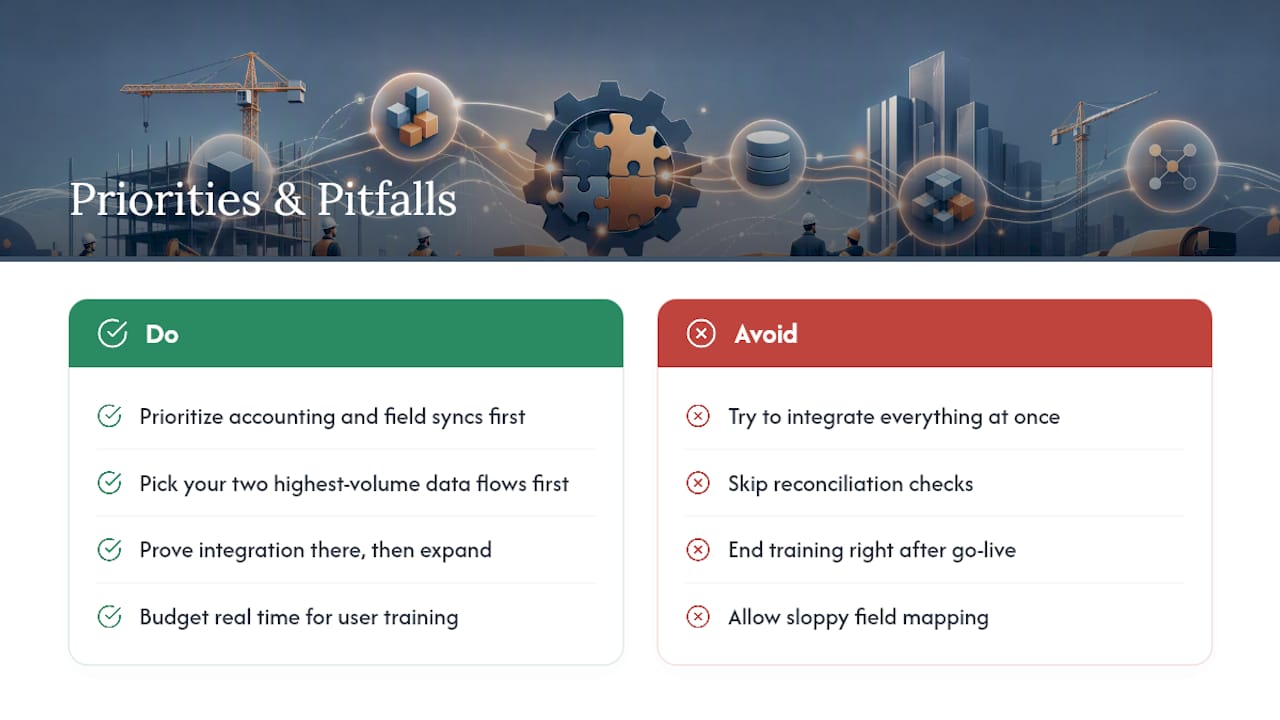
If you take one thing from this article, prioritize accounting and field syncs before anything else. Schedules and BIM data matter, but job costing errors compound weekly, and field time entry is where most manual double entry actually lives.
The pitfalls that sink these projects are predictable: sloppy field mapping, skipped reconciliation checks, and training that ends the day after go-live. Budget real time for user training, not a lunch-and-learn. My tactical recommendation for decision-makers: pick your two highest-volume data flows first, prove the integration works there, then expand. Trying to integrate everything at once is how these projects stall.
— Keith
Get Your Systems Talking to Each Other With Designflow-build
Most contractors patching together Excel, QuickBooks, and a separate PM tool eventually hit the same wall: someone spends hours a week reconciling numbers that should already match. Designflow-build replaces that patchwork with a single AI-native ERP that combines project management, accounting, and field operations, so job cost, schedule, and field data stay in sync without a custom integration project.

The vendor reports a short implementation timeline and a high adoption rate among deployed teams, figures provided directly by the vendor rather than a third-party benchmark. Check current pricing and plans or explore the Construction ERP platform to see how the integration model works before you commit to another point solution.
Sources
- Construction Software Integrations: Putting an End to Manual Workflows
- Construction Process Automation Software | FlowForma
- The Kahua Platform | Enterprise Construction Software
FAQ
What Software Do Most Construction Companies Use?
Most construction companies run a mix of project management, accounting, and field tools rather than one platform, which is why 37% of firms use four or more applications on a single project. That mix is exactly why integration planning matters so much before you add another tool to the stack.
What Are Integrations in Software?
An integration connects two or more systems so data moves between them automatically instead of being retyped by hand. In construction, that typically means syncing project schedules, cost codes, and field data across accounting, PM, and field-operations tools using native connectors, APIs, or middleware.
What Is the Best ERP for Construction?
The right ERP depends on your company size and how many separate tools you’re trying to replace. Platforms like Designflow-build consolidate project management, accounting, and field operations into one system, which reduces the integration work entirely rather than connecting separate applications.
What Is the Best Software for Construction Design?
Design-focused work typically runs through BIM tools, which then need to integrate with project management and field systems so crews work from current drawings. The integration point that matters most is syncing model markups and revisions with whatever platform your field teams use daily, whether that’s a dedicated PM tool or an all-in-one system like Designflow-build’s project management module.