
PMs’ 30–60 Day Plan: Construction Cost Codes, GL Mapping

Construction cost codes are the structured numeric identifiers that link every job transaction, labor hour, material invoice, and subcontractor draw to a specific work scope. The best practice for most US contractors is to adopt MasterFormat as your baseline structure, then map every code to your chart of accounts so job cost reports and WIP schedules reconcile without manual rework.
TL;DR:
- Using MasterFormat for cost codes helps standardize tracking and ensures accurate reconciliation between job costs and the general ledger.
- A multi-tier code includes division, phase, cost type, and optionally location segments, allowing precise budgeting, billing, and auditing.
- Implementing a phased rollout with clear design, pilot testing, and consistent enforcement improves adoption and data accuracy across projects.
- Validating cost codes through software prevents miscoding, streamlines workflows, and maintains clean WIP schedules for reliable revenue recognition.
- Maintaining a stable, minimal master list and regular reconciliation checks is essential to prevent breakdowns in project cost control over time.
Table of Contents
- What Construction Cost Codes Do for Job Costing and Controls
- MasterFormat, UniFormat, and AIA Mappings: Picking a Standard
- How to Structure a Multi-Tier Cost Code
- Mapping Cost Codes to Your Chart of Accounts and WIP
- Rolling Out Cost Codes: Design, Pilot, and Governance
- How Software Handles Cost Code Imports and Validation
- Getting Your Master List and Template Right
- DesignFlow Build: One System, Not Five Spreadsheets
- Cost Code Applications Across Project Types
- Why Cost Code Adoption Stalls (And How to Fix It)
- What Actually Matters Once the Codes Are Live
- Get Cost Codes Working Without the Spreadsheet Chaos
- Sources
- FAQ
What Construction Cost Codes Do for Job Costing and Controls
Cost codes exist to answer one question fast: where did the money actually go? Every purchase order, time card, subcontractor invoice, and change order gets tagged with a code that ties it to a specific piece of work. Without that link, you’re stuck reading a general ledger that tells you total spend but nothing about which scope blew the budget.
Construction cost codes are standardized identifiers that map labor, material, and equipment costs to project tasks, which is what makes accurate progress billing and variance analysis possible in the first place. When coding is consistent, you can pull a report mid-month and see exactly which trade is running hot before it becomes a budget crisis.
Here’s who actually touches cost codes across a project’s life:
- Estimators assign preliminary codes when building the original budget.
- Project managers track committed costs and actuals against each code weekly.
- Accountants use the same codes to reconcile WIP schedules and bill owners.
- Field supervisors code labor hours and material tickets in real time.
MasterFormat, UniFormat, and AIA Mappings: Picking a Standard
Three standards dominate US construction coding, and each solves a different problem.
- MasterFormat (CSI) organizes work into 50 divisions (like
03 00 00for Concrete or26 00 00for Electrical) and is the dominant framework for trade-level, detailed cost coding once a project moves past conceptual budgeting. - UniFormat groups costs by building system (foundations, superstructure, exterior enclosure) rather than trade, which makes it better suited to early, conceptual estimates before subcontractor scopes are finalized.
- OmniClass is a broader classification system covering everything from materials to disciplines, used mostly by owners and design teams managing large facility portfolios.
- AIA cost reporting mappings cross-reference these standards so architects, owners, and contractors can compare budgets built on different frameworks without translation errors.
For most general contractors and specialty trades, MasterFormat is the stronger foundation because it aligns naturally with how subcontractor bids and specifications are already organized. A custom list only makes sense once you’ve outgrown MasterFormat’s granularity for a niche scope, like a self-storage builder tracking dozens of unit-size variants that generic divisions don’t capture.
How to Structure a Multi-Tier Cost Code
A usable cost code isn’t a single number. It’s a stack of segments, each one narrowing the scope until the code points to exactly one thing you can budget, bill, and audit.
- Division/section (from MasterFormat): identifies the trade or work category, like
033000for cast-in-place concrete. - Phase or activity code: distinguishes rough-in from finish work, or foundation pour from slab pour, often a two-digit suffix.
- Cost type: separates labor, material, equipment, subcontract, and other direct costs within the same scope.
- Location or cost center (optional): tags the specific building, floor, or unit on multi-phase projects.
A sample code might read 033000-10-L, where 033000 is concrete, 10 is the foundation phase, and L flags labor cost type. That code rolls up directly into a schedule-of-values line for pay application 3, so when the owner asks why the concrete line jumped, you can break it into labor versus material versus the pump rental instantly. This is the same logic that lets a job costing workflow stay accurate instead of becoming a monthly guessing game.
Mapping Cost Codes to Your Chart of Accounts and WIP
Your chart of accounts and your cost codes are not the same tool, and treating them as interchangeable is where most contractors lose reconciliation accuracy. The chart of accounts should separate direct job costs into five categories: labor, materials, subcontractors, equipment, and other direct costs. Cost codes then live one layer below, giving detail within each category for every specific job.
WIP schedules depend on this separation working cleanly. Retainage receivable and retainage payable, along with over-billings and under-billings, all get calculated from cost-to-cost percentages that come straight from coded job costs. Because revenue recognition under ASC 606 relies on that cost-to-cost calculation, a miscoded invoice doesn’t just distort one report. It skews revenue recognized for the entire job.
Statistic Callout: Splitting job costs into the five direct categories, labor, materials, subcontractors, equipment, and other, isn’t optional bookkeeping preference. It’s the structural requirement for producing job cost reports and WIP reconciliations that a bank or surety will actually trust.
- Keep your general ledger lean with a modest number of accounts typical for a healthy contractor and push detail into cost codes at the job costing layer, not into dozens of nested GL subaccounts.
- Reconcile WIP monthly by comparing coded actuals to committed costs, not just to the original budget.
- Flag any transaction posted without a valid cost code before it hits the ledger, not after.
Rolling Out Cost Codes: Design, Pilot, and Governance
Implementation fails most often when a company tries to switch everyone over on day one across every active job. A phased approach holds up better.
- Design the structure first. Choose MasterFormat as your base, decide your numbering ranges for phases and cost types, and assign one owner (usually a controller or senior PM) who has final say on the master list.
- Pilot on one active job. Run the new codes alongside your existing system for 30 to 60 days so you can catch mapping errors before they touch every project.
- Import and train. Load the master list into your accounting or ERP platform, then train field supervisors on coding time and material tickets correctly, since bad data at the source ruins everything downstream.
- Govern ongoing. Assign someone to audit new code requests monthly and reject duplicate or overlapping entries before they multiply.
Pro Tip: Never let two people create new cost codes independently. One rogue code created in the field to save time now means an unreconcilable WIP report in three months.
Watch for red flags during rollout: field crews reverting to old paper codes, invoices posted to a generic “miscellaneous” bucket, or PMs building shadow spreadsheets because they don’t trust the new codes yet. Each one signals the training step needs another pass.
How Software Handles Cost Code Imports and Validation
Most modern platforms let you import a master cost-code list as a CSV, then crosswalk it to GL accounts and schedule-of-values lines instead of rebuilding the structure by hand in every module. That single import should flow through estimating, buyout, commitments, invoicing, and payroll without anyone re-entering codes at each stage.
The real value shows up in validation. Software that enforces required fields, rejects postings without a valid code, and flags cost-type mismatches catches miscoding before it reaches your WIP schedule instead of after your accountant finds it during month-end close.
- Set exception reports to run weekly, not just at month-end, so a bad code gets caught in days, not weeks.
- Confirm every integration checkpoint, estimating to buyout to invoice to payroll, uses the same master list, not four slightly different versions.
- Use live budget dashboards to spot a coding gap the moment a cost lands somewhere unexpected.
Getting Your Master List and Template Right
Licensed, edition-aware MasterFormat data is available through CSI and industry associations. Your import CSV needs five columns at minimum: code, title, description, linked GL account, and default cost type. Skip the description column and you’ll spend months answering “what does this code even cover?”
DesignFlow Build: One System, Not Five Spreadsheets
DesignFlow Build combines project management, accounting, and field operations into one AI-native ERP, so a cost code entered during estimating carries through commitments, invoices, and payroll automatically. Implementation typically runs a few weeks, with master-list validation and dashboards built into the same system rather than bolted on afterward.
Cost Code Applications Across Project Types
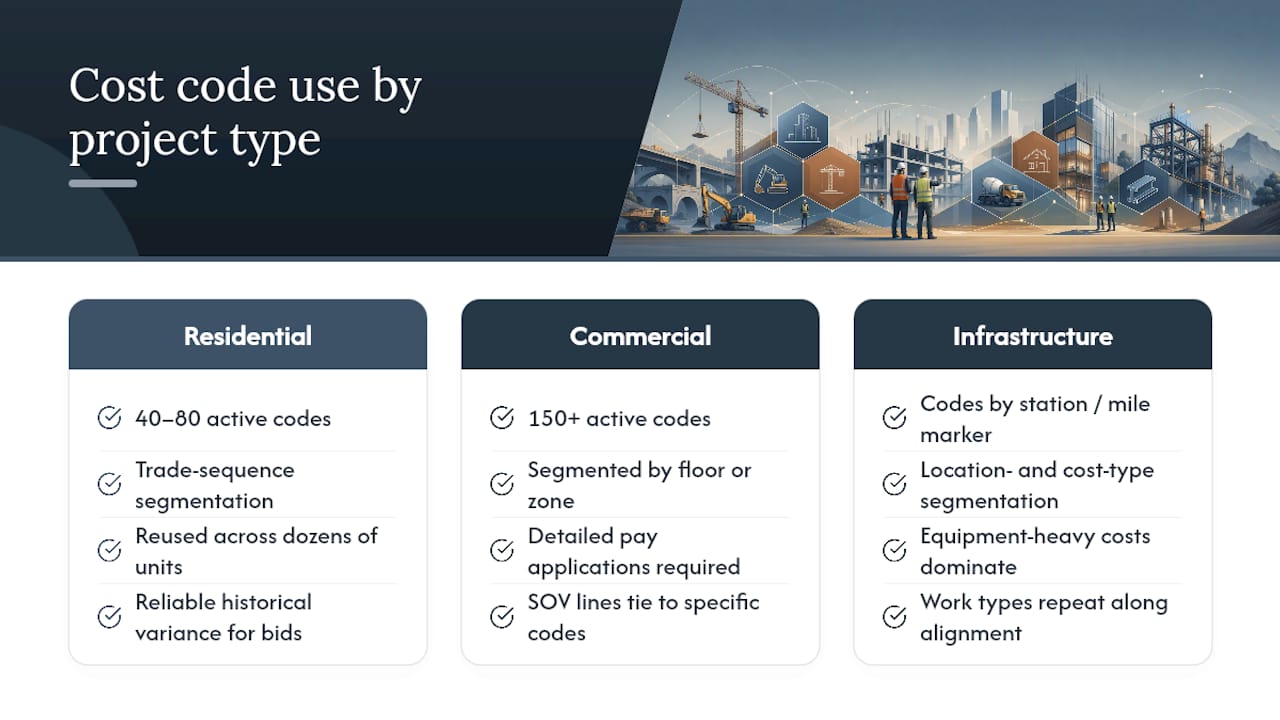
A residential builder, a commercial general contractor, and an infrastructure crew all use cost codes differently, even when they start from the same MasterFormat baseline.
Residential builders tend to run leaner code sets, often 40 to 80 active codes per home, organized around trade sequence: site work, foundation, framing, mechanical rough-in, drywall, finishes. Because homes repeat, the same code set gets reused across dozens of units, which makes historical variance data unusually reliable for bidding the next phase.
Commercial contractors need deeper granularity because scopes are more complex and owners demand detailed pay applications. A commercial office build might use 150 or more codes, with heavy segmentation by floor or building zone so a schedule-of-values line for “Level 4 electrical rough-in” ties cleanly to a specific code rather than a blended electrical bucket covering the whole building.
Infrastructure and civil projects lean on location-based segments more than any other project type. A highway job codes by station number or mile marker as much as by work type, since earthwork, drainage, and paving all repeat across the alignment. Cost-type segmentation matters enormously here too, because equipment costs (excavators, pavers, compactors) often dwarf labor and material on a linear job in a way vertical construction rarely sees.
The common thread: the coding structure should mirror how the project actually gets built and billed, not force every job type into an identical template.
Why Cost Code Adoption Stalls (And How to Fix It)
The single biggest obstacle to cost code adoption isn’t technical. It’s behavioral. Field supervisors who’ve coded time the same way for fifteen years don’t want to learn a new system mid-project, and office staff who built workarounds in Excel are often quietly attached to their spreadsheets.
Three patterns explain most failed rollouts:
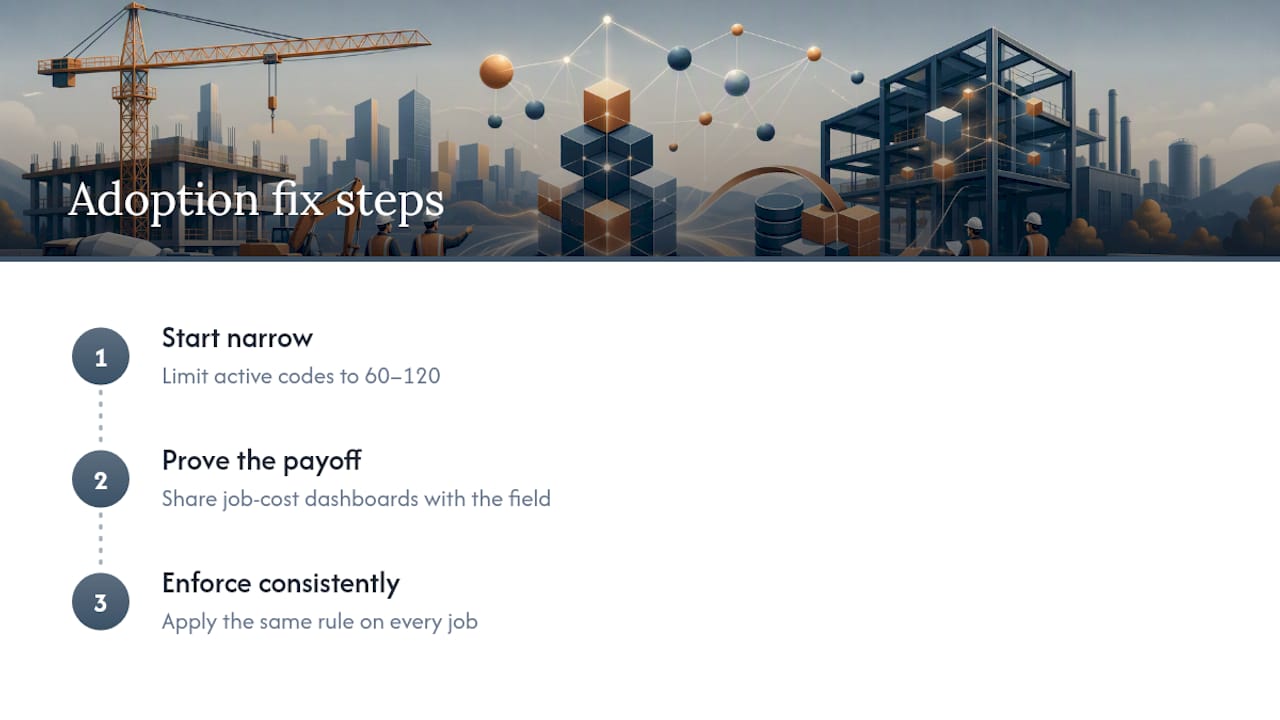
Too many codes, too fast. Companies sometimes import an entire MasterFormat list with hundreds of divisions and sections when a mid-size contractor realistically needs 60 to 120 active codes. Overwhelmed field crews default to whatever code is fastest to find, which defeats the entire point.
No visible payoff for the people doing the coding. If a superintendent codes labor accurately all month and never sees the resulting report, there’s no reason to keep doing it carefully. Sharing job cost dashboards with the field, not just the office, closes that loop.
Inconsistent enforcement. When one PM lets a subcontractor invoice through uncoded because “we’ll fix it later,” and another PM rejects every uncoded invoice, the team learns the rule doesn’t really apply. Governance has to be consistent across every project or it collapses within two quarters.
The fix in every case is the same: start narrow, prove the payoff with real reports the field can see, and enforce the rule the same way on every job. Adoption follows trust, not mandates.
What Actually Matters Once the Codes Are Live
Prioritize one thing above all else: keep the master list boring and stable. Every new code someone wants to add should get pushed back on hard, because a bloated list is where reconciliation breaks down six months from now, not on day one.
Run three checks monthly, without exception. First, tie total coded job costs to the general ledger and chase any gap immediately. Second, scan for variance hotspots where actuals are outpacing committed costs on a specific code, since that’s your earliest warning of a budget problem. Third, run an unmapped-code report and treat every hit as a training failure, not a fluke.
For field teams, the advice is simpler than most consultants make it sound: fewer codes, faster lookup, and a report they actually see. Complexity is the enemy of accurate coding, every time.
— Keith
Get Cost Codes Working Without the Spreadsheet Chaos
Every step in this guide, mapping codes to the chart of accounts, catching unmapped transactions, reconciling WIP monthly, is manual work if you’re running Excel next to QuickBooks next to a separate scheduling tool. DesignFlow Build replaces that stack with one AI-native ERP where cost codes flow from estimating through payroll automatically, instead of getting re-typed at every handoff.

The platform enforces validation rules on postings, so a transaction without a valid cost code gets flagged before it ever reaches your WIP schedule, not after your accountant finds it during close. Implementation typically takes a few weeks, well short of the consultant-led rollouts most ERP switches require. If you’re managing job costing across multiple active projects, check the Essentials, Pro, and Field seat pricing to see which plan fits your team size, or explore the Construction Project Management module directly to see how cost-code governance works inside a live dashboard.
If cleanup and closeout coding matters on your projects, pairing your cost-code discipline with a contractor cleaning compliance checklist helps make sure final-scope costs land in the right bucket too.
Sources
For deeper standards guidance, review the CSI MasterFormat documentation directly, or consult a construction chart of accounts setup guide before finalizing your GL structure.
- MasterFormat — Construction Specifications Institute
- Construction Cost Codes: Standard List & Free PDF Download — ConstructionCoverage
- Construction Chart of Accounts: Contractor Setup Guide — Precision Accounting Consulting
FAQ
What Are the Standard Cost Codes for Construction?
Most US contractors base their cost codes on MasterFormat, the CSI standard organizing work into 50 divisions like Concrete, Electrical, and General Requirements. Companies then add phase, cost-type, and sometimes location segments on top of the base division to create a multi-tier code specific to their operations.
What Is the CSI Cost Code?
A CSI cost code is a numeric identifier from the MasterFormat system that classifies a specific type of construction work, such as 033000 for cast-in-place concrete. It’s the trade-level foundation most contractors build their full multi-tier coding structure on top of.
What Are Cost Codes Used for in Construction?
Cost codes tie every labor hour, material purchase, and subcontractor invoice to a specific scope of work, which makes accurate job costing, progress billing, and variance analysis possible. Without consistent coding, a project manager can’t tell which trade or phase is driving a budget overrun until it’s too late to correct.
What Are the Five Types of Construction Costs?
The five direct cost categories are labor, materials, subcontractors, equipment, and other direct costs. Separating these categories in your chart of accounts is what makes accurate job cost reports and WIP reconciliation possible.
How Much Does DesignFlow Build Cost?
Pricing details for DesignFlow Build’s Essentials, Pro, and Field seat plans are available on the pricing page. The Pro plan runs $100 per office user per month, with Field seats priced separately for mobile field access.