
What a Construction Customer Portal Actually Does for You
A construction customer portal is a branded, secure project window that gives clients live visibility into progress, payments, and approvals, so your team stops fielding “where are we on this?” calls. Small crews get the fastest win from a no-code build. Mid-size firms running several jobs at once usually land on a standalone vendor portal. Companies juggling accounting, scheduling, and field data together tend to outgrow both and move to a portal built into their ERP.
Here’s how to think about which path fits your operation:
- No-code builder: fastest to launch, best for a single pilot project or a small team testing the concept
- Standalone vendor portal: dedicated features and support, but it lives outside your accounting and scheduling systems
- Integrated ERP module: pulls live data automatically from job costing, scheduling, and field apps, best suited to firms scaling past a handful of active projects
Key Takeaways
An effective construction customer portal reduces status calls and speeds up approvals by giving clients live, self-service visibility fed directly from your operational systems.
| Point | Details |
|---|---|
| Match the build path to scale | No-code fits a single pilot; integrated ERP fits firms managing several active projects at once. |
| Prioritize photos and payment status | Clients check progress photos and invoice status more than any other portal feature. |
| Default to hidden commercial figures | Use tokenized links and per-recipient overrides to control what each client sees. |
| Feed the portal automatically | Manual updates break down past one or two projects; live data feeds keep clients engaged. |
| Integrated ERP reduces reconciliation work | Designflow-build reports a 70% cut in manual data entry with implementation in two to four weeks. |
Table of Contents
- Key Benefits of a Construction Customer Portal for Firms and Clients
- Core Features a Construction Customer Portal Must Include
- Should You Build, Buy, or Bundle Your Client Portal?
- How to Roll Out a Construction Client Portal Without Disrupting Active Jobs
- Locking Down Security and Access Controls Without Slowing Clients Down
- Integrations That Keep a Construction Portal Current
- How to Measure Whether Your Client Portal Is Actually Working
- Why an Integrated Portal Tends to Outperform Standalone Tools Over Time
- A Contractor’s Take on Where to Start
- Get a Client Portal That’s Already Connected to Your Job Costing
- Sources
Key Benefits of a Construction Customer Portal for Firms and Clients
The math on a customer portal is simple: every status call you eliminate is time back in a project manager’s day. When clients can check progress, payment status, and photos themselves, your office stops playing phone tag and starts managing exceptions instead of routine updates.
Faster approvals matter even more than fewer calls. A client who can review and sign off on a change order from their phone approves it same-day instead of next week, and that speed shows up directly in your cash flow. Portals that centralize communication also cut down on the “he said, she said” disputes that eat into margin, because every update, photo, and approval has a timestamp attached.
The trade-off is measurable. Contractors who move status updates into a self-service portal typically report fewer weekly check-in calls per active project and shorter turnaround on payment certifications, since clients no longer wait for someone to compile a report.
The benefits break down into four buckets:
- Fewer status emails and calls because there’s one place clients check
- Faster approval cycles that shorten the gap between milestone completion and invoice payment
- Better client satisfaction from a consistent, branded experience instead of scattered email threads
- Cleaner audit trails that reduce disputes and make project handovers less painful
Core Features a Construction Customer Portal Must Include
Not every feature matters equally. Some are table stakes; others separate a portal clients actually use from one they open once and abandon. Guides on building these systems consistently point to the same core feature set: live updates, budget visibility, document sharing, and real-time communication.
Here’s the priority order that matters most for construction specifically:
- A live project dashboard showing percent complete, current phase, and upcoming milestones
- Document and drawing version control, so clients always see the current set, not an outdated PDF from three weeks ago
- Searchable photo galleries organized by date or phase, replacing the endless “can you send me photos of the framing” text
- Payment status and certified progress reporting, giving clients a real-time view of what’s owed and what’s been paid
- Approvals and e-signatures for change orders, so sign-off happens in minutes instead of a mailed document round-trip
- Granular permissions, controlling exactly what each client, subcontractor, or lender can see
- Branded interface and mobile access, because a portal that looks like a generic template undercuts the professionalism you’re trying to project
Pro Tip: Don’t build the photo gallery as an afterthought. Clients check progress photos more than any other feature, and a disorganized gallery is the fastest way to make a polished portal feel amateur.
Skipping the permissions layer is the most common mistake. Without it, you’re stuck choosing between hiding everything or exposing commercial figures you’d rather keep between your office and the client.
Should You Build, Buy, or Bundle Your Client Portal?
Three paths get you to a working portal, and each one trades speed for long-term fit differently.
No-code builders let you connect a data source, design a client-facing interface, and add integrations like payment processing in days rather than months, which makes them the right call for a single pilot project or a firm testing whether clients will actually use a portal before committing budget. The catch is that a no-code tool sits outside your accounting and scheduling systems, so someone still has to manually push updates into it, and that manual step tends to break down once you’re running more than one or two active jobs.
Standalone vendor portals solve some of that with dedicated document management, activity tracking, and permission controls built specifically for construction. They work well for firms running several projects that need more structure than a no-code tool offers, but they still operate as a separate system, which means your job costing and your portal don’t automatically agree on numbers.
Integrated ERP modules pull data directly from project accounting, scheduling, and field operations, so the portal always reflects the same numbers your office is working from. Consider these decision axes when comparing:
- Time to live: no-code wins for speed, integrated ERP wins for staying current without manual updates
- Integration depth: standalone tools need connectors; ERP modules are native
- Security and permissions: all three can do this well, but audit-log depth varies significantly
- Scale: no-code and standalone portals both start to strain past a handful of concurrent projects
How to Roll Out a Construction Client Portal Without Disrupting Active Jobs
A realistic rollout takes two to six weeks depending on which build path you choose, and skipping steps here is what causes clients to abandon the portal after the first login.
- Decide your visibility policy first. Determine what clients see by default (progress, photos, general timeline) versus what stays internal (margins, vendor pricing, change-order cost breakdowns).
- Inventory your data sources. Map where progress updates, invoices, and schedules currently live before you try to connect anything.
- Build templates and automated notifications. Set up standard update formats so PMs aren’t writing custom messages for every milestone.
- Test access flows before your first client logs in. Confirm tokenized links or PIN access work correctly and that permissions actually hide what they’re supposed to hide.
- Run a single-project pilot. Pick one active job, train the PM and the client together, and track adoption for two to three weeks.
- Collect pilot KPIs before expanding, including login frequency, approval turnaround, and reduction in status calls.
Pro Tip: Train the client, not just your team. A portal that your PM understands perfectly but the client finds confusing gets abandoned within the first week, no matter how good the features are.
Locking Down Security and Access Controls Without Slowing Clients Down
Every construction portal has to solve the same tension: make it easy enough that clients actually log in, but tight enough that sensitive numbers don’t leak to the wrong person.
Tokenized links with optional PINs solve the access problem for most clients. Contractors increasingly favor tokenized access over forcing every client to create and remember a password, since password resets generate their own support tickets. Full accounts still make sense for repeat clients like property managers or developers who need persistent access across multiple projects and a stronger audit trail.
Hiding commercial figures by default is the safer starting position. Most portals let you set per-recipient overrides, so a lender or investor might see cost breakdowns a homeowner never does.
Beyond access method, four defaults matter:
- Encrypt data in transit and at rest, no exceptions
- Log every view and approval with a timestamp
- Set a retention policy so old project data doesn’t linger indefinitely
- Keep exports available so clients or auditors can pull records without asking your office to compile them manually
Integrations That Keep a Construction Portal Current
A portal is only as useful as the data feeding it. Manually updating one is a part-time job nobody signed up for, which is why the strongest implementations pull data automatically from the systems your team already runs.
The integrations that matter most:
- Accounting and invoicing feeds so clients see real payment status instead of a number someone typed in last Tuesday
- Schedule and milestone sync so the timeline view always matches your actual project plan
- Field app feeds pulling daily logs, punch lists, and photos straight from the jobsite
- Automated routing for approvals and change-order notifications, so nothing sits in an inbox waiting for someone to notice it
Feeding the portal directly from your operational job system, rather than updating it by hand, is consistently what keeps clients engaged and cuts down on the follow-up questions that eat into a PM’s week.
How to Measure Whether Your Client Portal Is Actually Working
Track a small set of numbers during your pilot, and you’ll have a real business case before you scale to every project.
| Metric | What to Track |
|---|---|
| Status calls per project | Compare weekly call volume before and after portal launch |
| Days to approval | Time between change order submission and client sign-off |
| Invoice collection time | Days between certified progress billing and payment received |
| PM hours saved | Hours per week no longer spent compiling manual status updates |
If a PM saves even a few hours a week across several active projects, and invoice approval speeds up by several days, the case for expanding the portal past a pilot writes itself.
Why an Integrated Portal Tends to Outperform Standalone Tools Over Time
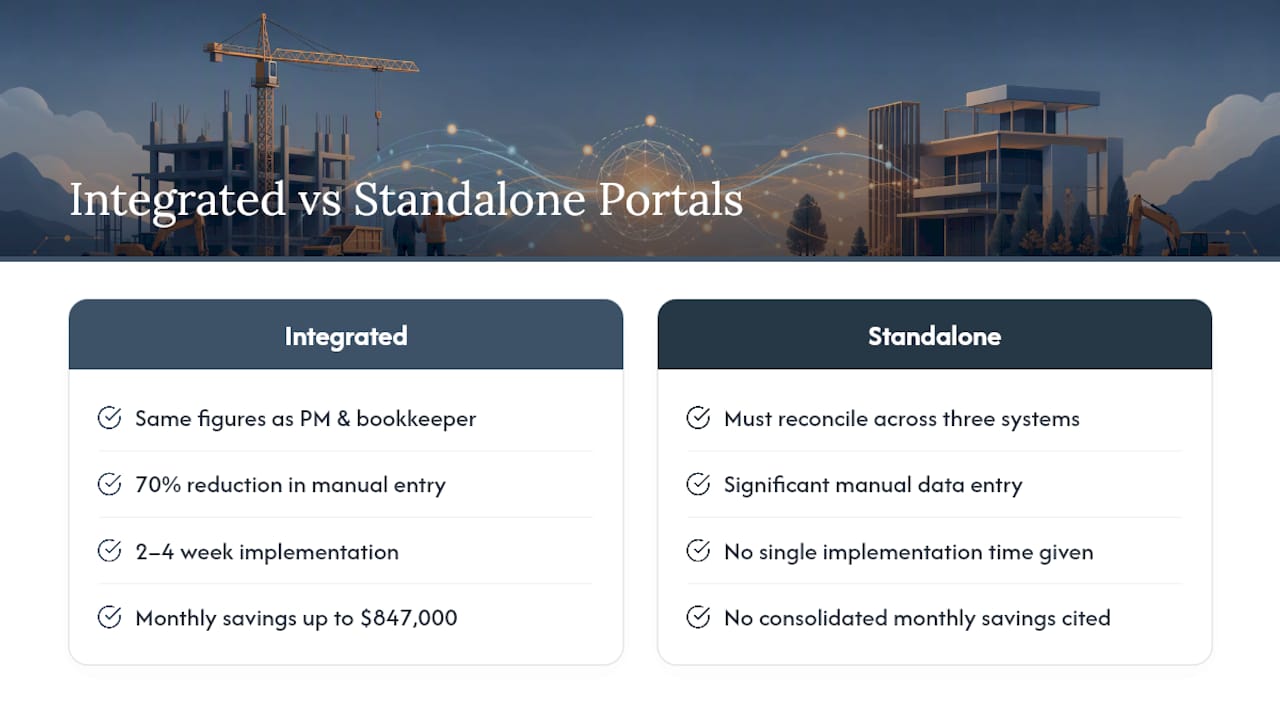
The gap between a standalone portal and one built into your ERP shows up the moment your office has to reconcile numbers across three different systems at month-end. DesignFlow Build’s approach ties the customer portal directly to project accounting, scheduling, and field operations, so the figures a client sees are the same figures your PM and your bookkeeper are already working from.
That single source of truth is where the real time savings show up. DesignFlow Build reports a 70% reduction in manual data entry for firms that consolidate their tools, with implementation running two to four weeks and monthly savings reaching as high as $847,000 for some clients.
When a portal pulls live from job costing and scheduling instead of a manual export, month-end reconciliation stops being a fire drill and approvals stop waiting on someone to update a spreadsheet first.
A very high user adoption rate on the platform suggests the interface is intuitive and minimizes the need for retraining, unlike bolted-together systems.
A Contractor’s Take on Where to Start
Start with what clients actually notice: a live photo feed and clear invoice visibility. Those two features alone kill most status calls before you’ve built anything more elaborate.
Pilot on one project before you roll out company-wide. Track approval turnaround and call volume for a few weeks, because that data is what justifies the next step, not enthusiasm.
If your team is still juggling separate accounting and scheduling tools, the portal is the smaller problem. Prioritize integrated ERP modules once your project count outgrows manual updates.
— Keith
Get a Client Portal That’s Already Connected to Your Job Costing
Building a portal is only half the problem. Keeping it accurate without a PM manually updating it every week is the part most contractors underestimate. Designflow-build’s customer portal isn’t a bolted-on add-on. It’s built into the same AI-native ERP that runs your project accounting, scheduling, and field data, so client-facing updates happen automatically instead of depending on someone remembering to log in and refresh a status.

That’s the practical difference between a standalone portal and Designflow-build’s approach: your clients see live payment status, current schedules, and progress photos pulled straight from the same system your office already runs on, with no manual sync step to forget. If you’re evaluating whether to migrate from a no-code pilot or a standalone tool, check the AI Construction ERP platform to see how the portal connects to job costing and scheduling, or start a free trial to test it on one active project before committing further.
Sources
Consult the linked guides above for build templates and step by step demos, including the construction software glossary for terminology.