
The Construction RFI Process: A Step-by-Step Guide

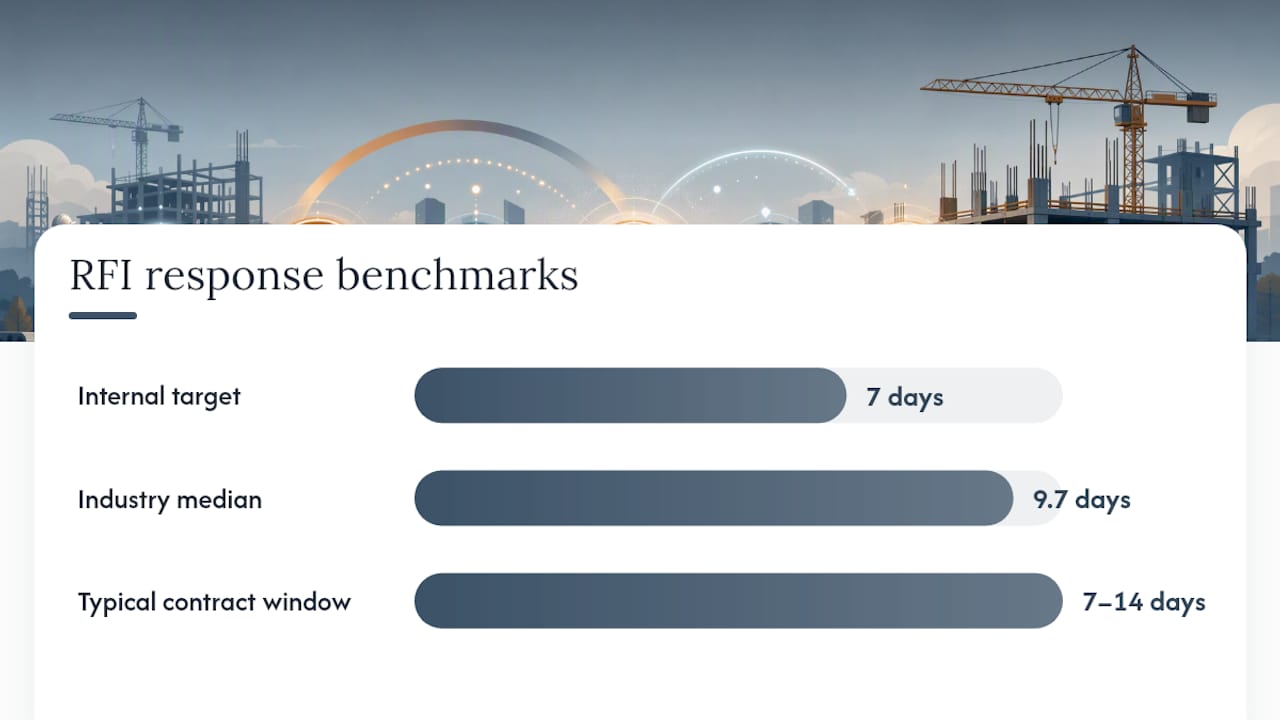
A construction RFI is a single-subject, written request that secures a traceable design clarification, not a change order. Subcontractors and general contractors typically initiate them; architects, engineers, or owner representatives respond within a contractually set window. A well-run construction RFI process produces a documented answer, not extra scope. Contracts usually allow 7 to 14 days for a response, though the median across industry surveys runs closer to 9.7 days.
TL;DR:
- Properly screening RFIs internally before submission can cut unnecessary questions by up to half, preventing delays caused by duplicate or irrelevant requests.
- Using a detailed RFI template with precise references and attachments reduces response time by clarifying issues and minimizing back-and-forth clarification.
- Routing RFIs correctly to discipline-specific reviewers and tracking response times in a centralized system improves response time consistency and accountability.
- Maintaining a comprehensive RFI log with key timestamps and disposition codes enables early identification of schedule risks and supports delay claim defense.
- Automating RFI management through connected software with AI features reduces manual errors, ensures up-to-date responses, and keeps RFIs tied to current drawing revisions.
Table of Contents
- What Is the Construction RFI Process, Step by Step?
- What Should Go in an RFI Template?
- Who Submits and Routes RFIs, and When?
- How Do You Track RFIs and Measure Response Times?
- What Best Practices Reduce RFI Delays?
- What Are the Most Common RFI Mistakes?
- Copy-Ready RFI Templates and Examples
- How Does Software Change RFI Outcomes?
- Why Tightening RFI Governance Pays Off
- A Faster Way to Run Your Construction RFI Process
- Sources
What Is the Construction RFI Process, Step by Step?
Every RFI starts as a question in the field, and most of them die there because the general contractor already knows the answer. That screening instinct is the first, and most overlooked, step in the entire construction RFI process. Skipping it is how a project ends up with 400 RFIs instead of 150, half of them repeat questions the architect answered three weeks earlier for a different trade.
Here is the workflow that actually holds up on a commercial job site, from a foreman spotting a conflict to the file getting closed out.
- Identify and isolate the issue. A single unclear dimension, a missing spec callout, an unforeseen field condition. Resist the urge to bundle three questions into one RFI. A multi-topic RFI takes longer to answer because the reviewer has to route pieces of it to different people, and if one part stalls, the whole thing sits.
- Screen it internally. Before anything leaves the GC’s office, someone with authority checks whether the answer already exists in the drawing set, a prior RFI response, or an addendum. Standardizing this validation step cuts unnecessary submissions and keeps the design team’s attention on questions that actually need it.
- Draft the RFI with exact references. Cite the sheet number, detail callout, and spec section. Propose a solution if you have one; it gives the reviewer something to confirm rather than a blank page to fill.
- Route to the correct discipline. A structural question goes to the structural engineer, not the architect of record, who then has to forward it and burn two days in the process.
- Review and disposition. The reviewer answers with a clarification, or flags that the request implies a change in scope, cost, or schedule. That flag is the trigger to open a change order, because an RFI response is never itself authorization for extra work or payment.
- Distribute the answer. Everyone affected, superintendent, subs, PM, gets the resolved RFI, not just the person who asked.
- Log and close. The RFI record gets a closed status, a disposition note, and a permanent spot in the project’s audit trail.
That closeout step matters more than most schedules give it credit for. A project with a high, sustained RFI count is rarely a coincidence. It usually signals document coordination problems that predict downstream change orders and schedule slippage. Treat your RFI log as an early warning system, not just paperwork.
What Should Go in an RFI Template?
A reviewer should be able to open your RFI, understand the exact issue, and answer it without a phone call. That’s the entire design goal of a good template. Get the fields wrong and you’ve just created a second round-trip you didn’t need.
Every RFI, whether typed into email or logged in software, needs these core fields:
- RFI number and project name for tracking and cross-referencing
- Originator name and company, plus the date submitted
- Discipline and recipient (architect, structural engineer, MEP engineer, owner rep)
- Sheet, detail, or spec section reference tied to the exact drawing revision
- A single, specific question, written in one sentence if possible
- A proposed resolution, when the field team has one
- Attachments: photos, markups, or a snapshot of the conflicting details
- Requested response date and a note on schedule impact if the date slips
The difference between a vague RFI and a clear one is almost always specificity. “Please confirm door hardware” invites a slow, confused answer. “Sheet A501, Door 114B: schedule calls for a panic hardware set, but Detail 4/A502 shows a standard lockset. Please confirm which governs” gets answered same day, because there’s nothing left to interpret.
Pro Tip: Attach a marked-up snapshot of the actual conflict, not just a written description. Creating the RFI directly on the drawing and attaching the annotated view keeps the response tied to the correct revision and removes almost all ambiguity for the reviewer.
Who Submits and Routes RFIs, and When?

Routing failures cost more time than slow answers do. An RFI that lands on the wrong desk doesn’t just wait, it waits invisibly, because nobody’s tracking a clock on a request the recipient doesn’t think is theirs.
Set these rules before the job starts, not after the first missed deadline:
- The GC answers internally when the question is already covered in the drawing set, an approved submittal, or a prior RFI response.
- The GC routes externally only when the answer requires new design direction from the architect, engineer, or owner.
- A designated RFI coordinator, often a project engineer, owns the log, confirms routing accuracy, and verifies every response before it goes back to the field.
- Escalation triggers kick in automatically once an RFI passes its due date. A three-day grace period followed by a direct call or a written escalation to the project executive keeps stalled items from disappearing into inbox purgatory.
- Submission channel matters. Email works for low-volume jobs but has no built-in audit trail and buries old threads. Project management software centralizes the log and timestamps every action. Drawing-linked RFIs go a step further by tying the request directly to the sheet and revision, which reduces the chance an answer gets applied to an outdated drawing.
On any job running more than a handful of RFIs a week, email alone becomes a liability. Someone always “forgets” they were CC’d on the answer.
How Do You Track RFIs and Measure Response Times?
An RFI log is only useful if it captures enough detail to answer three questions later: who owes a response, how long they’ve had it, and what it will cost if it slips. Skimpy logs turn into shouting matches during closeout, when nobody can prove who caused a two-week delay.
At minimum, track these fields for every RFI:
- Submission date and routing date
- Contractual or internal due date
- Actual response date and responder name
- Disposition (clarified, change required, rejected, duplicate)
- Cost or schedule impact, if any
- Current status (open, overdue, answered, closed)
Response time is the single clearest health indicator on the entire log. Industry surveys put the median RFI response time at 9.7 days, even though most contracts specify a 7 to 14 day window. Projects that consistently answer inside 7 days tend to see fewer downstream schedule impacts, according to technical analysis from CMAA, which makes 7 days a reasonable internal target even when the contract allows more.
Beyond raw response time, watch a few operational KPIs: average time to close, percentage of RFIs overdue at any given point, duplicate RFI rate (a red flag for coordination gaps), and the percent closed on first response without follow-up questions. That last one tells you how well your team is writing RFIs in the first place. A well-maintained log also becomes your best evidence if a delay claim ever goes to dispute. Time-stamped, disposition-coded records carry far more weight than a memory of “we asked about that months ago.”
What Best Practices Reduce RFI Delays?
Most RFI backlogs aren’t a communication problem. They’re a discipline problem. Teams that fix the discipline, not just the software, see the volume and the response time both drop.
- Screen every RFI internally before it leaves the building. Assign someone, usually a project engineer, to check the drawing set and prior RFI log first. This single habit eliminates a meaningful share of unnecessary submissions.
- Standardize the template and require attachments. Every RFI gets the same fields, every time, with a markup or photo attached whenever the issue is visual.
- Set internal SLAs tighter than the contract. A 48 hour internal screening window and a 7 to 10 day external response target keep you ahead of the contractual deadline instead of racing it.
- Hold a weekly RFI review. Ten minutes with the PM, superintendent, and project engineer to flag anything approaching its due date, before it becomes an escalation.
- Tie every RFI to a task or drawing, and automate the reminders. Manual tracking is where RFIs quietly die. Centralizing the workflow in software materially reduces lost or forgotten requests compared to email threads scattered across a dozen inboxes.
Pro Tip: Track your team’s percentage of RFIs closed on first response over a full quarter.
What Are the Most Common RFI Mistakes?
Three mistakes account for most of the friction in a typical construction RFI process. Vague or multi-topic questions force reviewers to guess at intent, which slows every answer down and often triggers a follow-up RFI just to clarify the first one. Misrouted requests sit unanswered because the recipient doesn’t realize the clock is running on them; enforcing a single point of routing responsibility fixes this fast.
Verbal or email-only answers create the worst exposure. A superintendent who gets a “yeah, that’s fine” on a job-site walk has nothing to show if that answer gets disputed later. Every response needs to land in the formal log, no exceptions.
- Rephrase multi-topic RFIs into separate, single-subject requests before submission
- Enforce discipline-based routing rules so requests never sit with the wrong reviewer
- Require every answer, verbal or written, to be logged formally within 24 hours
- Treat any response implying added scope or cost as the start of a change-order request, not a closed RFI
Copy-Ready RFI Templates and Examples
A usable RFI template needs the same bones every time: number, project, originator, discipline, sheet reference, single question, proposed resolution, attachments, and a requested response date. Paste the structure below into email or your project management software and adapt the details.
| Example Trigger | Core Issue | Proposed Resolution Field |
|---|---|---|
| Conflicting dimension | Architectural sheet A201 shows a 6 inch wall; structural sheet shows a thicker wall at the same gridline | Confirm which thickness governs and revise the conflicting sheet |
| Missing spec detail | Section references a hardware set not shown in the door schedule | Confirm hardware group or issue revised schedule before procurement cutoff |
| Unforeseen field condition | Existing utility line discovered at Column Line C, conflicting with new footing location | Provide relocation direction or confirm footing redesign |
For drawing-linked RFIs, skip the free-text description entirely where possible. Create the RFI directly on the plan sheet in your software, attach the markup, and let the location reference itself. It cuts out an entire round of “can you clarify where exactly” follow-ups.
- Keep the question to one sentence wherever possible
- Attach a photo or markup any time the issue involves a physical condition
- State the requested response date and the schedule consequence of missing it
How Does Software Change RFI Outcomes?
The steps that benefit most from moving off email and spreadsheets are screening, routing, and SLA tracking, exactly the three places where manual RFI management breaks down first. An AI-native system can flag a duplicate question before it’s submitted, auto-route by discipline, and escalate anything approaching its due date without a human remembering to check.
Those numbers reflect what happens when RFI logging, project scheduling, and cost tracking share one system instead of three disconnected tools.
If you’re moving off email threads, here’s a practical checklist:
- Migrate the open RFI log first; closed items can follow later
- Standardize your template fields before importing, not after
- Set automated reminders for internal screening and external due dates
- Train the field team on drawing-linked submission before rollout, not during it
Pro Tip: Run your current RFI log and your new software in parallel for one week before fully switching over. It catches formatting mismatches before they cause a missed deadline.
Why Tightening RFI Governance Pays Off
Loose RFI habits tend to look manageable right up until closeout, when unresolved threads become the centerpiece of a delay claim. The projects that avoid that mess aren’t the ones with the fewest problems in the field. They’re the ones with a screening step nobody skips and a log nobody argues with.
The pattern is consistent: teams that assign real ownership to routing and response tracking see fewer duplicate RFIs and faster closures, because accountability replaces guesswork. That discipline is worth building before volume gets ahead of you, not after. Moving that discipline into a connected system, rather than a shared inbox, is usually the point where teams stop firefighting the log and start using it as a genuine record of project risk.
Good RFI governance isn’t glamorous work. It’s a log somebody checks every morning and a routing rule nobody bends. Projects that treat it that way rarely end up explaining a six-week delay to an owner’s attorney.
— Keith
A Faster Way to Run Your Construction RFI Process
Everything covered above, screening, routing, logging, SLA tracking, is exactly what Designflow-build’s platform automates for contractors and project engineers who are tired of chasing answers across email threads and spreadsheets. The system routes RFIs to the correct discipline automatically, flags overdue responses before they become schedule problems, and keeps every RFI tied to its drawing revision so nothing gets answered against outdated plans.

If your current RFI process still lives in your inbox, that’s the first place to fix it. Take a look at how the platform’s AI-driven project management handles document coordination, or check the construction software glossary if you want to understand the terminology before you dig in. Book a walkthrough to see your own drawing set and RFI log inside the system before deciding anything.
Sources
- How to manage RFIs efficiently in construction projects | Fieldwire by Hilti
- Construction RFI Software | Bluebeam
- Construction RFI Workflow: Field guide for GCs | Datagrid