
Make Sureties Trust Your Construction WIP with a Five Column Monthly Close

A construction WIP report is the month-end snapshot that converts job costs into earned revenue and shows whether each job is over-billed or under-billed. Run it monthly, calculate percent complete using cost-to-cost, and reconcile it to your general ledger every time. Under FASB’s ASC 606, that method is the standard for measuring progress on most construction contracts, and it’s what sureties and lenders expect to see when they evaluate your books.
TL;DR:
- Accurate WIP reports require consistent updates to the estimated total cost and proper change-order tracking to prevent profit margin erosion.
- Monitoring sharp changes in percent complete and growing overbilling without progress signals potentially outdated estimates or billing issues.
- A structured, repeatable monthly close process with designated ownership improves report reliability and auditability.
- Automated construction software that syncs field costs and automates reconciliation reduces errors caused by manual spreadsheet updates.
- Clear documentation, stable format, and backup data are essential for passing surety and CPA reviews, speeding up approval processes.
Table of Contents
- What Goes Into a WIP Reporting Construction Schedule
- Calculating Percent Complete and Earned Revenue
- Where WIP Reports Go Wrong
- The Monthly WIP Close Process, Step by Step
- How Software Cuts WIP Errors and Manual Work
- Presenting a WIP That Passes Surety and CPA Review
- Turning WIP Data Into Daily Practice
- A Contrarian Take on WIP Discipline
- Making WIP Close Faster Without the Manual Grind
- Sources
What Goes Into a WIP Reporting Construction Schedule
A work-in-progress schedule isn’t a budget report and it isn’t a schedule of values. It’s a five-column financial tool that translates job costs into a real revenue and billing picture, and every contractor doing percentage-of-completion accounting needs one.
Here’s what each column actually tells you, following the standard WIP schedule structure that most CPAs and sureties expect:
- Contract value — the total revenue you’ll collect, including every approved change order. Miss a change order here and your percent complete skews wrong for the rest of the report.
- Estimated total cost — your project manager’s current, revised estimate to complete the job, not the original bid number.
- Costs incurred to date — everything posted to the job cost ledger through the reporting date, labor, materials, subs, equipment.
- Percent complete — costs incurred divided by estimated total cost. This is the cost-to-cost method, and it’s the input that drives everything else.
- Earned revenue and billed to date — earned revenue is what percent complete says you’ve actually earned; billed to date is what you’ve invoiced. The gap between them is your over- or underbilling.
Get these five columns right and you have a construction WIP report that actually means something, not just a spreadsheet that looks official.
Calculating Percent Complete and Earned Revenue
The formulas are simple. Applying them correctly, especially the cost-to-complete estimate, is where most contractors slip.
- Percent complete = costs incurred to date ÷ estimated total cost. Use actual cost postings, not billed amounts, and update the estimated total cost every month based on your PM’s current view of what’s left to spend.
- Earned revenue = percent complete × total contract value. This is the revenue you’re allowed to recognize this period under percentage-of-completion accounting.
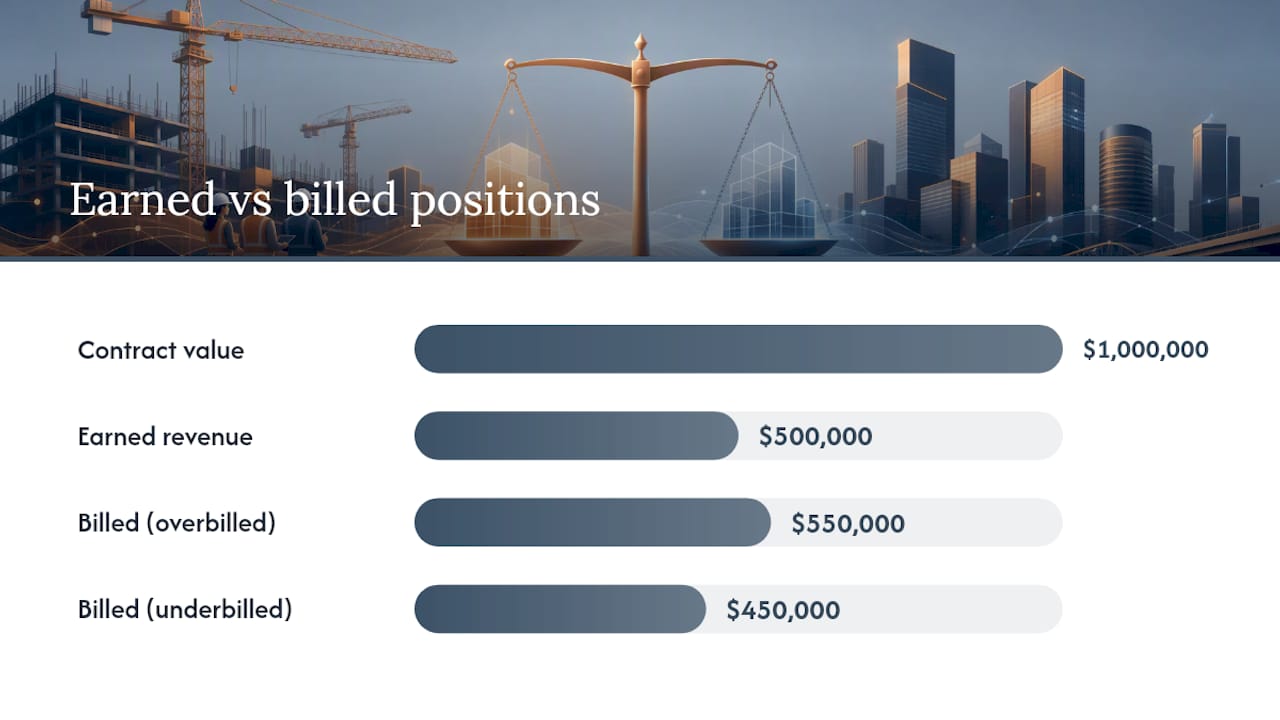
- Over/underbilling = billed to date minus earned revenue. A positive number means you’ve billed more than you’ve earned (overbilling); a negative number means you’re behind on billing (underbilling).
Here’s a compact example. Say a job has a contract value of $1,000,000 and an estimated total cost of $800,000. Earned revenue is $500,000. If you’ve billed $550,000 so far, you’re overbilled by $50,000, a liability on your balance sheet even though the cash is already in the bank. If you’ve billed only $450,000, you’re underbilled by $50,000, meaning you’ve done work you haven’t invoiced for yet.
Run that same math across every active job and you get a real-time read on where cash is sitting relative to work performed.
Where WIP Reports Go Wrong
Profit fade is the quiet killer in construction accounting: a job that looked like it would post a 15% margin at the 20% mark, but by the 70% mark, the margin has eroded to 6% or less. It happens because the estimated total cost column doesn’t get updated fast enough, and small overruns compound before anyone notices.
Reviewing WIP figures at the 30% and 60% completion checkpoints catches margin erosion while there’s still time to act.
Watch for these signals every month:
- A job’s percent complete jumps sharply between periods with no matching cost activity, a sign the cost-to-complete estimate wasn’t updated.
- Overbilling that keeps growing without a corresponding increase in progress, which usually means billing is running ahead of actual field production.
- Underbilling on a job nearing completion, which often points to unbilled change orders sitting in a drawer.
- The same job showing profit fade two months in a row, a pattern, not a blip.
Pro Tip: Flag any job where the cost-to-complete estimate hasn’t changed in two consecutive WIP cycles. An estimate that never moves usually means nobody’s actually re-forecasting it.
The Monthly WIP Close Process, Step by Step
A defensible WIP schedule comes from a repeatable close process, not a scramble on the 28th of the month. CCA’s guidance on WIP closes breaks it into phases your team can assign and repeat.
- Post all job costs and billings for the period, closing out labor, AP, and invoicing before you touch the schedule.
- Pull accounting outputs, job cost reports and billing summaries, and populate the WIP schedule’s five columns.
- Collect updated cost-to-complete estimates and change orders from project managers and estimators. This step alone determines whether your percent complete is honest or fictional.
- Review and validate at the 30% and 60% checkpoints, with the PM and CFO both signing off on any job showing a swing in margin.
- Reconcile to the general ledger and P&L, and post the over/underbilling journal entries so the balance sheet reflects reality.
Assigning a named owner to each phase, rather than leaving the whole process to one overworked controller, is what turns a WIP schedule into an auditable trail instead of a guess.
How Software Cuts WIP Errors and Manual Work
Manual WIP schedules built in spreadsheets fail for a predictable reason: someone forgets to update a cost-to-complete number, or a change order never makes it into the file. Integrated construction accounting systems close that gap by automating job-cost posting, billing capture, and reconciliation so the schedule reflects real-time data instead of last month’s snapshot.
Look for these capabilities when evaluating a system:
- Clean cost-code structures that prevent costs from landing in the wrong bucket, since messy job costing corrupts percent complete before you even open the WIP report.
- Change-order workflows that route approvals straight into contract value, not a separate tracker someone has to remember to update. A structured change-order process matters as much for WIP accuracy as it does for margin protection.
- Field data sync so labor and material costs post the same day they’re incurred, not two weeks later.
- Retainage handling that separates held-back amounts from billed-to-date figures automatically.
AI-driven forecasting can flag cost-to-complete risk earlier than a manual review cycle would catch it, surfacing jobs trending toward profit fade before the 60% checkpoint. But automation multiplies whatever process discipline already exists. A system full of stale cost codes and unposted labor hours won’t produce an accurate WIP report just because it’s automated.
Presenting a WIP That Passes Surety and CPA Review
Sureties, lenders, and CPAs pull the WIP schedule before almost anything else when they evaluate a contractor. It’s the first document underwriters check when setting bonding capacity or renewing a line of credit.
What earns trust on review:
- Consistency month to month, with the same format and the same reconciliation to the general ledger every cycle.
- Backup for cost-to-complete estimates, PM notes, and change-order documentation that supports the numbers rather than a bare percentage.
- No unexplained jumps in profit fade or overbilling between periods without a clear narrative attached.
A schedule that looks the same every month, reconciles cleanly, and comes with real backup gets approved faster and questioned less.
Turning WIP Data Into Daily Practice
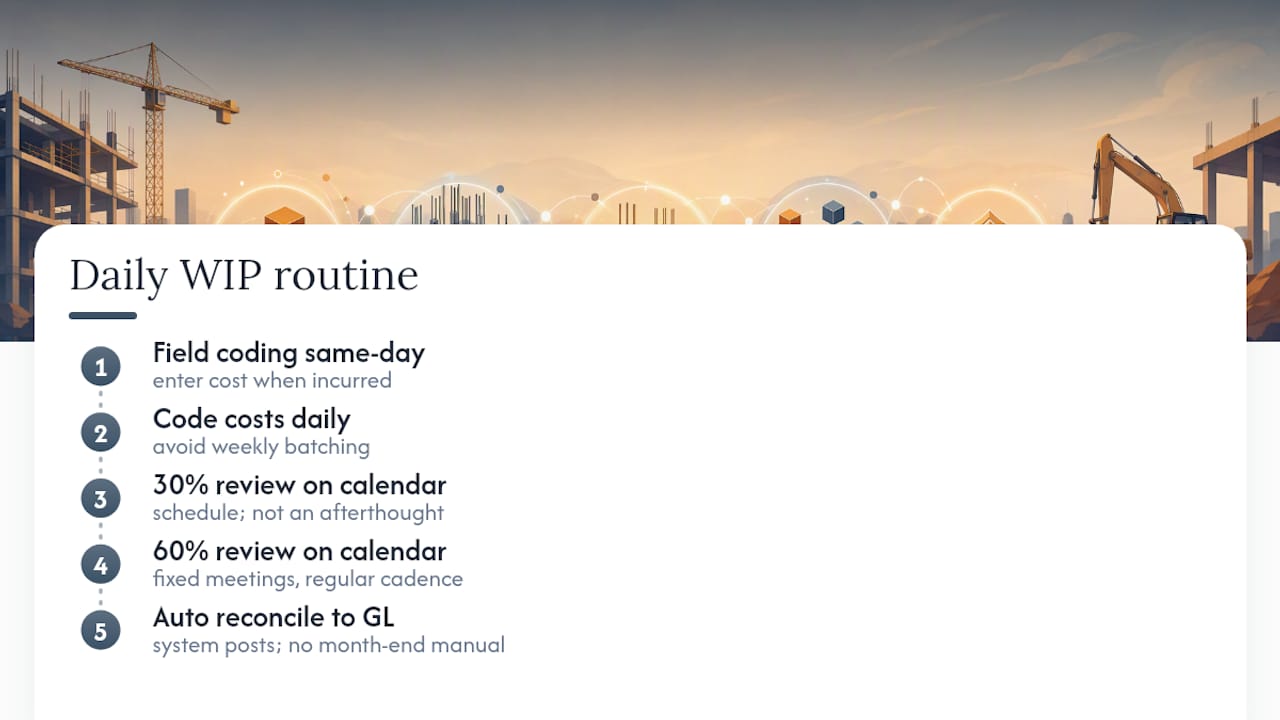
Field cost coding, done the day the cost is incurred, is the single biggest driver of an accurate WIP schedule. Automation helps, but it can’t fix data that never gets entered.
Teams that get this right tend to run the same routine: code costs daily instead of batching them weekly, hold the 30% and 60% reviews on the calendar rather than as an afterthought, and let reconciliation to the GL happen automatically instead of manually at month end. If you want a reference for the vocabulary used across these reports, the construction software glossary covers the terms that come up most often in WIP conversations.
A Contrarian Take on WIP Discipline
Most WIP advice focuses on the spreadsheet mechanics, and that misses the actual failure point. The columns are simple math. What breaks WIP reporting is organizational: nobody assigned ownership of the cost-to-complete estimate, so it goes stale, and stale estimates produce a percent complete number that’s technically calculated correctly and substantively wrong.
Skip that conversation and you’re not doing WIP reporting. You’re doing WIP theater, a schedule that satisfies a checklist but tells nobody the truth about where the job stands. Fix the ownership problem before you fix the template.
— Keith
Making WIP Close Faster Without the Manual Grind
Building an accurate construction WIP report by hand means chasing PMs for cost-to-complete updates, re-keying job costs from one system into another, and hoping nothing falls through the cracks before the CPA calls. An AI-native ERP can handle job costing, billing, and WIP in one connected system, so the schedule pulls real-time cost data instead of relying on someone remembering to update a spreadsheet.

If your WIP close still depends on chasing spreadsheets across three different tools, take a look at DesignFlow Build’s AI construction software and see how job costing, billing, and reporting connect automatically. You can visit software providers’ websites to learn about available plans and request demos to see how your own job data would look inside a live WIP schedule.
Sources
- How to Read a Construction WIP Schedule: Percentage-of-Completion, Over- and Under-Billing — Beancount
- How to Read a WIP Schedule in Construction — SPM The Construction CFO
- Construction WIP Reports 2026: Owner’s Guide | CCA