
Invoice Data Extraction: Feed Construction ERPs Without Manual Rekeying

Invoice data extraction uses AI-enhanced OCR to convert invoices into structured JSON, CSV, or Excel records, complete with field-level confidence scores for every value it pulls. The result is fast: modern models return invoice number, dates, vendor details, totals, and line items in under two seconds per document. For accounts payable teams, that means less manual keying, faster three-way matching, and an audit trail that holds up when someone asks where a number came from.
TL;DR:
- Pilot the extraction model on your most inconsistent vendor invoices to ensure it can handle complex and cluttered documents before broader deployment.
- Incorporate validation layers such as math checks, vendor matching, and duplicate detection to catch errors that confidence scores alone might miss.
- Use multi-page handling and high-resolution scans to improve accuracy, especially for construction pay applications with nested tables and cross-referenced totals.
- Export extracted data in formats like JSON, CSV, or directly to your API based on your workflow needs, ensuring proper mapping of titles, codes, and cost categories.
- Integrate the structured invoice data into construction ERP systems to automate job costing, payroll, and compliance, reducing manual entry and processing time.
Table of Contents
- Why Invoice Data Extraction Matters for AP Teams
- How Does Invoice Data Extraction Actually Work?
- What Fields Should an Invoice Extraction Schema Capture?
- How Accurate Is Invoice Data Extraction, and When Should a Human Review It?
- What Do You Need Before Implementing Invoice Data Extraction?
- JSON, Excel, or Direct API: Which Output Format Fits Your Workflow?
- Why Construction Invoices Need Different Extraction Rules
- How Structured Invoice Data Powers a Construction ERP
- What Should You Actually Do First?
- Get Invoice Data Straight Into Your Construction ERP
- Sources
Why Invoice Data Extraction Matters for AP Teams
Scanning an invoice and extracting data from it are not the same thing. A scanner gives you a picture of a document. Extraction gives you a database record: a vendor field mapped to your vendor master, a total that reconciles against a purchase order, a due date your system can act on. That difference is what makes automation possible downstream.
Teams that make this shift see it in their numbers. Manual entry time drops, posting errors fall because a human isn’t retyping a five-digit total from a blurry PDF, and every extracted field carries a timestamp and confidence score for audits. Modern AI-OCR models, like the invoice model built into Document Intelligence, already handle this at scale for general business documents.
Construction adds a layer most generic AP tools were never built for: pay applications, retainage, and job-cost coding. This is where the gap between “we digitized our invoices” and “we automated our invoice workflow” tends to show up first.
- Fewer manual entry hours per invoice batch
- Lower posting-error rates because totals are validated before they hit the ledger
- A searchable audit trail tied to the original document image
- Faster vendor payment cycles once approvals stop waiting on data entry
How Does Invoice Data Extraction Actually Work?
Four architectures dominate the market, and picking the wrong one for your invoice mix is the single most common reason a rollout stalls.
- Template-based parsing. You define a fixed layout per vendor. It’s accurate and cheap to run once configured, but it breaks the moment a vendor redesigns their invoice. Best fit: a handful of high-volume, stable suppliers.
- Classic OCR plus rules. Text recognition paired with regex or keyword rules. It requires real configuration work up front and struggles with layout drift, but it’s transparent, which auditors like.
- AI and machine learning models. These read invoices the way a person does: recognizing that “Total Due” and “Amount Payable” mean the same thing, even in a layout the model has never seen. They handle line-item tables and semantic variation far better than rules-based systems.
- Hybrid architectures. AI extraction layered with deterministic validation, a math check confirming unit price times quantity equals the line total, catches silent extraction errors that a confidence score alone might miss.
Performance expectations have moved fast. Developer-facing extraction APIs now return structured JSON in low single-digit seconds per document, which is fast enough for real-time approval workflows rather than overnight batch jobs, according to ParseFlow’s invoice extraction API documentation. Field-level confidence scores let you route only the uncertain fields to a human, instead of every invoice.
Pro Tip: Don’t pilot a new extraction tool on your cleanest, most uniform vendor invoices. Pilot with your messiest, most inconsistent vendor first. If the model handles that, it will handle everything easier than it.
What Fields Should an Invoice Extraction Schema Capture?
A usable schema separates header-level data from line-item data, and it keeps metadata attached to every value so a reviewer can trace a number back to its source page.
Header fields: invoice ID, invoice date, due date, vendor name and tax ID, bill-to and ship-to addresses, subtotal, tax amount, total due, and currency.
Line-item fields: description, quantity, unit of measure, unit price, line total, tax per line, and a general ledger code mapping for job costing.
Metadata to retain: source filename, page number, bounding box coordinates, and a confidence score per field, not just per document.
Document Intelligence’s prebuilt invoice model organizes this exact structure into three layers, readResults for raw OCR text, pageResults for tables and bounding boxes, and documentResults for the invoice-specific key values, which is a useful reference shape whether or not you use that specific extraction model. For CSV or Excel exports, mirror that hierarchy: one row per line item, with header fields repeated across rows so a spreadsheet formula can still roll up totals correctly.
How Accurate Is Invoice Data Extraction, and When Should a Human Review It?
Confidence scores only help if you act on them consistently. The work is in setting that threshold correctly for your risk tolerance, not in trusting the model blindly.
Three validation layers catch what confidence scores alone miss:
- Math checks. Quantity times unit price should equal the line total, and line totals should sum to the invoice total. A mismatch flags extraction error even when every individual field scored high confidence.
- Vendor matching. Cross-reference the extracted vendor name and tax ID against your vendor master to catch typos, duplicate vendor records, or fraud attempts.
- Duplicate detection. Flag invoices with matching vendor, amount, and date combinations before they get paid twice.
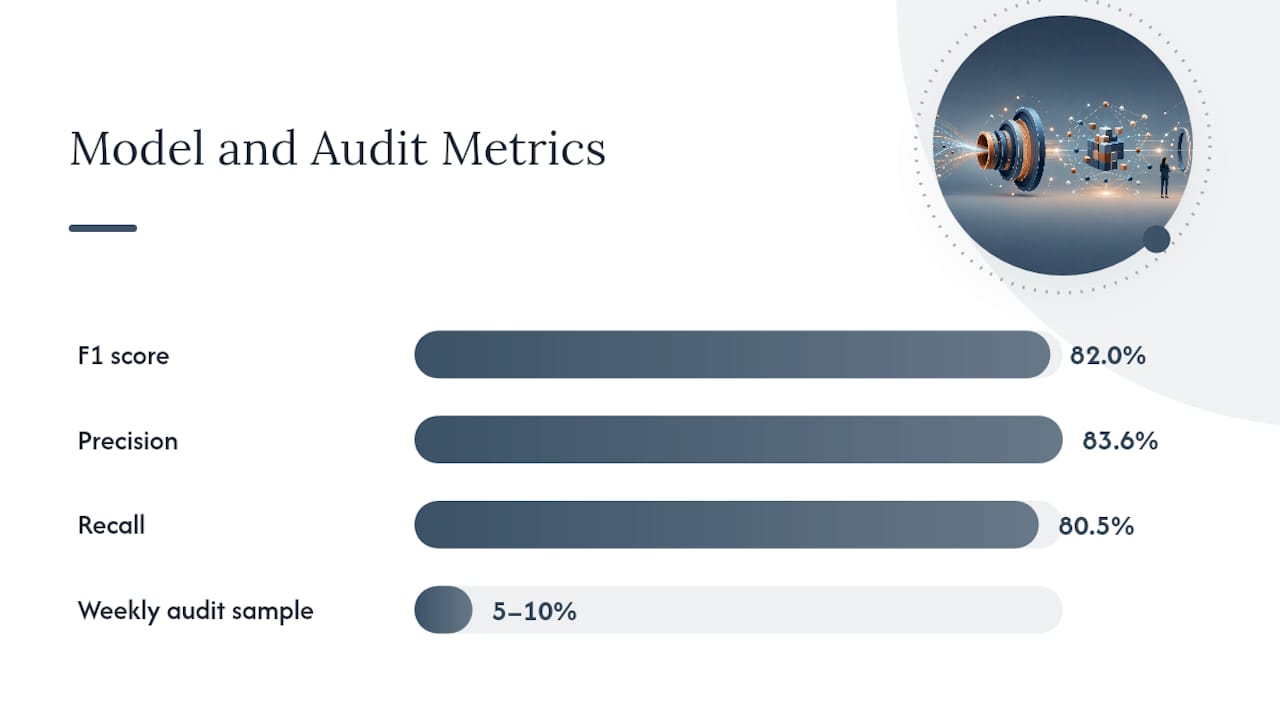
Beyond these basics, multilevel outlier detection frameworks analyze transactions at three levels: individual transaction, account-level patterns, and combinations across variables like vendor and cost code together. Research applying self-supervised anomaly detection to accounting data reports F1 scores around 0.820, with precision near 0.836 and recall near 0.805, outperforming simple rule-based filters at catching genuinely suspicious entries without flooding the review queue with false positives.
A workable policy: auto-approve anything above your confidence threshold with passing validation checks, route everything else to a review queue, and sample audit 5 to 10 percent of auto-approved invoices weekly to make sure your threshold hasn’t drifted.
What Do You Need Before Implementing Invoice Data Extraction?
Rollouts fail more often from poor input prep than from weak software. Get these right first.
- File requirements. Accept PDF, JPEG, PNG, and TIFF at minimum. Scan at 300 DPI or higher; anything lower degrades OCR accuracy on small print like line-item tax codes.
- Multi-page handling. Confirm your tool treats a multi-page invoice as one document, not one page per record. This matters enormously for construction pay applications that routinely run multiple pages.
- Pilot scope. Pick 15 to 20 invoices from your three most inconsistent vendors, not your cleanest ones. Set KPIs before you start: target extraction accuracy per field, review-queue volume, and time-to-post.
- Evaluation window. Run the pilot for two to four weeks, long enough to catch a full invoice cycle, including any recurring vendor that only bills monthly.
- Integration path. Decide between a direct API/SDK integration, a prebuilt ERP connector, or a CSV/Excel handoff into your existing accounting software. RPA tools can bridge the gap if no native connector exists yet.
- Security checkpoints. Confirm data-at-rest encryption, retention policy, and whether the vendor’s data handling meets your compliance obligations, including GDPR requirements if you process invoices from EU-based vendors.
Pro Tip: Budget for a two to four week rollout window rather than a multi-month one. If a vendor’s implementation timeline stretches past a month for a straightforward invoice-extraction use case, that’s usually a sign the tool needs heavy custom configuration, not a sign the problem is inherently hard.
JSON, Excel, or Direct API: Which Output Format Fits Your Workflow?
The right export format depends on volume and how much custom logic sits between extraction and your ledger.
- JSON fits real-time integrations where a downstream service or ERP API consumes the data programmatically, and it preserves nested line-item structures cleanly.
- CSV and Excel work best for finance teams that review batches manually before posting, or for smaller operations without a dedicated integration layer.
- Direct API calls suit high-volume operations where invoices need to hit your accounting system within seconds of arriving, skipping the file-export step entirely.
Whichever format you choose, map GL codes, vendor IDs, and job-cost fields at the extraction layer, not after the fact in a spreadsheet formula. For batch processing, name files with a consistent vendor-date-invoice number pattern so partitioning and reprocessing stay simple. High-volume operations increasingly favor streaming ingestion, where each invoice posts as it’s processed, over nightly batch jobs that delay approvals by a full business day.
Why Construction Invoices Need Different Extraction Rules
Construction invoicing breaks most generic extraction tools because the documents themselves are structurally different from a standard vendor bill. An AIA G702/G703 pay application spans multiple pages with nested schedule-of-values tables, and a lien waiver often needs to be cross-checked against the exact dollar amount on that same pay application.
- Multi-page table parsing has to preserve row relationships across page breaks, not just read each page in isolation.
- Visual grounding, the ability to show a reviewer exactly where on the original PDF a value came from, matters more here because a misread retainage percentage can throw off an entire draw request.
- Extracted totals need cross-validation against the contract sum, current WIP position, and any approved change orders before payment.
- Certified payroll fields and project cost codes need to map correctly for compliance reporting, and monthly pay application cycles need batch handling that a generic invoice tool rarely supports out of the box.
How Structured Invoice Data Powers a Construction ERP
Extraction only pays off once the structured output actually does something. That’s the gap between a tool that reads invoices and a system built to act on what it reads.
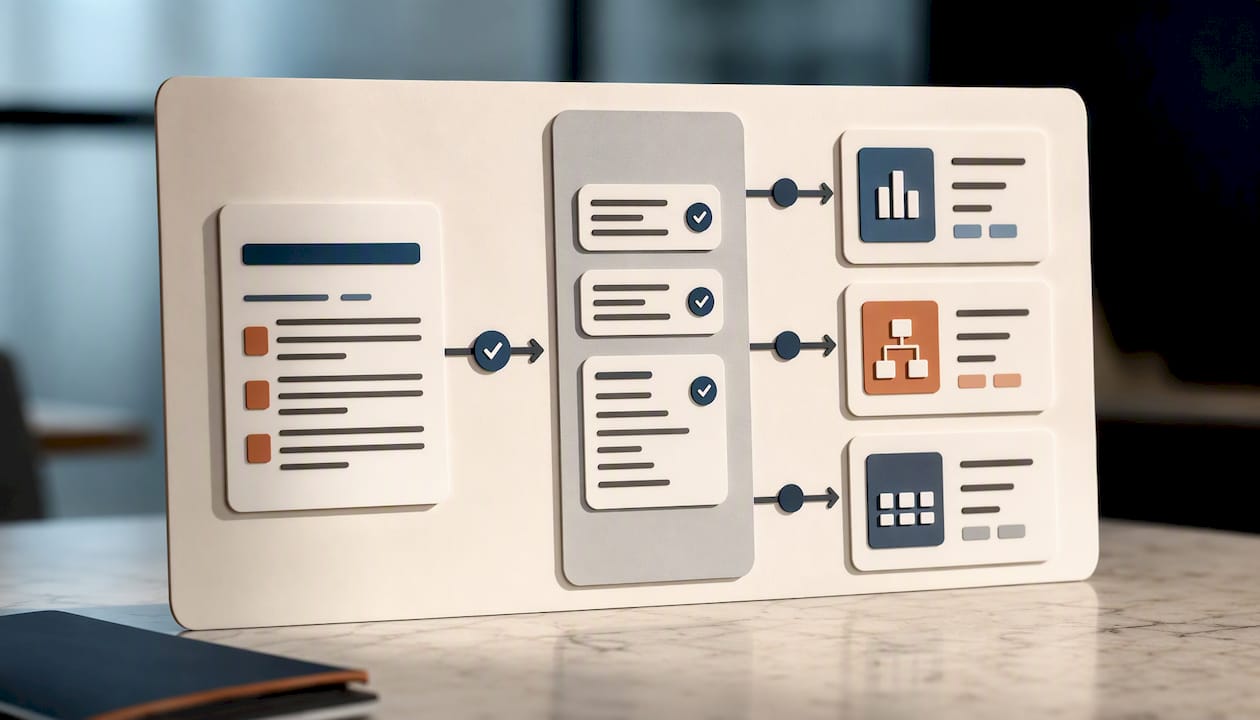
An AI-native construction ERP shows what that looks like in practice. Those numbers come from feeding extracted invoice data directly into job costing, certified payroll, and compliance workflows instead of leaving it stranded in a spreadsheet.
Here’s how that connection works in practice:
- Line items map to cost codes automatically, so job-cost reports update without a bookkeeper re-entering totals.
- Certified payroll fields populate from extracted vendor and labor data, cutting a step out of compliance reporting.
- Compliance automation flags missing lien waivers or COI documents tied to a specific invoice before payment releases.
- Field teams can capture invoice data via mobile voice entry on-site, feeding the same pipeline as office-scanned documents.
What Should You Actually Do First?
Start small and stress-test the model before you scale it. Pull your three messiest vendors, run a two-week pilot, and track one number: percentage of invoices requiring zero manual correction. That single KPI tells you more about readiness than a dozen vanity metrics.
The most common mistake is skipping validation layers because confidence scores look high. Math checks and vendor matching catch what confidence alone won’t.
Build the exception queue before you need it, not after the first bad invoice slips through.
— Keith
Get Invoice Data Straight Into Your Construction ERP
This platform removes the disconnect between extracting invoice data and actually using it. Instead of pulling numbers into a spreadsheet and re-entering them into your accounting system, invoices flow directly into job costing, certified payroll, and compliance checks inside one platform.

The AI-native ERP ingests invoices, maps line items to cost codes automatically, and flags missing lien waivers or COI documents before a payment goes out. That speed matters if you’ve watched a “quick” software rollout drag into a multi-month consultant engagement elsewhere.
If you’re tired of invoice data dying in a spreadsheet instead of driving your job-cost reports, visit the DesignFlow Build platform to see how it fits your workflow, or explore automation’s impact on contractor profit before you request a demo.
Sources
- Document Intelligence invoice model — Microsoft Learn
- Accounting data anomaly detection and prediction based on self-supervised learning — Frontiers
- Construction and engineering document automation — Landing AI