
How to Dispatch Service Technicians Efficiently in 2026

To dispatch service technicians efficiently, focus on five actions right now: build a skill matrix, enforce time-window routing rules, enable automated job assignment, add customer SMS ETAs, and pilot a parts-stocking rule based on dispatch history. These five moves address the root causes of wasted drive time, wrong-tech assignments, and repeat visits. Industry benchmarking shows technicians spend roughly 28% of the workday driving; optimized dispatch can bring that down to 18–20% and add meaningful capacity without hiring anyone new.
- Set a skill matrix: Tag every technician with certifications, tools, and job types they can handle.
- Enforce time-window rules: Build customer availability windows into your routing engine as hard constraints, not suggestions.
- Enable automated routing: Let the system assign jobs based on proximity, skill match, and window fit rather than dispatcher memory.
- Add customer SMS ETAs: Automated arrival notifications cut no-shows and reduce inbound “where is my tech?” calls.
- Pilot a parts-stocking rule: Stock trucks based on the last 90 days of dispatch history for each technician’s job mix.
Designflow-build enforces all five of these constraints inside a single platform, which makes it a practical starting point for any operations team running a 2–4 week pilot.
Pro Tip: Before you touch any software, spend one hour mapping your top five job types to the specific skills each one requires. That single document becomes the foundation of every routing rule you build.
Key Takeaways
| Point | Details |
|---|---|
| Skills matrix first | Tag every technician with certifications and job-type clearances before configuring any routing rules. |
| Drive-time target | Industry benchmarks show optimized dispatch cuts drive time from ~28% to 18–20% of the workday. |
| SMS confirmation impact | Automated SMS flows reduce no-shows and can cut drive time 15–32% when paired with constraint-aware routing. |
| First-visit fix rate | Top shops hit 88–95% first-time fix by stocking trucks from dispatch history, recovering $8,000–$20,000 per tech annually. |
| Designflow-build deployment | Designflow-build enforces skill, time-window, parts, and SMS constraints in one platform with a 2–4 week implementation timeline. |
Table of Contents
- How do you dispatch service technicians efficiently from day one?
- What features should you demand from dispatch software?
- How do you roll out better dispatching without disrupting operations?
- What KPIs actually measure dispatch efficiency?
- What are the most common dispatch problems and how do you fix them fast?
- Why skill sets and time-windows must be first-class routing constraints
- The case for starting small and measuring fast
- Designflow-build puts these dispatch constraints in one place
- Sources
How do you dispatch service technicians efficiently from day one?
Efficient technician scheduling starts with triage, not technology. Most dispatch problems trace back to one of three failures: the wrong technician was sent, the job window was ignored, or the parts weren’t on the truck. Fix those three things and your metrics move fast.
1. Define your triage rules. Not every job is equal. Classify incoming work by urgency (emergency, same-day, scheduled), job type (install, repair, maintenance), and required skill level. A dispatcher who has to make that call from memory on every ticket will make inconsistent decisions. Write the rules down and build them into your intake form or work order system.
2. Build a skills matrix. List every technician, then tag each one with the job types they’re certified for, the tools they carry, and any sales or compliance credentials. Routing engines perform best when technician skills and customer time-windows are encoded as explicit constraints, not inferred from dispatcher experience. Cross-training has real limits; a focused specialist often produces lower overall scheduling cost than a generalist who can technically do anything.

3. Apply zone-based clustering. Group jobs by geography before assigning technicians. Sending one tech across town twice in a morning is a routing failure, not a capacity problem. Cluster jobs within a defined radius and assign the technician whose home base or first job is already in that zone.
4. Prioritize job types explicitly. Emergency jobs override scheduled work. Maintenance visits get batched. Installs get blocked time. Build those priority rules into your dispatch board so the system surfaces the right job at the right time rather than leaving it to whoever is watching the queue.
5. Audit your current rules in the first 30 days. Before you change anything, measure it.
- Track drive-time percentage for each technician (target: under 20% of the workday).
- Count jobs per tech per day by job type.
- Record how often the wrong skill was assigned (a callback within 24 hours is a proxy).
- Note how many jobs were rescheduled due to missing parts.
Pro Tip: Build your skills matrix in a spreadsheet first. Columns: technician name, certifications, tools on truck, job types cleared for, sales-certified (yes/no). Once it’s clean, import it into your FSM. Doing it in software first usually means doing it twice.
O*NET identifies decision-making, communication, multitasking, and emotional control as core dispatcher competencies. Automation handles routine matches well, but a dispatcher’s judgment is still the backstop when constraints conflict or a customer situation escalates.
What features should you demand from dispatch software?
The right field service management (FSM) platform does more than display a map. Here’s what to require before you commit to any system.
Must-have features:
- Constraint-aware routing: The engine must accept skill tags and time-window parameters as hard constraints, not optional filters. If it can’t see them, it can’t optimize around them.
- Real-time technician location and ETA: Live GPS with automatic ETA updates sent to customers. Manual ETA calls are a dispatcher time sink.
- Mobile job details with offline mode: Technicians need job notes, site history, and customer contact info on their phones, even without cell coverage. Mobile tools in the field directly raise adoption rates because they replace the clipboard and the phone call simultaneously.
- Parts and inventory visibility: The dispatcher should see what’s on each truck before assigning a job. A parts mismatch is the single most common cause of a failed first visit.
- Two-way SMS and ETA links: Automated confirmations before the appointment and a live tracking link for the customer. Orchestrated SMS flows can reduce drive time 15–32% and cut no-show rates significantly when implemented correctly.
- CRM and work order integration: The FSM must read from and write to your existing work order system. Duplicate data entry is where dispatch efficiency dies.
- Automation layer: Rule-based job assignment, escalation triggers, and job-complete workflows should run without dispatcher intervention on routine jobs.
Nice-to-have features:
- Predictive scheduling based on historical job duration by type and technician.
- AI-assisted intake classification that reads inbound requests and suggests job type and priority.
- Dynamic re-routing when a job runs long or a cancellation opens a slot.
Implementation cost by fleet size:
The investment is lower and the configuration is simpler. Mid-size teams (5–20 trucks) typically need constraint-aware routing and an automation layer to see meaningful gains. Larger operations benefit from full orchestration, including multi-source intake, AI assignment, and telematics integration. Orchestration layers tend to pay off around the 3-truck and multi-lead-source threshold, so don’t over-engineer a 2-truck shop.
Questions to ask any vendor before buying:
- Can the routing engine accept skill tags and time-windows as hard constraints?
- Does the mobile app work offline and sync when connectivity returns?
- What does the integration with our current CRM or work order system look like, and how long does it take?
- How are parts and inventory data surfaced to the dispatcher at assignment time?
Pro Tip: Ask vendors for a live demo using your actual job types and technician skill mix. A generic demo tells you nothing. A demo built on your data tells you everything.
How do you roll out better dispatching without disrupting operations?
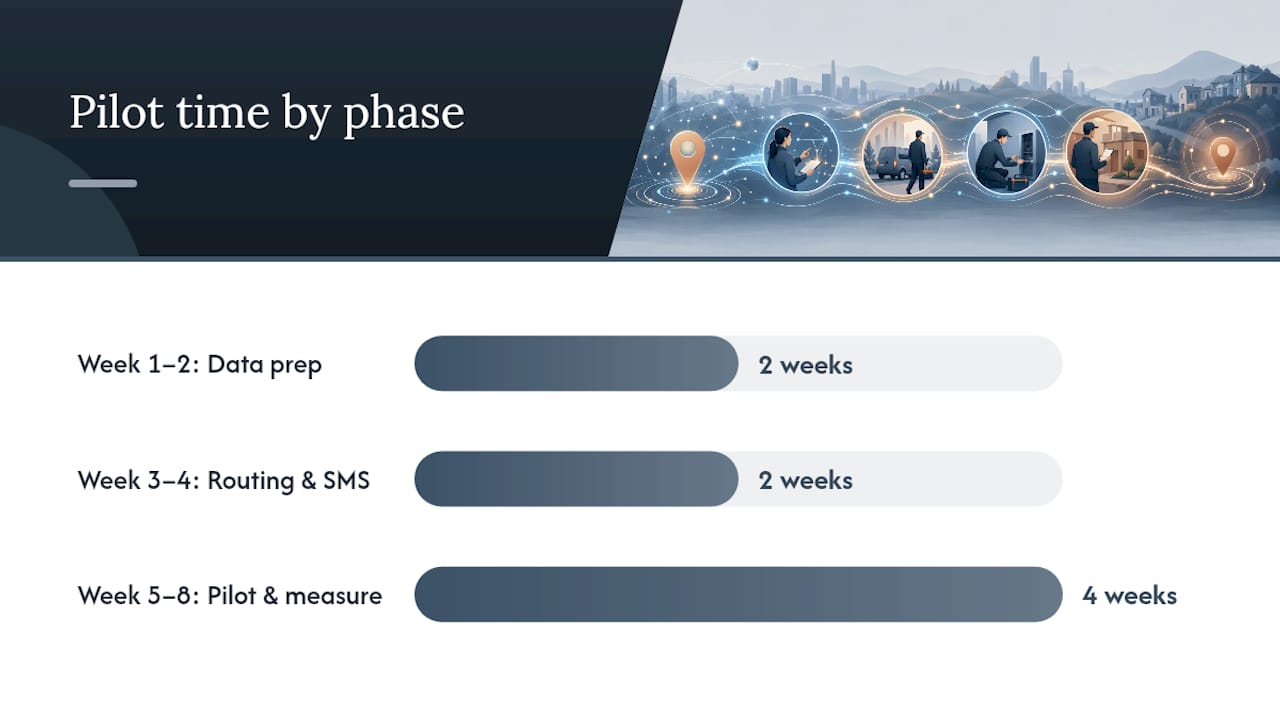
A 2–8 week pilot is the right scope. Anything shorter doesn’t generate enough data; anything longer loses momentum.
Week 1–2: Data preparation
- Export your last 90 days of job history: job type, technician assigned, drive time, completion status, and parts used.
- Build the skills matrix from that data. Tag each technician accurately.
- Map your top five job types to required skills, average duration, and typical parts needed.
- Set up time-window fields in your FSM if they don’t exist.
Week 3–4: Routing rules and SMS flows
- Configure constraint-aware routing with skill and time-window parameters active.
- Build SMS confirmation flows: pre-appointment reminder (24 hours out), day-of ETA notification, and job-complete follow-up.
- Set a parts-stocking rule for each technician based on their job mix from the last 90 days.
- Run the new routing rules in parallel with your current process for 3–5 days before going live.
Week 5–8: Pilot and measure
- Go live with one dispatcher and 3–5 technicians.
- Track four metrics daily: jobs per tech, drive-time percentage, first-visit fix rate, and no-show rate.
- Hold a 15-minute standup each morning to review the previous day’s exceptions.
- Communicate early wins to the broader team. A 10% drop in drive time in week one is a concrete signal worth sharing.
Training checklist:
- Dispatchers: 2-hour session on routing rule configuration, exception handling, and SMS flow management.
- Technicians: 30-minute mobile app walkthrough covering job acceptance, status updates, and offline use.
- Supervisors: 1-hour KPI review session covering how to read the dispatch dashboard.
Change management actions that actually work:
- Give dispatchers a scorecard with their own metrics, not just team averages. Personal accountability moves behavior faster than team targets.
- Acknowledge resistance directly. Dispatchers who’ve built mental routing maps over years will feel displaced by automation. Frame the tool as handling routine matches so they can focus on exceptions and customer escalations.
- FMCSA research on detention and fatigue is a useful reference when setting schedule buffers: realistic time windows protect technicians from excessive duty time and reduce the safety risk that comes with back-to-back jobs with no travel buffer.
Pro Tip: *Run your pilot on your highest-volume job type first.
What KPIs actually measure dispatch efficiency?
Seven metrics cover the full picture. Measure all of them; prioritize the first three.
Top shops improve first-visit fix rates from industry averages of 72–78% to 88–95% by stocking trucks based on dispatch history. That improvement recovers approximately $8,000–$20,000 per technician per year in billable hours.
How to collect this data:
- Drive time and location data come from your FSM or a telematics integration.
- First-time fix rate requires a “job closed on first visit” status in your work order system. If that field doesn’t exist, add it before the pilot starts.
- Time-to-assign pulls from job creation and assignment timestamps in your FSM.
- No-show rate needs a “customer not available” disposition code in your scheduling system.
Set a baseline in week one of the pilot. Without a baseline, you can’t prove the improvement.
What are the most common dispatch problems and how do you fix them fast?
Most dispatch failures fall into five patterns. Each one has a same-day fix and a structural fix.
Missing parts on arrival
- Same-day fix: Call the technician before they leave for the job and confirm the required parts against the work order.
- Structural fix: Build a parts-check step into your job assignment workflow. The system should flag a mismatch between the job’s required parts and the technician’s truck inventory before assignment is confirmed.
Wrong skill assigned
- Same-day fix: Reassign immediately using the skills matrix. Don’t send the tech to “try anyway.”
- Structural fix: Make skill tags mandatory in your FSM. A job without a required-skill tag should not be assignable.
High no-show rate
- Same-day fix: Add a manual confirmation call for any appointment that hasn’t received an SMS confirmation response.
- Structural fix: Implement automated SMS confirmations 24 hours and 2 hours before every appointment. Automated SMS and ETA flows are among the highest-leverage patterns for reducing no-shows.
Backlog triage overload
- Same-day fix: Freeze new scheduling for 2 hours and have the dispatcher work through the backlog using the priority rules (emergency first, then same-day, then scheduled).
- Structural fix: Set a maximum queue depth per dispatcher. When the queue hits that threshold, the system should alert a supervisor rather than letting the backlog grow silently.
Night-before overbooking
- Same-day fix: Identify which jobs can shift to the following day without SLA breach and notify those customers before 8:00 AM.
- Structural fix: Cap the schedulable jobs per technician per day at 90% of their average capacity. The 10% buffer absorbs overruns and emergency inserts without cascading delays.
When to escalate to a human exception:
Automation handles routine matches well. Escalate to a dispatcher when: a job requires a skill combination no available technician holds, a customer has escalated to a complaint, a safety concern is flagged on the work order, or a job has been reassigned more than twice in the same day.
Why skill sets and time-windows must be first-class routing constraints
The routing engine can’t optimize what it can’t see. That’s the core principle behind treating technician skills and customer time-windows as first-class constraints rather than post-processing filters. When a routing engine assigns jobs without skill visibility, it produces technically optimal routes that are operationally useless because the assigned technician can’t do the job.
Designflow-build enforces these constraints end-to-end:
- Skill matrix enforcement: Technician profiles carry certification tags, tool inventory, and job-type clearances. The routing engine only surfaces a technician as a candidate when their profile matches the job’s required skills.
- Time-window constraints: Customer availability windows are hard parameters in the scheduling engine, not display-only fields. A job outside a technician’s reachable window is excluded from the candidate set automatically.
- Parts visibility at assignment: The dispatcher sees truck inventory against job requirements before confirming the assignment. A mismatch triggers a flag, not a failed visit.
- Mobile ETAs and job details: Technicians receive full job context on the mobile app, including site history, required parts, and customer contact. Offline mode keeps that data accessible without cell coverage.
- Automation orchestration: Rule-based workflows handle intake classification, job assignment for routine matches, SMS confirmation flows, and job-complete triggers without dispatcher intervention.
Hiring the right technicians in the first place also matters. Poor hiring increases callbacks and dispatch inefficiency in ways that no routing engine can fully compensate for. Skills tagging is only as accurate as the underlying skill set.
Pro Tip: When you configure skill tags in Designflow-build, add a “last verified” date to each certification. Certifications expire. A routing engine that doesn’t know a cert lapsed will keep assigning that technician to jobs they’re no longer cleared for.
The case for starting small and measuring fast
The biggest mistake operations teams make with dispatch efficiency is waiting for the perfect configuration before going live. Perfect routing rules built on incomplete data produce worse outcomes than simple rules built on real job history.
Start with one dispatcher, one job type, and one week of data. Measure drive-time percentage and first-visit fix rate. If those two numbers move in the right direction, you have proof of concept. If they don’t, you have a specific failure mode to diagnose rather than a vague sense that “the system isn’t working.”
Iterating quickly beats perfect configuration because field service operations are dynamic. Job durations vary. Technicians call out sick. Customers reschedule. A routing model that was calibrated on last quarter’s data will drift within weeks. The teams that win on dispatch efficiency are the ones that review their KPIs weekly and adjust their rules monthly, not the ones who spent three months building the perfect initial setup.
The one action you can take today: pull your last 30 days of job completions, calculate your current drive-time percentage, and set a target for 60 days from now. That number becomes the anchor for every configuration decision you make.
Designflow-build puts these dispatch constraints in one place
If you’ve read this far, you have a clear picture of what efficient dispatch requires: a skills matrix, constraint-aware routing, parts visibility, SMS automation, and a KPI dashboard you review weekly. The hard part isn’t knowing what to build. It’s building it without stitching together five separate tools that don’t talk to each other.

Designflow-build is an AI-native ERP built for contractors and service teams that need all of those capabilities in a single system. Skill tags, time-window routing, truck inventory checks, mobile job details, and automated SMS flows are all native features, not integrations you have to maintain. The platform deploys in 2–4 weeks with no consultant-led rollout, and the free tier lets you test core features before committing to a paid seat. For operations teams ready to run the pilot described in this article, Designflow-build’s scheduling and field operations platform is the fastest path from current state to measurable results. Start your free trial at Designflow-build and have your first routing rules live within the week.
Sources
- Smarter Technician Routing Cuts Drive Time and Lifts Daily Job Throughput | ServiceMag
- Cut 32% Truck-Roll Drag: HVAC Dispatch Automation 2026
- O*NET: Dispatcher (43-5032.00)
- FMCSA — Effects of detention times on commercial motor vehicle driver fatigue