
Coordinate Subcontractors With One Platform, Not Five Apps

Use a single, unified construction platform, an AI-native ERP, to coordinate every subcontractor on a job. One system gives you dependency-aware schedules that update automatically, compliance tracking that flags expired insurance before it becomes a liability, and one place to find every document, message, and change order instead of five.
That’s the whole verdict. The rest of this guide is about making it work in your operation.
The immediate payoffs show up in the first week you run it:
- Shared schedules that shift automatically when one trade runs long, instead of a dozen separate calendars nobody trusts
- Automated certificate of insurance (COI) alerts before coverage lapses, not after a claim
- One thread per subcontractor for scopes, RFIs, and photos, instead of texts, emails, and voicemail
- A single record of who confirmed what and when, so disputes get resolved with data instead of memory
Some contractors running an AI-native ERP report a significant cut in manual data entry, because the schedule, the accounting ledger, and the field updates all read from the same data instead of three people typing the same information into three tools.
Key Takeaways
Centralizing subcontractor coordination in one AI-native platform eliminates the manual rekeying, missed compliance deadlines, and schedule drift that fragmented tools create.
| Point | Details |
|---|---|
| Pick dependency-aware scheduling | Choose a platform where one delayed task automatically shifts every downstream trade’s dates. |
| Automate COI tracking | Require certificate upload before “approved to start” status and automate expiry alerts. |
| Remove app-download friction | Use SMS or guest link confirmations so subs never need a login to respond. |
| Start with one pilot project | Test with 5 to 15 subs and a named internal champion before scaling company-wide. |
| DesignFlow Build fits fast rollouts | The AI-native ERP implements in 2 to 4 weeks with a reported 98% adoption rate and up to 70% less manual data entry. |
Table of Contents
- What Features Actually Matter When You Coordinate Subcontractors With One Platform?
- How Do You Coordinate Subcontractors From Pre-Award Through Closeout?
- What Does a Rollout Checklist Look Like for a New Platform?
- Why Do Subcontractor Coordination Efforts Break Down?
- How Does DesignFlow Build Cover This Entire Checklist?
- Where to Learn More About Subcontractor Coordination
- What the Data Actually Tells You to Prioritize
- Get Started With a Platform Built for This Exact Problem
- Frequently Asked Questions
- Sources
What Features Actually Matter When You Coordinate Subcontractors With One Platform?
Every vendor pitch sounds comprehensive. Most platforms cover maybe half of what actually reduces coordination work. Industry roundups on subcontractor tracking software converge on the same short list of features that separate a real coordination system from a glorified group chat: scheduling logic, credential automation, field reporting, and integrations. Here’s what to actually screen for.
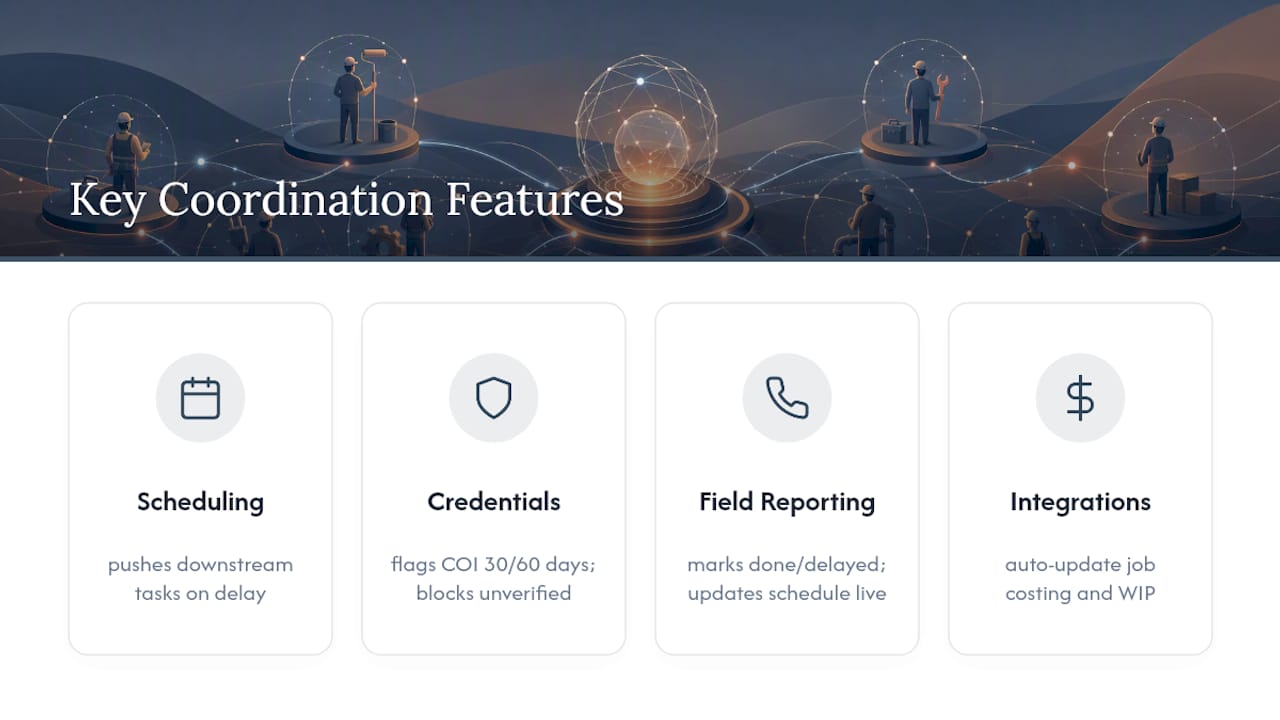
Scheduling with dependency logic. A drywall crew can’t start until framing passes inspection. If your schedule doesn’t know that, every delay becomes a fire drill. Look for drag-and-drop scheduling that automatically pushes downstream tasks when an upstream one slips, plus mobile confirmations so subs acknowledge dates instead of assuming you’ll call them.
Sub portals that don’t require an app download. The fastest way to kill adoption is forcing a plumber’s foreman to create an account and download an app just to confirm a Tuesday start time. Platforms like EverBuild send SMS or URL-based confirmations that subs can act on from any phone, no login required.
COI and credential tracking that runs itself. Manually chasing insurance certificates is one of the most time-consuming parts of subcontractor management. A platform should flag expiring COIs 30 and 60 days out, let subs upload certificates directly, and block a crew from being scheduled until verification clears.
Field reporting tied to the schedule. A foreman marking a task “done” or “delayed” from a phone should ripple through the entire project timeline in real time, not sit in a text message until someone remembers to update the master schedule.
Integration with accounting and estimating. If a change order in the field doesn’t automatically update job costing, someone is rekeying numbers by hand, and errors creep in every time. The strongest construction scheduling tools tie directly into cost codes and work-in-progress reporting.
Role-based access and audit trails. Subs should see their scope, not your entire budget. Owners should see progress, not payroll. A proper audit trail also matters if a dispute ever escalates to a claim.
Pro Tip: When you demo a platform, ask to see what happens when a sub reports a two-day delay live. If the schedule, the crew notifications, and the cost projections don’t all update automatically, you’re looking at a glorified calendar, not a coordination system.
How Do You Coordinate Subcontractors From Pre-Award Through Closeout?
Coordinating subs well isn’t about having more meetings. It’s about having fewer, because the platform already answered the question before someone had to ask it. Here’s the sequence that works across most trades and project sizes.
1. Pre-award: build your bench before you need it. Import COIs, licenses, and past performance into subcontractor profiles before bidding starts. Build reusable scope templates for common trades (electrical rough-in, framing, MEP coordination) so you’re not rewriting scope language every project. GC teams managing several subs at once lose 6 to 12 hours a week to manual coordination tasks that a pre-built profile system eliminates almost entirely.
2. Award and kickoff: assign, schedule, confirm. Once a sub is awarded, assign their scope directly to the master schedule with dependency logic baked in. Send kickoff confirmations that include start dates, site logistics, and safety requirements in one message. Require a confirmation click or text reply before the crew shows up, so nobody arrives to a locked gate.
3. Daily execution: let the field drive the schedule. This is where most fragmented systems fall apart. Crews update status from the field, a phone works fine, using simple “report done” or “report delay” actions. When a delay gets logged, the platform should automatically recalculate downstream dates and notify the next trade in line, the same automated ripple effect that platforms like EverBuild use to cut manual scheduling calls between GCs and subs.

4. Change management: log it once, update everything. When scope changes mid-project, the change order needs to flow into three places at once: the schedule, the sub’s contract value, and the job cost report. Route the approval through whoever needs to sign off, then let the budget update automatically instead of waiting for someone to reconcile spreadsheets at month end.
5. Closeout: compliance first, punch list second. Generate the punch list directly from field reports, not from a walk-through nobody wrote down. Confirm final lien waivers and compliance documents are collected before final payment releases. Archive the full project record, communications, COIs, change orders, so it’s ready if an audit or dispute surfaces two years later.
Common friction points worth planning for:
- Subs who resist any new system, even a simple one
- Change orders that get verbally approved but never logged
- Final payment delays caused by missing lien waivers nobody tracked
What Does a Rollout Checklist Look Like for a New Platform?
You don’t need a six-month rollout to get value from a coordination platform. Most GCs see meaningful traction within a single pilot project if they follow a structured sequence instead of flipping every feature on at once.
- Pick a pilot project and a champion. Choose a mid-complexity job with 5 to 15 active subs, not your biggest or smallest. Assign one internal person to own adoption.
- Define success metrics upfront. Decide what you’re measuring: hours saved on manual scheduling, faster sub confirmation times, fewer missed COI renewals. Write the baseline down before you start.
- Clean your data before you migrate it. Consolidate your subcontractor list, current COIs, and cost codes. Garbage data in means garbage automation out.
- Map your integrations. Identify what needs to connect: your accounting system, your existing scheduling tool if you’re keeping one, and any estimating software you rely on.
- Build templates and notification rules. Set up scope templates for recurring trades and configure who gets alerted for what, delays, COI expirations, change orders.
- Configure guest workflows for subs. Set up SMS or link-based confirmations so subs never need a login to participate.
- Train the pilot team, then gather real feedback. Run one to two weeks of actual use, ask what’s confusing, and adjust notification rules or templates accordingly.
- Scale once metrics confirm the win. Expand to additional projects once your pilot data shows the time savings, then set up a weekly adoption dashboard to keep tracking it.
Pro Tip: Don’t roll out to every sub on day one. Start with your three or four highest-volume subcontractors, the ones you work with on nearly every job, since their buy-in creates the social proof that gets everyone else to stop resisting.
Why Do Subcontractor Coordination Efforts Break Down?
Most coordination failures aren’t caused by bad subs. They’re caused by systems that make good coordination harder than it needs to be. Here’s what actually goes wrong, and the specific configuration that fixes it.
Onboarding resistance. Subs have seen enough failed software rollouts to be skeptical of one more login to remember. The fix isn’t more training, it’s removing the friction. SMS-based confirmations and guest links let a foreman respond from a job site in seconds. Platforms built around this model report open rates near 98% on automated SMS reminders, because there’s nothing to log into.
Schedule drift. A single missed update cascades into a week of confusion if nobody’s tracking dependencies. Dependency-aware scheduling paired with a required daily check-in from active crews catches drift within 24 hours instead of at the next site walk.
Fragmented documents and missing COIs. The moment a certificate expires without anyone noticing, you’ve got a liability gap. Requiring COI upload as a condition of “approved to start” status, enforced by the platform rather than a person’s memory, closes that gap automatically.
Double data entry. Rekeying the same information into your scheduling tool, your accounting software, and a spreadsheet is where most PMs lose their week. Integration between scheduling and job costing removes the rekeying step entirely.
Inconsistent sub performance. Not every sub delivers the same way twice. Saved crew lists and performance history let you make award decisions based on data instead of guesswork.
Formalized subcontractor compliance workflows aren’t just a government-contracting requirement. FAR Part 44 outlines the federal standard for subcontracting oversight, and the same discipline, documented approvals, tracked credentials, clear scope, holds up just as well on private commercial work.
How Does DesignFlow Build Cover This Entire Checklist?
DesignFlow Build was built around the exact feature set that actually reduces subcontractor coordination work, not a patchwork of integrations bolted onto a scheduling app. The platform combines project management, accounting, estimating, and field operations into one system, which means the schedule, the job cost report, and the field updates are reading from the same data instead of three disconnected tools that need manual reconciliation.
Here’s how the core capabilities map directly to what you should be screening for:
- AI-driven project management predicts scheduling risk and reallocates resources before a delay cascades into the next trade
- Compliance automation handles COI tracking and lien waivers without a spreadsheet chase
- Field operations with voice data entry lets crews report status from a job site without typing on a small screen
- Job costing by cost code ties every change order directly to the budget, no rekeying required
- Customer portal and mobile app give subs a lightweight way to confirm schedules and submit updates
The proof points are concrete. DesignFlow Build implements in 2 to 4 weeks, reports a 98% user adoption rate, and contractors using the AI-native ERP approach have seen up to a 70% reduction in manual data entry, with monthly savings reported as high as $847,000 on larger operations.
If you’re evaluating a coordination platform, the real test isn’t the feature list, it’s whether the schedule, the accounting ledger, and the field reports update from a single source of truth or three disconnected ones you have to reconcile by hand.
This setup fits contractors, engineering firms, and construction managers with teams typically ranging from 10 to 500 employees, particularly where project managers, estimators, and accounting staff are currently juggling separate tools for each function. A typical pilot configuration starts with one project, one champion, and a handful of high-volume subs before scaling company-wide.
Where to Learn More About Subcontractor Coordination
For compliance context, FAR Part 44 remains the federal reference point for subcontracting oversight even on private jobs. For operational tactics, the renovation coordination workflow guide from Expressions Remodeling covers day-to-day communication practices worth borrowing. DesignFlow Build’s own construction software glossary defines ERP, takeoff, and scheduling terminology if any of this is new vocabulary.
What the Data Actually Tells You to Prioritize
Most advice on subcontractor coordination focuses on communication, “talk to your subs more,” “set clearer expectations.” That’s not wrong, but it’s incomplete. The bigger failure point is structural: teams keep trying to coordinate complex, interdependent work across tools that don’t talk to each other. No amount of better communication fixes a schedule that lives in one app while the budget lives in a spreadsheet.
What the evidence actually supports is narrower and more mechanical than most guides admit. Dependency logic and automated COI tracking do more heavy lifting than any communication protocol, because they remove the moments where a human has to remember something under pressure. The GCs who see the fastest results aren’t the ones who run more meetings. They’re the ones who pick one pilot project, measure hours saved against a real baseline, and expand only once the numbers hold up.
If you take one thing from this guide, prioritize the integration between scheduling and accounting before you worry about anything else. That single connection is where most of the manual entry, and most of the coordination headaches, actually live.
Get Started With a Platform Built for This Exact Problem
Everything in this guide describes what a unified coordination platform should do. DesignFlow Build is built to do it without requiring a consulting team to configure it for you. Where most ERP rollouts take months and a small army of implementation consultants, DesignFlow Build’s guided setup gets contractors live in 2 to 4 weeks, because the scheduling, accounting, and field operations were designed as one system from the start, not stitched together after the fact.

That matters most for GCs and specialty contractors who are still running subcontractor coordination across a spreadsheet, a group text, and a separate accounting tool. If that’s your current setup, the switch isn’t about learning new software so much as retiring three old habits at once. Explore the AI-native ERP platform to see how project management, job costing, and field reporting work from a single data source, and start a free trial to run your own pilot project before committing to a paid seat.
Frequently Asked Questions
What does it mean to coordinate subcontractors with one platform? It means running scheduling, compliance tracking, communications, and document sharing for every subcontractor through a single system instead of spreading them across email, texts, spreadsheets, and separate scheduling tools.
How long does it take to implement a subcontractor coordination platform? Timelines vary by vendor and project complexity, but AI-native ERP platforms like DesignFlow Build report implementation in 2 to 4 weeks rather than the months typical of legacy ERP rollouts.
Do subcontractors need to download an app to use a coordination platform? Not with platforms that support guest workflows. SMS-based confirmations and web links let subs respond to schedules and job details without creating an account, which meaningfully improves adoption among crews resistant to new software.
What’s the biggest cost consideration when choosing a platform? Look past the seat price to what you’re replacing. A unified platform that eliminates a separate accounting tool, scheduling app, and compliance tracker often costs less in total than maintaining three subscriptions plus the labor spent rekeying data between them.
Can a unified platform replace QuickBooks and a spreadsheet-based schedule? Yes, that’s the core case for an AI-native ERP. Combining accounting, job costing, and scheduling in one system removes the manual syncing required when those functions live in separate tools.
Sources
- FAR part 44 — Subcontracting policies and procedures
- 6 Best Subcontractor Tracking Software (May 2026)