
Cut Manual Scheduling Work 70%: Construction Project Scheduling for PMs

Construction project scheduling is the process of breaking a project into activities, sequencing them with dependencies, and assigning realistic durations and resources so the whole team knows what happens when. The recommended approach follows one path: build a work breakdown structure, sequence activities with logical dependencies, run the critical path method to find your longest chain of dependent tasks, lock a baseline, and update on a fixed cadence. Techniques like the Last Planner System and platforms like Designflow-build support that core process rather than replace it.
TL;DR:
- Accurate scheduling requires detailed dependency logic, real data-driven activity durations, and locking milestones to prevent scope and sequence errors.
- The critical path method is essential for projects with well-defined scope, while alternatives like PERT or resource-based scheduling suit uncertainty or resource constraints.
- Multi-level schedule views tailored to stakeholders ensure clarity, from high-level milestones to detailed field-level daily plans.
- Maintaining a baseline, regularly updating progress, and using recovery schedules are crucial to keep the project on track and handle delays effectively.
- Integrated platforms like Designflow-build significantly reduce manual data entry and improve schedule and budget synchronization through live field, procurement, and cost data.
Table of Contents
- What Construction Scheduling Is and Why It Matters
- Core Scheduling Methods and When to Use Each
- Schedule Levels and Visualizations That Match the Audience
- How to Build a Construction Schedule Step by Step
- Keeping the Schedule Alive: Updates, Look-Aheads, and Recovery Plans
- Tools and Integrations That Keep a Schedule Reliable
- How AI and an Integrated ERP Close the Schedule-to-Site Gap
- What Frontline Schedulers Get Right That Nobody Writes Down
- Designflow-build: Scheduling Built Into the Rest of Your Job
- Sources
What Construction Scheduling Is and Why It Matters
A construction schedule answers three questions: what work happens, when it happens, and who does it. Miss any one of those and the document stops being a schedule and becomes a wish list. Oracle’s guide to construction scheduling frames it correctly: the process integrates tasks, durations, dependencies, and resources so the team can track progress against a real plan, not a guess.
Different people need different views of that plan. An owner wants milestone dates. A superintendent wants next week’s crew assignments. A subcontractor wants to know exactly when their trade can mobilize without tripping over the trade ahead of them. Get the schedule right and every one of those audiences pulls from the same source of truth.
Get it wrong and the damage shows up in places that have nothing to do with the calendar itself:
- Cash flow suffers when billing milestones slip because nobody flagged a dependency early enough.
- Procurement breaks down when long-lead items get ordered late because the schedule never called out lead time in the first place.
- Inspections get missed or duplicated when trade sequencing isn’t coordinated with the authority having jurisdiction.
- Claims multiply when there’s no documented baseline to compare against when a dispute over delay responsibility surfaces.
Consider two scenarios on the same 40-unit multifamily project. In the first, the scheduler builds logic ties between rough-in and inspection milestones, catches a six-week lead time on switchgear during the planning phase, and orders it before foundations are even poured. In the second, nobody checks lead times until the electrical subcontractor asks where the gear is, three weeks after it should have shipped. Same building, same crew, but one project finishes on time and the other eats a change order and a testy owner meeting. That gap is what construction project scheduling exists to close.
Core Scheduling Methods and When to Use Each
Most projects don’t need one scheduling method. They need the right method for the right problem, sometimes layered together.
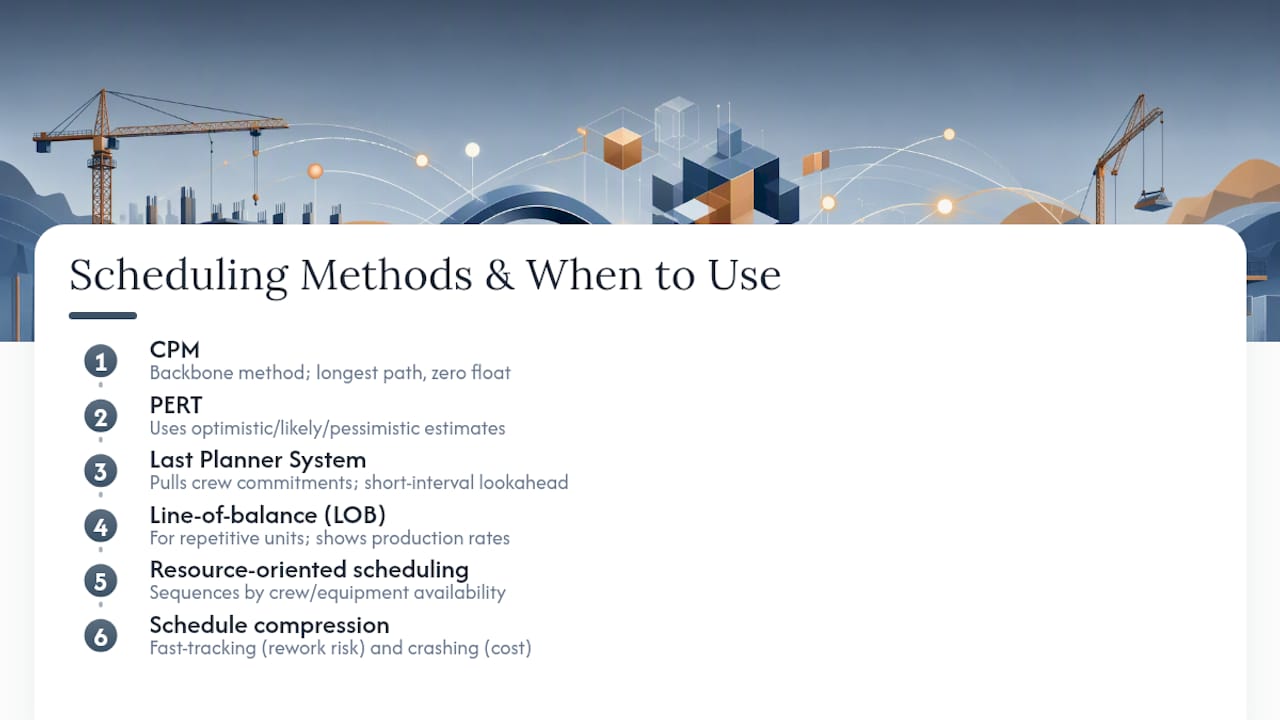
Critical Path Method (CPM) remains the backbone of commercial and industrial scheduling. It calculates early and late start and finish dates for every activity, then identifies the longest chain of dependent tasks that determines your earliest possible completion date. Activities on that chain have zero float, meaning any delay pushes the finish date. Everything else carries some cushion, which tells you where you can absorb a bad week without blowing the deadline. CPM works best when scope is well-defined and logic ties are known, which is most vertical construction.
PERT (Program Evaluation and Review Technique) answers a different question: what happens when duration estimates are uncertain rather than fixed? Instead of one number per activity, PERT uses optimistic, pessimistic, and most-likely estimates to model a probability distribution around the finish date. It’s more useful on R&D-heavy or first-of-a-kind projects, like a novel foundation system, than on repetitive commercial work where historical durations already exist.
Last Planner System (LPS) flips the planning direction. Instead of a master schedule dictating what should happen, LPS pulls commitments from the people actually doing the work. The Lean Construction Institute describes LPS as a collaborative method that raises workflow reliability through short-interval look-ahead planning and weekly crew commitments. It doesn’t replace CPM. It sits on top of it, translating a six-month CPM schedule into a reliable next two to six weeks.
Line-of-balance (linear/LOB) scheduling fits repetitive work like high-rise floors, highway paving, or pipeline installation, where the same sequence of trades repeats unit after unit. Instead of a Gantt bar per activity, LOB charts show production rates as sloped lines, making it immediately visible when a trade is about to catch up to the crew ahead of it.
Resource-oriented scheduling starts from crew or equipment availability rather than logic alone. When you have one crane and four buildings that all want it, resource-oriented scheduling forces the sequencing decision that pure CPM logic won’t make for you.
Schedule compression comes up on almost every project once the initial CPM run shows a finish date the owner doesn’t like. Fast-tracking overlaps activities that were originally sequential, while crashing adds resources to shorten specific durations. Both carry real trade-offs: fast-tracking increases rework risk, and crashing increases cost, and neither can shorten a process that’s bound by physics or paperwork, like concrete cure time or permit review.
Pro Tip: Before you crash anything, check whether the delay is even on the critical path. Throwing labor at a non-critical activity burns budget without moving your finish date by a single day.
Schedule Levels and Visualizations That Match the Audience
Not every stakeholder needs the same schedule, and handing an executive a 2,000-line CPM network is as useless as handing a foreman a one-page milestone chart. Recommended practice defines a five-level hierarchy that matches schedule detail to decision-making need.
- Level 1 covers executive summary milestones, roughly 10 to 25 line items spanning the entire project. This is what goes in a board deck or an owner’s monthly update.
- Level 2 breaks the project into major phases or systems, still high enough to review in a monthly project meeting without drowning anyone in detail.
- Level 3 is the working project schedule most PMs live in day to day, typically several hundred activities with full logic ties, resource assignments, and the calculated critical path.
- Level 4 drills into short-duration work packages, often at the two to six week look-ahead window, feeding directly from Level 3 logic but refined with field-level detail.
- Level 5 is the daily or shift-level plan, the territory of Last Planner weekly work plans and crew task assignments.
The visualization should match the level. Gantt charts communicate Level 1 and 2 milestones clearly because stakeholders read timelines, not logic. CPM network diagrams matter at Level 3, where the actual dependency structure and float calculations live and where a scheduler needs to see which ties are driving the finish. Look-ahead lists, often just a filtered view of Level 3 activities due to start in the next two to six weeks, serve Level 4 and 5 coordination meetings.
The roll-up discipline matters as much as the levels themselves. A Level 3 schedule should summarize cleanly into Level 2 milestones without manual re-entry, and Level 4 to 5 field plans should trace back to specific Level 3 activities rather than existing as disconnected to-do lists. When that link breaks, the field ends up working from an outdated plan while the office schedule shows something else entirely, and nobody notices until the monthly update reveals a gap nobody can explain.
How to Build a Construction Schedule Step by Step
Building a schedule that survives contact with the field takes discipline at each stage, not just software. Here’s the sequence that holds up on real projects.
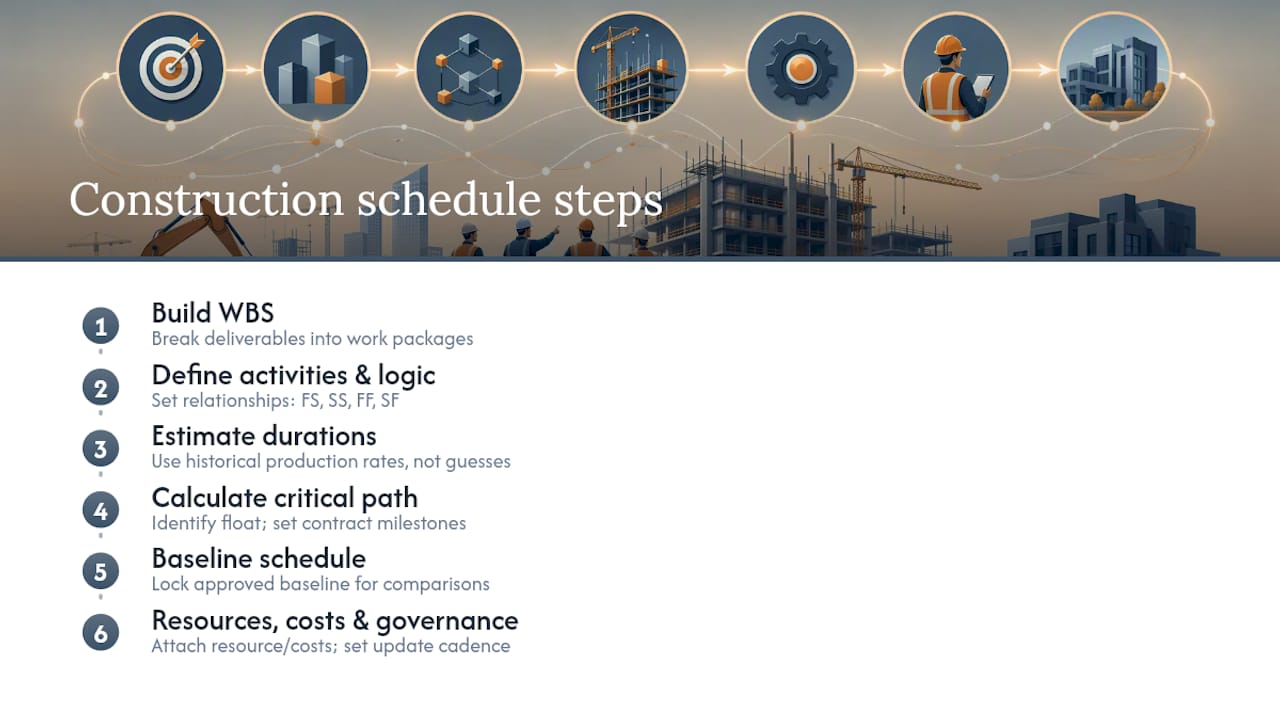
1. Build a work breakdown structure (WBS). Break the project into deliverables, then break those deliverables into work packages small enough to estimate and track. A WBS organized by building system or area, rather than one flat list, makes the next steps far easier because activities naturally group by trade and location.
2. List activities and define dependency logic. Every work package becomes one or more schedule activities. Each activity needs a relationship to at least one other: finish to start (the most common), start to start, finish to finish, or start to finish. Get the logic wrong here and every downstream calculation, including your critical path, is unreliable. Practitioner guidance is blunt about this: CPM output is only as trustworthy as the dependency mapping behind it.
3. Estimate durations from real data. Pull durations from historical production rates on comparable projects, not from a subcontractor’s optimistic verbal estimate. If your last three drywall packages ran 400 square feet per crew per day, use that number, not 600.
4. Calculate the critical path and identify float. Once logic and durations are in place, scheduling software runs forward and backward passes to calculate early and late dates for every activity. Activities with zero float sit on the critical path; those with positive float have room to slip without threatening the finish date. Set contract milestones at this stage, tying substantial completion, permit dates, and any liquidated-damages triggers directly to specific activities rather than floating dates.
5. Baseline the schedule. Once logic, durations, and milestones are approved, lock a baseline copy. This becomes your reference point for every future comparison and the document you’ll need if a delay claim ever surfaces.
6. Resource and cost load as needed. For projects where crew or equipment availability is the real constraint, or where the schedule needs to support billing and cash-flow forecasting, attach resource and cost data to each activity.
7. Set your update cadence and governance. Decide upfront who updates the schedule, how often, and what triggers a formal re-baseline versus a routine status update. Communicate the baseline and update plan to every stakeholder before work starts, not after the first missed milestone forces the conversation.
Pro Tip: Treat your WBS numbering scheme as permanent infrastructure. Renumbering activities mid-project breaks historical reporting and makes it nearly impossible to compare a Month 6 update against your original baseline.
Keeping the Schedule Alive: Updates, Look-Aheads, and Recovery Plans
A baseline is a snapshot, frozen the day it’s approved. A control schedule is the same network, updated regularly to reflect actual progress. Confusing the two is one of the most common scheduling mistakes on active projects. When someone asks “are we on schedule,” they’re really asking how the control schedule compares to the baseline, and that comparison only means something if the baseline never moved without a formal change.
A workable governance rhythm looks like this, and it holds up whether you’re running a $2 million tenant fit-out or a $200 million hospital:
- Monthly formal updates that capture actual start and finish dates, revise remaining durations, and recalculate the critical path.
- A rolling two to six week look-ahead, reviewed weekly, that translates the Level 3 schedule into specific crew commitments.
- Daily field coordination, informal but consistent, catching sequencing conflicts before they show up in the next formal update.
This cadence lines up with what Carnegie Mellon’s scheduling procedures reference describes as sound schedule governance: a documented baseline, regular statused snapshots, and a short-interval look-ahead managed through weekly commitments.
When an update shows a projected finish slipping past an acceptable threshold, a single recovery schedule is the right response, not a series of ad hoc fixes buried in comments. A recovery schedule re-sequences remaining work, evaluates fast-tracking or crashing candidates on the current critical path, and gets reissued as the new working plan while the original baseline stays untouched for comparison purposes.
Watch for these red flags in every update: float burning down faster than percent complete would suggest, the same activities slipping two updates in a row, and a critical path that keeps jumping between different trades. Any of those usually means the logic needs a second look before you trust the numbers, not just a note that “the sub is behind.”
Tools and Integrations That Keep a Schedule Reliable
Scheduling software falls into three practical tiers, and knowing which one you’re in matters more than any specific feature list.
Pure Gantt tools handle visualization and basic task tracking well, but most don’t calculate a true critical path with float, and almost none connect to cost or resource data. CPM-capable schedulers add the network logic, forward and backward pass calculations, and resource loading that serious commercial work requires. Integrated ERP platforms go a step further by tying that CPM engine directly to procurement, job costing, and field data, so a schedule change and a budget change are the same event instead of two spreadsheets that quietly drift apart.
Combining CPM with BIM adds a fourth dimension, literally: 4D BIM ties the schedule to the 3D model, letting the team visualize sequencing conflicts, like a crane path crossing an occupied stairwell, before they happen on-site rather than after.
Linking the schedule to procurement and crew data closes a gap that trips up even experienced schedulers: a perfectly logical CPM network is worthless if the long-lead switchgear activity assumes a delivery date procurement never confirmed. A guide to resource leveling with live crew data walks through why that connection matters when the same crew is committed to two jobs simultaneously.
Whatever template you build or buy, confirm it includes these fields at minimum:
- Unique activity ID and WBS code
- Predecessor and successor logic with relationship type
- Original and remaining duration
- Assigned resources and cost codes
- Milestone flags tied to contract dates
- Baseline start/finish fields separate from current/forecast fields
How AI and an Integrated ERP Close the Schedule-to-Site Gap
The weakest point in most schedules isn’t the logic. It’s the lag between what’s happening on-site and what the schedule says is happening. AI-driven forecasting narrows that gap by flagging duration outliers and resource conflicts before they cascade into the critical path, using patterns from prior activities rather than waiting for a human to notice a trend in a spreadsheet.
That only works when the underlying data is current. An ERP that pulls live crew assignments and procurement status directly into the schedule engine means resource leveling reflects today’s reality, not last month’s status meeting.
Contractors using Designflow-build’s integrated platform report a 70% reduction in manual data entry, with implementation running two to four weeks and a 98% user adoption rate, because the schedule, cost codes, and field data live in one system instead of three disconnected tools.
Those numbers reflect a structural fix, not a feature add-on: when the schedule stops living in isolation from accounting and field operations, the update cycle that used to take days of reconciliation collapses into something closer to real time.
What Frontline Schedulers Get Right That Nobody Writes Down
Three rules separate schedules that hold up from ones that unravel by week six. First, protect anything with a long lead time or a permit dependency like it’s already on the critical path, because it usually becomes critical the moment you’re least prepared for it. Second, never let float sit unmonitored. Third, treat logic errors as the default suspect whenever the critical path behaves strangely.
The three mistakes that show up most often: building activities without real dependency logic, skipping the baseline lock because the schedule “still might change,” and updating durations without asking why the original estimate missed.
In the next 24 to 72 hours: confirm every long-lead procurement item has a schedule tie, verify the baseline is locked and dated, and walk the current critical path with your superintendent to sanity-check the logic against what’s actually happening in the field.
— Keith
Designflow-build: Scheduling Built Into the Rest of Your Job
Most scheduling tools stop at the Gantt chart, leaving you to manually reconcile every update against your accounting system and your field reports. Designflow-build is built differently: scheduling, job costing, and field data live in the same AI-native ERP, so a crew delay on-site updates the schedule and the budget at the same time, instead of three separate corrections in three separate tools.

That connection is what drives the 70% cut in manual data entry contractors report after switching, along with monthly savings that have reached $847K on larger operations.
If you’re managing CPM logic, Monte Carlo risk analysis, or DCMA compliance checks by hand, the construction scheduling software page walks through exactly how those capabilities connect to your cost and field data. Start a free trial to see your current schedule running inside a system that updates itself as your crews report progress.
Sources
Readers who want the formal standards behind the practices covered here should start with AACE International’s recommended practice on schedule development, which defines the Level 1–5 hierarchy in full technical detail. Carnegie Mellon’s fundamental scheduling procedures reference remains one of the clearest academic explanations of CPM mechanics. For vendor-side templates and step-by-step walkthroughs, ProjectManager’s construction scheduling guide and Procore’s resource library both offer practical starting points, and the Last Planner System overview from the Lean Construction Institute covers collaborative look-ahead planning in depth.