
Automate Client Reporting for Engineering Firms in 2026

Automated client reporting is defined as the use of software workflows to collect project data, generate formatted reports, and route them for approval without manual assembly. Engineering firms that automate client reporting recover 10 to 25 staff hours per week in a 30-person firm alone. That time translates directly into billable work, faster project delivery, and fewer write-offs. The industry term for the broader practice is reporting automation, and it sits at the intersection of project controls, data integration, and AI orchestration. This guide gives engineering managers and project leads a clear path to implement it in 2026.
How to automate client reporting in an engineering firm
Automated client reporting works by connecting your project data sources to a generation engine that formats, validates, and routes reports without human assembly. The result is a shift from reactive status updates to proactive project controls that flag risks before clients escalate them.
The quantitative case is strong. AI tools pulling data from PSA systems cut document generation time by more than 50%, reducing manual report assembly from 3 hours to a 20-minute review. In commissioning workflows, report generation drops from 4–6 hours to under 12 minutes when AI orchestration pulls directly from project management systems like Procore. That is not a marginal improvement. It is a structural change in how your team spends its time.

Larger firms that implement reporting automation realize $5,000 to $15,000 in monthly savings through reduced write-offs and faster proposal assembly. Those savings compound when you factor in fewer revision cycles and stronger client trust built on consistent, accurate reports.
What tools and prerequisites do you need first?
The right foundation determines whether your automation succeeds or stalls. Before selecting any software, you need to map your existing data sources and identify where project data lives today.
Common data sources in engineering firms
Most engineering firms pull report data from a combination of these systems:
- Project management platforms such as Procore or Microsoft Project for schedule and milestone data
- PSA tools such as Deltek for time tracking, resource allocation, and billing
- Accounting systems for cost codes, holdbacks, and progress billing
- Document control systems for version-locked deliverables and submittals
The challenge is that these systems rarely speak the same language. Integration tax, the time spent standardizing data across legacy systems, is consistently underestimated. Teams that skip this step end up with automation that produces fast but inaccurate reports.
Essential tools and their roles
| Tool category | Role in reporting automation |
|---|---|
| PSA or project management platform | Primary data source for schedule, cost, and resource status |
| Integration middleware | Connects legacy systems and standardizes data formats |
| AI orchestration layer | Validates data, generates reports, and routes approvals |
| Document control system | Stores version-locked templates and final report archives |
| Audit trail module | Records every workflow action for compliance and client review |
Pro Tip: Before evaluating any software, document every data field your client reports currently require. Map each field back to its source system. This exercise surfaces integration gaps before they become expensive problems.
Engineering-specific tools matter more than generic AI platforms here. Tools built for engineering natively understand holdbacks, WBS, and revenue recognition, which generic AI adapted from other industries does not. Choosing a platform without that domain knowledge forces your team to build workarounds that erode the time savings you were chasing.
How do you set up automated reporting workflows step by step?
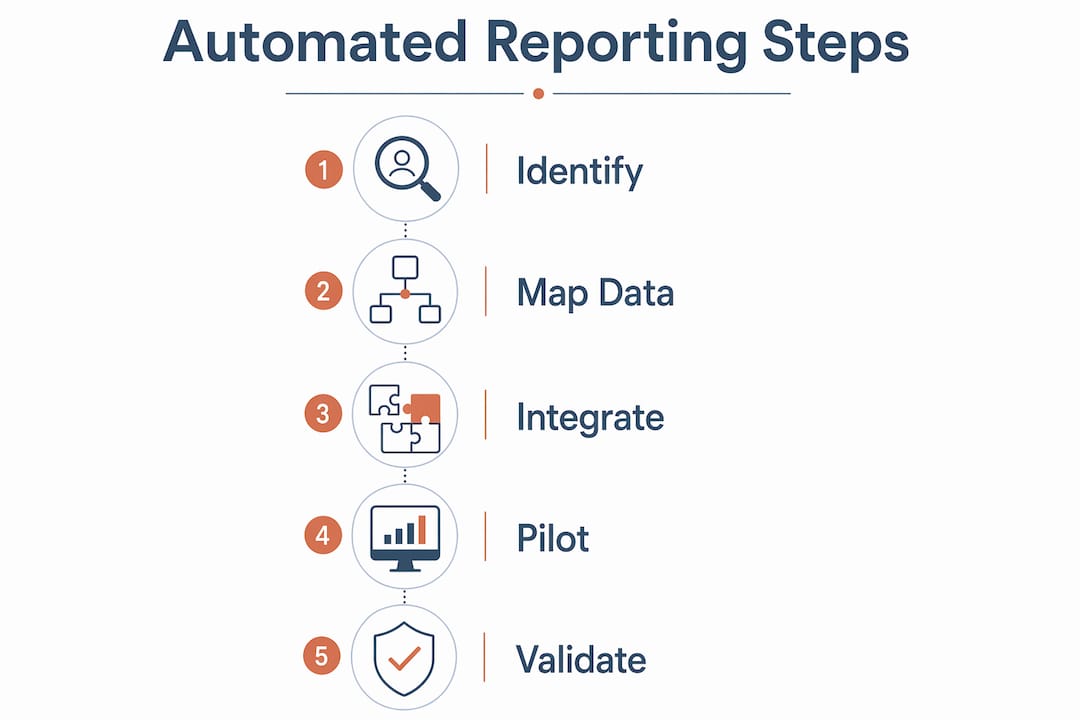
Implementation follows a defined sequence. Skipping steps creates gaps that surface as errors in live client reports.
-
Define your KPIs and required data points. Defining target KPIs in the first week of implementation aligns your team and gives you a measurable baseline. Identify which metrics each client report must include: schedule variance, cost performance index, milestone completion, and any contract-specific items like holdback releases.
-
Audit and clean your source data. Pull a sample report manually and trace every data point back to its source system. Fix naming inconsistencies, duplicate cost codes, and missing WBS entries before connecting any automation layer. Garbage in means garbage out, regardless of how sophisticated your orchestration is.
-
Build your integration layer. Connect your project management platform, PSA tool, and accounting system through middleware or native API connections. The goal is a single data pipeline that feeds your reporting engine without manual exports.
-
Design your multi-agent orchestration workflow. Multi-agent orchestration coordinates three distinct functions: a validation agent that checks incoming data against defined rules, a generation agent that populates report templates, and a routing agent that sends drafts to the right approver via webhook or email. This architecture is more reliable than simple data scraping because each agent has a specific, auditable job.
-
Version-lock your report templates. Store approved templates in your document control system with change logs. Any template update should trigger a review and approval before it goes live. This prevents unauthorized format changes from reaching clients.
-
Configure approval routing and audit trails. Set up automated routing so generated reports go to the project engineer for a 20-minute review before client delivery. Every action in the workflow, including edits, approvals, and rejections, should write to an immutable audit log.
-
Run a parallel pilot. For the first two reporting cycles, generate both manual and automated reports. Compare outputs line by line. This catches integration errors and builds team confidence before you retire the manual process.
Pro Tip: Assign one engineer as the workflow owner during the pilot phase. That person becomes your internal expert and the first point of contact when something flags unexpectedly. Distributed ownership at this stage leads to no ownership.
Common mistakes at this stage include connecting too many data sources at once, skipping the parallel pilot, and treating template design as an afterthought. Each of these adds weeks to your go-live timeline.
What are the best practices for accuracy and governance?
Accuracy in automated client reports is not automatic. It requires deliberate governance built into the workflow architecture.
Validation and audit trail requirements
A validation agent cross-references incoming data against expected ranges and flags anomalies before report generation. For example, if a cost code shows 140% budget consumption but the schedule shows 60% completion, the agent flags that discrepancy for engineer review rather than letting it pass into the client report. Governed automation with auditable trails and version-locked templates is the standard that successful engineering reporting systems follow.
Audit trails serve two purposes. First, they protect you during client disputes by showing exactly what data was used and when. Second, they satisfy compliance requirements in regulated projects where certifiers and clients have oversight rights. An immutable workflow history is not optional in these environments.
Governance features that matter
The difference between governed and ungoverned automation is significant in practice:
- Governed systems include version-locked templates, role-based approval routing, immutable audit logs, and exception flagging with engineer comment fields.
- Ungoverned systems generate reports faster but lack traceability, making it difficult to explain discrepancies to clients or auditors.
Template management deserves specific attention. Every report template should carry a version number, an effective date, and the name of the approver who signed off on it. When a client requests a format change, that change goes through the same approval process as a project deliverable. This discipline prevents template drift, where small informal edits accumulate until the report no longer matches the contract requirement.
Governed automation preserves auditability and compliance, which is critical in regulated engineering projects. Treating governance as a bureaucratic overhead rather than a client protection mechanism is the fastest way to lose trust when something goes wrong.
How do you troubleshoot and improve automated reporting over time?
Even well-built systems develop problems. The key is catching them early and fixing root causes rather than symptoms.
The most common issues engineering firms encounter are:
- Data drift: Source systems change field names or structures after a software update, breaking the integration pipeline silently.
- Template mismatches: A contract amendment changes reporting requirements, but the template update does not go through the governance process.
- Approval bottlenecks: The routing agent sends reports to an approver who is on leave, and no backup rule exists.
- Adoption resistance: Engineers distrust the automated draft and rebuild it manually, defeating the purpose of automation.
AI-driven early warning tools address the adoption problem by shifting reporting from lagging indicators to proactive risk detection. When engineers see the system flagging budget slippage or schedule risk before the client notices, trust in the automation builds quickly.
Conversational AI interfaces reduce the cognitive load of querying project metrics. Instead of running a report to check one number, an engineer asks a natural language question and gets an answer in seconds. This capability accelerates adoption because it makes the system useful for daily work, not just formal client reporting.
Pro Tip: Schedule a monthly workflow review for the first six months after go-live. Check integration logs for silent failures, review flagged exceptions to identify patterns, and survey the team on friction points. Most optimization opportunities surface in this window.
Iterative improvement follows a simple cycle: monitor outputs, identify the highest-frequency error, trace it to its source, fix the root cause, and verify the fix in the next reporting cycle. Firms that treat automation as a set-and-forget system see quality degrade within two quarters.
Key takeaways
Automated client reporting in engineering firms delivers measurable time savings and accuracy improvements only when built on governed, engineering-specific workflows with proper data integration and audit trails.
| Point | Details |
|---|---|
| Time savings are substantial | Automation cuts report assembly from hours to minutes, recovering 10–25 staff hours per week. |
| Integration tax is real | Standardize data across Procore, Deltek, and legacy systems before connecting any automation layer. |
| Engineering-specific tools win | Platforms that natively handle holdbacks and WBS outperform generic AI solutions in accuracy. |
| Governance is non-negotiable | Version-locked templates and immutable audit trails protect client trust and satisfy compliance requirements. |
| Iterative improvement sustains results | Monthly workflow reviews in the first six months prevent quality degradation and catch silent failures. |
Why most engineering firms automate reporting the wrong way
After watching firms implement reporting automation across a range of project types, the pattern I see most often is this: a firm picks a capable tool, connects it to their main data source, and calls it done. Six months later, the reports are faster but the engineers still don’t trust them. The root cause is almost always the same. The firm automated the generation step but skipped the governance layer.
The firms that get this right treat their report templates like contract documents. They version them, approve changes formally, and audit the outputs regularly. That discipline feels slow at first. It pays off when a client questions a number and you can show them exactly where it came from, down to the timestamp.
The other thing I’d push back on is the idea that any AI tool will do. Engineering-specific AI understands holdbacks, WBS, and progress billing in ways that generic platforms simply do not. Forcing a generic tool to handle engineering reporting is like using a spreadsheet to manage a construction schedule. It works until it doesn’t, and when it fails, it fails in front of your client.
The shift from lagging to proactive reporting is where the real value lives. When your system flags a cost overrun before the client’s monthly meeting, you walk into that meeting with a solution instead of an explanation. That changes the client relationship permanently.
— Keith
How Designflow-build supports engineering reporting automation
Engineering firms that want to move from manual report assembly to governed AI workflows need a platform built for construction and engineering from the ground up.
Designflow-build combines AI-driven project management with integrated accounting and field operations in one system. The platform reports a 70% reduction in manual data entry, which directly cuts the time your team spends assembling client reports. Implementation runs in 2–4 weeks with a 98% user adoption rate, so your team is generating automated reports quickly without a lengthy rollout. Explore Designflow-build’s AI construction ERP to see how it fits your firm’s reporting workflow. For a quick orientation on key terms like WBS, holdbacks, and ERP, the construction software glossary is a practical starting point.
FAQ
What does it cost to automate client reporting in an engineering firm?
Costs vary by firm size and tool selection. Larger firms typically realize $5,000 to $15,000 in monthly savings through reduced write-offs and faster report assembly, which offsets platform costs quickly.
How long does it take to implement automated client reporting?
A governed workflow with proper data integration typically takes 4–8 weeks to deploy, including the parallel pilot phase. Platforms like Designflow-build report implementation timelines of 2–4 weeks for their core system.
What is multi-agent orchestration in engineering reporting?
Multi-agent orchestration uses separate AI agents to validate data, generate the report, and route it for approval. This approach is more accurate and auditable than simple data scraping or single-step automation.
Do automated reports work for regulated engineering projects?
Yes, when built with immutable audit trails, version-locked templates, and role-based approval routing. Governed automation satisfies compliance requirements and provides the traceability that certifiers and clients require.
What is the biggest mistake firms make when automating client reports?
Skipping the data standardization step before connecting automation tools. Integration tax from legacy systems like Deltek and Procore is consistently underestimated and causes silent data errors in live client reports.