
Best Trave.io Alternatives for U.S. Contractors in 2026

For U.S. contractors and project managers searching for Trave.io alternatives, the practical shortlist comes down to four categories: an entry-level field app for daily reporting, a mid-market all-in-one for growing GCs, an enterprise platform for large commercial teams, and an AI-native ERP for contractors who need PM, accounting, and field ops in one system. Trave is a small Irish startup founded in 2021 with roughly 7 employees, which means U.S. contractors often outgrow its scale quickly or need deeper integrations than it offers.
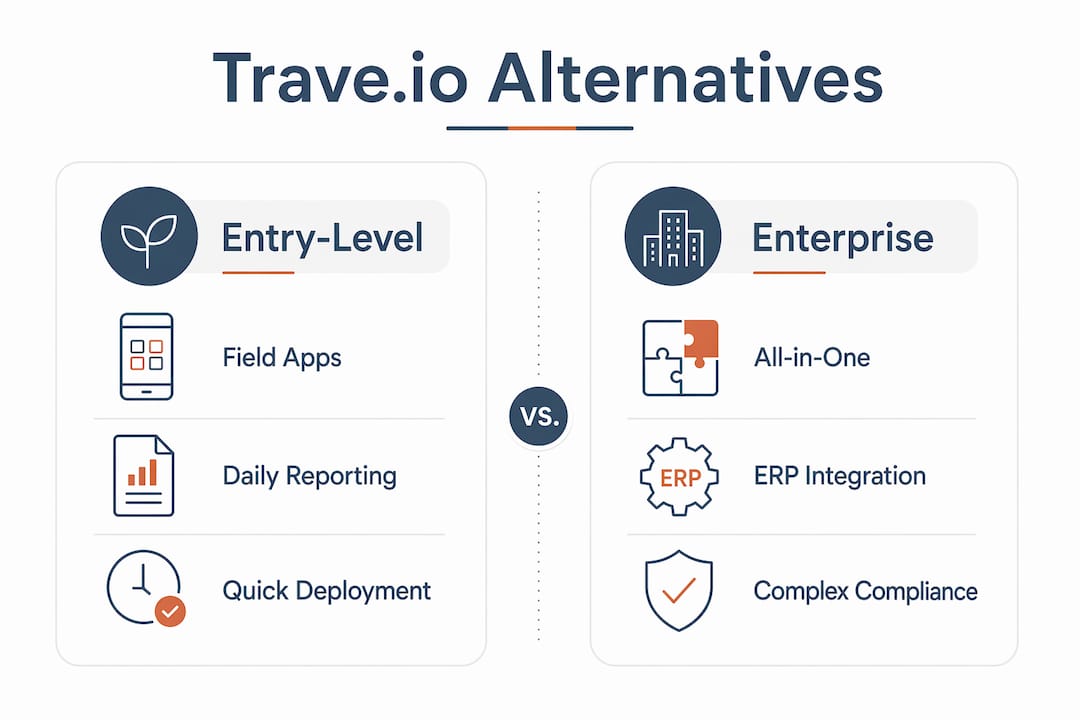
Here is how the categories map to contractor type:
- Small GCs and specialty trades doing daily field reporting: entry-level field apps (Fieldwire, Raken) get you live fast with minimal training.
- Residential contractors managing budgets and client communication: mid-market all-in-one platforms (Buildertrend, CoConstruct) cover scheduling, selections, and basic financials.
- Commercial GCs and enterprise teams: enterprise platforms (Procore, Autodesk Build/PlanGrid) handle complex document control, subcontractor management, and compliance.
- Contractors who want ERP-grade financials plus field ops in one product: Designflow-build is the single strongest pick in this category, with a reported 70% reduction in manual data entry and implementation in 2–4 weeks.
If you want one integrated system that replaces Excel, QuickBooks, and a field app simultaneously, Designflow-build is the alternative to evaluate first.
Table of Contents
- How do the top Trave.io alternatives compare side by side?
- How to pick the right Trave.io alternative for your company
- Profiles: what each alternative actually offers contractors
- How these alternatives were evaluated
- Why Designflow-build is a competitive alternative to Trave.io
- Key Takeaways
- What most contractor software evaluations get wrong
- Designflow-build cuts implementation time without cutting ERP depth
- Sources and further reading
How do the top Trave.io alternatives compare side by side?
The table below maps each platform category across the dimensions that matter most to U.S. contractors: core modules, pricing shape, implementation time, integrations, and field usability. Note that pricing models vary widely across free tiers, per-user subscriptions, and tiered enterprise plans, and total cost of ownership often rises once implementation and add-ons are included.
| Category | Best For | Core Modules | Pricing Shape | Implementation | Integrations | Mobile/Field | Scale |
|---|---|---|---|---|---|---|---|
| Entry-level field apps | Small GCs, specialty trades | Daily logs, punch lists, photo uploads | Free tier or low per-user fee | Days to 1 week | Limited; basic accounting connectors | Strong; offline capable | 1–20 users |
| Mid-market all-in-one | Residential, small commercial | Scheduling, selections, client portal, basic financials | Per-user or per-project subscription | 2–6 weeks | QuickBooks, Xero; limited BIM | Good; some offline gaps | 5–20 users |
| Enterprise platforms | Large commercial GCs | Full PM, document control, RFIs, submittals, compliance | Tiered enterprise; custom quotes | 8–16 weeks | BIM (Autodesk), ERP, estimating tools | Strong; purpose-built apps | 20+ users |
| Estimating-focused | Specialty trades, bid-heavy GCs | Takeoff, bid management, cost tracking | Per-user or module pricing | 2–4 weeks | QuickBooks, accounting; limited field | Moderate | 5–20 users |
| AI-native ERP | Contractors needing PM + accounting + field ops unified | PM, accounting/ERP, field ops, AI risk prediction | Subscription; contact for pricing | 2–4 weeks | Accounting, estimating, BIM | Strong; frictionless daily reporting | SMB to mid-market |
Pro Tip: Map your single biggest daily pain point before evaluating vendors. If field reporting eats an hour every morning, prioritize mobile/field usability above everything else. If job costing is wrong every month, start with ERP-depth financials. Buying a platform that excels at your weakest link delivers faster ROI than buying the most feature-rich option.
When comparing platforms, real-time data access is consistently one of the top decision factors for PMs who need accurate job cost visibility without waiting for end-of-week reconciliations.
How to pick the right Trave.io alternative for your company
The single strongest decision rule: identify the module your team uses every single day and make that module non-negotiable in your evaluation. Field crews logging daily reports need a platform that works offline and takes under two minutes to submit. Project managers reconciling job costs need accounting depth that connects directly to field data. Everything else is secondary.
Before you run a demo, confirm your company fits the vendor’s target market. Some vendors labeled as construction software actually target hospitality or property management, and similarly named products can serve entirely different industries. Verify the vendor’s customer base is construction-specific before investing time in an evaluation.
Questions to ask every vendor during demos:
- Does your mobile app work fully offline, and how does it sync when connectivity returns?
- Which accounting systems do you integrate with natively, and which require a paid connector?
- What does data migration from our current system look like, and who owns that process?
- What is your typical implementation timeline for a company our size?
- What is your support SLA after go-live, and do we get a dedicated contact?
- How do you measure user adoption, and what onboarding resources are included?
- Can you show us a live job cost report pulling from both field data and accounting in real time?
Red flags to watch for in sales conversations:
- Pricing tiers that require a call to get any number at all, with no published baseline.
- “We integrate with everything” without specifying whether those are native integrations, documented APIs, or paid third-party connectors. Verifying integration type matters because paid connectors add to total cost and extend implementation time.
- No clear answer on offline mobile capability.
- Vague implementation plans with no named project manager or milestone schedule.
- Adoption metrics that are company-wide averages rather than specific to your industry or team size.
Buyers who prioritize faster ROI should rank implementation time and data migration effort ahead of feature breadth. A narrower fit that deploys in two weeks often delivers higher early returns than a feature-rich platform that takes four months to configure.
Profiles: what each alternative actually offers contractors

Entry-level field apps (Fieldwire, Raken)
These platforms solve one problem extremely well: getting field data off paper and into a shared system the same day. Core modules focus on daily logs, punch lists, task assignments, photo documentation, and basic plan viewing. Offline support is typically strong, which matters on job sites with spotty connectivity. Pricing starts low, often with a free tier for small teams, and per-user costs stay manageable for crews under 20.
- Pros: Fast setup (days, not weeks), strong mobile UX, low cost of entry.
- Pros: Offline capability is usually best-in-class for this category.
- Pros: Minimal training required; field crews adopt quickly.
- Con: Limited or no native accounting/ERP depth.
- Con: Scaling beyond field reporting requires adding separate tools.
Best for: Small GCs and specialty trades whose primary pain is daily reporting and punch list management.
Mid-market all-in-one platforms (Buildertrend, CoConstruct)
These platforms target residential contractors and small commercial GCs who need scheduling, client communication, selections management, and basic job costing in one place. They typically integrate with QuickBooks for accounting rather than replacing it. Implementation runs 2–6 weeks with guided onboarding. Mobile apps are solid for most tasks, though some offline gaps exist depending on the feature.
- Pros: Purpose-built for residential workflows (selections, client portal, change orders).
- Pros: QuickBooks integration is usually well-documented and reliable.
- Pros: Mid-range pricing fits growing GC budgets.
- Con: Accounting depth is limited compared to true ERP platforms.
- Con: Less suited for complex commercial projects with heavy document control needs.
Best for: Residential builders and remodelers managing client relationships alongside project schedules.
Enterprise platforms (Procore, Autodesk Build/PlanGrid)
Enterprise platforms handle the full complexity of large commercial construction: RFIs, submittals, document control, subcontractor management, compliance tracking, and BIM coordination. Procore and Autodesk Build are the two most widely deployed in this category among U.S. commercial GCs. Implementation typically runs 8–16 weeks and often requires dedicated IT resources or a consulting partner. Pricing is custom and negotiated by contract size.
- Pros: Deepest document control and compliance features available.
- Pros: Strong BIM integration (especially Autodesk Build with the broader Autodesk ecosystem).
- Pros: Large partner and integration ecosystem.
- Con: Long implementation timelines and significant configuration effort.
- Con: Cost can be prohibitive for small to mid-size GCs.
Best for: Large commercial GCs and enterprise teams managing multi-project portfolios with complex compliance requirements.
Estimating-focused platforms (Planyard)
Estimating-focused tools center on takeoff, bid management, and cost tracking. They connect bid data to project budgets and often integrate with accounting systems for job cost reporting. Implementation is typically faster than enterprise platforms, and pricing is more accessible for mid-size specialty contractors. Field capabilities are moderate; these platforms shine in pre-construction rather than daily site operations.
- Pros: Strong takeoff and bid-to-budget workflow.
- Pros: Faster implementation than full enterprise platforms.
- Con: Field/mobile capabilities are secondary to estimating features.
- Con: May require a separate field app for daily site operations.
Best for: Specialty trades and bid-heavy GCs who need accurate cost tracking from estimate through project close.
AI-native ERP (Designflow-build)
Designflow-build combines project management, accounting, and field operations into one AI-native platform, eliminating the need to run separate tools for each function. The AI layer predicts project risks, flags resource allocation issues, and reduces the manual data entry that typically consumes hours of a PM’s week. Vendor-reported metrics include a 70% reduction in manual data entry, monthly savings of up to $847K in some cases, implementation completed in 2–4 weeks, and a 98% user adoption rate.
- Pros: PM, accounting, and field ops in one system with no integration gaps between modules.
- Pros: Implementation over a few weeks is significantly faster than enterprise alternatives.
- Pros: AI-driven risk prediction and resource allocation built into the core workflow.
- Con: Best fit for contractors ready to replace their current stack rather than add a point solution.
- Con: Pricing is not publicly listed; requires a demo conversation.
Best for: Contractors who need ERP-grade financials and field ops unified, without a long consultant-led rollout.
Pro Tip: When evaluating Designflow-build or any AI-native platform, ask the vendor to show you the AI output in a live environment, not a demo dataset. Seeing risk flags and resource recommendations on a real project type similar to yours is the fastest way to validate whether the AI layer adds genuine value for your workflows.

How these alternatives were evaluated
Every platform in this comparison was assessed using a consistent set of criteria drawn from vendor briefings, third-party review platforms, customer case studies, and hands-on demo sessions where available. The goal was to give U.S. contractors a practical, honest comparison rather than a feature checklist that looks comprehensive but tells you nothing about real-world use.
Evaluation criteria used:
- Core feature depth across PM, financials/ERP, field/mobile, and document control.
- Mobile usability and offline support for field crews without reliable connectivity.
- Integration quality: native vs. API vs. paid connector, and which accounting and estimating systems are supported.
- Pricing model transparency and total cost of ownership signals.
- Implementation timeline and onboarding support included in the base contract.
- Support SLA and post-go-live resources.
- ROI signals: vendor-reported adoption rates, time savings, and cost reduction metrics where available and sourced.
Evaluation steps:
- Reviewed vendor documentation, published case studies, and third-party comparison sources.
- Assessed demo environments or recorded walkthroughs for each platform category.
- Cross-referenced user feedback from contractor communities and review platforms.
- Validated vendor-reported metrics against published showcases and reference materials.
- Applied the comparison dimensions consistently across all categories.
Pricing figures in this article reflect published ranges and vendor-reported signals. Actual costs vary by team size, contract terms, and add-ons. Always request a detailed quote that includes implementation, data migration, and ongoing support before signing. Regional differences in support availability and contract terms may also apply.
Why Designflow-build is a competitive alternative to Trave.io
Designflow-build’s core position is straightforward: it is the only platform in this comparison that treats PM, accounting, and field operations as a single integrated system rather than three modules bolted together. For contractors who have been running Excel for job costing, QuickBooks for accounting, and a separate field app for daily logs, that integration is the practical payoff. Manual processes directly cut into construction profits, and Designflow-build is built specifically to close that gap.
Vendor-reported metrics from the Designflow-build showcases page:
- a substantial reduction in manual data entry across tracked projects.
- monthly savings in documented cases in documented cases (vendor-reported; validate with reference checks).
- implementation over a few weeks with guided onboarding, no large consulting team required.
- very high user adoption rate, which the vendor attributes to frictionless field reporting and minimal training overhead.
“Field adoption is the single gating factor for project-wide success: platforms that reduce daily data entry and make field reporting frictionless see much higher adoption and faster benefits.” — DesignFlow Build showcases
What to validate during a Designflow-build demo:
- Ask to see a live job cost report that pulls from both field data and accounting in real time, not a pre-built demo dataset.
- Request a reference from a contractor of similar size and project type who completed implementation within the stated 2–4 week window.
- Confirm which accounting systems are natively integrated versus connected via API.
- Ask how the AI risk prediction works on a project type similar to yours, and what triggers a flag.
- Verify what is included in onboarding: data migration support, training sessions, and post-go-live check-ins.
These are the same questions worth asking any vendor. With Designflow-build, the answers should be specific and demonstrable in a live environment.
Key Takeaways
For U.S. contractors evaluating Trave.io alternatives, the right platform depends on one factor above all others: which module you rely on every single day.
| Point | Details |
|---|---|
| Match platform to daily pain | Field-first contractors should prioritize offline mobile capability; accounting-first teams need ERP-depth financials. |
| Implementation time drives early ROI | Faster deployments (2–4 weeks) often yield higher early returns than feature-rich platforms with 8–16 week rollouts. |
| Verify integration type before signing | Native integrations, APIs, and paid connectors differ in cost and complexity; confirm which applies to your accounting system. |
| Enterprise platforms suit large commercial GCs | Procore and Autodesk Build offer the deepest document control but require significant configuration time and budget. |
| Designflow-build for integrated ERP | Designflow-build reports 70% less manual data entry, implementation in 2–4 weeks, and a 98% user adoption rate, making it the strongest pick for contractors replacing a fragmented tool stack. |
What most contractor software evaluations get wrong
The conventional wisdom says to compare platforms by feature count. More modules, more checkboxes, better software. That logic is backwards for most U.S. contractors, and it is why so many teams end up with a powerful platform they use at 20% capacity six months after go-live.
The real question is not “which platform has the most features?” It is “which platform will my field crew actually open tomorrow morning?” Field adoption is the gating factor for every ROI claim a vendor makes. A platform that reduces daily reporting to two minutes per crew member will generate more measurable value in 90 days than an enterprise system that takes a year to configure and requires a dedicated admin to maintain.
The other thing most evaluations underweight is the cost of integration gaps. Contractors running a field app, a separate accounting system, and a scheduling tool are paying three subscription fees and spending real hours every week reconciling data between them. That reconciliation cost rarely shows up in a feature comparison, but it shows up every month on the P&L. Platforms that unify those functions, even if they are not the deepest in any single category, often deliver faster and more durable ROI than best-in-class point solutions that never talk to each other cleanly.
The tradeoff worth watching: broader platforms with deeper integration tend to have longer implementation timelines. The contractors who get the most value are the ones who go into the evaluation knowing exactly which tradeoff they are willing to make.
Designflow-build cuts implementation time without cutting ERP depth
Most contractors evaluating alternatives to Trave.io face the same tradeoff: go with a field app that deploys in a week but leaves accounting disconnected, or commit to an enterprise platform that takes months to stand up. Designflow-build is built for contractors who refuse that tradeoff.

With AI-native ERP features that unify project management, job cost accounting, and field operations in one system, Designflow-build reports a 70% reduction in manual data entry, implementation in 2–4 weeks, and a 98% adoption rate. This reflects a platform designed for field crews, not just back-office PMs.
If you are ready to see how it works on your project type, book a demo and bring your current job cost report. Ask the team to show you a live accounting-to-field data flow, walk through the AI risk prediction on a project similar to yours, and run through the integration checklist for your accounting system. That 30-minute session will tell you more than any feature comparison table.
Schedule your demo and see the integrated ERP in action.
Sources and further reading
The following sources were used to research and validate claims in this article. Vendor-reported metrics are labeled as such and should be verified with reference checks during your evaluation.
Research and reference sources:
- Trave company profile (founded 2021, ~7 employees, HQ Ireland) — third-party company data
- DesignFlow Build showcases: vendor-reported metrics (70% manual data reduction, $847K savings, implementation over a few weeks, 98% adoption) — vendor-reported
- Why real-time data matters for construction managers — Designflow-build editorial
- Mobile tools in construction management: A 2026 Guide — Designflow-build editorial
- Construction operational efficiency explained for PMs — Designflow-build editorial
- Why manual processes cut your construction profits — Designflow-build editorial
- ITQlick vendor comparisons: pricing shapes and demo checklist themes — third-party review platform
- CB Insights: Travelio alternatives and competitor market mapping — third-party market intelligence
- Reddit: What’s the best construction management software? — contractor community discussion
- Planera: Best construction management software platforms — third-party roundup
Headline trust signals (vendor-reported):
| Metric | Value | Source | Type |
|---|---|---|---|
| Manual data entry reduction | 70% | DesignFlow Build showcases | Vendor-reported |
| Monthly savings (documented cases) | Up to $847K | DesignFlow Build showcases | Vendor-reported |
| Implementation timeline | 2–4 weeks | DesignFlow Build showcases | Vendor-reported |
| User adoption rate | 98% | DesignFlow Build showcases | Vendor-reported |
| Trave founding year | 2021 | Exa.ai company profile | Third-party |
| Trave employee count | ~7 | Exa.ai company profile | Third-party |