
How to Reduce Admin Workload on Engineering Projects

Administrative overhead is the single largest productivity drain in engineering project management. Centralizing data, automating rule-based processes, and deploying AI-powered platforms are the three proven methods to reduce admin workload on engineering projects. One engineering firm cut coordination time by 50% within 90 days after consolidating project data into an AI-enabled portal, saving over $100,000 annually. Tools like Jira, ConnectTeam, and Maisa AI’s Digital Workers are already delivering these results for contractors and project managers in 2026. This article gives you a direct, step-by-step path to the same outcome.
What tools and technology platforms reduce admin workload on engineering projects?
The right platform stack is the foundation of any serious effort to cut administrative overhead. Three categories matter most: integration hubs, AI automation engines, and project management software.
Integration hubs like SharePoint and ConnectTeam pull data from disconnected systems into one dashboard. Integrating siloed tools into a single source of truth yields greater efficiency gains than automating tasks within any one system alone. That means your field reports, billing data, and scheduling updates all live in one place instead of three separate spreadsheets.
AI automation engines handle the repetitive work. Maisa AI’s Digital Workers automate document analysis, blueprint verification, and compliance checks, cutting manual review cycles and accelerating billing. These tools are configurable via natural language, so your team does not need a developer to set up a new workflow.
Project management software enforces process discipline. Tools like Jira and Linear handle issue tracking and status reporting. High-performing teams consistently prefer opinionated tools that enforce standard workflows over infinitely configurable software. Less configuration means less dedicated administration.

Here is a direct comparison of the major tool categories:
| Tool category | Example tools | Key admin reduction capability | Ease of adoption |
|---|---|---|---|
| AI project portals | Maisa AI Digital Workers | Blueprint verification, compliance checks, billing automation | Moderate |
| Integration hubs | ConnectTeam, SharePoint | Unified data dashboard, background sync | High |
| Issue tracking | Jira, Linear | CI triage, status reporting, automated notifications | High |
| ERP platforms | Designflow-build | End-to-end project, accounting, and field ops in one system | High (2–4 week setup) |
| Engineering automation | Lino GmbH Engineering Automation | Order-to-manufacturing workflow, CAD and ERP integration | Moderate |
Pro Tip: Start with the tool your team already uses most. Connecting it to one additional system via API delivers faster adoption than deploying an entirely new platform from scratch.
The goal is not to collect tools. The goal is to eliminate the manual handoffs between them.
How to implement a step-by-step process to minimize project management tasks
A phased rollout prevents the chaos that kills most automation initiatives before they deliver results.
Step 1: Audit your current admin load. List every recurring task your team performs manually each week. Common targets include CI triage, status reporting, billing approvals, and document retrieval. Engineering managers can eliminate up to 6 hours of weekly overhead by automating just these four task types. That is not a marginal gain. It is a full workday returned to your team every week.
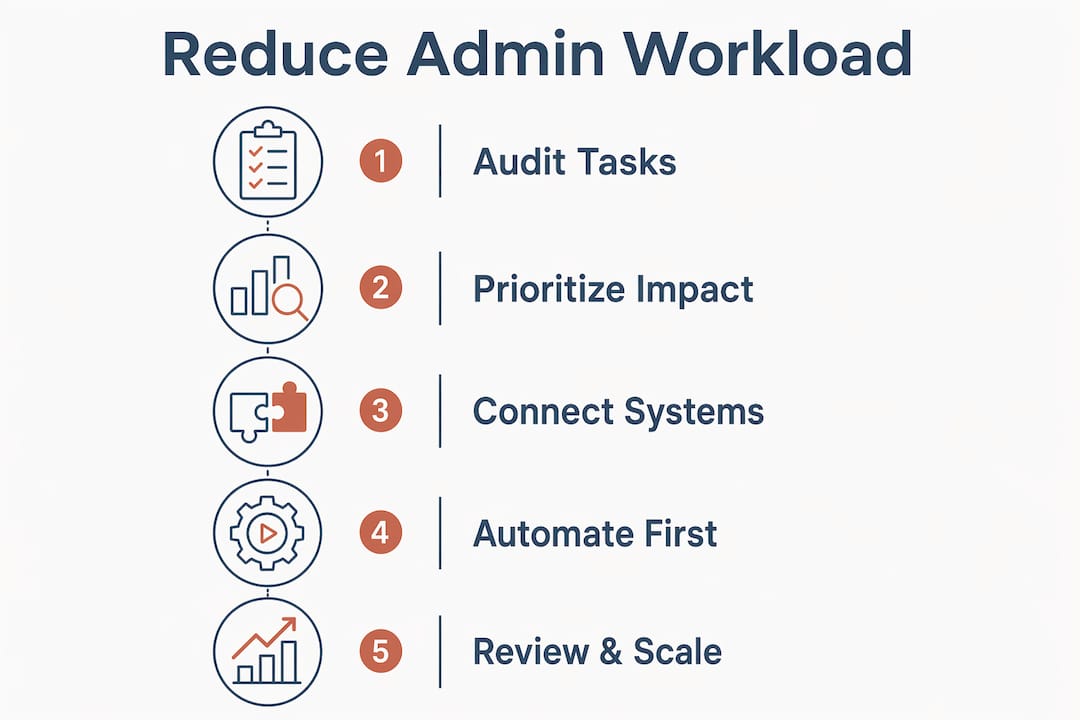
Step 2: Prioritize by impact and effort. Not every workflow is worth automating first. Rank tasks by time consumed and error frequency. Billing approvals and status reports typically rank highest because they recur daily and involve multiple stakeholders.
Step 3: Connect your systems. Set up API integrations between your existing tools. ConnectTeam connects field operations to back-office systems. SharePoint centralizes document management. VantagePoint links project financials to scheduling data. The integration layer is where most of the admin reduction actually happens.
Step 4: Configure automation rules and triggers. Define what happens automatically versus what requires human review. Set up notification triggers for overdue tasks, budget thresholds, and document approvals. Keep human-in-the-loop checkpoints for any action that affects billing or compliance.
Step 5: Train your team with minimal friction. AI-assisted onboarding tools cut documentation search time by 30–40% for new engineers. That reduction also frees senior engineers from answering repetitive questions. Use short video walkthroughs and in-app guidance rather than lengthy training sessions.
“The teams that succeed with automation are not the ones with the most sophisticated tools. They are the ones who removed the most manual steps from their most frequent workflows first.”
Pro Tip: Automate your highest-frequency task first, even if it is not the most complex. Early wins build team confidence and justify the investment to leadership.
What are the common challenges when reducing admin workload in engineering projects?
Three obstacles derail most admin reduction efforts before they reach full impact.
Challenge 1: Engineer resistance. Engineers reject tools they perceive as adding overhead rather than removing it. Tools that minimize UI interaction through conversational interfaces and background sync see significantly higher adoption rates. The lesson is direct: if your team has to click through five screens to log a status update, they will not use the tool.
Challenge 2: Siloed data sources. Automating within one tool while leaving others disconnected produces partial results. The fix is integration first, automation second. Connect Jira to your ERP before you build automation rules inside either system.
Challenge 3: Full AI autonomy without review. Full AI autonomy without human review leads to errors that damage team trust and create costly rework. The solution is a structured approval queue. AI handles the drafting and routing. A human confirms before anything is committed to the record.
Here are the most effective solutions for each challenge:
-
Resistance: Choose tools with conversational interfaces and background sync. Reduce required clicks to a minimum.
-
Siloed data: Integrate systems via API before configuring automation rules. One source of truth first.
-
AI errors: Build human-in-the-loop approval queues into every workflow that touches billing, compliance, or client-facing documents.
-
Data integrity: Run parallel processes for the first two weeks after any automation goes live. Compare automated outputs against manual records before fully switching over.
Pro Tip: Never automate a broken process. Fix the workflow manually first, then automate the fixed version. Automating a flawed process just produces errors faster.
How do organizations measure success in ongoing admin workload reduction?
Measurement is what separates a one-time efficiency gain from a compounding improvement program.
Key performance indicators to track
The four metrics that matter most are time saved per week, cost reduction per project cycle, error rate in automated outputs, and project cycle duration. Establish a baseline for each before you deploy any automation. Without a baseline, you cannot prove the value of what you built.
End-to-end engineering automation reduces lead times by 25–50% and errors by 30% when configuration, CAD, and ERP systems are fully integrated. Those numbers represent the ceiling of what is achievable with mature automation. Most teams reach 40–60% of that ceiling within the first six months.
Dashboards and automated reporting
Set up automated dashboards that pull live data from your integrated systems. Weekly reports on task completion rates, approval queue backlogs, and billing cycle times give you an early warning system for process breakdowns. Tools like Jira and ConnectTeam both support custom dashboard views without additional development work.
Continuous feedback loops
Schedule a monthly 30-minute review with your project team to assess which automations are working and which are creating new friction. Collect specific examples, not general sentiment. “The billing approval trigger fires too early” is actionable. “The system feels slow” is not.
Scaling automation across additional workflows follows the same phased approach as the initial rollout. Add one new automated workflow per month after your first three are stable. That pace prevents overload and keeps your team’s trust intact.
| KPI | What to measure | Target improvement |
|---|---|---|
| Weekly admin hours | Hours spent on manual recurring tasks | 40–60% reduction in 90 days |
| Billing cycle time | Days from project milestone to invoice | 60% faster with AI portal |
| Error rate | Errors per 100 automated outputs | Below 2% with HITL queues |
| Documentation retrieval | Time to find a specific project document | 30–40% reduction with AI onboarding |
Key takeaways
Reducing admin workload on engineering projects requires integrating disconnected systems first, then automating the highest-frequency tasks with human-in-the-loop oversight to maintain accuracy and team trust.
| Point | Details |
|---|---|
| Integration before automation | Connect siloed tools into one data source before configuring any automation rules. |
| Target high-frequency tasks first | Automating CI triage, status reporting, and billing approvals delivers the fastest measurable time savings. |
| Keep humans in the loop | Build approval queues for any automated action touching billing, compliance, or client records. |
| Choose opinionated tools | Tools that enforce standard workflows require less administration than highly configurable platforms. |
| Measure from a baseline | Establish pre-automation benchmarks for time, cost, and error rates before deploying any new workflow. |
The part most teams skip entirely
I have worked with enough project managers to know where admin reduction programs stall. It is almost never the technology. The tools work. The integrations hold. The dashboards look great in the demo. What breaks down is the assumption that deploying a tool is the same as changing a behavior.
Engineers are practical people. They will use a tool that saves them time on the first day they touch it. They will abandon a tool that adds two extra steps to a task they already know how to do manually. That is not resistance to change. That is a rational response to a bad implementation.
The teams I have seen succeed with admin reduction share one habit: they remove a manual step before they add an automated one. They do not layer new tools on top of existing workflows. They redesign the workflow first, then automate the redesigned version. That sequence matters more than any specific tool choice.
The other thing I would push back on is the instinct to automate everything at once. A phased rollout is not a compromise. It is the strategy. Three stable automations running cleanly for 90 days build more organizational confidence than ten automations running at 70% reliability. Confidence is what gets you budget for the next phase.
Start with the workflow your team complains about most. Fix it manually. Then automate the fixed version. Measure the result. Repeat.
— Keith
See how Designflow-build cuts engineering admin in practice
If the strategies in this article describe problems you are solving right now, Designflow-build is built for exactly this situation. The platform combines project management, accounting, and field operations into one system, eliminating the manual handoffs between disconnected tools that create most of your admin overhead. Users report a 70% reduction in manual data entry, and the platform goes live in 2–4 weeks without a consultant-led rollout.
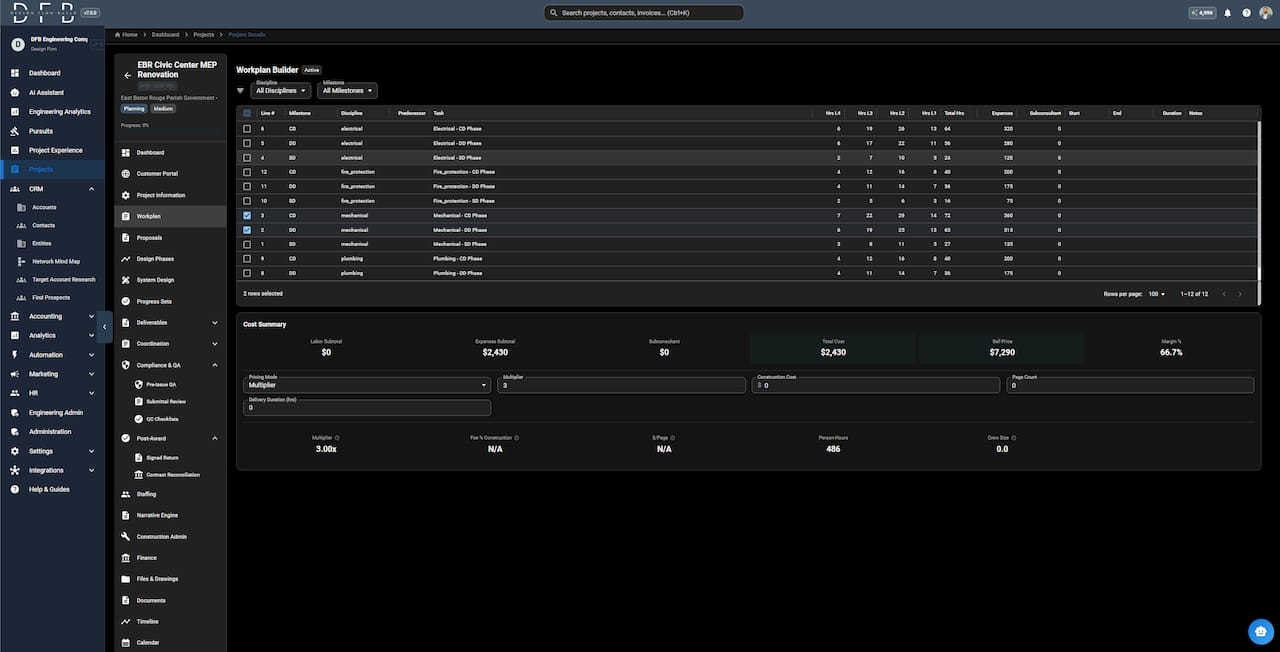
You can explore AI construction software capabilities on the Designflow-build site, or review the construction scheduling software to see how enforced workflows reduce administrative burden from day one. If you want to understand the terminology before committing to a platform decision, the software glossary covers every key ERP and takeoff term in plain language. Start a free trial or talk to the team directly at Designflow-build.
FAQ
How much admin time can engineering teams realistically save?
Engineering managers can eliminate up to 6 hours of weekly overhead by automating CI triage, status reporting, and data retrieval. One firm reduced coordination time by 50% within 90 days of centralizing data into an AI-enabled portal.
What is the first step to automate engineering workflows?
Audit your recurring manual tasks and rank them by time consumed and error frequency. Connect your existing tools via API integration before configuring any automation rules, since integration across systems delivers greater gains than automating within a single platform.
Why do engineers resist admin automation tools?
Engineers reject tools that feel like overhead collectors rather than time savers. Tools that minimize required UI interaction through conversational interfaces and background sync see higher adoption because they reduce friction instead of adding it.
Should AI handle billing and compliance approvals automatically?
No. Human-in-the-loop approval queues are required for any automated action touching billing, compliance, or client-facing documents. Full AI autonomy in these areas produces errors that damage team trust and require costly correction.
How long does it take to see measurable results from admin reduction?
Most teams see measurable time savings within 30–90 days of deploying their first integrated automation. Billing cycle improvements of up to 60% are achievable within the same window when an AI-enabled project portal is used.