
Automated Scheduling Construction Benefits in 2026

Automated scheduling in construction is defined as the use of AI-powered software to plan, assign, and update project timelines, crew assignments, and equipment deployment without manual input. The automated scheduling construction benefits are measurable and immediate: AI-powered scheduling reduces overruns by 30–45% and delivers projects up to 20% faster. Platforms like Designflow-build combine scheduling with accounting and field operations in one system, eliminating the patchwork of Excel spreadsheets and disconnected tools that slow most contractors down. If you manage crews across multiple sites, the gap between manual and automated project scheduling is not a matter of preference. It is a competitive gap that widens every month you wait.
What are the core automated scheduling construction benefits?
Automated scheduling in construction operates through a different logic than traditional methods. Instead of a project manager manually updating a Gantt chart after every change, the software recalculates dependencies, reassigns resources, and alerts affected teams in real time. The industry term for this is dynamic critical path scheduling, and it is the foundation of every serious construction scheduling software platform available today.
The operational gains are specific and well-documented:
-
Schedule overrun reduction: AI scheduling cuts overruns by 30–45%, which on a 12-month commercial project can mean the difference between a bonus and a penalty clause.
-
Resource utilization: Contractors using automated tools report 25% better resource utilization across labor and equipment.
-
Management overhead: Automated project scheduling lowers management overhead by 22–35%, freeing project managers for higher-value decisions.
-
Conflict elimination: Scheduling conflicts drop from an average of 2.8 per month to 0.15 per month after automation is deployed.
-
Delivery speed: Projects complete up to 20% faster when AI handles dependency tracking and real-time updates.
Manual scheduling using spreadsheets cannot match this. A project manager updating a shared Excel file cannot see a subcontractor delay on Site B and instantly reschedule the crane on Site A. Automated tools do exactly that, without a phone call or a meeting.
Pro Tip: When evaluating construction scheduling software, ask vendors specifically about real-time conflict detection. Some platforms update schedules only nightly, which is too slow for active job sites.
How much money does automated scheduling actually save?
The financial case for automation in construction is not theoretical. It is built on recovered time, avoided conflicts, and reduced equipment waste.
Project managers using automated scheduling recover 8–12 hours per week that would otherwise go to manual updates, status calls, and rescheduling. For a large contractor with 10 project managers, that translates to up to $340,000 in recovered labor value annually. Even for a smaller firm with two or three PMs, the annual savings land between $39,000 and $85,000.
| Savings Category | Annual Value |
|---|---|
| Recovered project manager time | $39,000–$340,000 |
| Conflict cost avoidance ($2,000–$5,000 each) | $48,000–$170,000 |
| Equipment idle time reduction (35–45%) | $15,000–$60,000 |
| Recovered labor from equipment scheduling | $80,000–$178,000 |
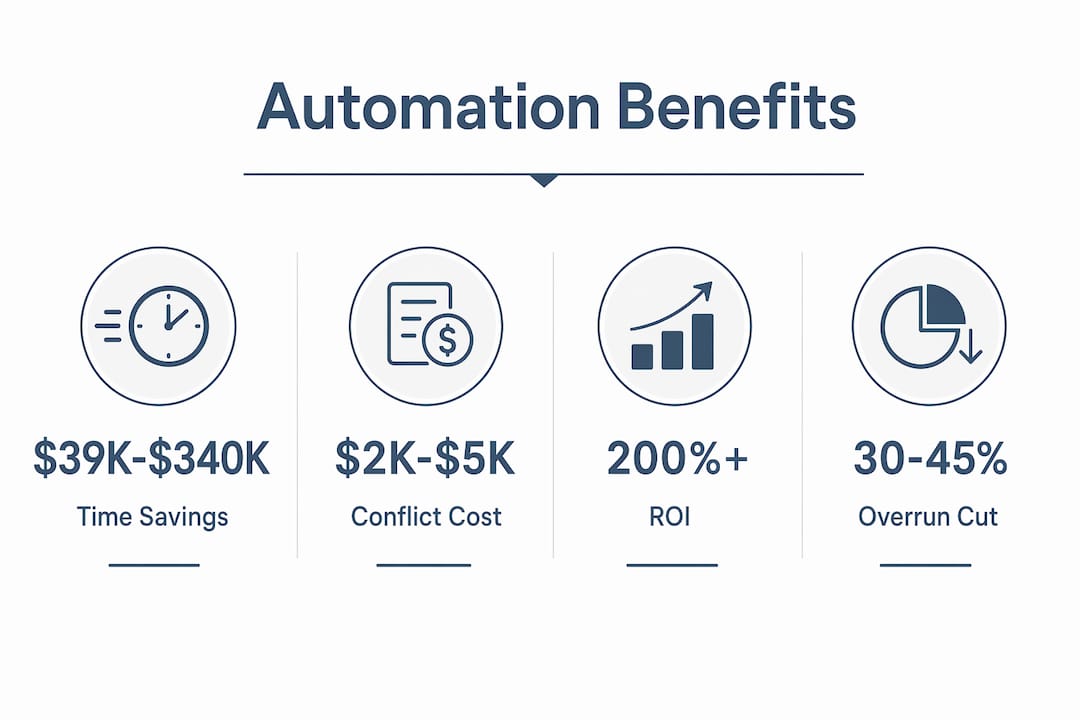
Each scheduling conflict that does not happen is worth $2,000–$5,000 in avoided rework, crew downtime, and equipment repositioning costs. Automated equipment scheduling generates between $80,000 and $178,000 in recovered labor value and cuts rental costs by $15,000–$60,000 annually. These numbers scale with fleet size and project concurrency.
The ROI picture is equally strong. ROI from automated scheduling often exceeds 200% within the first year, with most implementations reaching full deployment in 60–90 days. That is a faster payback period than most equipment purchases.
Overtime is another area where visibility pays off. 8–12% of overtime hours are avoidable with better scheduling data. When you can see real-time hours worked across all sites, you stop last-minute overtime surprises before they hit the payroll.
Pro Tip: Calculate your current monthly conflict cost before your first demo with any scheduling vendor. Multiply your average conflicts per month by $3,500 (the midpoint estimate). That number is your baseline ROI argument.
How does automation improve resource management across crews and equipment?
Resource management is where the benefits of automation in construction become most visible on the job site. The core problem with manual scheduling is that no single person can hold the full picture of crew availability, equipment location, certifications, and project dependencies across multiple active sites. Automated scheduling tools do this continuously.
The specific improvements contractors report include:
-
Double-booking elimination: Conflicts drop from 2.8 to 0.15 per month, protecting both crew time and equipment availability.
-
Idle equipment reduction: Automated idle time tracking cuts equipment idle days by 35–45% annually, which directly reduces rental fees and fuel costs.
-
Workload balancing: AI scheduling distributes tasks across crews based on actual hours worked, reducing fatigue-related errors and lowering injury risk.
-
Employee satisfaction: Automated platforms increase employee satisfaction by providing 24/7 schedule access and reducing unexpected changes that disrupt personal plans.
-
Retention impact: Crews who receive consistent, predictable schedules are more likely to stay. Turnover in construction is expensive, and scheduling instability is a documented driver of it.
AI-based scheduling can simultaneously manage multiple project sites, accounting for role-based staffing and dynamically updating all linked schedules to prevent conflicts. This means a concrete crew finishing early on one site can be rerouted to another without a phone tree or a delay. The system handles the logistics; your team handles the work.
What challenges come with implementing automated scheduling?

Adoption barriers are real, and ignoring them leads to failed implementations. The American Society of Civil Engineers notes that early adoption of AI scheduling yields gains despite perceived high costs and learning curves. The key word is “perceived.” Most contractors overestimate the cost and underestimate the speed of return.
Here is a practical approach to getting implementation right:
-
Frame it correctly from day one. Framing automation as a tool to reduce administrative friction, not a micromanagement system, is the single biggest factor in crew adoption. Field teams resist tools they think are tracking them. They embrace tools that make their day easier.
-
Start with one high-conflict project. Pick a project with a history of scheduling conflicts and deploy automated scheduling there first. The before-and-after data becomes your internal business case.
-
Connect scheduling to financial workflows early. Linking scheduling to financial workflows reduces payment delays by over 8 days, improving cash flow across the project. This is a quick win that finance teams notice immediately.
-
Prioritize quick ROI features first. Automated scheduling workflow implementations that focus on lien waiver processing, bid management, and safety documentation deliver visible results within the first 30 days. These wins build internal support for broader rollout.
-
Avoid waiting for perfect timing. Contractors who delay adoption risk losing competitive advantage as peers move faster and bid more accurately. There is no ideal moment. There is only the cost of waiting.
How do you choose the right construction scheduling software?
The market for automated scheduling tools ranges from standalone apps to full AI construction ERP platforms. The right choice depends on your firm’s size, project complexity, and how tightly you need scheduling connected to financial and field operations.
Key features to evaluate
When comparing platforms, prioritize these capabilities:
-
Multi-site management: The platform must handle concurrent projects with shared resources without manual reconciliation.
-
Role-based staffing: Scheduling should account for certifications, union rules, and crew specializations automatically.
-
Real-time updates: Changes on one project must propagate instantly to all linked schedules and stakeholders.
-
Financial integration: The best platforms connect scheduling directly to progress billing, lien waivers, and payroll to close the loop between field and finance.
Comparing platform types by firm size
| Firm Type | Best Fit | Key Priority |
|---|---|---|
| Small contractor (under 20 employees) | Standalone scheduling app | Ease of use, mobile access |
| Mid-size contractor (20–200 employees) | Integrated scheduling + project management | Multi-site visibility, reporting |
| Large contractor (200+ employees) | Full AI construction ERP | Financial integration, predictive analytics |
Designflow-build sits in the full ERP category, combining AI-driven project management with scheduling, accounting, and field operations in one platform. The reported 70% reduction in manual data entry is a direct result of connecting these workflows rather than running them in separate tools. For mid-size to large contractors, that level of integration is where the real efficiency gains live.
Pricing and ROI should be evaluated together. A platform that costs more but eliminates $150,000 in annual scheduling conflicts is not expensive. It is profitable. Use the conflict cost calculation from the financial section above as your baseline when comparing vendors.
Key Takeaways
Automated scheduling in construction delivers measurable ROI through conflict reduction, recovered labor time, and tighter financial integration across every project phase.
| Point | Details |
|---|---|
| Schedule overrun reduction | AI scheduling cuts overruns by 30–45%, delivering projects up to 20% faster. |
| Financial return | ROI exceeds 200% in year one, with $39,000–$340,000 in recovered PM labor annually. |
| Resource optimization | Equipment idle days drop 35–45% and scheduling conflicts fall from 2.8 to 0.15 per month. |
| Cash flow improvement | Connecting scheduling to financial workflows cuts payment delays by over 8 days. |
| Adoption strategy | Frame automation as friction reduction, not oversight, and start with one high-conflict project. |
Why I think most contractors are still leaving money on the table
I have spent years watching construction firms evaluate scheduling software and then delay the decision for another quarter. The reasoning is always the same: the timing is not right, the team is not ready, or the current system is “good enough.” That logic is expensive.
The contractors I have seen gain the most from automated project scheduling are not the ones with the biggest budgets. They are the ones who committed to a phased rollout, picked a single problem to solve first, and used the results to build internal momentum. One firm I worked with started by automating equipment dispatch on a single bridge project. Within 90 days, idle equipment costs dropped by 40% and the PM was spending six fewer hours per week on phone calls. That result funded the full platform rollout.
The cultural piece matters more than the technology. Field crews do not resist good tools. They resist tools that feel like surveillance. When you introduce scheduling automation as something that gives them better information and fewer last-minute surprises, adoption follows. The firms that struggle are the ones that roll out a new system without explaining the “why” to the people using it daily.
My honest view: the window for early-mover advantage in AI construction scheduling is still open, but it is closing. The ASCE data on competitive advantage is clear. Firms that adopt now will bid faster, execute tighter, and retain better crews. The ones that wait will spend the next three years catching up to competitors who already have two years of scheduling data training their AI models.
— Keith
How Designflow-build puts automated scheduling to work for you
If you are ready to move from manual scheduling to a system that actually connects your field, finance, and project management in one place, Designflow-build is built for exactly that. The platform combines AI-driven scheduling with accounting, payroll, and field operations, so a schedule change on Tuesday does not create a billing problem on Friday.
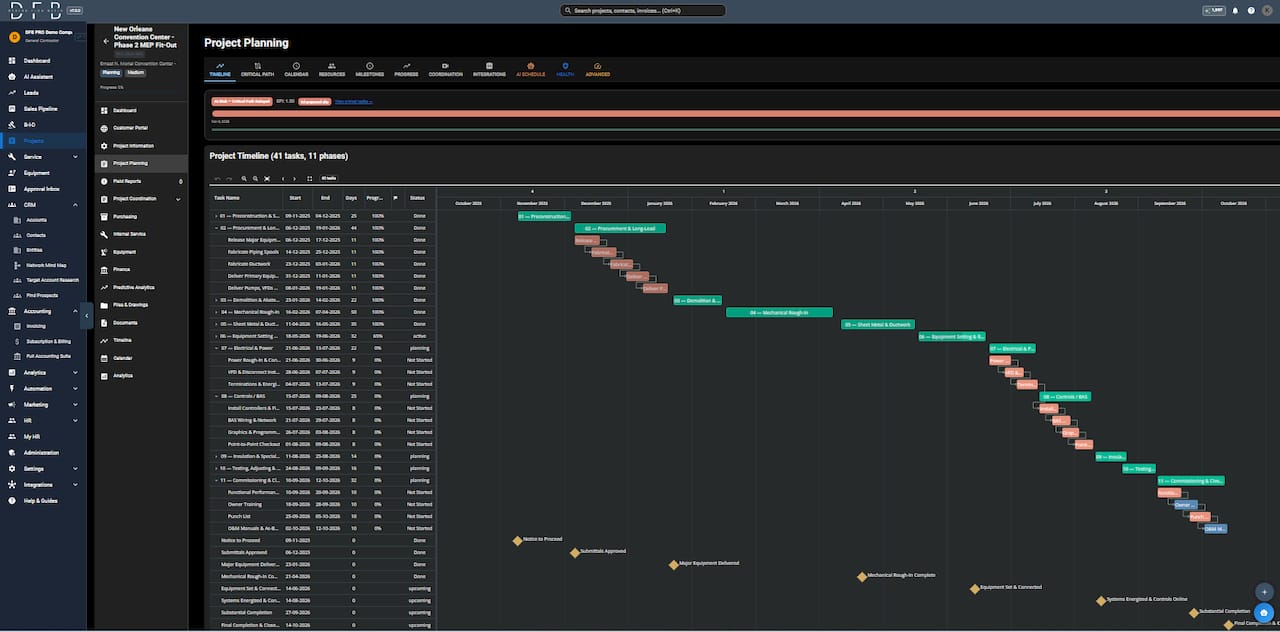
Designflow-build reports a 98% user adoption rate and a 2–4 week implementation timeline, with no army of consultants required. You can explore the full construction scheduling software capabilities, review transparent pricing, or browse real contractor case studies to see what the numbers look like in practice. If you want to understand the terminology before your first demo, the construction software glossary covers every key term from CPM to AI takeoff in plain language.
FAQ
What is automated scheduling in construction?
Automated scheduling in construction is the use of AI-powered software to plan, assign, and update project timelines, crew assignments, and equipment deployment without manual input. It replaces spreadsheet-based methods with dynamic systems that recalculate schedules in real time as conditions change.
How much can automated scheduling reduce project overruns?
AI-powered scheduling reduces schedule overruns by 30–45% and delivers projects up to 20% faster, according to 2026 industry data. Contractors also report 25% better resource utilization after implementation.
What is the ROI of construction scheduling automation?
ROI from automated scheduling typically exceeds 200% within the first year, with implementation completing in 60–90 days. Annual savings range from $39,000 for small firms to over $340,000 for large contractors, driven by recovered project manager time and eliminated scheduling conflicts.
How does automated scheduling improve cash flow?
Linking scheduling to financial workflows reduces payment delays by over 8 days by automating progress billing triggers, lien waiver processing, and documentation tied to schedule milestones.
What should I look for in construction scheduling software?
Prioritize multi-site management, role-based staffing, real-time conflict detection, and direct integration with your financial and payroll systems. Platforms that connect scheduling to billing close the loop between field performance and cash flow.
Recommended
-
Construction Scheduling Software | CPM, Monte Carlo, DCMA - DesignFlow Build
-
Construction Software Glossary — ERP, Takeoff, Scheduling Terms | DesignFlow Build
-
DesignFlow Build | AI Construction ERP Software & Project Management Platform
-
DesignFlow Build - AI-Powered Business Transformation Platform