
Commercial Contractor Workflow Automation Explained

Commercial contractor workflow automation is defined as the use of digital systems to replace repetitive, manual construction processes while keeping humans in control of critical decisions. For commercial contractors and construction managers, this means software handles bid solicitation, RFI routing, lien waiver collection, and scheduling notifications automatically. The result is fewer hours lost to administrative coordination and more time spent on decisions that protect project margins. Companies that adopt construction project automation report measurable gains in profitability and overhead reduction. This guide covers what automation entails, how it pays off, how to implement it step by step, and which workflow types deliver the fastest returns.
What is commercial contractor workflow automation?
Construction workflow automation is the practice of configuring software to trigger actions, route documents, send notifications, and collect approvals without manual intervention at each step. The industry term for this practice is “process automation,” though contractors often call it workflow automation when applied to project-specific sequences like bid management or submittal tracking.
Automated workflows operate on rules. When a subcontractor submits a bid, the system logs it, timestamps it, and routes it to the right estimator automatically. When an RFI is submitted in the field, the software assigns it based on trade category, notifies the responsible party, and tracks the deadline. Humans still review, approve, and make judgment calls. The software removes the coordination layer that previously consumed hours of project manager time each week.

A successful workflow automation system integrates scheduling, document management, accounting, and communication with role-based controls and audit trails. That integration is what separates a true automation platform from a collection of disconnected apps.
Core workflow modules in commercial contracting
The most common automation modules in commercial construction cover these areas:
- Bid management: Automated invitation lists, deadline reminders, bid comparison compilation, and award notifications
- Estimating and takeoff: AI-assisted quantity extraction from drawings, linked directly to cost databases
- Scheduling: Template-based schedule generation, conflict detection, and automatic crew notifications when tasks shift
- RFI and submittal routing: Auto-assignment by trade, deadline tracking, and escalation alerts
- Lien waiver collection: Automated requests, digital signature workflows, and payment-hold triggers
- Safety and compliance: Digital checklists, incident report routing, credential tracking, and audit trail generation
| Workflow type | Manual pain point | Automation benefit |
|---|---|---|
| Bid solicitation | Tracking responses across email threads | Centralized tracking, auto-reminders, comparison reports |
| RFI management | Delays from manual routing and follow-up | Auto-routing by trade, deadline alerts, resolution tracking |
| Lien waiver collection | 3–8 hours per cycle chasing signatures | Automated requests, digital signatures, 80% time reduction |
| Scheduling | Conflicts discovered late, manual notifications | Conflict detection, automatic crew alerts |
| Safety compliance | Paper checklists, lost incident reports | Digital forms, automatic routing, full audit trail |
How does automation improve margins and reduce overhead?
The financial case for contractor automation is direct. Companies that systematically automate construction operations achieve 18–35% higher project margins and 25–40% lower administrative overhead, according to the AGC 2025 Technology Adoption report. Those are not incremental gains. They represent the difference between a firm that wins on price and one that wins on execution.
Time savings compound across every project. Automated bid solicitation reduces invitation-to-response time by 38%, according to Q2 2026 data from the Associated Builders and Contractors. On a project with 40 subcontractor invitations, that time reduction translates directly into faster bid leveling and earlier award decisions.
Lien waiver collection is one of the highest-friction administrative tasks in commercial contracting. Manual lien waiver collection costs 3–8 hours of project manager time per cycle. Automating the process reduces that time by up to 80%. Across a portfolio of active projects, the cumulative recovery of project manager hours is substantial.
Error reduction is the less-discussed benefit. Automated routing eliminates the “I forgot to forward that” failure mode. Every document has a timestamp, an assigned owner, and a tracked deadline. That visibility alone reduces disputes and improves subcontractor relationships.
Pro Tip: Before deploying any automation, document your current cycle times for bid solicitation, RFI resolution, and lien waiver collection. These three baseline metrics give you a clear before-and-after comparison to calculate actual ROI within the first 90 days.
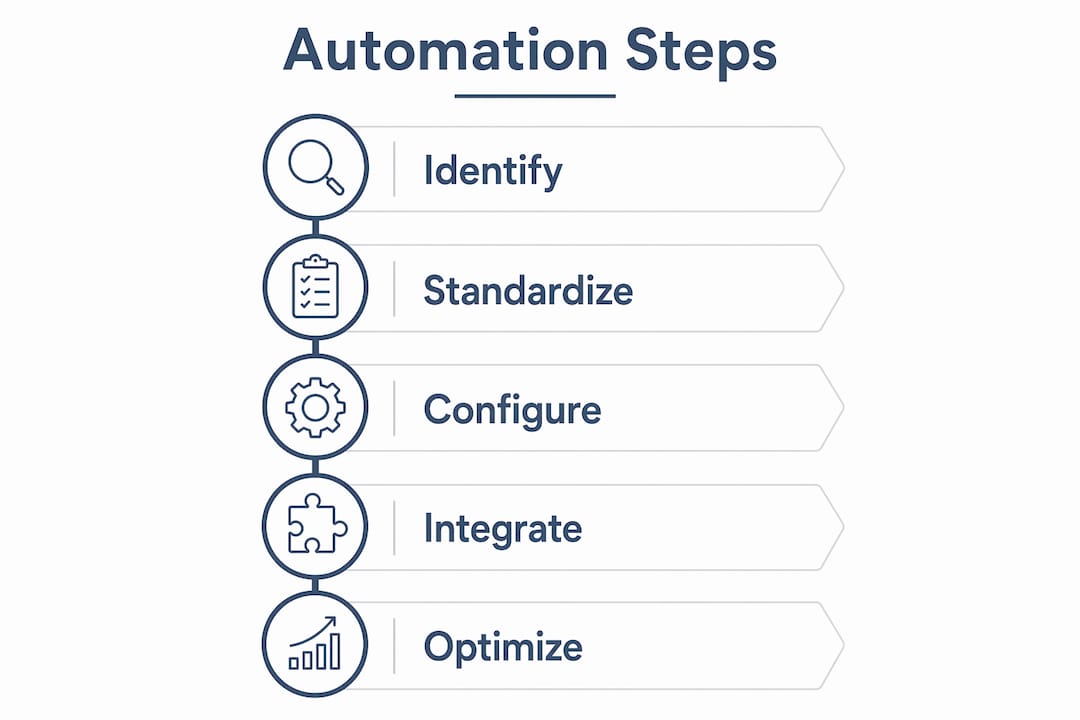
How to automate contractor workflows step by step
Implementation succeeds when you start narrow and expand deliberately. Trying to automate every workflow at once is the fastest way to create confusion and resistance. The right approach is phased.
Step 1: Identify your highest-friction workflow
Map your current manual processes and rank them by time cost and error frequency. For most commercial contractors, bid management or lien waiver collection tops the list. Starting automation on one high-friction process and measuring ROI before expanding increases the likelihood of long-term success. Pick one workflow, configure it fully, and run it in parallel with your manual process for two weeks before cutting over.
Step 2: Standardize before you automate
The biggest adoption risk is choosing automation tools before standardizing workflows and data naming conventions. Automation amplifies whatever process it runs on. If your RFI numbering is inconsistent across projects, an automated routing system will route inconsistently. Clean up your naming conventions, approval hierarchies, and document templates first.
Step 3: Configure, train, and measure
Configure the workflow with your cross-functional team, including field supervisors, project managers, and accounting staff. Role-based access controls matter here. A field foreman needs a different view than a project accountant. Train each group on their specific touchpoints, not the entire system. Then measure cycle time, error rate, and user adoption weekly for the first 30 days.
Step 4: Plan integrations carefully
API dependencies and identity controls must be planned carefully to avoid broken data flows between field apps and back-office systems. If your scheduling tool does not share data with your accounting platform, you will create manual reconciliation work that offsets your automation gains. Confirm integration paths before selecting any tool.
Step 5: Prioritize mobile and offline access
Commercial construction happens on job sites with unreliable connectivity. Any automation platform that requires a constant internet connection will fail in the field. Mobile-first design with offline capability is a non-negotiable requirement for field-facing workflows like safety checklists and daily reports.
Pro Tip: Assign one “automation champion” per project team during rollout. This person becomes the internal expert, handles first-line questions, and reports adoption issues back to the project manager. Champions reduce training burden and accelerate adoption.
What are the main types of contractor workflow automation?
Each workflow type solves a specific operational problem. Understanding what each one does helps you prioritize which to implement first.
Bid management automation
Bid management automation handles the full invitation-to-award cycle. The system maintains a prequalified subcontractor database, sends invitations by trade category, tracks response status in real time, and compiles bid comparisons automatically. Project managers stop chasing email threads and start reviewing organized comparison reports. AI-driven workflows also detect anomalies in bid pricing, flagging outliers that warrant a closer look before award.
RFI and submittal workflows
RFI auto-routing assigns each request to the correct design team member based on trade and discipline. AI-assisted design review and RFI auto-routing reduce RFI volumes by up to 40% and cut resolution times significantly. Submittal workflows track approval chains, send reminders before deadlines, and log every version change. The feedback loop between field and office compresses from days to hours. For a deeper look at how AI tools in construction are reshaping design review processes, the applications extend well beyond RFI management.
Lien waiver and payment workflows
Automated lien waiver workflows send requests to subcontractors immediately after payment approval, track signature status, send reminders on a set schedule, and flag unsigned waivers before the next pay application. Digital signatures eliminate the fax-and-scan cycle entirely. The result is a clean, auditable payment record that protects the general contractor from downstream lien exposure.
Safety compliance and permit workflows
Automation improves compliance and safety documentation by digitizing checklists and incident reports and generating full audit trails. Safety inspection checklists route automatically to the site superintendent after completion. Incident reports trigger notifications to the safety officer and project manager simultaneously. Credential tracking flags expired certifications before a worker enters a restricted area. These workflows reduce liability exposure and simplify OSHA recordkeeping.
Key Takeaways
Commercial contractor workflow automation delivers the highest returns when you start with one high-friction process, standardize your data first, and measure cycle time improvements before scaling to additional workflows.
| Point | Details |
|---|---|
| Start with one workflow | Pilot bid management or lien waiver collection before expanding to other processes. |
| Standardize data first | Clean up naming conventions and approval hierarchies before configuring any automation tool. |
| Measure baseline KPIs | Track bid response time, RFI resolution time, and lien waiver cycle time before and after automation. |
| Keep humans in control | Automation handles routing and notifications; humans retain approval authority over critical decisions. |
| Integrate systems fully | Connect scheduling, accounting, and field apps through verified API paths to prevent manual reconciliation. |
Why most contractors automate the wrong thing first
The contractors I see get the most from automation are not the ones who bought the most sophisticated platform. They are the ones who spent two weeks mapping their actual process before touching any software. That distinction matters more than any feature list.
The common mistake is automating a visible but low-impact process, like daily report distribution, while leaving bid management and lien waiver collection on spreadsheets and email. Those two workflows consume more project manager hours than almost anything else on a commercial project. They are also where errors create real financial exposure.
Workflow automation shifts human work from administrative coordination to high-value decision making. That shift only happens if you automate the right tasks. Automating a process that takes 20 minutes a week saves 20 minutes. Automating a process that takes 6 hours a week and involves 15 subcontractors saves something worth measuring.
Successful AI workflow tools use a hybrid of people, processes, and AI, with humans retaining control over critical approvals. That framing is important for change management. When you tell your team that automation removes the coordination burden but keeps them in charge of decisions, adoption resistance drops significantly.
The future of commercial contractor automation is tighter integration between field and office, more AI-assisted risk flagging, and mobile-first design that works on a job site with spotty LTE. The contractors building those habits now will have a structural advantage in two years.
— Keith
Designflow-build for commercial contractor workflow automation
Designflow-build is an AI-native ERP platform built specifically for commercial contractors. It combines project management, accounting, and field operations in one system, which means your bid management, RFI routing, scheduling, and lien waiver workflows all share the same data without manual transfers.

Designflow-build reports a 70% reduction in manual data entry and monthly savings of up to $847K for contractors who replace disconnected tools with its unified platform. Implementation takes 2–4 weeks with guided onboarding, and the platform reaches a 98% user adoption rate. You can explore the full feature set and key terminology in the construction software glossary, or see the AI-powered capabilities on the AI construction software page. If scheduling automation is your priority, the construction scheduling software page covers CPM, Monte Carlo, and DCMA tools in detail.
FAQ
What is construction workflow automation?
Construction workflow automation is the use of software to trigger, route, and track repetitive project tasks automatically, such as bid invitations, RFI assignments, and lien waiver requests, while humans retain approval authority over critical decisions.
How long does it take to implement contractor workflow automation?
Implementation timelines vary by platform and scope. Designflow-build reports a 2–4 week implementation period for its AI-native ERP, which covers project management, accounting, and field operations in a single system.
What workflows should commercial contractors automate first?
Bid solicitation and lien waiver collection deliver the fastest measurable ROI. Automated bid solicitation reduces invitation-to-response time by 38%, and automating lien waiver collection can cut cycle time by up to 80%.
Do automated workflows replace project managers?
Automation does not replace project managers. It removes administrative coordination tasks so project managers can focus on risk management, subcontractor relationships, and decisions that directly affect project outcomes.
What is the biggest risk when implementing workflow automation?
The biggest risk is automating before standardizing. Choosing automation tools before establishing consistent data naming conventions and approval hierarchies amplifies existing process weaknesses rather than correcting them.