
Automate Timesheet Collection for Engineering Teams

Automated timesheet collection is defined as the process of capturing and categorizing engineer work hours through software integrations, AI classification, and event-driven triggers, without requiring manual data entry. Manual timesheets produce errors in up to 80% of entries, costing $291 per correction on average. That error rate makes manual logging a direct threat to billing accuracy and project profitability. Automation cuts administrative overhead by 50% and improves project profitability by 30%. For engineering team leaders managing complex sprints, billable hours, and R&D documentation, those numbers represent real money recovered every month.
How to automate timesheet collection for engineering teams
Automated time management for engineering teams works best when it connects directly to the tools engineers already use. Integrations with platforms like Jira, GitHub, and calendar apps capture work events as they happen. AI classification at the point of entry maps those events to billing codes, CapEx, OpEx, or R&D categories automatically. This removes the end-of-week memory exercise that causes most manual logging errors.
The industry term for this approach is automated time tracking, which covers both passive background capture and active API-driven event logging. The phrase “automate timesheet collection” describes the same outcome from a workflow perspective. Both terms refer to replacing manual reconstruction of hours with real-time, system-generated records.

What prerequisites do you need before implementing automation?
Before you select any tool, audit your existing project management and communication stack. The goal is to identify every system that already logs engineer activity, including Git commits, Jira tickets, Slack threads, and calendar events. Each of those systems is a potential data source for automated time entries.
Your device ownership policy determines which automation mode is feasible. Company-owned hardware enables background-passive tracking, where software monitors application usage silently. BYOD environments require API-based integration, pulling event data from project tools rather than device activity. This distinction matters before you evaluate any timesheet software for engineers, because the wrong deployment model will fail regardless of the tool’s quality.
Key prerequisites to confirm before you begin:
- Integration compatibility: Confirm your project tools expose APIs or webhooks that a time tracking system can consume.
- Device policy: Clarify whether engineers use company-managed devices, personal devices, or a mix of both.
- Legal and privacy requirements: Review local labor laws and data privacy regulations that govern employee monitoring in your jurisdiction.
- Stakeholder alignment: Get buy-in from HR, legal, and finance before piloting any tracking system.
- Baseline definition: Decide what “accurate” looks like for your team before you measure anything.
Pro Tip: Run a two-week manual logging exercise before deploying any automation. It gives you a baseline to compare against and surfaces the specific gaps your automation needs to fill.
How do you implement automated timesheet collection step by step?
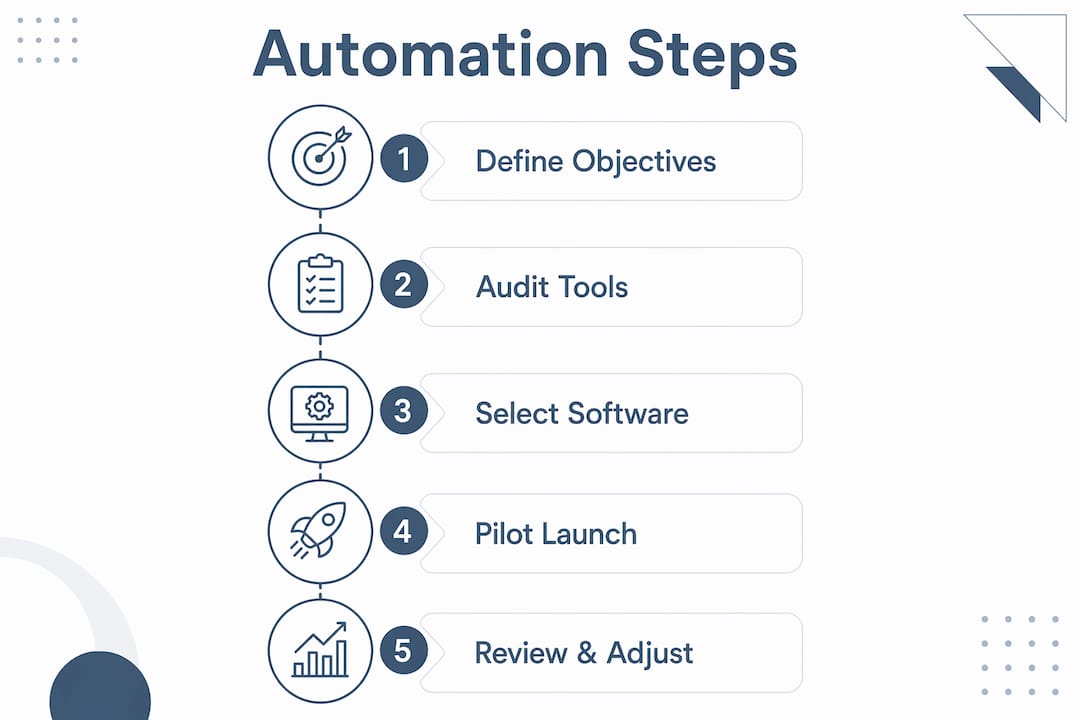
A structured six-step process produces reliable results for engineering teams moving from manual to automated time collection.
-
Define your objectives. Decide whether the primary goal is billing accuracy, R&D tax credit documentation, sprint productivity analysis, or all three. Clear objectives determine which data points matter and which integrations are worth building.
-
Select and configure your tool. Choose a platform that supports AI-driven activity categorization and connects natively to your project management stack. Prioritize tools that classify time entries against finance categories at the moment of capture, not after the fact.
-
Integrate with your engineering workflow. Connect the tool to Jira, GitHub, Linear, or whichever platforms your team uses daily. Integrations with Jira and GitHub let the system create draft time entries from commit messages, ticket transitions, and pull request activity automatically.
-
Build a user review process. Automation generates draft entries. Engineers should review and approve those drafts daily, not weekly. Daily verification takes under five minutes and catches categorization errors before they compound.
-
Train your team and communicate transparently. Explain exactly what data the system collects, who can see it, and how engineers can pause or redact entries. Transparency centers where engineers view and control their data are the single most effective adoption tool available. Teams that trust the system use it correctly.
-
Run a pilot phase, then refine. A 2–4 week pilot phase establishes a baseline of normal developer activity before full rollout. Use that baseline to tune AI categorization rules and identify any data gaps from offline or non-digital tasks.
Pro Tip: Assign one team lead as the automation owner during the pilot. That person reviews categorization accuracy daily and reports findings weekly. This single role prevents configuration drift and accelerates refinement.
The table below maps each implementation step to its primary outcome and the team role responsible.
| Step | Primary outcome | Responsible role |
|---|---|---|
| Define objectives | Clear success metrics | Engineering manager |
| Select and configure tool | Correct data capture scope | IT or operations lead |
| Integrate with project tools | Automatic draft entry creation | DevOps or platform team |
| Build review process | Daily accuracy verification | Individual engineers |
| Train and communicate | High adoption and trust | Team lead plus HR |
| Pilot and refine | Accurate baseline data | Automation owner |
What are common challenges in automated timesheet collection?
Privacy concerns are the most common reason automation fails at the team level. Engineers who feel monitored rather than supported disengage from the system. The fix is not to reduce data collection. The fix is to give engineers full visibility into what is collected and the ability to redact personal entries.
A second challenge is data noise. Automated systems capture everything, including time spent on Slack conversations unrelated to any project, browser tabs left open, and meetings that span multiple work streams. Hybrid workflows where automation suggests entries and users verify them produce better accuracy than fully autonomous systems. The human verification step filters noise without requiring full manual reconstruction.
A third challenge is performativity, where engineers optimize their behavior for the tracking system rather than for actual work. This is more common when systems rely on keyboard activity or mouse movement as proxies for productivity.
Explainable AI that detects anomalous activity patterns prevents metrics gaming more effectively than blunt keyboard or mouse tracking. When engineers understand that the system looks for patterns rather than raw activity counts, the incentive to game the system disappears. Anomaly detection over basic activity measures is the standard that mature automated tracking systems apply.
Additional challenges to plan for:
- Offline and non-digital tasks: Design reviews, whiteboard sessions, and client calls often go unlogged. Build a lightweight manual entry option for these cases.
- Missing data from context switches: Engineers who work across multiple projects in a single day need clear project-switching prompts to keep entries accurate.
- Management buy-in gaps: Without visible ROI data from the pilot phase, middle management sometimes deprioritizes enforcement. Share weekly accuracy reports upward from day one.
For a broader view of how project management software integrates with tracking platforms, the integration strategies apply directly to engineering and construction environments.
How does automated timesheet collection connect to financial management?
Accurate time data becomes a financial asset when it flows directly into budgeting, billing, and compliance systems. Automated tracking feeds into GL and ERP systems, creating audit-ready workflows without manual data transfer. That connection eliminates the reconciliation step that typically consumes hours of finance team time each month.
R&D tax credit documentation is one of the highest-value use cases for engineering teams. Tax authorities require detailed records of qualifying activities and the hours spent on them. Automated time entries classified at the point of capture provide exactly that evidence, without requiring engineers to reconstruct their work months later.
Pro Tip: Map your time entry categories to your chart of accounts before you go live. A category mismatch discovered after three months of data collection requires a full reclassification exercise. Getting it right at setup costs one hour. Fixing it later costs days.
Real-time visibility into labor costs versus project budgets changes how engineering leaders make decisions. Estimated versus actual hours comparison improves sprint planning accuracy and surfaces resource allocation problems before they become budget overruns. 69% of developers struggled with manual logging accuracy, which means the baseline for improvement is significant.
For engineering firms evaluating ERP integration strategies, connecting automated time data to a central ERP is the step that converts tracking from an administrative task into a financial planning tool.
Key Takeaways
Automating timesheet collection for engineering teams requires the right integrations, a transparent trust model, and a hybrid verification workflow to deliver accurate, finance-ready time data.
| Point | Details |
|---|---|
| Audit before you automate | Map your existing project tools and device policies before selecting any tracking system. |
| Pilot for 2–4 weeks | Establish a baseline of normal activity before full rollout to tune AI categorization rules. |
| Use hybrid verification | Let automation draft entries and have engineers verify daily for the best accuracy and morale. |
| Connect to finance systems | Map time categories to your chart of accounts at setup to feed billing and R&D documentation directly. |
| Prioritize transparency | Give engineers full visibility and control over their data to drive adoption and maintain trust. |
Why I think most engineering teams automate timesheets the wrong way
The most common mistake I see is treating automation as a replacement for human judgment rather than a support system for it. Teams deploy a tracking tool, set it to run in the background, and assume the data is clean. Six months later, the finance team is reconciling entries that make no sense, and engineers have quietly stopped caring about accuracy.
The teams that get this right treat automation as a safety net. The system captures everything it can. Engineers spend five minutes a day confirming what the system got right and correcting what it missed. That shift from reconstruction to verification is where the real productivity gain lives. Automation shifts human input to verification, and that change alone improves both morale and data quality.
The other mistake is skipping the pilot phase because the team is busy. A 2–4 week pilot is not a delay. It is the configuration step. Without it, you are tuning a live system with real billing data, and errors compound before anyone notices.
My honest advice: start with one team, one project, and one integration. Get that right before you scale. The patience required in the first month pays back in months of clean data afterward.
— Keith
Designflow-build brings automated time management to your projects
Engineering leaders who want accurate labor data without months of setup have a direct path forward with Designflow-build.

Designflow-build’s AI-native ERP combines project management, field operations, and accounting in one system, eliminating the manual handoffs that corrupt time data. The platform reports a 70% reduction in manual data entry and goes live in 2–4 weeks, with a 98% user adoption rate. Real-time dashboards give you live visibility into labor costs against project budgets, and the system exports finance-ready time data for billing, CapEx, and R&D documentation. If you are ready to replace spreadsheets and disconnected tools, explore what Designflow-build’s AI platform can do for your team.
FAQ
What is automated timesheet collection for engineering teams?
Automated timesheet collection is the process of capturing engineer work hours through software integrations with tools like Jira and GitHub, using AI to categorize entries without manual input. It replaces end-of-week manual logging with real-time, system-generated draft entries that engineers verify daily.
How much does manual timesheet error cost?
Manual timesheets produce errors in up to 80% of entries, with each correction costing $291 on average. Automation reduces that administrative burden by 50% and improves project profitability by 30%.
Does automated time tracking work in BYOD environments?
Yes, but the deployment model changes. BYOD environments require API-based tracking that pulls event data from project tools rather than monitoring device activity directly. Company-owned hardware supports background-passive tracking as an additional option.
How do you prevent engineers from gaming automated tracking metrics?
Use explainable AI that identifies anomalous activity patterns rather than measuring raw keyboard or mouse activity. Anomaly detection prevents metrics gaming more effectively than blunt activity measures and removes the incentive to optimize behavior for the tracking system.
How long does it take to implement automated timesheet collection?
A 2–4 week pilot phase is the standard starting point for engineering teams. That window establishes a baseline of normal developer activity, allows AI categorization rules to be tuned, and builds team trust before full rollout.