
Automate Service Work Order Management in 2026

Automated service work order management is defined as a system that creates, routes, tracks, and closes work orders with minimal manual effort, replacing paper logs and email chains with rule-based workflows and AI-powered dispatch. Service-based businesses and contractors that automate service work order management report faster response times, fewer missed jobs, and a measurable drop in administrative overhead. The industry standard term for this practice is work order automation, and it sits at the center of modern service management software. This guide covers the tools you need, a step-by-step implementation plan, common pitfalls, and the performance gains you can realistically expect.
What tools are essential to automate service work order management?
Work order automation runs on four core software components: an intake portal, an AI triage engine, a rule-based dispatch system, and a mobile field app. Each layer handles a distinct stage of the job lifecycle, and all four must share data in real time to avoid gaps.
The intake portal is where service requests enter the system. Customers or internal staff submit requests through a web form, email parser, or API connection. The AI triage engine then reads each request, classifies the issue type, assigns urgency, and applies pricing rules. AI triage categorizes requests, applies flat-rate pricing, and routes jobs in seconds. That speed removes the dispatcher bottleneck that slows most manual operations.
The dispatch engine uses skill-based and location-based logic to assign the right technician. Skill-based and proximity-based assignment improves first-time fix rates significantly. A technician who arrives with the right skills and the right parts closes jobs faster and reduces costly return visits.

Mobile field apps complete the loop. Technicians receive job details, update status in the field, capture signatures, and close orders without calling the office. Automated status triggers reduce dispatcher calls, with mobile apps enabling field updates. The result is a live view of every job without anyone chasing anyone.
Integration with asset management, inventory, and accounting systems is not optional. Without it, you end up with data fragmentation, which forces manual reconciliation and defeats the purpose of automation. The table below maps the four functional categories and what each one does.
| Functional Category | Core Function | Key Capability |
|---|---|---|
| Intake and triage | Capture and classify requests | AI classification, urgency scoring |
| Dispatch and routing | Assign jobs to technicians | Skill, location, and SLA logic |
| Mobile execution | Field updates and job closure | Status updates, photo capture, e-signature |
| Escalation and alerts | Flag stalled or overdue jobs | Conditional routing, SLA breach alerts |
How to implement work order automation step by step
Successful implementation starts before you touch any software. The most common reason automation projects fail is that teams configure tools around broken workflows instead of fixing the workflows first.
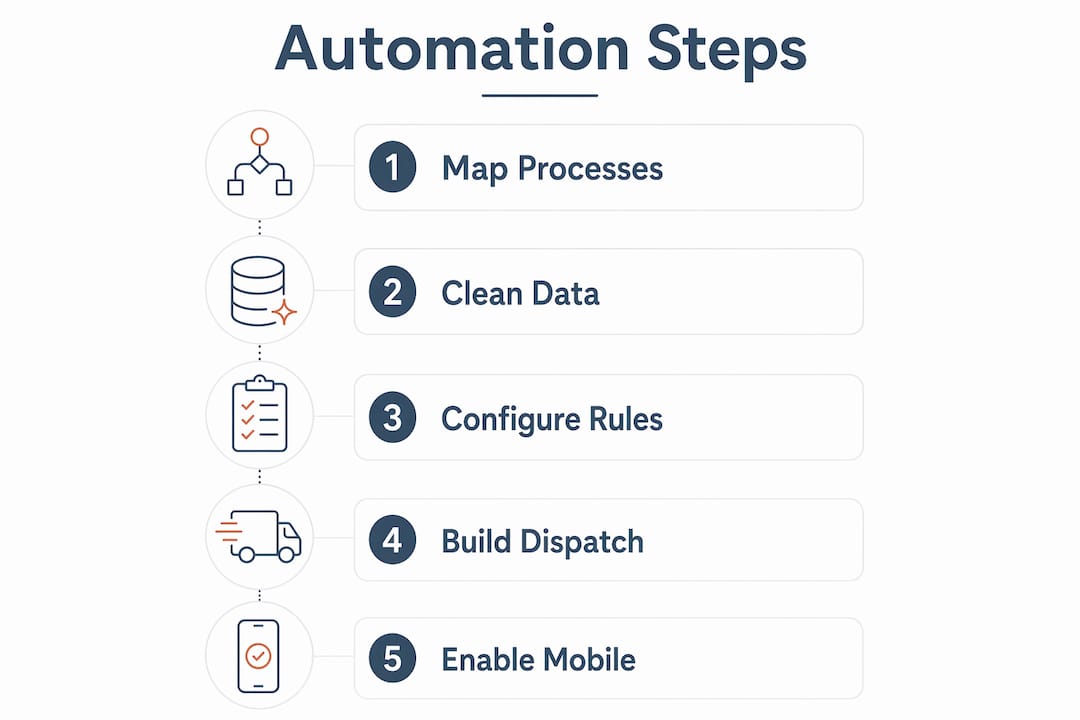
Step 1: Map your current process
Write down every step from the moment a service request arrives to the moment the invoice goes out. Include booking, dispatch, site work, wrap-up, and billing. Best automation mirrors current booking, dispatch, site work, wrap-up, and billing steps. Skipping this step means you will automate inefficiencies rather than remove them.
Step 2: Clean your data
Your automation rules are only as good as the data behind them. Audit your asset records, technician skill profiles, and customer contact data. Remove duplicates, fill in missing fields, and standardize naming conventions. This is tedious work, but it takes hours now versus weeks of troubleshooting later.
Step 3: Configure intake and triage rules
Set up your intake portal and define the classification logic for your AI triage engine. Map issue types to urgency levels and assign default pricing where applicable. Test with real historical requests before going live.
Step 4: Build dispatch logic
Define which technicians qualify for which job types, and set geographic zones. Add SLA priority rules so that high-urgency jobs always jump the queue. Conditional routing by budget, work type, and site removes manual approval delays and keeps jobs moving.
Pro Tip: Start with your top three job types and automate those first. Trying to automate every scenario at once leads to configuration errors and frustrated technicians.
Step 5: Enable mobile updates and automated notifications
Push job details to technicians via the mobile app and configure automated status notifications for customers and managers. Set escalation triggers for jobs that have not been updated within a defined window.
Step 6: Run a pilot, then scale
Run the automated workflow on a subset of jobs for two weeks. Measure dispatch time, first-time fix rate, and technician feedback. Fix what breaks, then roll out to the full operation.
| Step | Action | Output |
|---|---|---|
| 1. Map workflows | Document every job stage | Baseline process map |
| 2. Clean data | Audit assets, skills, contacts | Reliable data foundation |
| 3. Configure triage | Set classification and pricing rules | Automated intake |
| 4. Build dispatch logic | Define skill, zone, and SLA rules | Automated routing |
| 5. Enable mobile | Push jobs, set notifications | Real-time field visibility |
| 6. Pilot and scale | Test on subset, then expand | Validated automation |
Modular work order platforms can speed deployment by up to 3x compared to building custom systems. That means you can have a working automated workflow in days rather than months.
What are common challenges when automating work order management?
Data fragmentation is the most damaging problem in work order automation. When asset records, inventory levels, and job histories live in separate systems, technicians arrive without the information they need. Disconnected systems create gaps that force manual reconciliation and undermine the efficiency gains automation is supposed to deliver. The fix is an asset-aware platform that links work orders directly to maintenance history and parts inventory.
AI decision-making also creates trust issues with dispatchers and field staff. When the system assigns a job and a technician disagrees with the choice, the instinct is to override it manually. Grounding AI models in private organizational data maintains relevance and trust. That means training your triage and routing models on your own job history, not generic industry data.
Resistance to behavioral change is real and predictable. Automation should remove the administrative chase, not replace the people doing the work. Frame it that way with your team from day one. Technicians who understand that automation handles the paperwork while they focus on the actual repair are far more likely to adopt the new tools.
Here are the most practical troubleshooting steps when automation is not performing as expected:
- Check data completeness. Missing skill tags or asset records cause misroutes. Audit monthly.
- Review escalation triggers. If jobs are stalling, your escalation window may be too wide.
- Monitor dispatch override rates. High override rates signal that routing rules do not reflect real-world constraints.
- Run feedback sessions with technicians. Field staff catch problems that dashboards miss.
- Validate SLA rules quarterly. Customer contracts change, and your automation rules must keep up.
Pro Tip: Set up a weekly dashboard review for the first 90 days after launch. Early anomalies are easy to fix. Ignored anomalies become expensive habits.
Structured documentation practices, like those used in as-built cabling projects, show how consistent data capture at each job stage prevents the reconciliation problems that plague manual operations.
What measurable results can service businesses expect from automation?
The performance gains from work order automation are concrete and trackable. The most important metrics to watch are mean-time-to-repair (MTTR), first-time fix rate, SLA compliance, and dispatcher hours saved.
Businesses that automated dispatch and work order management cut MTTR from 38 to 14 hours, a 63% reduction. That kind of improvement does not come from working harder. It comes from removing the coordination delays that sit between a request and a technician showing up with the right information.
Automated escalation and real-time status updates directly improve SLA compliance. When a job misses a milestone, the system flags it immediately and routes it to a supervisor. No one has to remember to follow up. Customers receive automatic updates, which reduces inbound calls and raises satisfaction scores without adding staff.
Embedded AI helps categorize requests, assign priority, guide routing, and surface stalled work orders. That visibility means managers spend time on exceptions rather than status checks. The operational shift is significant: your team moves from reactive firefighting to proactive management.
Field service teams that adopt automated work order tracking solutions also see productivity gains in the field. Technicians spend less time on paperwork and more time on billable work. For contractors running multiple crews, that difference compounds quickly across every job completed each week.
Key Takeaways
Automating work order management delivers measurable gains in speed, accuracy, and SLA compliance when built on clean data, skill-based dispatch logic, and mobile-enabled field execution.
| Point | Details |
|---|---|
| Start with workflow mapping | Document every job stage before configuring any automation rules. |
| Use AI triage for intake | AI classification routes and prices jobs in seconds, removing dispatcher bottlenecks. |
| Integrate asset and inventory data | Linked systems prevent fragmentation and reduce manual reconciliation. |
| Measure MTTR and fix rates | Track mean-time-to-repair and first-time fix rates to validate automation performance. |
| Address resistance early | Frame automation as removing paperwork, not replacing people, to drive adoption. |
Why most automation projects succeed or fail in the first 90 days
After watching service businesses implement work order automation across different industries, the pattern is consistent. The teams that succeed are not the ones with the most sophisticated software. They are the ones that did the unglamorous work first: cleaning their data, documenting their actual workflows, and getting technicians involved before the system went live.
The teams that struggle almost always skip the workflow mapping step. They assume the software will figure it out. It will not. Automation enforces your process. If your process has gaps, automation makes those gaps faster and more expensive.
The other thing I have seen underestimated is the value of grounding your AI routing model in your own job history. Generic models produce generic results. When you train dispatch logic on your specific job types, your technician skill profiles, and your actual SLA commitments, the system starts making decisions that your dispatchers would actually make. That is when trust builds and override rates drop.
The future of this space is moving toward predictive work orders, where the system identifies maintenance needs before a failure occurs, based on asset condition data. That capability is already available in more advanced platforms. The contractors who build clean, integrated data foundations now will be the ones who can use predictive automation effectively in the next two to three years.
— Keith
How Designflow-build supports work order automation for contractors
Designflow-build is built for contractors who need project management, accounting, and field operations in one place, without the complexity of a multi-system setup. Its AI-powered platform handles automated routing, asset-aware job tracking, and mobile field execution out of the box.

Designflow-build reports a 70% reduction in manual data entry and a 98% user adoption rate, with implementation completed in 2–4 weeks. For service businesses ready to move past spreadsheets and email chains, the scheduling and dispatch tools give you the workflow control and real-time visibility that manual processes cannot deliver. You can explore the full platform at Designflow-build.com and see how it fits your operation.
FAQ
What is automated work order management?
Automated work order management is a system that creates, routes, tracks, and closes service jobs with minimal manual input. It uses rule-based logic and AI to handle dispatch, status updates, and escalations automatically.
How long does it take to implement work order automation?
Modular platforms can deploy in days rather than months, with some systems going live up to 3x faster than custom builds. A realistic timeline for a full rollout, including data cleanup and pilot testing, is 2–6 weeks.
What is the biggest risk when automating work orders?
Data fragmentation is the most common failure point. When asset records, inventory, and job histories are not connected, automated routing produces errors that require manual correction and erode team trust.
How does AI improve work order routing?
AI triage classifies issue type, urgency, and pricing in seconds, then dispatch logic assigns the job based on technician skill, location, and SLA priority. That combination raises first-time fix rates and reduces return visits.
What metrics should I track after automation goes live?
Track mean-time-to-repair (MTTR), first-time fix rate, SLA compliance percentage, and dispatcher override rate. These four metrics tell you whether your automation rules are working or need adjustment.